FOCAL_FOLLOWS contains one row per FOLLOWS row.
The purpose of the FOCAL_FOLLOWS view is to provide a convenient interface for deleting and creating follows.
In the case of twins, the column suffixed with the number “2” always contains the twin with the ChimpID which is alphabetically last.
Figure 5.9. Query Defining the FOCAL_FOLLOWS View: Part I
SELECT follows.followid AS followid

     , follows.date AS date

     , moms.chimpid AS mom

     , infants.infant AS infant

     , infants.infant2 AS infant2

     , sibs.sib AS sib

     , sibs.sib2 AS sib2

  FROM follows

         JOIN followparts AS moms

              ON (moms.followid = follows.followid)

         JOIN followroles AS momroles

              ON (momroles.role = moms.role

                  AND momroles.function = 'M')

         JOIN (SELECT q.followid AS followid

                    , q.infant1 AS infant

                    , CASE

                        WHEN q.infant2 = q.infant1

                          THEN NULL

                        ELSE

                          q.infant2

                        END AS infant2

                 FROM

                   (SELECT followparts.followid AS followid

                         , FIRST_VALUE(followparts.chimpid) OVER w AS infant1

                         , LAST_VALUE(followparts.chimpid) OVER w AS infant2

                         , ROW_NUMBER() OVER w AS rn

                      FROM followparts

                           JOIN followroles

                                ON (followroles.role = followparts.role

                               AND followroles.function = 'I')

                      WINDOW w AS (PARTITION BY followparts.followid

                                   ORDER BY followparts.chimpid

                                   RANGE BETWEEN UNBOUNDED PRECEDING

                                         AND UNBOUNDED FOLLOWING)

                   ) AS q

                 WHERE q.rn = 1

              ) AS infants

              ON (infants.followid = follows.followid)
Figure 5.10. Query Defining the FOCAL_FOLLOWS View: Part II
         LEFT OUTER JOIN

              (SELECT q.followid AS followid

                    , q.sib1 AS sib

                    , CASE

                        WHEN q.sib2 = q.sib1

                          THEN NULL

                        ELSE

                          q.sib2

                        END AS sib2

                 FROM

                   (SELECT followparts.followid AS followid

                         , FIRST_VALUE(followparts.chimpid) OVER w AS sib1

                         , LAST_VALUE(followparts.chimpid) OVER w AS sib2

                         , ROW_NUMBER() OVER w AS rn

                      FROM followparts

                           JOIN followroles

                                ON (followroles.role = followparts.role

                               AND followroles.function = 'S')

                      WINDOW w AS (PARTITION BY followparts.followid

                                   ORDER BY followparts.chimpid

                                   RANGE BETWEEN UNBOUNDED PRECEDING

                                         AND UNBOUNDED FOLLOWING)

                   ) AS q

                 WHERE q.rn = 1

              ) AS sibs

              ON (sibs.followid = follows.followid)
;
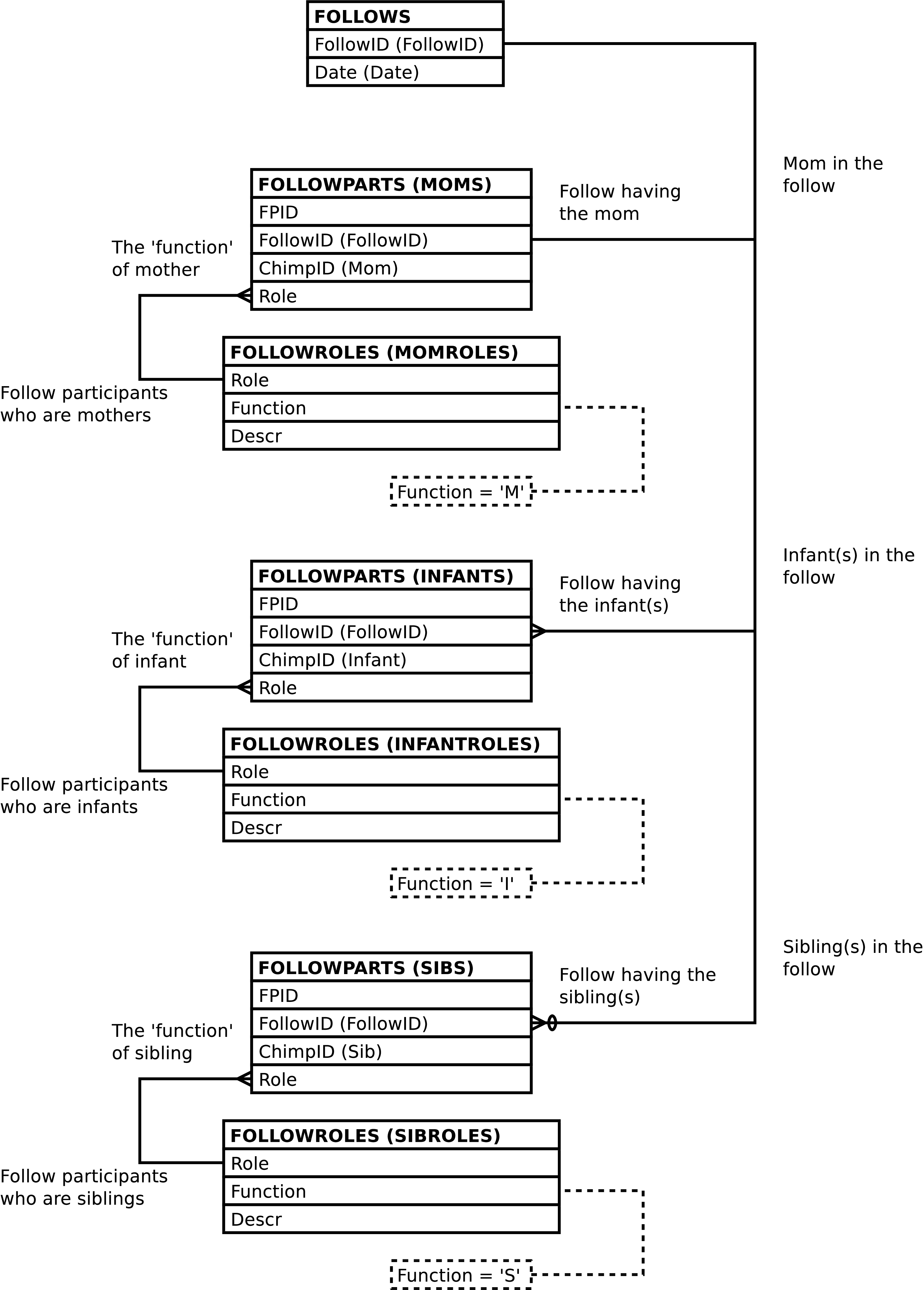
| Column | From | Description |
|---|---|---|
| FollowID | FOLLOWS.FollowID | Unique integer identifying the follow. |
| Date | FOLLOWS.Date | The date of the follow. |
| Mom | FOLLOWPARTS.ChimpID | The ChimpID of the mother in the follow. |
| Infant | FOLLOWPARTS.ChimpID | The ChimpID of an infant in the follow. |
| Infant2 | FOLLOWPARTS.ChimpID | The ChimpID of a
second infant in the follow, or NULL if the infant
is not a twin. |
| Sib | FOLLOWPARTS.ChimpID | The ChimpID of a
sibling in the follow, or NULL if there is no
sibling focal. |
| Sib2 | FOLLOWPARTS.ChimpID | The ChimpID of a
second sibling in the follow, or NULL if the sibling
is not a twin. |
Altering the FOCAL_FOLLOWS view alters the content of the underlying tables in the fashion described below.
Inserting a row into the FOCAL_FOLLOWS view inserts a
row into the FOLLOWS table, as expected.
A row is also inserted into the
FOLLOWPARTS table for each non-NULL
Mom,
Infant,
Infant2,
Sib, and
Sib2 value. The inserted
FOLLOWPARTS.ChimpID
value is the Mom,
Infant,
Infant2,
Sib, or
Sib2 value and the
FOLLOWPARTS.Role
value is set to the
corresponding M,
I,
or S value.
Note
On insert there is no distinction between
Infant and
Infant2, nor a distinction
between Sib and
Sib2. Either may contain
the alphabetically larger
ChimpID, and when not a
twin, either may be NULL.
Note
When inserting into FOCAL_FOLLOWS it is not
recommended to set the
FollowID value. Omitting
this column or supplying a NULL value will allow the
system to automatically generate an id.
Updating the columns of the FOCAL_FOLLOWS view updates the underlying tables as expected with the following exceptions:
Setting any one of the
Mom,
Infant, or
Sib values to NULL deletes
the corresponding FOLLOWPARTS row.
Setting any one of the
Mom,
Infant, or
Sib values to non-NULL,
where the original value was NULL inserts a corresponding
row into the FOLLOWPARTS table as
described above regards insertion into FOCAL_FOLLOWS.
Tip
Updating the columns of FOCAL_FOLLOWS, Date excepted, will probably result in data integrity violations. Deleting and re-uploading the follow may be a better option.
Note
On update there is no distinction between
Infant and
Infant2, nor a distinction
between Sib and
Sib2. Either may contain
the alphabetically larger
ChimpID, and when not a
twin, either may be NULL.
However, it is an error to attempt to “swap” twins -- e.g., by setting the Infant value to the Infant2 value or vice-versa.
Deleting rows from FOCAL_FOLLOWS deletes rows from the underlying tables as expected. Because deleting a row from FOLLOWS automatically deletes all information related to the follow this is a convenient way to remove follows from the database.
DATASHEETS contains one row per EVENTS row plus one row per DISTANCES row. It's purpose is to produce a report resembling[51] the data entry sheets.
The columns of the DATASHEETS view resemble the columns on the field data entry collection sheets. Due to the large number of these columns and the degree to which data is transformed when uploaded into GOMBE-MI the details regarding individual columns are not documented.
Figure 5.12. Query Defining the DATASHEETS View: Part I
SELECT *

  FROM

    (SELECT datasheet_events.followid AS followid

          , datasheet_events.intid AS intid

          , datasheet_events.date AS date

          , datasheet_events.time AS time

          , datasheet_events.mom AS mom

          , datasheet_events.infant AS infant

          , datasheet_events.infant2 AS infant2

          , datasheet_events.sib AS sib

          , datasheet_events.sib2 AS sib2

          , datasheet_events.eid AS eid

          , datasheet_events.behavior AS e_behavior

          , datasheet_events.position AS e_position

          , datasheet_events.uncertain AS e_uncertain

          , datasheet_events.e_mom AS e_mom

          , datasheet_events.e_mompart AS e_mompart

          , datasheet_events.e_mom_foodpart AS e_mom_foodpart

          , datasheet_events.e_mom_foodkind AS e_mom_foodkind

          , datasheet_events.e_mom_fishpart AS e_mom_fishpart

          , datasheet_events.e_mom_fishkind AS e_mom_fishkind

          , datasheet_events.e_mom_fishresult AS e_mom_fishresult

          , datasheet_events.e_mom_voc AS e_mom_voc

          , datasheet_events.e_mom_play AS e_mom_play

          , datasheet_events.e_mom_rest AS e_mom_rest

          , datasheet_events.e_infant AS e_infant

          , datasheet_events.e_infantpart AS e_infantpart

          , datasheet_events.e_infant_foodpart AS e_infant_foodpart

          , datasheet_events.e_infant_foodkind AS e_infant_foodkind

          , datasheet_events.e_infant_fishpart AS e_infant_fishpart

          , datasheet_events.e_infant_fishkind AS e_infant_fishkind

          , datasheet_events.e_infant_fishresult AS e_infant_fishresult

          , datasheet_events.e_infant_voc AS e_infant_voc

          , datasheet_events.e_infant_play AS e_infant_play

          , datasheet_events.e_infant_ride AS e_infant_ride

          , datasheet_events.e_infant_rest AS e_infant_rest

          , datasheet_events.e_sib as e_sib

          , datasheet_events.e_sibpart AS e_sibpart

          , datasheet_events.e_sib_foodpart AS e_sib_foodpart

          , datasheet_events.e_sib_foodkind AS e_sib_foodkind

          , datasheet_events.e_sib_fishpart AS e_sib_fishpart

          , datasheet_events.e_sib_fishkind AS e_sib_fishkind

          , datasheet_events.e_sib_fishresult AS e_sib_fishresult

          , datasheet_events.e_sib_voc AS e_sib_voc

          , datasheet_events.e_sib_play AS e_sib_play

          , datasheet_events.e_sib_ride AS e_sib_ride

          , datasheet_events.e_sib_rest AS e_sib_rest

          , datasheet_events.e_nonfocal AS e_nonfocal

          , datasheet_events.e_nonfocalpart as e_nonfocalpart

          , datasheet_events.e_baboon AS e_baboon

          , datasheet_events.e_baboonpart AS e_baboonpart
Figure 5.13. Query Defining the DATASHEETS View: Part II
          , NULL AS d_distid

          , NULL AS d_uncertain

          , NULL AS d_mom

          , NULL AS d_infant

          , NULL AS d_sib

          , NULL AS d_distance

          , datasheet_events.i_comment AS i_comment

          , datasheet_events.e_comment AS e_comment

        FROM datasheet_events
Figure 5.14. Query Defining the DATASHEETS View: Part III
     UNION

     SELECT family_dists.followid AS followid

          , family_dists.intid AS intid

          , family_dists.date AS date

          , family_dists.time AS time

          , family_dists.mom AS mom

          , family_dists.infant AS infant

          , family_dists.infant2 AS infant2

          , family_dists.sib AS sib

          , family_dists.sib2 AS sib2

          , NULL AS eid

          , NULL AS e_behavior

          , NULL AS e_position

          , NULL AS e_uncertain

          , NULL AS e_mom

          , NULL AS e_mompart

          , NULL AS e_mom_foodpart

          , NULL AS e_mom_foodkind

          , NULL AS e_mom_fishpart

          , NULL AS e_mom_fishkind

          , NULL AS e_mom_fishresult

          , NULL AS e_mom_voc

          , NULL AS e_mom_play

          , NULL AS e_mom_rest

          , NULL AS e_infant

          , NULL AS e_infantpart

          , NULL AS e_infant_foodpart

          , NULL AS e_infant_foodkind

          , NULL AS e_infant_fishpart

          , NULL AS e_infant_fishkind

          , NULL AS e_infant_fishresult

          , NULL AS e_infant_voc

          , NULL AS e_infant_play

          , NULL AS e_infant_ride

          , NULL AS e_infant_rest

          , NULL AS e_sib

          , NULL AS e_sibpart

          , NULL AS e_sib_foodpart

          , NULL AS e_sib_foodkind

          , NULL AS e_sib_fishpart

          , NULL AS e_sib_fishkind

          , NULL AS e_sib_fishresult

          , NULL AS e_sib_voc

          , NULL AS e_sib_play

          , NULL AS e_sib_ride

          , NULL AS e_sib_rest

          , NULL AS e_nonfocal

          , NULL AS e_nonfocalpart

          , NULL AS e_baboon

          , NULL AS e_baboonpart
Figure 5.15. Query Defining the DATASHEETS View: Part IV
          , family_dists.distid AS d_distid

          , family_dists.uncertain AS d_uncertain

          , family_dists.d_mom AS d_mom

          , family_dists.d_infant AS d_infant

          , family_dists.d_sib AS d_sib

          , family_dists.distance AS d_distance

          , family_dists.i_comment AS i_comment

          , NULL AS e_comment

       FROM family_dists

    ) AS q

  ORDER BY q.date

         , q.time

         , q.e_behavior

         , q.e_mom IS NULL

         , q.e_infant IS NULL

         , q.e_nonfocal

         , q.d_mom IS NULL

         , q.d_infant IS NULL
;
Figure 5.16. Entity Relationship Diagram of the DATASHEETS View
The DATASHEETS view is a combination of the DATASHEET_EVENTS and FAMILY_DISTS views, organized and sorted in a fashion such that the rows “interleave”. See the documentation on these views for further detail regards the content of the DATASHEETS view.
Only SELECT is allowed on
DATASHEETS. INSERT, UPDATE,
and DELETE are not allowed.
Related views which may be used to modify the database are: DATASHEET_EVENTS, FAMILY_EVENTS, FAMILY_DISTS, and FOLLOW_INTERVALS.
DATASHEET_EVENTS contains one row per EVENTS row. It's primary purpose is to produce a report resembling the behavioral event portion of the data entry sheets. It is also possible to use the DATASHEET_EVENTS view to alter database content. For more on this see below.
The columns of the DATASHEET_EVENTS view resemble the behavior related columns on the field data entry collection sheets. Due to the large number of these columns and the degree to which data is transformed when uploaded into GOMBE-MI the details regarding individual columns are not documented.
The overall structure of the DATASHEET_EVENTS view is as
follows: The FAMILY_EVENTS view is extended,
per possible participant, with all of the columns that appear in
the EVENTS related “sub-tables”.
So, for example, there are vocalization columns containing
VOCS.Vocalization
values for each of: mother, infant, sib, and non-focal. If the
behavioral event is not a vocalization or respective individual
is not involved in the behavioral event then the value of the
individual's vocalization column is NULL. If the behavioral
event is a vocalization then the column(s) corresponding to the
individual(s) involved in the event contain the vocalization
made by the respective individual. This pattern is repeated for
all of the EVENTS
table's “sub-tables”.
Figure 5.17. Query Defining the DATASHEET_EVENTS View: Part I
SELECT family_events.followid AS followid

     , family_events.intid AS intid

     , family_events.eid AS eid

     , family_events.e_mompid AS e_mompid

     , family_events.e_infantpid AS e_infantpid

     , family_events.e_sibpid AS e_sibpid

     , family_events.e_nonfocalpid AS e_nonfocalpid

     , family_events.date AS date

     , family_events.time AS time

     , family_events.mom AS mom

     , family_events.infant AS infant

     , family_events.infant2 AS infant2

     , family_events.sib AS sib

     , family_events.sib2 AS sib2

     , family_events.behavior AS behavior

     , family_events.position AS position

     , family_events.uncertain AS uncertain
Figure 5.18. Query Defining the DATASHEET_EVENTS View: Part II
     , family_events.e_mom AS e_mom

     , family_events.e_mompart AS e_mompart

     , CASE

         WHEN family_events.e_mom IS NOT NULL THEN

           mom_eats.foodpart

         ELSE

           NULL

       END AS e_mom_foodpart

     , CASE

         WHEN family_events.e_mom IS NOT NULL THEN

           mom_eats.foodkind

         ELSE

           NULL

       END AS e_mom_foodkind

     , CASE

         WHEN family_events.e_mom IS NOT NULL THEN

           mom_fished.foodpart

         ELSE

           NULL

       END AS e_mom_fishpart

     , CASE

         WHEN family_events.e_mom IS NOT NULL THEN

           mom_fished.foodkind

         ELSE

           NULL

       END AS e_mom_fishkind

     , CASE

         WHEN family_events.e_mom IS NOT NULL THEN

           mom_fished.result

         ELSE

           NULL

       END AS e_mom_fishresult

     , CASE

         WHEN family_events.e_mom IS NOT NULL THEN

           mom_vocs.vocalization

         ELSE

           NULL

       END AS e_mom_voc

     , CASE

         WHEN family_events.e_mom IS NOT NULL THEN

           mom_plays.play

         ELSE

           NULL

       END AS e_mom_play

     , CASE

         WHEN family_events.e_mom IS NOT NULL THEN

           mom_rests.rest

         ELSE

           NULL

       END AS e_mom_rest
Figure 5.19. Query Defining the DATASHEET_EVENTS View: Part III
     , family_events.e_infant AS e_infant

     , family_events.e_infantpart AS e_infantpart

     , CASE

         WHEN family_events.e_infant IS NOT NULL THEN

           inf_eats.foodpart

         ELSE

           NULL

       END AS e_infant_foodpart

     , CASE

         WHEN family_events.e_infant IS NOT NULL THEN

           inf_eats.foodkind

         ELSE

           NULL

       END AS e_infant_foodkind

     , CASE

         WHEN family_events.e_infant IS NOT NULL THEN

           inf_fished.foodpart

         ELSE

           NULL

       END AS e_infant_fishpart

     , CASE

         WHEN family_events.e_infant IS NOT NULL THEN

           inf_fished.foodkind

         ELSE

           NULL

       END AS e_infant_fishkind

     , CASE

         WHEN family_events.e_infant IS NOT NULL THEN

           inf_fished.result

         ELSE

           NULL

       END AS e_infant_fishresult

     , CASE

         WHEN family_events.e_infant IS NOT NULL THEN

           inf_vocs.vocalization

         ELSE

           NULL

       END AS e_infant_voc

     , CASE

         WHEN family_events.e_infant IS NOT NULL THEN

           inf_plays.play

         ELSE

           NULL

       END AS e_infant_play

     , CASE

         WHEN family_events.e_infant IS NOT NULL THEN

           inf_rides.ride

         ELSE

           NULL

       END AS e_infant_ride

     , CASE

         WHEN family_events.e_infant IS NOT NULL THEN

           inf_rests.rest

         ELSE

           NULL

       END AS e_infant_rest
Figure 5.20. Query Defining the DATASHEET_EVENTS View: Part IV
     , family_events.e_sib as e_sib

     , family_events.e_sibpart AS e_sibpart

     , CASE

         WHEN family_events.e_sib IS NOT NULL THEN

           sib_eats.foodpart

         ELSE

           NULL

       END AS e_sib_foodpart

     , CASE

         WHEN family_events.e_sib IS NOT NULL THEN

           sib_eats.foodkind

         ELSE

           NULL

       END AS e_sib_foodkind

     , CASE

         WHEN family_events.e_sib IS NOT NULL THEN

           sib_fished.foodpart

         ELSE

           NULL

       END AS e_sib_fishpart

     , CASE

         WHEN family_events.e_sib IS NOT NULL THEN

           sib_fished.foodkind

         ELSE

           NULL

       END AS e_sib_fishkind

     , CASE

         WHEN family_events.e_sib IS NOT NULL THEN

           sib_fished.result

         ELSE

           NULL

       END AS e_sib_fishresult

     , CASE

         WHEN family_events.e_sib IS NOT NULL THEN

           sib_vocs.vocalization

         ELSE

           NULL

       END AS e_sib_voc

     , CASE

         WHEN family_events.e_sib IS NOT NULL THEN

           sib_plays.play

         ELSE

           NULL

       END AS e_sib_play

     , CASE

         WHEN family_events.e_sib IS NOT NULL THEN

           sib_rides.ride

         ELSE

           NULL

       END AS e_sib_ride

     , CASE

         WHEN family_events.e_sib IS NOT NULL THEN

           sib_rests.rest

         ELSE

           NULL

       END AS e_sib_rest
Figure 5.21. Query Defining the DATASHEET_EVENTS View: Part V
     , family_events.e_nonfocal AS e_nonfocal

     , family_events.e_nonfocalpart as e_nonfocalpart

     , family_events.e_baboon AS e_baboon

     , family_events.e_baboonpart AS e_baboonpart

     , family_events.e_comment AS e_comment

     , family_events.i_comment AS i_comment
Figure 5.22. Query Defining the DATASHEET_EVENTS View: Part VI
  FROM family_events

         LEFT OUTER JOIN vocs AS mom_vocs

           ON (mom_vocs.eid = family_events.eid

               AND family_events.e_mom IS NOT NULL)

         LEFT OUTER JOIN plays AS mom_plays

           ON (mom_plays.eid = family_events.eid

               AND family_events.e_mom IS NOT NULL)

         LEFT OUTER JOIN rests AS mom_rests

           ON (mom_rests.eid = family_events.eid

               AND family_events.e_mom IS NOT NULL)

         LEFT OUTER JOIN eats AS mom_eats

           ON (mom_eats.eid = family_events.eid

               AND family_events.e_mom IS NOT NULL)

         LEFT OUTER JOIN fished AS mom_fished

           ON (mom_fished.eid = family_events.eid

               AND family_events.e_mom IS NOT NULL)

         LEFT OUTER JOIN vocs AS inf_vocs

           ON (inf_vocs.eid = family_events.eid

               AND family_events.e_infant IS NOT NULL)

         LEFT OUTER JOIN plays AS inf_plays

           ON (inf_plays.eid = family_events.eid

               AND family_events.e_infant IS NOT NULL)

         LEFT OUTER JOIN rides AS inf_rides

           ON (inf_rides.eid = family_events.eid

               AND family_events.e_infant IS NOT NULL)

         LEFT OUTER JOIN rests AS inf_rests

           ON (inf_rests.eid = family_events.eid

               AND family_events.e_infant IS NOT NULL)

         LEFT OUTER JOIN eats AS inf_eats

           ON (inf_eats.eid = family_events.eid

               AND family_events.e_infant IS NOT NULL)

         LEFT OUTER JOIN fished AS inf_fished

           ON (inf_fished.eid = family_events.eid

               AND family_events.e_infant IS NOT NULL)

         LEFT OUTER JOIN vocs AS sib_vocs

           ON (sib_vocs.eid = family_events.eid

               AND family_events.e_sib IS NOT NULL)

         LEFT OUTER JOIN plays AS sib_plays

           ON (sib_plays.eid = family_events.eid

               AND family_events.e_sib IS NOT NULL)

         LEFT OUTER JOIN rides AS sib_rides

           ON (sib_rides.eid = family_events.eid

               AND family_events.e_sib IS NOT NULL)

         LEFT OUTER JOIN rests AS sib_rests

           ON (sib_rests.eid = family_events.eid

               AND family_events.e_sib IS NOT NULL)

         LEFT OUTER JOIN eats AS sib_eats

           ON (sib_eats.eid = family_events.eid

               AND family_events.e_sib IS NOT NULL)

         LEFT OUTER JOIN fished AS sib_fished

           ON (sib_fished.eid = family_events.eid

               AND family_events.e_sib IS NOT NULL);
Figure 5.23. Entity Relationship Diagram of the DATASHEET_EVENTS View
The DATASHEET_EVENTS view contains all the columns in the FAMILY_EVENTS view. In the interest of brevity these columns are not documented here. Please refer to the table describing the columns of FAMILY_EVENTS for information on these columns.
The columns on DATASHEET_EVENTS that are unique to the view are all from the EVENTS “sub-tables”: EATS, FISHED, PLAYS, RESTS, RIDES, and VOCS. Each column in these “sub-tables” occurs three times in the DATASHEET_EVENTS view, once for the mother, once for the infant and once for the sibling. Rather than document each column 3 times, once for each of the focals, the columns are documented only once in the table below. The columns documented below have either Mom, Infant, or Sib in place of <focal> in their column names.
The exception is the E_<focal>_ride column. There is no such column for the mother, although there is for the infant and the sibling.
| Column | From | Description |
|---|---|---|
| E_<focal>_Foodpart | EATS.Foodpart | Code indicating the food part eaten by the
focal during the event, or NULL if the focal was not
involved in a eating event. |
| E_<focal>_Foodkind | EATS.Foodkind | Code indicating (one of) the food kind(s) eaten
by the focal during the event, or NULL if the focal
was not involved in a eating event. |
| E_<focal>_Fishpart | FISHED.Foodpart | Code indicating (one of) the food part(s)
fished for by the focal during the event, or NULL if
the focal was not involved in a fishing event. |
| E_<focal>_Fishkind | FISHED.Foodkind | Code indicating the food kind fished for by the
focal during the event, or NULL if the focal was not
involved in a fishing event. |
| E_<focal>_Fishresult | FISHED.Result | Code indicating the result of the focal's
fishing attempt, or NULL if the focal was not
involved in a fishing event. |
| E_<focal>_Voc | VOCS.Vocalization | Code indicating (one of) the focal's
vocalizations made during the vocalization event, or
NULL if the focal was not involved in a vocalization
event. |
| E_<focal>_Play | PLAYS.Play | Code indicating (one of) the focal's play
activities conducted during the playing event, or
NULL if the focal was not involved in a playing
event. |
| E_<focal>_Ride | RIDES.Ride | Code indicating the focal's riding posture
during the riding event, or NULL if the focal was
not involved in a riding event. |
| E_<focal>_Rest | RESTS.Rest | Code indicating the focal's resting posture
during the resting event, or NULL if the focal was
not involved in a resting event. |
Altering the DATASHEET_EVENTS view alters the content of the underlying tables in the fashion described below.
Related views which also may be used to modify the database are: DATASHEETS, FAMILY_EVENTS, and FOLLOW_INTERVALS.
Inserting into DATASHEET_EVENTS first tests to see if
the inserted row already exists in
FAMILY_EVENTS. Unlike usual, a NULL
inserted value, or omitting the column from the insert
statement, matches any existent data value.[52] It is an error if more than one row in
FAMILY_EVENTS matches the inserted
row.[53]
If the inserted row does not already exist in FAMILY_EVENTS, inserting a row into the DATASHEET_EVENTS view inserts one row into either the FAMILY_EVENTS view, for insertion into the underlying EVENTS and PARTS tables. For further information see the FAMILY_EVENTS insert documentation.
Inserting into DATASHEET_EVENTS can also insert a row into the EVENTS “sub-tables”: EATS, FISHED, PLAYS, RESTS, RIDES, and VOCS. If the inserted row already exists on FAMILY_EVENTS then inserting into DATASHEET_EVENTS can add additional rows to the “sub-tables” related to the existing EVENTS row; as might be required, for example, when a single vocalization event is comprised of are multiple vocalizations .
It is an error to attempt to insert data into an EVENTS “sub-table” using a column pertaining to a focal when that focal is not involved in the given behavioral event. For example, it is an error to attempt to use the E_Mom_Voc column to associate a vocalization with a behavioral event involving only the infant.[54]
Updating a row in DATASHEET_EVENTS updates a row in the FAMILY_EVENTS view, updating the underlying EVENTS and PARTS tables. For further information see the FAMILY_EVENTS update documentation.
Updating DATASHEET_EVENTS can update or delete rows from EATS, FISHED, PLAYS, RESTS, RIDES, and VOCS.
Note
The examples below explicitly specify an
EVENTS.EID
value. This is solely for the purpose of brevity. Any valid
WHERE clause could be used instead to
designate the desired row in
EVENTS.
If the old values for a mom, infant, or sib
EVENTS “sub-table” row are
not NULL and the new values are all NULL then the old
row is deleted. The following example removes the
mother's HOO vocalization from the event
with an
EVENTS.EID
of 1234:
Example 5.1. Deleting The Mother's VOCS Row
UPDATE datasheet_events

       SET e_mom_voc = NULL

       WHERE eid = 1234

             AND e_mom_voc = 'HOO';
Caution
If the old vocalization value is not specified then all VOCS rows related to the event will be deleted.
If old values exist, they are replaced by new values.
Assuming the mother is involved in a vocalization the event
with an
EVENTS.EID
of 1234, the following example changes
the UNK vocalization
to HOO:
Example 5.2. Changing A Vocalization
UPDATE datasheet_events

       SET e_mom_voc = 'HOO'

       WHERE eid = 1234

             AND e_mom_voc = 'UNK';
Note
The ChimpID values need
not correspond to the roles the individuals play in the
follow because data is associated with chimp id values,
not focal roles. The presence of focal roles in the
column names of the view is, in some sense, artificial.
For example, the following changes the focal involved with
a vocalization event from mother to sibling, and changes
the vocalization made from UNK
to HOO:
Example 5.3. Changing a Vocalization Event to Involve the Sibling Instead of the Mom and Changing the Vocalization Made
UPDATE datsheet_events

       SET e_mom_voc = 'HOO'

         , e_mom = 'SB'  -- SB is the sibling's ChimpID

       WHERE eid = 1234

             AND e_mom_voc = 'UNK';
The above is sufficient to re-use the exiting
PARTS row, changing the mother's
ChimpID value to the siblings,
and reuse the existing VOCS row,
changing the vocalization. When the result is
queried SB will show up as a sibling
with a sibling vocalization
of HOO.
Updating NULL values, when all related values are
NULL, in the columns of the EATS,
FISHED, PLAYS,
RESTS, RIDES, or
VOCS tables, inserts a new row into one of
these tables.
To insert a new row in FISHED for
the mother, when all of the mom's FISHED
data is NULL (E_Mom_Fishpart, E_Mom_Fishkind,
E_Mom_Fishresult), update the mom's FISHED
data. The following example shows how to do this, changing
an “other” behavior into a fishing
behavior.
Example 5.4. Changing a Mother's Behavior into a Fishing Behavior and Inserting a FISHED Row For the Mother
UPDATE datasheet_events

       SET behavior = 'F'  --  F is fishing

         , e_mom_fishpart = 'A'

         , e_mom_fishkind = 'B'

         , e_mom_fishresult = 'C'

       WHERE eid = 1234;
Caution
As with FAMILY_EVENTS,
FAMILY_DISTS, and
FOLLOW_INTERVALS the focal associated
with the name of the column is not relevant when inserting
new rows via an UPDATE statement. If the
DATASHEET_EVENTS row represents an observation of the
mother vocalizing, setting the E_Infant_Voc value will
give the mother an additional vocalization row on the
VOCS table.
It is easy to unintentionally add additional rows to
EATS, FISHED,
PLAYS, RESTS,
RIDES, or VOCS. To
avoid this do not attempt to update an existing NULL
value in EATS, FISHED,
PLAYS, RESTS,
RIDES, or VOCS.
Instead update the non-NULL value, no matter if the
focal is changing and the name of the column containing
the old value does not pertain to the new focal. There is
an example of this above.
To insert a new row in FISHED for the mother, regardless of whether the mother has existing related rows on FISHED for the given behavioral event, update the infant or sibling's FISHED data.[55] The following example shows how to do this:[56]
Example 5.5. Unconditionally Inserting a FISHED Row For the Mother
UPDATE datasheet_events

       SET e_infant_fishpart = 'A'  -- note change of "infant's" data

         , e_infant_fishkind = 'B'

         , e_infant_fishresult = 'C'

       WHERE eid = 1234;
It is an error to attempt to update the values of any columns not derived from the EVENTS, PARTS, EATS, FISHED, PLAYS, RESTS, RIDES, or VOCS tables. It is also an error to attempt to change the E_BaboonPart value.
When updated, DATASHEET_EVENTS raises a notice containing the number of rows altered. A row is counted only once, when updating the row changes the database content in any way.
FOLLOW_DURATION contains one row per follow. It's purpose is to compute the various totals regards observation time per follow.
Figure 5.24. Query Defining the FOLLOW_DURATIONS View
SELECT follows.followid AS followid

     , COUNT(*) AS followmins

     , (SELECT COUNT(*)

          FROM intervals AS badintervals

          WHERE badintervals.followid = follows.followid

                AND NOT EXISTS

                     (SELECT 1

                        FROM events

                        WHERE events.intid = badintervals.intid

                        LIMIT 1)

                AND NOT EXISTS

                     (SELECT 1

                        FROM distances

                        WHERE distances.intid = badintervals.intid

                        LIMIT 1)

       ) AS emptymins

     , EXTRACT(EPOCH FROM (MAX(intervals.time) - MIN(intervals.time)))

       / 60 + 1 AS spanmins

  FROM follows

       JOIN intervals ON (intervals.followid = follows.followid)

  GROUP BY follows.followid
;

| Column | From | Description |
|---|---|---|
| FollowID | FOLLOWS.FollowID | Unique integer identifying the follow. |
| FollowMins (Attempted Observational Minutes) | Computed | The number of minutes during which observations where attempted. |
| EmptyMins (Bad Observational Minutes) | Computed | The number of minutes during which observations where attempted but no data was collected. No data is collected if there are no EVENTS rows related to the interval and no DISTANCES rows related to the interval. |
| SpanMins (Span of Minutes in Follow) | Computed. | The number of minutes, including endpoints, between the first observation of the follow and the last observation of the follow. |
FOLLOW_INTERVALS contains one row per FOLLOWS row per INTERVALS row. So, one row per minute of each follow.
The purpose of the FOLLOW_INTERVALS view is to provide a convenient interface for deleting, creating, and altering INTERVALS rows and for creating Sheets and FIELDFOLLOWS rows.
See the description of the FOCAL_FOLLOWS view for more information regarding the handling of twins.
Figure 5.26. Query Defining the FOLLOW_INTERVALS View
SELECT focal_follows.followid AS followid

     , intervals.intid AS intid

     , intervals.sheetid AS sheetid

     , fieldfollows.ffid AS ffid

     , focal_follows.date AS date

     , focal_follows.mom AS mom

     , focal_follows.infant AS infant

     , focal_follows.infant2 AS infant2

     , focal_follows.sib AS sib

     , focal_follows.sib2 AS sib2

     , intervals.time AS time

     , intervals.gid AS gid

     , intervals.comment AS comment

     , sheets.followtype AS followtype

     , sheets.page AS page

     , sheets.location AS location

     , fieldfollows.collector AS collector

     , fieldfollows.entrydate AS entrydate

     , fieldfollows.enterer AS enterer

     , fieldfollows.uploaddate AS uploaddate

     , fieldfollows.gcstatus AS gcstatus

  FROM focal_follows

         JOIN intervals ON (intervals.followid = focal_follows.followid)

         JOIN sheets ON (sheets.sheetid = intervals.sheetid)

         JOIN fieldfollows ON (fieldfollows.ffid = sheets.ffid)
;
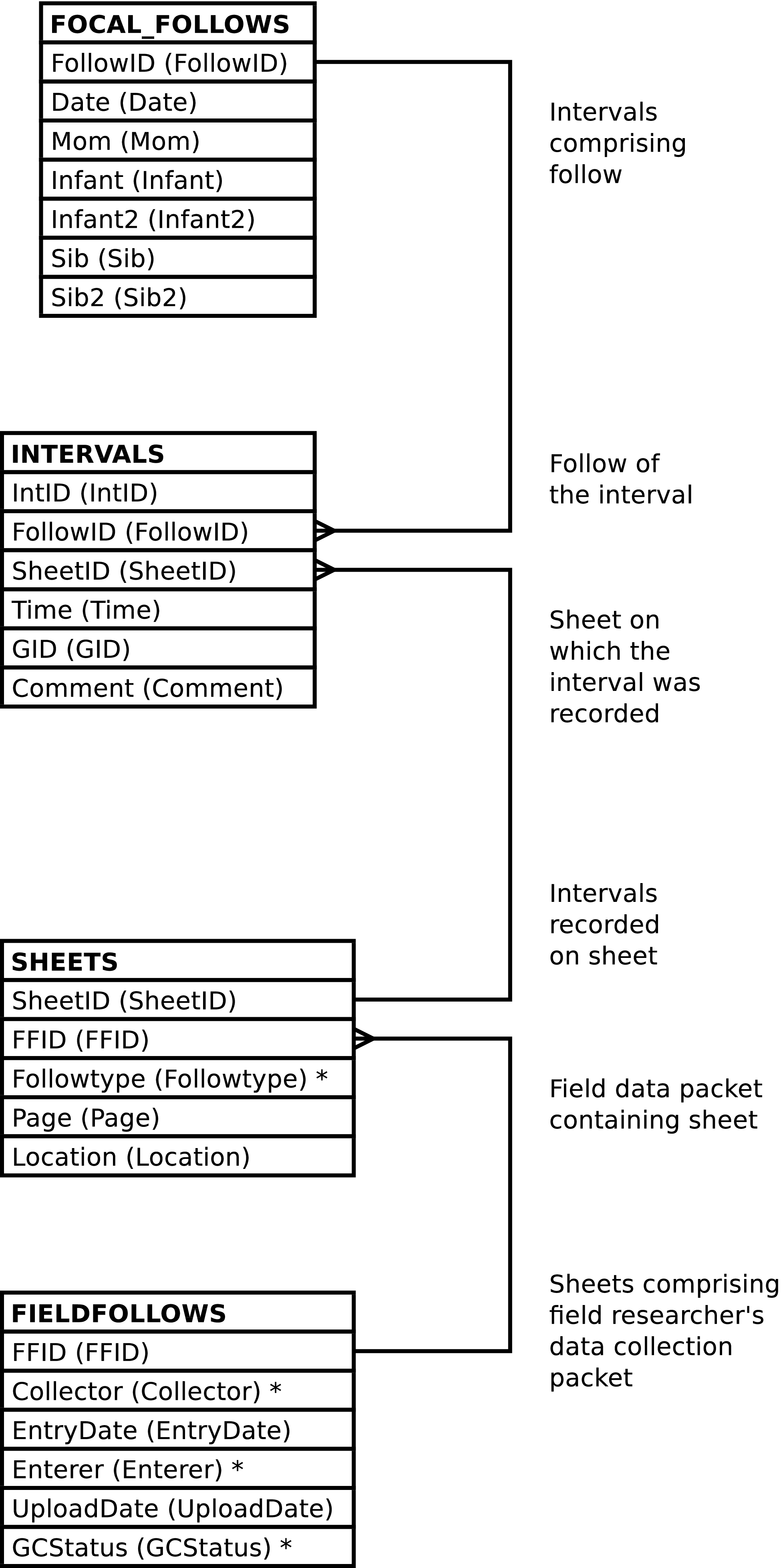
| Column | From | Description |
|---|---|---|
| FollowID | FOLLOWS.FollowID | Unique integer identifying the follow. |
| IntID | INTERVALS.IntID | Unique integer identifying the interval. |
| SheetID | INTERVALS.SheetID | The integer identifying the data collection sheet on which the interval was recorded. |
| FFID | FIELDFOLLOWS.FFID | The integer identifying the field follow, the set of sheets collected by a researcher in the field comprising a day's mother-infant follow, in which the sheet belongs. |
| Date | FOLLOWS.Date | The date of the follow. |
| Mom | FOLLOWPARTS.ChimpID | The ChimpID of the mother in the follow. |
| Infant | FOLLOWPARTS.ChimpID | The ChimpID of an infant in the follow. |
| Infant2 | FOLLOWPARTS.ChimpID | The ChimpID of a
twin infant in the follow, or NULL when the infant
is not a twin. |
| Sib | FOLLOWPARTS.ChimpID | The ChimpID of a
sibling in the follow, or NULL when there is not
sibling focal in the follow. |
| Sib2 | FOLLOWPARTS.ChimpID | The ChimpID of a
twin sibling in the follow, or NULL when there is no
sibling or the sibling is not a twin. |
| Time | INTERVALS.Time | The time of the interval. |
| GID | INTERVALS.GID | The identifier of the group composition related
to the interval. The system will automatically
compute this when a NULL value is supplied upon
insert or update. |
| Comment | INTERVALS.Comment | The comment on the interval. |
| Followtype | Sheets.Followtype | Code indicating the data collected on the data collection sheet. |
| Page | Sheets.Page | The page number on the field data collection sheet. |
| Location | Sheets.Location | The valley location information on the field data collection sheet. |
| Collector | FIELDFOLLOWS.Collector | The field researcher who collected the information on the field data collection sheet. |
| Entrydate | FIELDFOLLOWS.Entrydate | The date the data entry technician converted the information on the field data collection sheet into electronic form. |
| Enterer | FIELDFOLLOWS.Enterer | The data entry technician who converted the information on the field data collection sheet into electronic form. |
| UploadDate | FIELDFOLLOWS.UploadDate | The date and time the information on the field data collection sheet was uploaded into into the database. |
| GCStatus | FIELDFOLLOWS.GCStatus | The code indicating the status of the group
composition information, or NULL if there is no
group composition information. |
Altering the FOLLOW_INTERVALS view alters the content of the underlying INTERVALS table in the fashion described below. Inserting into FOLLOW_INTERVALS can also insert into the Sheets and FIELDFOLLOWS table. The FOLLOWS and related FOLLOWPARTS rows must exist; the content of these tables is never altered.
Inserting a row into the FOLLOW_INTERVALS view inserts a row into the INTERVALS table, as expected.
When inserting INTERVALS rows using FOLLOW_INTERVALS the follow must be specified. The follow may be specified in either or both of the following 2 ways:
-
A FollowID may be supplied.
-
Date, Mom and, Infant values all may be supplied.
Note
In the case of twins, either twin may be supplied as the Infant, or the Infant2 (or likewise with the sibling columns). The correct follow will be identified so long as the indicated twin is a focal in the follow.
However, if a
RETURNINGclause is used the twins will be returned in column names as if queried, irrespective of how specified in the inserted values.
Caution
FOLLOW_INTERVALS inserts only when there is a FOLLOWS row that matches the above selection criteria. If no row matches the database content is not altered. Note that no row will match if conflicting information is supplied.
Note
When inserting into FOLLOW_INTERVALS it is not
recommended to set the
IntID value. Omitting
this column or supplying a NULL value will allow the
system to automatically generate an id.
Inserting a row into FOLLOW_INTERVALS will also insert a row into Sheets if the specified related Sheets row does not already exist.
The related Sheets row may be specified in either or both of the following 2 ways:
Additional Sheets column values may
be supplied. (The
Followtype,
Location, and
FFID values.) As usual,
omitting any column is the same as specifying a NULL
value. It is an error for any of the supplied, non-NULL,
values to conflict with the content of an existing
Sheets row when the row is related to the
newly inserted INTERVALS row. If there is
no existing Sheets row then the supplied
values are stored in a newly created
Sheets row.
Note
When inserting into FOLLOW_INTERVALS and creating a
new Sheets row it is not recommended to
set the SheetID value.
Omitting this column or supplying a NULL value will
allow the system to automatically generate an id.
Inserting a row into FOLLOW_INTERVALS will also insert a row into FIELDFOLLOWS if the specified related FIELDFOLLOWS row does not already exist.
The related FIELDFOLLOWS row may be specified in either or both of the following 2 ways:
-
A FFID value may be supplied.
-
A Collector value may be supplied.
Note
Supplying a Collector value serves to identify a FIELDFOLLOWS row only when there is already a relationship between the follow and a field follow conducted by the designated collector. If the field data collector is not already in the database as having collected data for the follow, (or has, for some reason, performed more than one bout of data collection regards the follow) then the system cannot use the collector to identify a single, existent, field follow to relate to the new interval.
Additional FIELDFOLLOWS column
values may be supplied. (The
Entrydate,
Enterer,
UploadDate,
GCStatus values.) As
usual, omitting any column is the same as specifying a
NULL value. It is an error for any of the supplied,
non-NULL, values to conflict with the content of an
existing FIELDFOLLOWS row when the row is
related to the newly inserted INTERVALS
row. If there is no existing FIELDFOLLOWS
row then the supplied values are stored in a newly created
FIELDFOLLOWS row.
Note
When inserting into FOLLOW_INTERVALS and creating a
new FIELDFOLLOWS row it is not
recommended to set the
FFID value. Omitting
this column or supplying a NULL value will allow the
system to automatically generate an id.
Note
While the system does not dis-allow multiple FIELDFOLLOWS row per Collector per FOLLOWS row, just in case a single researcher's daily follow sheets of a single mother/infant pair are somehow separated into two packets that are subsequently entered into the system at different times, inserting into FOLLOW_INTERVALS ensures that there is always a single FIELDFOLLOWS row per field data collector per date per mother/infant pair.
This view returns no rows, it is used only to upload follow data. This view exists instead of a custom upload program.
The columns of the UPLOAD_BEHAVIORS view resemble the
columns on the field data entry collection sheets. Only some of
these columns are required, others may be present or omitted
depending on the template type of the sheet used in the field.
Omitting a column is equivalent to including the column and
specifying a NULL value for all the column's rows. Required
columns are either documented as such below or are required to
have non-NULL values in the database.
Note
The UPLOAD_BEHAVIORS view does not validate the existence or absence of specific columns based on the template type. It is up to the data entry staff to use the correct columns.
Note
Depending on the program used to upload data into this view, the case of the column names can be significant. All column names, in this view and everywhere else in Gombe-MI, are in lower case. Column names are written here in mixed case as a lexical convention so that column names can be easily discerned from regular text. The use of the underscore character in place of spaces in the column names is always significant.
It is recommended to always use lower case column names when uploading data.
ChimpID values of the focals are not required to be consistent throughout the follow. The first row containing data for any given follow will have it's ChimpID values used as FOLLOWPARTS.ChimpID values. The ChimpID values supplied in each line uploaded are used as PARTS.Participant values for the behavioral interactions the line records and as DISTANCEPARTS.Participant values for the inter-focal distances the line records. The AnimID values of the focals must remain consistent from line to line of any given focal, but the ChimpID used may vary from line to line.
If any of a follow's uploaded lines contains a Sibling value then all the uploaded lines for the follow must contain a Sibling value. This is true not only for the lines uploaded in any given file but is also must be the case if a follow's lines are uploaded in multiple files.
If Sibling is NULL
then it is an error for any of the following columns to contain
data:
The time values, Time_Converted_Mil, in the uploaded lines cannot decrease when examined in line-number order on a per-fieldfollow basis (i.e. per date/mom/field-data-collector). However, subsequent uploads may add new intervals to an existing follow irrespective of the times of pre-existent behavioral intervals.
The page number values,
Page, in the uploaded lines
cannot decrease when examined in line-number order on a
per-fieldfollow basis. However, a NULL page number can occur on
any line. Further, this restriction is per file uploaded.
Subsequent uploads may add additional behavioral information to
any existing or newly uploaded page regardless of page
number.
The Bad_Observation column affects the certitude of all data recorded on the line. It may contain the following values:
-
No characters or
NULL -
All the data recorded on the line is certain, unless another column's value indicates otherwise.
-
YorW -
All the data recorded on the line is uncertain.
-
M -
The data related to the mother is uncertain.
-
IorT -
The data related to the infant is uncertain.
-
SorK -
The data related to the sibling is uncertain.
-
M/IorM,T -
The data related to the mother and the data related to the infant is uncertain.
-
M/SorM,K -
The data related to the mother and the data related to the sibling is uncertain.
-
I/SorK,T -
The data related to the infant and the data related to the sibling is uncertain.
The Sib_Bad_Observation column is used to denote uncertainty regarding data contained in the sibling related columns -- those columns beginning with “sib_”. Sib_Bad_Observation is used in conjunction with Bad_Observation.
Any given behavioral or distance observation is denoted uncertain when uncertainty is indicated either by the Bad_Observation or Sib_Bad_Observation columns or by the data value of the given observation.
The uploaded behavior
code - is ignored.
Behavior codes are translated from the code or column written on paper in the field into the codes used within Gombe-MI by reference to the BEHAVIOR_TRANS table. This provides a degree of flexibility; adding new rows to BEHAVIOR_TRANS (and BEHAVIORS) may allow new behavioral observations to be collected and uploaded into Gombe-MI without having to modify the system's code.
The behavior code to use for the eating behavior
associated with the
Ma_Foodpart,
Ma_Foodkind,
Inf_Foodpart,
Inf_Foodkind,
Sib_Foodpart, and
Sib_Foodkind columns and the fishing
behavior associated with the
Ma_Fishpart,
Ma_Fishkind,
Inf_Fishpart,
Inf_Fishkind,
Sib_Fishpart, and
Sib_Fishkind columns is
determined by looking up ma_foodpart,
inf_foodpart,
sib_foodpart,
ma_fishpart,
inf_fishpart, and
sib_fishpart on the
BEHAVIOR_TRANS table. (The foodkind and
fishkind columns have no row on
BEHAVIOR_TRANS.
When there are multiple food part codes in the Ma_Foodpart, Inf_Foodkind, Sib_Foodkind, Ma_Fishpart, Inf_Fishkind, or Sib_Fishkind columns a separate row on EATS or FISHED is created for each of them. The Ma_Foodkind, Inf_Foodkind, Sib_Foodkind, Ma_Fishkind, Inf_Fishkind, or Sib_Fishkind value is used as the Foodkind or Foodkind value for each such created row.
When the uploaded followtype
value identifies a row on FOLLOWTYPES with a
FOLLOWTYPES.Implied_Behavior
value of TRUE UPLOAD_BEHAVIORS looks up the following column
names in BEHAVIOR_TRANS to determine the
implied behavior code:
When
FOLLOWTYPES.Implied_Behavior
is TRUE the implied behavior code is only used if the data in
the above columns has not been processed due to the presence of
an uploaded behavior code. The implied behavior code is
therefore the default behavior when no behavior code is
listed.
When
FOLLOWTYPES.Implied_Behavior
is FALSE the data in these columns is processed only when an
appropriate[57] behavior value is encountered. Should there be no
such behavior code UPLOAD_BEHAVIORS will raise an error if the
above columns contain data.
The following columns always imply a behavior[58]:
BEHAVIOR_TRANS
Controls other aspects of the upload process. When
BEHAVIOR_TRANS.Dups
is TRUE, and the behavior is between focals, and the behavior
is uploaded as a behavior code and not a column dedicated to a
specific behavior[59], UPLOAD_BEHAVIORS
expects that the behavior to be recorded twice on the uploaded
line, once for each focal. If this is not the case an error is
reported. If either (or both) of the observations is uncertain
then the observation is recorded in the database (once) as
uncertain. If the
EVENTS.Position
values do not match an error is reported.
BEHAVIOR_TRANS.Play_Val,
, as well as the name of the column, controls whether the
behavior is considered a social play behavior. When
BEHAVIOR_TRANS.Play_Val
is non-NULL, or the
Inf_Social_Play column data
is under consideration and the infant is not the individual
listed in the Inf_Social_Play
column, and the behavior is between focals, UPLOAD_BEHAVIORS
considers the play to be a directed (actor/actee) behavior. The
program also checks for reciprocal actor/actee play
relationships between focals, having identical
EVENTS.Behavior
codes, and, if found, ensures that the 2 observations recorded
in the field are uploaded into the database as a single mutual
behavioral interaction, as a single EVENTS row
having PARTS.Part
values of P. So, for
example, when an uploaded line records the mother playing with
the infant (in a directed fashion) and the infant playing with
the mother (in a directed fashion, both events having the same
code for play) a single mutual (undirected) play event is
recorded in the database. If either (or both) of the
observations is uncertain then the observation is recorded in
the database (once) as uncertain. If the
EVENTS.Position
values do not match an error is reported.
When
BEHAVIOR_TRANS.Play_Val
is non-NULL, or the
Inf_Social_Play column data is
under consideration, and the behavior is not between focals,
UPLOAD_BEHAVIORS considers the play to be mutual -- the
PARTS.Part values are
set to P.
When the Inf_Social_Play column data lists the focal infant the behavior is considered to be self-play.
Caution
The “old Excel” data format does not designate self-play by listing the focal infant in the Inf_Social_Play column. Instead self-play is designated by use of the Inf_Solitary_Play column. In order to accommodate the “new Excel” data format the rules for Inf_Social_Play were altered to allow the coding for self-play regardless of whether old or new data is uploaded. Consequently, should the old data need to be re-uploaded, improper data may be silently ignored and incorrect self-play behaviors may be inadvertently uploaded into the system.
BEHAVIOR_TRANS.Grooms_Other,
as well as the data in the
Inf_Grooming column, controls
whether the behavior is considered one where the focal grooms
another individual;
BEHAVIOR_TRANS.Grooms_By,
as well as the data in the
Inf_Being_Groomed column,
controls whether the behavior is considered to be one where the
focal is groomed by another individual; and a non-NULL
BEHAVIOR_TRANS.Ride_Val
column indicates that the behavior is considered to be one where
the focal rides on another individual. When the grooming
behavior is identified by a code rather than by ChimpIDs entered
into a column it is an error to upload a behavior code with a
BEHAVIOR_TRANS.Grooms_Other,
or Grooms_By value of TRUE,
or a Ride_Val
or Play_Val value which is non-NULL
without at least one ChimpID value in a corresponding column to
provide a social partner for the focal.
Unless UPLOAD_BEHAVIORS is to take the mother's grooming
and play partners from separate columns on any one uploaded line
the individuals with whom the mother groomed and played with
must either both be recorded in a single column or be recorded
in separate columns -- unless
Ma_GP_Combined is FALSE
there cannot be data in both
Ma_Groomingplay and
Ma_Grooming, nor may there be
data in both Ma_Groomingplay
and Ma_Play.[60]
It is an error to upload a row where the mother's grooming and play partners are combined into a single column and there is more than one grooming and play partner; UPLOAD_BEHAVIORS is then unable to determine which partners were play partners and which were grooming partners.
The Gombe Chimp Database Handbook reserves some AnimID values to carry special meaning. These may not be used as BIOGRAPHY_DATA.AnimID values or as CHIMPIDS.ChimpID values. These special values have the following effect when uploaded into UPLOAD_BEHAVIORS:
Reserved AnimID Values
-
? -
In most cases the focal is recorded as interacting with the
UNKChimpID (in PARTS.Participant) and the EVENTS.Uncertain value is set toTRUE.In the case of the Inf_Rejection column the focal is recorded as interacting with the mother and the EVENTS.Uncertain value is set to
TRUE.In the case of the Inf_Display column the focal (the infant) is recorded as interacting with herself and the EVENTS.Uncertain value is set to
TRUE. -
Y -
In most cases the focal is recorded as interacting with the
UNKChimpID (in PARTS.Participant).In the case of the Inf_Ride_On_Belly, Inf_Ride_On_Back, Inf_Ride_On_Unk, Inf_Dangle, and Inf_Rejection columns the focal is recorded as interacting with the mother.
In the case of the Inf_Display column the focal (the infant) is recorded as interacting with herself.
-
NYA -
The focal is recorded as interacting with a baboon -- EVENTS.Baboon is set to
TRUEand there is not a PARTS row recording the focal's behavioral partner.
UPLOAD_BEHAVIORS does not vary the
FISHED.Result value
when recording a fishing event. The value used is
always S to indicate
successful fishing.
The Inf_Cry and Inf_Voc data are added to the database as a single vocalization event (a single EVENTS row) in which, possibly, more than one sound is made (possibly having more than one related VOCS rows).
The
Comments column is examined
on upload and sometimes altered and a new behavioral event
created. When the Comments
column contains the character
sequence DEVBEH! (case sensitive) and
the columns Inf_Nurse,
Inf_Eat,
Inf_Travel,
Inf_Solitary_Play,
Inf_Rest,
Inf_Ride_On_Belly,
Inf_Ride_On_Back,
Inf_Ride_On_Unk,
Inf_Dangle,
Inf_Touching_Another,
Inf_Grooming,
Inf_Being_Groomed and
Inf_Social_Play are all empty
then the comment text is examined to see if
the DEVBEH! characters are immediately
followed by at least one character surrounded by square
braces, []. If not an error is raised. If
so then the a behavioral event is recorded in the database, the
behavior code being obtained from the
BEHAVIOR_TRANS.Old_Behavior
value where the
BEHAVIOR_TRANS.Old_Behavior
is devbeh,
the DEVBEH! character sequence, the
square braces with follow it and the text enclosed by the square
braces are recorded in the
EVENTS.Comment value
of the newly created behavioral event.[61]
Figure 5.28. Query Defining the UPLOAD_BEHAVIORS View: Part I
SELECT NULL::TEXT AS followtype

     , NULL::DATE AS entrydate

     , NULL::TEXT as entered_by

     , NULL::TEXT AS researcher

     , NULL::DATE AS date

     , NULL::INT AS page

     , NULL::TEXT AS location

     , NULL::TEXT AS mother

     , NULL::TEXT AS infant

     , NULL::TEXT AS sibling

     , NULL::TEXT AS time_on_sheet

     , NULL::TIME AS time_converted_mil

     , NULL::TEXT AS time_type

     , NULL::TEXT AS bad_observation

     , NULL::TEXT AS rain

     , NULL::TEXT AS ma_behavior

     , NULL::TEXT AS ma_foodpart

     , NULL::TEXT AS ma_foodkind

     , NULL::TEXT AS ma_fishpart

     , NULL::TEXT AS ma_fishkind

     , NULL::BOOLEAN AS ma_gp_combined

     , NULL::TEXT AS ma_groomingplay

     , NULL::TEXT AS ma_grooming

     , NULL::TEXT AS ma_play

     , NULL::TEXT AS ma_groomed_by

     , NULL::TEXT AS ma_voc
Figure 5.29. Query Defining the UPLOAD_BEHAVIORS View: Part II
     , NULL::TEXT AS inf_behavior

     , NULL::TEXT AS inf_foodpart

     , NULL::TEXT AS inf_foodkind

     , NULL::TEXT AS inf_fishpart

     , NULL::TEXT AS inf_fishkind

     , NULL::TEXT AS inf_distance_to_ma

     , NULL::TEXT AS inf_nurse

     , NULL::TEXT AS inf_travel

     , NULL::TEXT AS inf_eat

     , NULL::TEXT AS inf_solitary_play

     , NULL::TEXT AS inf_rest

     , NULL::TEXT AS inf_distance_1

     , NULL::TEXT AS inf_distance_2

     , NULL::TEXT AS inf_distance_3

     , NULL::TEXT AS inf_distance_4

     , NULL::TEXT AS inf_distance_5

     , NULL::TEXT AS inf_distance_over_5m

     , NULL::TEXT AS inf_ride_on_belly

     , NULL::TEXT AS inf_ride_on_back

     , NULL::TEXT AS inf_ride_on_unk

     , NULL::TEXT AS inf_dangle

     , NULL::TEXT AS inf_rejection

     , NULL::TEXT AS inf_touching_another

     , NULL::TEXT AS inf_grooming

     , NULL::TEXT AS inf_being_groomed

     , NULL::TEXT AS inf_social_play

     , NULL::TEXT AS inf_display

     , NULL::TEXT AS inf_cry

     , NULL::TEXT AS inf_voc

     , NULL::TEXT AS inf_beg

     , NULL::TEXT AS inf_assr

     , NULL::TEXT AS inf_sex_related

     , NULL::TEXT AS inf_tooluse

     , NULL::TEXT AS inf_directaggression

     , NULL::TEXT AS sib_bad_observation

     , NULL::TEXT AS sib_behavior

     , NULL::TEXT AS sib_foodpart

     , NULL::TEXT AS sib_foodkind

     , NULL::TEXT AS sib_fishpart

     , NULL::TEXT AS sib_fishkind

     , NULL::TEXT AS sib_play

     , NULL::TEXT AS sib_grooming

     , NULL::TEXT AS sib_groomed_by

     , NULL::TEXT AS sib_ride

     , NULL::TEXT AS sib_distance_to_ma

     , NULL::TEXT AS sib_distance_to_infant

     , NULL::TEXT AS sib_voc

     , NULL::TEXT AS comments

  WHERE _raise_gombemi_exception(

          'Cannot select UPLOAD_BEHAVIORS'

          || ': The only use of the UPLOAD_BEHAVIORS view is to insert'

          || ' new data into the 1-minute interval related portion of'

          || ' Gombe-MI')
;
Figure 5.30. Entity Relationship Diagram of the UPLOAD_BEHAVIORS View
| Column | Uploads into | Description |
|---|---|---|
| Followtype | Sheets.Followtype | Code indicating the set of data collected.
This column may not be NULL. Leading and trailing spaces in the data are
removed. |
| Entrydate | FIELDFOLLOWS.Entrydate |
Date the data collection sheet was entered into an electronic form. This value may be |
| Entered_By | FIELDFOLLOWS.Enterer |
Code for the person who entered the data into
electronic form. This column may not be Leading and trailing spaces in the data are removed. The coded data is case sensitive. |
| Researcher | FIELDFOLLOWS.Collector |
Written out name of the person who collected the
data in the field. This column may not be Leading and trailing spaces in the data are removed and case is ignored. |
| Date | FOLLOWS.Date | Date of the follow. This column may not be NULL. |
| Page | Sheets.Page | Page number of the data collection sheet on which
the data is written. All of any one follow's data rows
having NULL page numbers are considered to have been
written on a single sheet (a sheet having a NULL page
number). |
| Location | Sheets.Location | Location of follow. Leading and trailing spaces in the data are removed. |
| Mother | FOLLOWPARTS.ChimpID, FOLLOWPARTS.Role, PARTS.Participant, DISTANCEPARTS.Participant |
ChimpID of the mother in the follow. The
related
FOLLOWPARTS.Role
value is always set
to Leading and trailing spaces in the data are removed. |
| Infant | FOLLOWPARTS.ChimpID, FOLLOWPARTS.Role, PARTS.Participant, DISTANCEPARTS.Participant |
ChimpID of the infant in the follow. The
related
FOLLOWPARTS.Role
value is always set
to Leading and trailing spaces in the data are removed. |
| Sibling | FOLLOWPARTS.ChimpID, FOLLOWPARTS.Role, PARTS.Participant, DISTANCEPARTS.Participant |
ChimpID of the sibling in the follow. The
related
FOLLOWPARTS.Role
value is always set
to Leading and trailing spaces in the data are
removed. This column may be |
| Time_On_Sheet | The content of this column is ignored. | Time value written on data collection sheet. |
| Time_Converted_Mil | INTERVALS.Time | Time of the 1-minute interval in 24-hour clock format. Note that the format of the time is not validated beyond ensuring that it conforms to some legal PostgreSQL time syntax. |
| Time_Type | The content of this column is ignored. | Code indicating time system used in time written on data entry sheet. |
| Bad_Observation | DISTANCES.Uncertain, EVENTS.Uncertain | This column is used in conjunction with other columns to indicate observation certainty. See the description of how certainty is determined above. |
| Rain | The content of this column is ignored. | Indication of whether or not it was raining. |
| Ma_Behavior | EVENTS.Behavior | Mother's behavior codes. This is translated into the codes used within Gombe-MI by reference to the BEHAVIOR_TRANS table. Multiple behaviors are separated from each other
by the |
| Ma_Foodpart | EATS.Foodpart | Mother's food part codes of food eaten. This is translated into the codes used within Gombe-MI by reference to the FOODPART_TRANS table. Multiple food part codes are separated from
each other by the |
| Ma_Foodkind | EATS.Foodkind |
Mother's food kind code of food eaten. |
| Ma_Fishpart | FISHED.Foodpart | Mother's food part codes of foods fished for. This is translated into the codes used within Gombe-MI by reference to the FOODPART_TRANS table. Multiple food part codes are separated from
each other by the |
| Ma_Fishkind | FISHED.Foodkind |
Mother's food kind code of food fished for. |
| Ma_GP_Combined (Mother's Grooming and Play Partners are Combined) | This column controls how other columns are interpreted. |
When this value is Note that this column only affects observations of the mother doing the grooming or play. Observations of others grooming or playing with the mother are not influenced. |
| Ma_Groomingplay | PARTS.Participant |
Chimpids (or other
code) identifying the
individuals whom the mother either groomed or played
with. These are delimited with
commas ( See above for information on how the determination is made as to whether play is mutual or directed. |
| Ma_Grooming | PARTS.Participant | Chimpids (or other
code) identifying the
individuals whom the mother groomed.
These are delimited with
commas (,)
and all whitespace is ignored. |
| Ma_Play | PARTS.Participant |
Chimpids (or other
code) identifying the
individuals whom the mother played with.
These are delimited with
commas ( See above for information on how the determination is made as to whether play is mutual or directed. |
| Ma_Groomed_By | PARTS.Participant | Chimpids (or other
code) identifying the
individuals whom the mother was groomed
by. These are delimited with
commas (,)
and all whitespace is ignored.
See above
for special ChimpID values recognized by this column. |
| Ma_Voc (Mother's Vocalization Codes | VOCS.Vocalization and others | Mother's vocalization codes, separated by the comma (,) character. This is translated into the codes used within Gombe-MI by reference to the VOC_TRANS table. Whitespace is ignored. |
| Inf_Behavior | EVENTS.Behavior | Infant's behavior codes. This is translated into the codes used within Gombe-MI by reference to the BEHAVIOR_TRANS table. Multiple behaviors are separated from each other
by the |
| Inf_Foodpart | EATS.Foodpart | Infant's food part codes of food eaten. This is translated into the codes used within Gombe-MI by reference to the FOODPART_TRANS table. Multiple food part codes are separated from
each other by the |
| Inf_Foodkind | EATS.Foodkind |
Infant's food kind code of food eaten. |
| Inf_Fishpart | FISHED.Foodpart | Infant's food part codes of foods fished for. This is translated into the codes used within Gombe-MI by reference to the FOODPART_TRANS table. Multiple food part codes are separated from
each other by the |
| Inf_Fishkind | FISHED.Foodkind |
Infant's food kind code of food fished for. |
| Inf_Distance_To_Ma (Code for Infant's Distance To Mother) | DISTANCES.Distance and others | A
DISTANCECODES.Distance
value indicating the distance between mother and
infant. This column may not be The related
DISTANCEPARTS.Role
values are always set
to |
| Inf_Nurse (Infant Nurses on Mother) | EVENTS.Behavior and others | Whether the infant is nursing on the mother.
The legal values are: Y, meaning true; NULL meaning false; and ?, meaning true but uncertain. The column name is looked up in the BEHAVIOR_TRANS table to determine
the behavior code and control other aspects of the
event recorded in Gombe-MI. |
| Inf_Travel | EVENTS.Behavior and others | Whether the infant is traveling.
The legal values are: Y, meaning true; NULL meaning false; and ?, meaning true but uncertain. The column name is looked up in the BEHAVIOR_TRANS table to determine
the behavior code and control other aspects of the
event recorded in Gombe-MI. |
| Inf_Eat | EVENTS.Behavior and others | Whether the infant is eating. The legal values are: Y, meaning true; NULL meaning false; and ?, meaning true but uncertain.
The column name is looked up in the BEHAVIOR_TRANS table to determine
the behavior code and control other aspects of the
event recorded in Gombe-MI. |
| Inf_Solitary_Play | PLAYS.Play and others | Infant's solitary play code. This is translated into the codes used within Gombe-MI by reference to the PLAY_TRANS table. Whitespace is ignored. |
| Inf_Rest | EVENTS.Behavior and others | Whether the infant is resting. The legal values are: Y, meaning true; NULL meaning false; and ?, meaning true but uncertain.
The column name is looked up in the BEHAVIOR_TRANS table to determine
the behavior code and control other aspects of the
event recorded in Gombe-MI. |
| Inf_Distance_1 | DISTANCES.Distance and others | An indication of distance between mother and
infant. The column name is looked up in the DISTANCE_TRANS table to determine
the behavior code recorded in Gombe-MI. The legal values are: The related
DISTANCEPARTS.Role
values are always set
to |
| Inf_Distance_2 | DISTANCES.Distance and others | An indication of distance between mother and
infant. The column name is looked up in the DISTANCE_TRANS table to determine
the behavior code recorded in Gombe-MI. The legal values are: The related
DISTANCEPARTS.Role
values are always set
to |
| Inf_Distance_3 | DISTANCES.Distance and others | An indication of distance between mother and
infant. The column name is looked up in the DISTANCE_TRANS table to determine
the behavior code recorded in Gombe-MI. The legal values are: The related
DISTANCEPARTS.Role
values are always set
to |
| Inf_Distance_4 | DISTANCES.Distance and others | An indication of distance between mother and
infant. The column name is looked up in the DISTANCE_TRANS table to determine
the behavior code recorded in Gombe-MI. The legal values are: The related
DISTANCEPARTS.Role
values are always set
to |
| Inf_Distance_5 | DISTANCES.Distance and others | An indication of distance between mother and
infant. The column name is looked up in the DISTANCE_TRANS table to determine
the behavior code recorded in Gombe-MI. The legal values are: The related
DISTANCEPARTS.Role
values are always set
to |
| Inf_Distance_Over_5m | DISTANCES.Distance and others | An indication of distance between mother and
infant. The column name is looked up in the DISTANCE_TRANS table to determine
the behavior code recorded in Gombe-MI. The legal values are: The related
DISTANCEPARTS.Role
values are always set
to |
| Inf_Ride_On_Belly | RIDES.Ride and others | Chimpid (or other code) identifying the individual on whom the infant is riding dorsally. Whitespace is ignored. See above for special ChimpID values recognized by this column. The column name is looked up in the BEHAVIOR_TRANS table to determine the behavior code and control other aspects of the event recorded in Gombe-MI. |
| Inf_Ride_On_Back | RIDES.Ride and others | Chimpid (or other code) identifying the individual on whom the infant is riding ventrally. Whitespace is ignored. See above for special ChimpID values recognized by this column. The column name is looked up in the BEHAVIOR_TRANS table to determine the behavior code and control other aspects of the event recorded in Gombe-MI. |
| Inf_Ride_On_Unk | RIDES.Ride and others | Chimpid (or other code) identifying the individual on whom the infant is riding when the riding posture is unknown. Whitespace is ignored. See above for special ChimpID values recognized by this column. The column name is looked up in the BEHAVIOR_TRANS table to determine the behavior code and control other aspects of the event recorded in Gombe-MI. |
| Inf_Dangle | EVENTS.Behavior and others | Chimpid (or other code) identifying the individual from whom the infant is dangling. Whitespace is ignored. See above for special ChimpID values recognized by this column. The column name is looked up in the BEHAVIOR_TRANS table to determine the behavior code and control other aspects of the event recorded in Gombe-MI. |
| Inf_Rejection | EVENTS.Behavior and others | Chimpid (or other code) identifying the individual rejecting the infant. Whitespace is ignored. See above for special ChimpID values recognized by this column. The column name is looked up in the BEHAVIOR_TRANS table to determine the behavior code and control other aspects of the event recorded in Gombe-MI. |
| Inf_Touching_Another | EVENTS.Behavior and others | Chimpids (or other code) identifying the individuals involved (in a non-directed fashion) in touch with the infant. Whitespace is ignored. See above for special ChimpID values recognized by this column. The column name is looked up in the BEHAVIOR_TRANS table to determine the behavior code and control other aspects of the event recorded in Gombe-MI. |
| Inf_Grooming | EVENTS.Behavior and others | Chimpids (or other code) identifying the individuals whom the infant is grooming. Whitespace is ignored. See above for special ChimpID values recognized by this column. The column name is looked up in the BEHAVIOR_TRANS table to determine the behavior code and control other aspects of the event recorded in Gombe-MI. |
| Inf_Being_Groomed | EVENTS.Behavior and others | Chimpids (or other code) identifying the individuals who are grooming the infant. Whitespace is ignored. See above for special ChimpID values recognized by this column. The column name is looked up in the BEHAVIOR_TRANS table to determine the behavior code and control other aspects of the event recorded in Gombe-MI. |
| Inf_Social_Play | EVENTS.Behavior and others | Chimpids (or other code) identifying the individuals participating in play with the infant. Whitespace is ignored. See above for special ChimpID values recognized by this column. The column name is looked up in the BEHAVIOR_TRANS table to determine the behavior code and control other aspects of the event recorded in Gombe-MI. |
| Inf_Display | EVENTS.Behavior and others | Chimpids (or other code) indicator of whether the infant is displaying and to which individuals. Whitespace is ignored. See above for special ChimpID values recognized by this column. The column name is looked up in the BEHAVIOR_TRANS table to determine the behavior code and control other aspects of the event recorded in Gombe-MI. |
| Inf_Cry | VOCS.Vocalization and others | Whether the infant is crying.
The legal values are: Y, meaning true; NULL meaning false; and ?, meaning true but uncertain. The column name is looked up in the BEHAVIOR_TRANS table to determine
the behavior code and control other aspects of the
event recorded in Gombe-MI. |
| Inf_Voc (Infant's Vocalization Codes | VOCS.Vocalization and others | Infant's vocalization codes, separated by the comma (,) character. This is translated into the codes used within Gombe-MI by reference to the VOC_TRANS table. Whitespace is ignored. |
| Inf_Beg | EVENTS.Behavior and others | Chimpids (or other code) identifying the individuals from which the infant is begging. Whitespace is ignored. See above for special ChimpID values recognized by this column. The column name is looked up in the BEHAVIOR_TRANS table to determine the behavior code and control other aspects of the event recorded in Gombe-MI. |
| Inf_ASSR | EVENTS.Behavior and others | Chimpids (or other code) identifying the individuals against whom the infant is ASSR-ing. Whitespace is ignored. See above for special ChimpID values recognized by this column. The column name is looked up in the BEHAVIOR_TRANS table to determine the behavior code and control other aspects of the event recorded in Gombe-MI. |
| Inf_Sex_Related | EVENTS.Behavior and others | Chimpids (or other code) identifying the individuals with whom the infant is engaging in sex related behavior. The behavior is directed and the infant is the actor. Whitespace is ignored. See above for special ChimpID values recognized by this column. The column name is looked up in the BEHAVIOR_TRANS table to determine the behavior code and control other aspects of the event recorded in Gombe-MI. |
| Inf_Tooluse | EVENTS.Behavior and others | Whether the infant is using a tool. The legal values are: Y, meaning true; NULL meaning false; and ?, meaning true but uncertain.
The column name is looked up in the BEHAVIOR_TRANS table to determine
the behavior code and control other aspects of the
event recorded in Gombe-MI. |
| Inf_Directaggression | EVENTS.Behavior and others | Chimpids (or other code) identifying the individuals against whom the infant is engaging in direct aggression. The behavior is directed and the infant is the actor. Whitespace is ignored. See above for special ChimpID values recognized by this column. The column name is looked up in the BEHAVIOR_TRANS table to determine the behavior code and control other aspects of the event recorded in Gombe-MI. |
| Sib_Bad_Observation | DISTANCES.Uncertain, EVENTS.Uncertain | This column is used in conjunction with other
columns to indicate observation certainty of sibling
related data. The legal values for this column
are: Y, meaning the sibling
data is
uncertain; - or
NULL meaning the Sib_Bad_Observation column does not
influence whether sibling related data is uncertain.
See the description of
how certainty is determined above. |
| Sib_Behavior | EVENTS.Behavior | Sibling's behavior codes. This is translated into the codes used within Gombe-MI by reference to the BEHAVIOR_TRANS table. Multiple behaviors are separated from each
other by the |
| Sib_Foodpart | EATS.Foodpart | Sibling's food part codes of food eaten. This is translated into the codes used within Gombe-MI by reference to the FOODPART_TRANS table. Multiple food part codes are separated from
each other by
the |
| Sib_Foodkind | EATS.Foodkind |
Sibling's food kind code of food eaten. |
| Sib_Fishpart | FISHED.Foodpart | Sibling's food part codes of foods fished for. This is translated into the codes used within Gombe-MI by reference to the FOODPART_TRANS table. Multiple food part codes are separated from
each other by
the |
| Sib_Fishkind | FISHED.Foodkind |
Sibling's food kind code of food fished for. |
| Sib_Play | PARTS.Participant |
Chimpids (or other
code) identifying the
individuals whom the sibling played with.
These are delimited with
commas ( See above for information on how the determination is made as to whether play is mutual or directed. |
| Sib_Grooming | PARTS.Participant | Chimpids (or other
code) identifying the
individuals whom the sibling groomed.
These are delimited with
commas (,)
and all whitespace is ignored. |
| Sib_Groomed_By | PARTS.Participant | Chimpids (or other
code) identifying the
individuals whom the sibling was groomed
by. These are delimited with
commas (,)
and all whitespace is ignored.
See above
for special ChimpID values recognized by this column. |
| Sib_Ride | PARTS.Participant | Chimpid (or other
code) identifying the
individual on whom the sibling
rode. These are delimited with
commas (,)
and all whitespace is ignored.
See above
for special ChimpID values recognized by this column. |
| Sib_Voc (Sibling's Vocalization Codes | VOCS.Vocalization and others | Sibling's vocalization codes, separated by the comma (,) character. This is translated into the codes used within Gombe-MI by reference to the VOC_TRANS table. Whitespace is ignored. |
| Sib_Distance_To_Ma (Sibling Distance To Mother Code) | DISTANCES.Distance and others | A code indicating the distance between
mother and sibling. The column name is looked up in the DISTANCE_TRANS table to determine
the behavior code recorded in Gombe-MI. The uploaded
distance code The related
DISTANCEPARTS.Role
values are always set
to |
| Sib_Distance_To_Infant (Sibling Distance To Infant Code) | DISTANCES.Distance and others | A code indicating the distance between
infant and sibling. The column name is looked up in the DISTANCE_TRANS table to determine
the behavior code recorded in Gombe-MI. The uploaded
distance code The related
DISTANCEPARTS.Role
values are always set
to |
| Comments | INTERVALS.Comment |
Comments on the behaviors occurring during the
minute. Leading and trailing whitespace is removed.
This value may be CautionThe Comments column is processed as described and sometimes behaviors are created as a result. |
|
[a] Irrespective of the content of the FOLLOWROLES table. [b] Irrespective of the content of the FOLLOWROLES table. [c] Irrespective of the content of the FOLLOWROLES table. [d] Irrespective of the content of the FOLLOWROLES table. [e] Irrespective of the content of the FOLLOWROLES table. [f] Irrespective of the content of the FOLLOWROLES table. [g] Irrespective of the content of the FOLLOWROLES table. [h] Irrespective of the content of the FOLLOWROLES table. [i] Irrespective of the content of the FOLLOWROLES table. [j] Irrespective of the content of the FOLLOWROLES table. [k] Irrespective of the content of the FOLLOWROLES table. [l] Irrespective of the content of the FOLLOWROLES table. |
||
[51] While it is possible to use the “window function” PostgreSQL feature to produce an improved report-like format by eliminating rectangular areas of empty space in the query output, this was not deemed important enough to justify the time required. The reader is left to to complete this as an exercise in query construction.
[52] This allows, e.g., id columns to be omitted or
specified as NULL.
[53] Of course more than one row can be inserted into
DATASHEET events in a single INSERT
statement. The requirement is that each inserted row be
sufficiently specified.
[54] As can be seen from the documentation on updating FAMILY_EVENTS, the system does not really care about whether the column name pertains to a particular focal or not. It's possible for the system to ignore the focal associated with an EVENTS “sub-table” and simply insert data into the appropriate table, relating it to the event at hand. However at this point it seems preferable to have DATASHEET_EVENTS perform this check.
[55] The odd nature of this procedure is due to the lack of EATS, FISHED, PLAYS, RESTS, RIDES, or VOCS id columns on DATASHEET_EVENTS. Id values could be used to signal whether an existing row should be altered or a new row inserted. However, additional id columns would clutter the view, which already has over-many columns.
[56] This works due to the lack of association on update
between the column names and the focal, and because the
infant's column values will always be NULL so changing
them to a non-NULL value causes a row to be
inserted.
[57] Based on a behavior code written into the data and according to the corresponding BEHAVIOR_TRANS row.
[58] That is, they are processed as if
FOLLOWTYPES.Implied_Behavior
is TRUE regardless of it's actual value.
[59] Duplicate detection is hardcoded into UPLOAD_BEHAVIORS for those columns that are dedicated to specific behaviors.
[60] Yes, it is allowed to have data in the Ma_Groomingplay column even though the data is ignored.