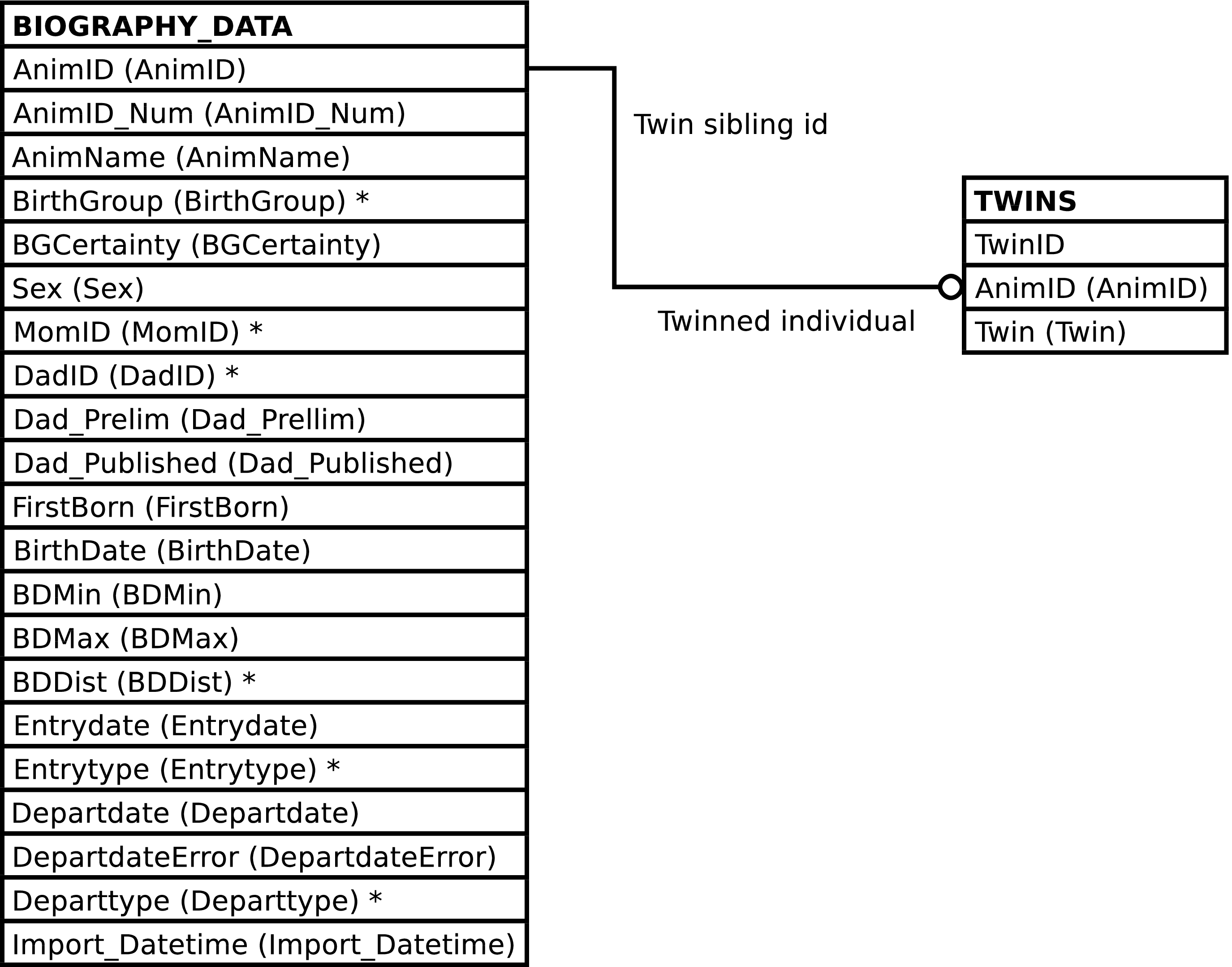
BIOGRAPHY contains one row per BIOGRAPHY_DATA row. It provides a stable interface into the imported Access table BIOGRAPHY_DATA, allowing the underlying table to change without affecting Gombe-MI.
This view should be used instead of
BIOGRAPHY_DATA. The view contains all of
BIOGRAPHY_DATA's columns, plus the
AnimID of the individual's twin,
from TWINS.Twin, if a
twin. Of course in most cases there is no twin and the
Twin column will be NULL.
Figure 5.1. Query Defining the BIOGRAPHY View
SELECT biography_data.animid AS animid

     , biography_data.animid_num AS animid_num

     , biography_data.animname AS animname

     , biography_data.birthgroup AS birthgroup

     , biography_data.bgcertainty AS bgcertainty

     , biography_data.sex AS sex

     , biography_data.momid AS momid

     , biography_data.dadid AS dadid

     , biography_data.dad_prelim AS dad_prelim

     , biography_data.dad_published AS dad_published

     , biography_data.firstborn AS firstborn

     , biography_data.birthdate AS birthdate

     , biography_data.bdmin AS bdmin

     , biography_data.bdmax AS bdmax

     , biography_data.bddist AS bddist

     , biography_data.entrydate AS entrydate

     , biography_data.entrytype AS entrytype

     , biography_data.departdate AS departdate

     , biography_data.departdateerror AS departdateerror

     , biography_data.departtype AS departtype

     , biography_data.import_datetime AS import_datetime

     , twins.twin AS twin

  FROM biography_data

       LEFT OUTER JOIN twins ON (twins.animid = biography_data.animid)
;
| Column | From | Description |
|---|---|---|
| AnimID | BIOGRAPHY_DATA.AnimID | Identifier of the individual. |
| AnimID_Num | BIOGRAPHY_DATA.AnimID_Num | Identifier for the individual in the SIV study. |
| AnimName | BIOGRAPHY_DATA.AnimName | Name of the individual. |
| BirthGroup | BIOGRAPHY_DATA.BirthGroup | Birth community of the individual. |
| BGCertainty | BIOGRAPHY_DATA.BGCertainty | Certainty of the individual's birth community. |
| Sex | BIOGRAPHY_DATA.Sex | Sex of the individual. |
| MomID | BIOGRAPHY_DATA.MomID | Identifier of the individual's mother. |
| DadID | BIOGRAPHY_DATA.DadID | Identifier of the individual's father. |
| Dad_Prelim | BIOGRAPHY_DATA.Dad_Prelim | Whether paternity is preliminary. |
| Dad_Published | BIOGRAPHY_DATA.Dad_Published | Whether paternity has been published. |
| FirstBorn | BIOGRAPHY_DATA.FirstBorn | Whether the individual is the mother's firstborn. |
| Birthdate | BIOGRAPHY_DATA.Birthdate | Birth date of the individual. |
| BDMin | BIOGRAPHY_DATA.BDMin | Minimum possible birth date. |
| BDMax | BIOGRAPHY_DATA.BDMax | Maximum possible birth date. |
| BDDist | BIOGRAPHY_DATA.BDDist | Probability distribution of the individual's birth date estimate. |
| Entrydate | BIOGRAPHY_DATA.Entrydate | Individual's date of entry into the study. |
| Entrytype | BIOGRAPHY_DATA.Entrytype | Individual's method of entry into the study. |
| Departdate | BIOGRAPHY_DATA.Departdate | Individual's date of departure from the study. |
| DepartdateError | BIOGRAPHY_DATA.DepartdateError | Degree of error in departure date. |
| Departtype | BIOGRAPHY_DATA.Departtype | Method of individual's departure from the study. |
| ImportDatetime | BIOGRAPHY_DATA.Import_Datetime | Timestamp of import from the master Access database. |
| Twin | TWINS.Twin | Identifier of the individual's twin. |
INSERTing into BIOGRAPHY inserts rows into
BIOGRAPHY_DATA as expected. A row is
inserted into the TWINS table if the
Twin value is non-NULL, otherwise a
TWINS row is not inserted.
Updating BIOGRAPHY updates the rows of
BIOGRAPHY_DATA as expected. Setting the
Twin column to NULL results in deletion of a related
TWINS row, if any exists. Setting the Twin
column to a non-NULL value either updates the existing
TWINS.Twin value or
creates a new TWINS row, as
necessary.
Deleting rows from BIOGRAPHY deletes rows from BIOGRAPHY_DATA and TWINS, as expected.
The purpose of the BIOGRAPHY_UPLOAD view is to provide a convenient interface for uploading the master Access biography table into the Gombe-MI BIOGRAPHY_DATA table. It contains columns for each of the columns in the master Access biography table, named as they are named in the master table.
Caution
Character case is significant in BIOGRAPHY_UPLOAD's column names. The column names must be written exactly as shown (and enclosed in double quote characters (") when used in SQL). This is to match Duke's column names and avoid having to change the column headings when uploading Duke's data.
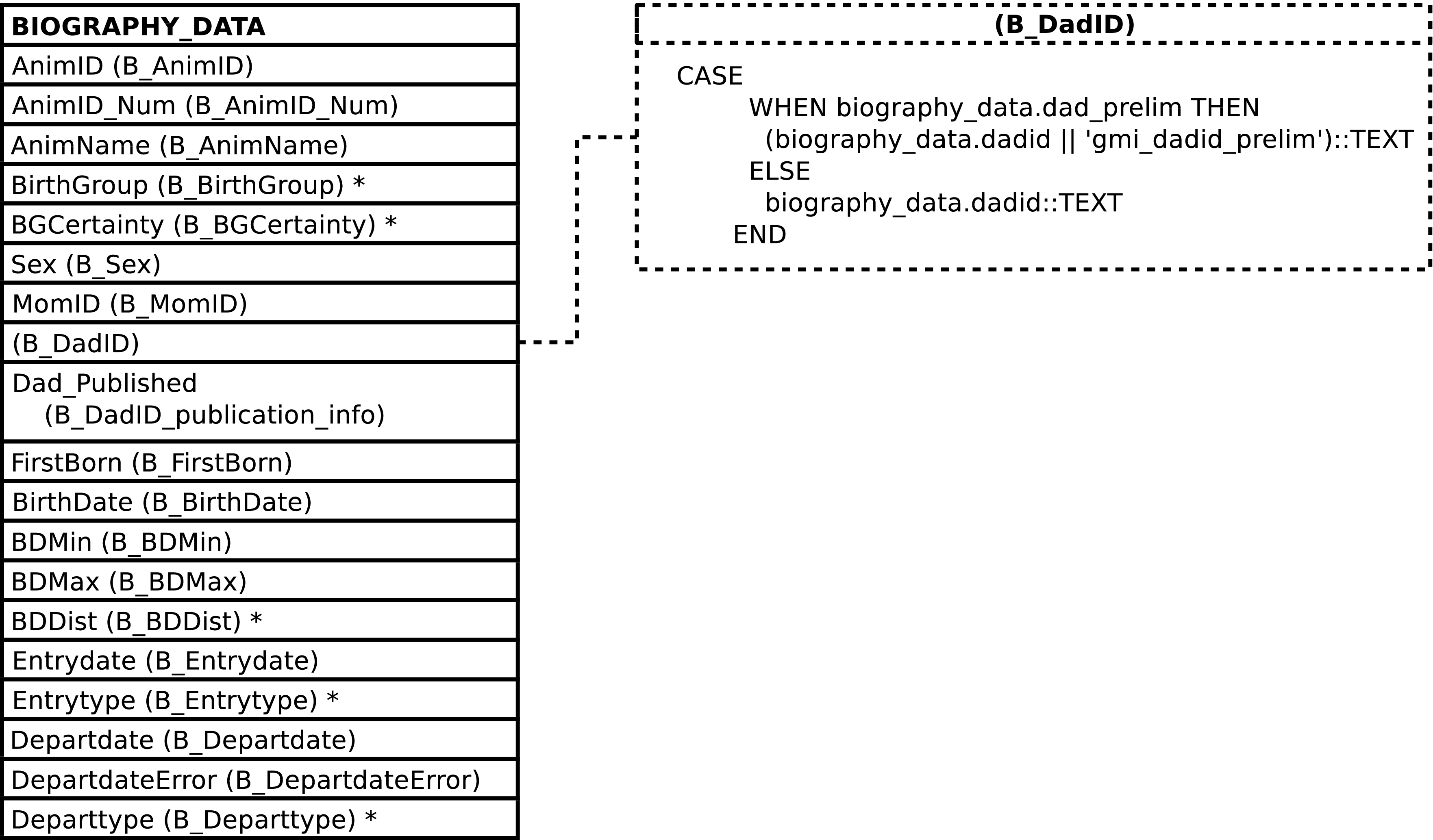
BIOGRAPHY_UPLOAD provides features upon data INSERT to ease
the upload process. It serves to translate the column names in
the master Access biography table into the column names in
BIOGRAPHY_DATA. It removes trailing spaces from
all textual columns. The
BIOGRAPHY_DATA.Dad_Prelim
column is set to TRUE when the BIOGRAPHY_UPLOAD.B_DadID column
ends in _prelim and FALSE
otherwise. The suffix _prelim is
removed from the BIOGRAPHY_UPLOAD.B_DadID value when it is stored
in the
BIOGRAPHY_DATA.DadID
column.
Figure 5.3. Query Defining the BIOGRAPHY_UPLOAD View
SELECT biography_data.animid::TEXT AS "B_AnimID"

     , biography_data.animid_num::TEXT AS "B_AnimID_num"

     , biography_data.animname::TEXT AS "B_AnimName"

     , biography_data.birthgroup::TEXT AS "B_BirthGroup"

     , biography_data.bgcertainty::TEXT AS "B_BGCertainty"

     , biography_data.sex::TEXT AS "B_Sex"

     , biography_data.momid::TEXT AS "B_MomID"

     , CASE

         WHEN biography_data.dad_prelim THEN

           (biography_data.dadid || 'gmi_dadid_prelim')::TEXT

         ELSE

           biography_data.dadid::TEXT

       END AS "B_DadID"

     , biography_data.dad_published AS "B_DadID_publication_info"

     , biography_data.firstborn::TEXT AS "B_FirstBorn"

     , biography_data.birthdate AS "B_Birthdate"

     , biography_data.bdmin AS "B_BDMin"

     , biography_data.bdmax AS "B_BDMax"

     , biography_data.bddist::TEXT AS "B_BDDist"

     , biography_data.entrydate AS "B_Entrydate"

     , biography_data.entrytype::TEXT AS "B_Entrytype"

     , biography_data.departdate AS "B_Departdate"

     , biography_data.departdateerror AS "B_DepartdateError"

     , biography_data.departtype::TEXT AS "B_Departtype"

  FROM biography_data
;
Because there is nearly[48] a one-to-one match between the columns in this view and the master Access table there is no additional documentation of this view's columns. See the Gombe Chimp Database Handbook and the BIOGRAPHY_DATA table for further information.
INSERTing into this view trims trailing spaces from all inserted textual data. Non-textual data is inserted unaltered.
Although it is not recommended to do anything other than INSERT into this view as part of a bulk upload of the master Access biography table, there are no special restrictions on the use of this view. SELECT, INSERT, UPDATE, and DELETE are all allowed and perform the expected operations on the underlying table.
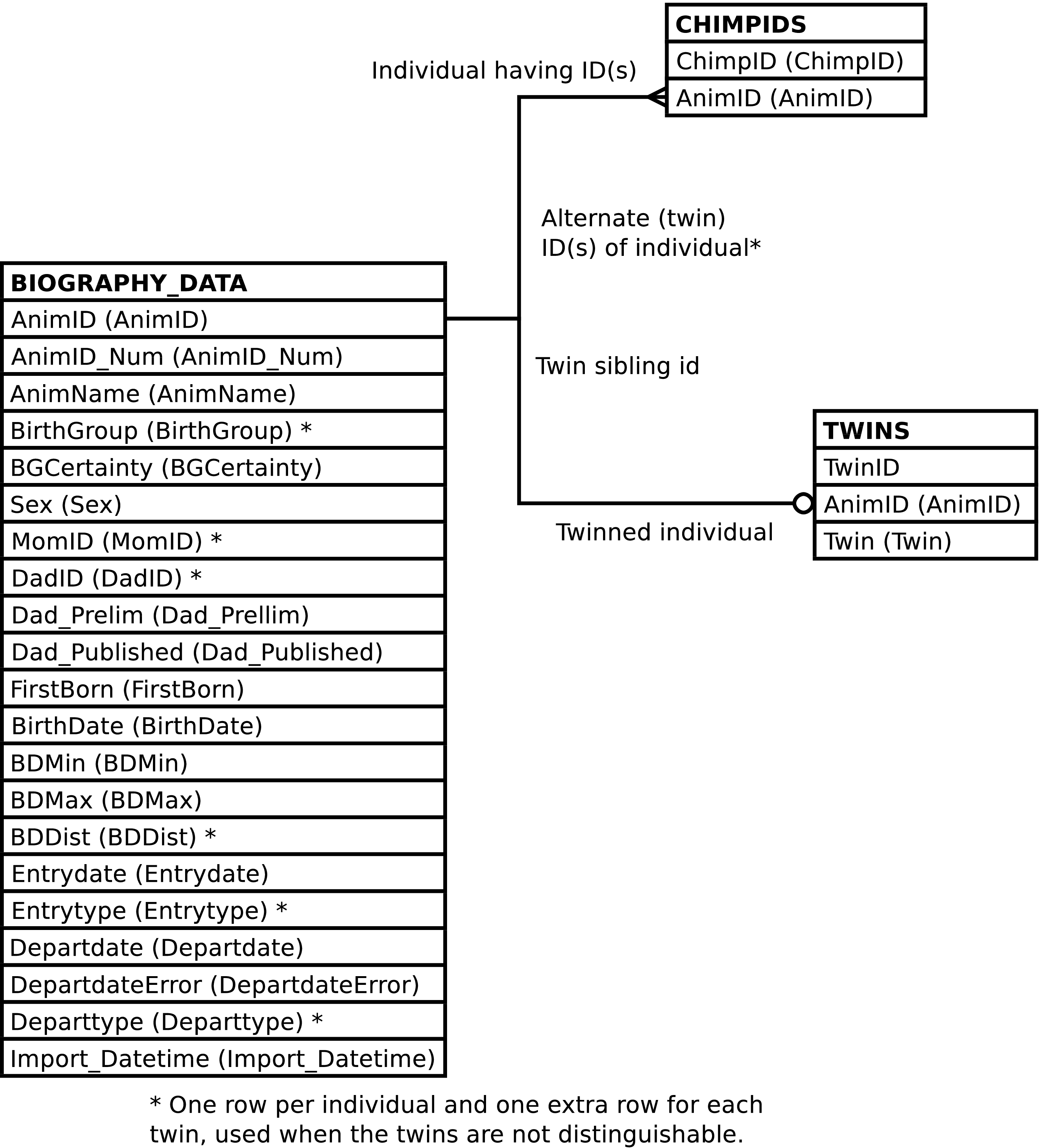
CHIMPS contains one row per BIOGRAPHY_DATA
row plus one extra row for each twin. The additional rows are
duplicates of each twin, and are used only when the twins are were
indistinguishable in the field (e.g., observers
used TW1 or TW2 in place of
the twin's name).
This view should be used for querying instead of
BIOGRAPHY_DATA, so long as it is safe to
consider the temporary identifiers used when the twins cannot be
distinguished as representative of individuals that are identical
to, but distinct from, the twins themselves.[49] The CHIMPS view contains all of
BIOGRAPHY_DATA's columns, plus the
ChimpID column, plus the
AnimID of the individual's twin,
from TWINS.Twin, if a
twin. Of course in most cases there is no twin and the
Twin column will be NULL.[50]
Figure 5.5. Query Defining the CHIMPS View
SELECT chimpids.chimpid AS chimpid

     , biography_data.animid AS animid

     , biography_data.animid_num AS animid_num

     , biography_data.animname AS animname

     , biography_data.birthgroup AS birthgroup

     , biography_data.bgcertainty AS bgcertainty

     , biography_data.sex AS sex

     , biography_data.momid AS momid

     , biography_data.dadid AS dadid

     , biography_data.dad_prelim AS dad_prelim

     , biography_data.dad_published AS dad_published

     , biography_data.firstborn AS firstborn

     , biography_data.birthdate AS birthdate

     , biography_data.bdmin AS bdmin

     , biography_data.bdmax AS bdmax

     , biography_data.bddist AS bddist

     , biography_data.entrydate AS entrydate

     , biography_data.entrytype AS entrytype

     , biography_data.departdate AS departdate

     , biography_data.departdateerror AS departdateerror

     , biography_data.departtype AS departtype

     , biography_data.import_datetime AS import_datetime

     , twins.twin AS twin

  FROM biography_data

       JOIN chimpids ON (chimpids.animid = biography_data.animid)

       LEFT OUTER JOIN twins ON (twins.animid = biography_data.animid)
;
| Column | From | Description |
|---|---|---|
| ChimpID | CHIMPIDS.ChimpID | Identifier or alternate identifier of the individual. |
| AnimID | BIOGRAPHY_DATA.AnimID | Identifier of the individual. |
| AnimID_Num | BIOGRAPHY_DATA.AnimID_Num | Identifier of the individual used in SIV study. |
| AnimName | BIOGRAPHY_DATA.AnimName | Name of the individual. |
| BirthGroup | BIOGRAPHY_DATA.BirthGroup | Birth community of the individual. |
| BGCertainty | BIOGRAPHY_DATA.BGCertainty | Certainty of the individual's birth community. |
| Sex | BIOGRAPHY_DATA.Sex | Sex of the individual. |
| MomID | BIOGRAPHY_DATA.MomID | Identifier of the individual's mother. |
| DadID | BIOGRAPHY_DATA.DadID | Identifier of the individual's father. |
| Dad_Prelim | BIOGRAPHY_DATA.Dad_Prelim | Whether paternity is preliminary. |
| Dad_Published | BIOGRAPHY_DATA.Dad_Published | Whether paternity has been published. |
| FirstBorn | BIOGRAPHY_DATA.FirstBorn | Whether the individual is the mother's firstborn. |
| Birthdate | BIOGRAPHY_DATA.Birthdate | Birth date of the individual. |
| BDMin | BIOGRAPHY_DATA.BDMin | Minimum possible birth date. |
| BDMax | BIOGRAPHY_DATA.BDMax | Maximum possible birth date. |
| BDDist | BIOGRAPHY_DATA.BDDist | Probability distribution of the individual's birth date estimate. |
| Entrydate | BIOGRAPHY_DATA.Entrydate | Individual's date of entry into the study. |
| Entrytype | BIOGRAPHY_DATA.Entrytype | Individual's method of entry into the study. |
| Departdate | BIOGRAPHY_DATA.Departdate | Individual's date of departure from the study. |
| DepartdateError | BIOGRAPHY_DATA.DepartdateError | Degree of error in departure date. |
| Departtype | BIOGRAPHY_DATA.Departtype | Method of individual's departure from the study. |
| ImportDatetime | BIOGRAPHY_DATA.Import_Datetime | Timestamp of import from the master Access database. |
| Twin | TWINS.Twin | Identifier of the individual's twin. |
The CHIMPS view cannot be INSERTed into, UPDATEed, or DELETEd from.
Tip
Use the BIOGRAPHY view instead.
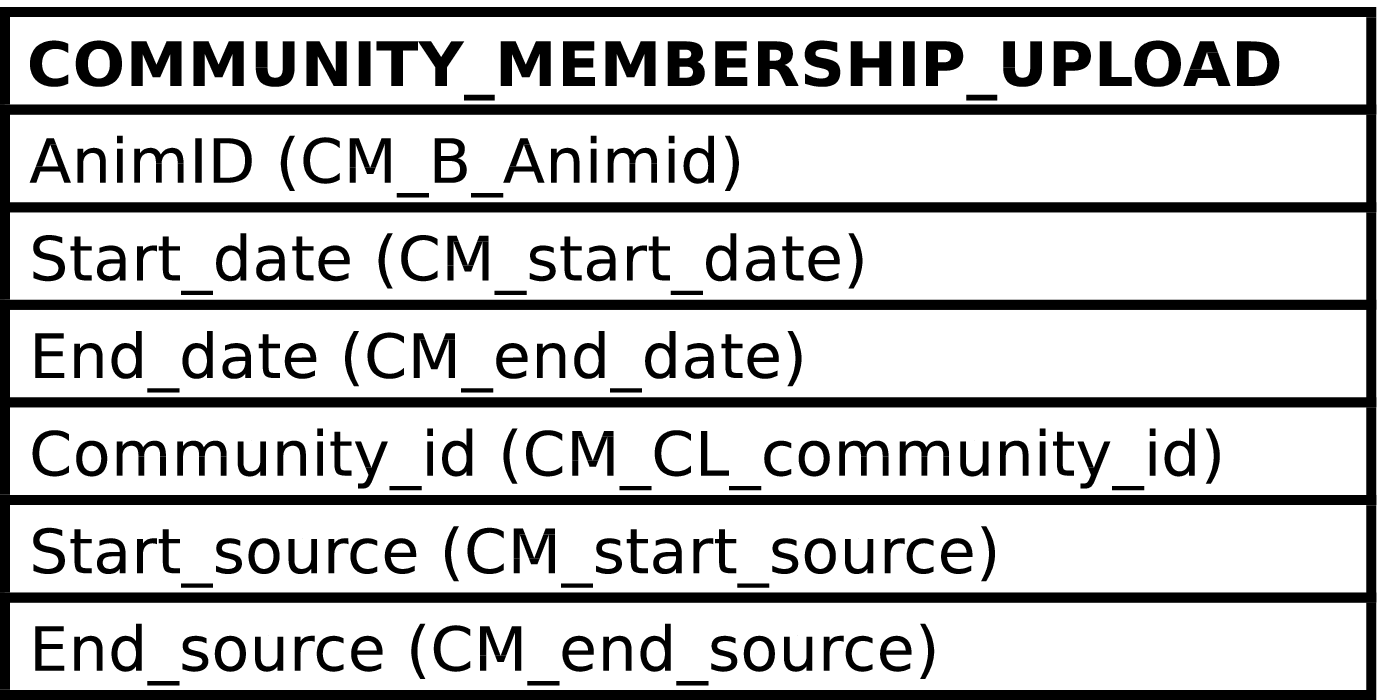
The purpose of the COMMUNITY_MEMBERSHIP_UPLOAD view is to provide a convenient interface for uploading the master Access community_membership table into the Gombe-MI COMMUNITY_MEMBERSHIP table. It contains columns for each of the columns in the master Access community_membership table, named as they are named in the master table.
COMMUNITY_MEMBERSHIP_UPLOAD provides two features to ease the upload process. It serves to translate the column names in the master Access community_membership table into the column names in COMMUNITY_MEMBERSHIP. And it removes trailing spaces from all textual columns.
Figure 5.7. Query Defining the COMMUNITY_MEMBERSHIP_UPLOAD View
SELECT community_membership.animid::TEXT AS cm_b_animid

     , community_membership.start_date AS cm_start_date

     , community_membership.end_date AS cm_end_date

     , community_membership.community_id::TEXT AS cm_cl_community_id

     , community_membership.start_source AS cm_start_source

     , community_membership.end_source AS cm_end_source

  FROM community_membership
;
Because there is a one-to-one match between the columns in this view and the master Access table there is no additional documentation of this view's columns. See the Gombe Chimp Database Handbook and the COMMUNITY_MEMBERSHIP table for further information.
INSERTing into this view trims trailing spaces from all inserted textual data. Non-textual data is inserted unaltered.
Although it is not recommended to do anything other than INSERT into this view as part of a bulk upload of the master Access community_membership table, there are no special restrictions on the use of this view. SELECT, INSERT, UPDATE, and DELETE are all allowed and perform the expected operations on the underlying table.
[48] The exception being the Import_Datetime column, which is not included in the BIOGRAPHY_UPLOAD view.
[49] This might be never. Which is why the CHIMPIDS table exists; so that use of the temporary twin identifiers does not imply existence of additional individuals. Twins will always cause headaches, but at least the database can recognize the temporary identifiers as representing virtual rather than real individuals.
Using the CHIMPS view should be safe enough when simply retrieving demographic data from BIOGRAPHY_DATA, but care must be taken when using CHIMPS and doing any sort of counting of individuals. One way to take care is to pay attention to AnimID values.
[50] Note that while BIOGRAPHY and BIOGRAPHY_DATA have the CHIMPS view there is no corresponding view for COMMUNITY_MEMBERSHIP, although such a view could be created.