DISTS contains one row per DISTANCES row per related DISTANCEPARTS row. DISTS provides a general way to analyze chimp inter-familial distances -- based on either ChimpID or role played in the follow.
Caution
DISTS has 2 rows per inter-familial distance measurement -- per DISTANCES row.
Tip
The two DISTS rows for each DISTANCES row are reciprocal, the individuals arbitrarily designated “first” and “second” are reversed. So, either querying for the first individual as the mother and the 2nd as the infant or querying for the second individual as the mother and the 1st as the infant will eliminate double counting of events; each query returning “one side” of the “duplicated pair”.
The mutual placement of each participant in the distance measurements in both the “first” and “second” columns can be convenient when querying; all individuals involved in a measurement can be tested against, joined with, etc., regardless of whether the “first” or “second” column content is examined.
Figure 5.73. Query Defining the DISTS View
SELECT distances.distid AS distid

     , distances.intid AS intid

     , dpart1s.dpid AS dpart1pid

     , dpart2s.dpid AS dpart2pid

     , distances.uncertain AS uncertain

     , dpart1s.role AS dpart1role

     , dpart1s.participant AS participant1

     , dpart2s.role AS dpart2role

     , dpart2s.participant AS participant2

     , distances.distance AS distance

  FROM distances

         JOIN distanceparts AS dpart1s

           ON (dpart1s.distid = distances.distid)

         JOIN distanceparts AS dpart2s

           ON (dpart2s.distid = distances.distid)

  WHERE dpart1s.dpid <> dpart2s.dpid
;
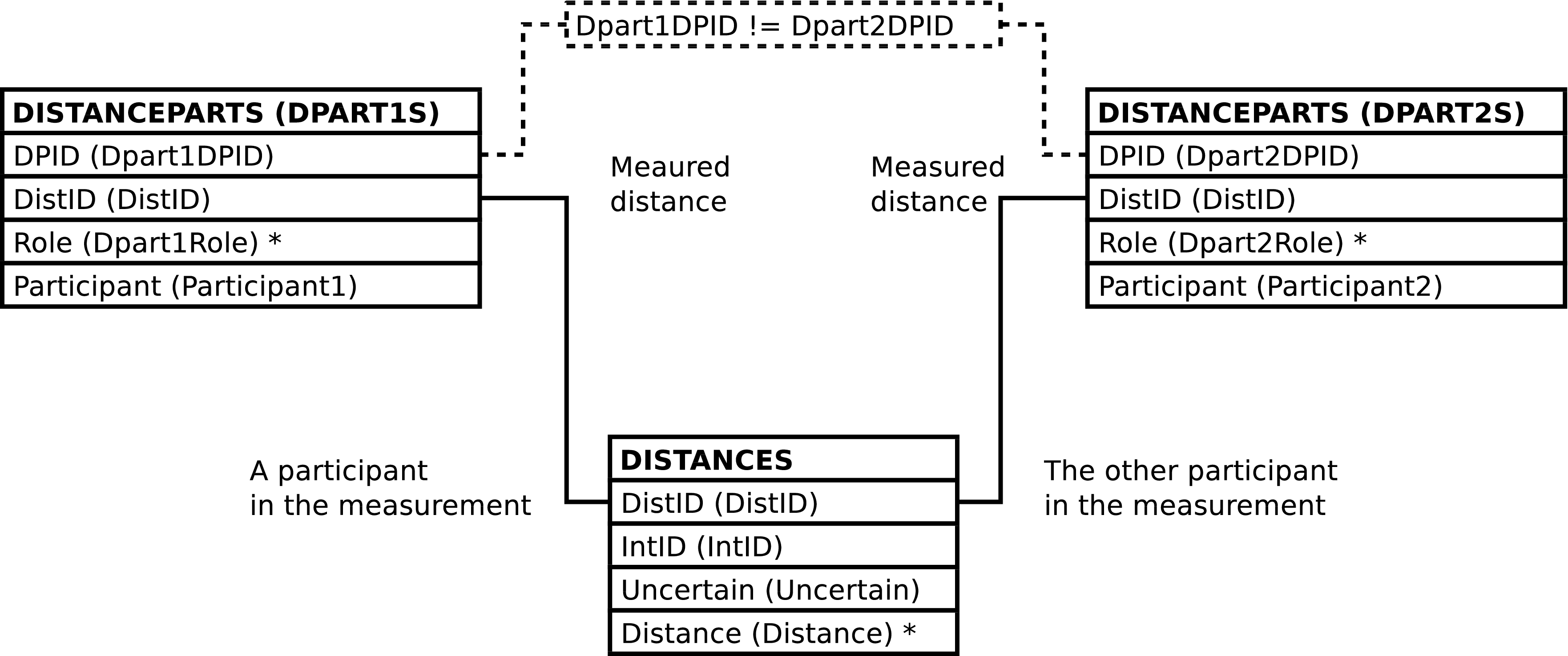
| Column | From | Description |
|---|---|---|
| DistID | DISTANCES.DistID | Identifier of the distance measurement row. |
| IntID | DISTANCES.IntID | Identifier of the observation interval during which the distance measurement was recorded. |
| Part1DPID | DISTANCEPARTS.DPID | Identifier of the distance measurement participant row which records data regarding “the first” of the individuals between which distance was measured. |
| Part2DPID | DISTANCEPARTS.DPID | Identifier of the distance measurement participant row which records data regarding “the second” of the individuals between which distance was measured. |
| Uncertain | DISTANCES.Uncertain | Whether or not the inter-familial distance was observed with certainty. |
| DPart1Role (Role in Follow of First Chimp) | DISTANCEPARTS.Role | Code for the role, i.e. mom, sib, infant, played by the individual designated as “the first” individual involved in the measurement. |
| Participant1 | DISTANCEPARTS.Participant | The identifier or alternate identifier of the “first” individual. |
| DPart2Role (Role in Follow of Second Chimp) | DISTANCEPARTS.Role | Code for the role, i.e. mom, sib, infant, played by the individual designated as “the second” in the measurement. |
| Participant2 | DISTANCEPARTS.Participant | The identifier or alternate identifier of the “second” individual. |
| Distance | DISTANCES.Distance | Code designating the distance between the 2 individuals. |
FAMILY_DISTS contains one row per DISTANCES row. FAMILY_DISTS provides a way to review recorded inter-familial distances in a way similar to the way data is recorded in the field. It is also useful for changing database content, since this is often done based on data recorded in the field.
Note
The FAMILY_DISTS view is neither particularly efficient nor always well suited to data analysis. Other views will very likely be faster and more appropriate when analyzing data.
Note
The D_Momrole, D_Infantrole, and D_Sibrole columns are not useful from a query standpoint but are, at present, needed when changing some database content; notably, but not exclusively, when inserting new rows.
Figure 5.75. Query Defining the FAMILY_DISTS View: Part I
SELECT focal_follows.followid AS followid

     , intervals.intid AS intid

     , distances.distid AS distid

     , moms.dpid AS d_momdpid

     , infants.dpid AS d_infantdpid

     , sibs.dpid AS d_sibdpid

     , focal_follows.date AS date

     , intervals.time AS time

     , focal_follows.mom AS mom

     , focal_follows.infant AS infant

     , focal_follows.infant2 AS infant2

     , focal_follows.sib AS sib

     , focal_follows.sib2 AS sib2

     , distances.uncertain AS uncertain

     , moms.participant AS d_mom

     , moms.role as d_momrole

     , infants.participant AS d_infant

     , infants.role AS d_infantrole

     , sibs.participant AS d_sib

     , sibs.role AS d_sibrole

     , distances.distance AS distance

     , intervals.comment AS i_comment
Figure 5.76. Query Defining the FAMILY_DISTS View: Part II
  FROM focal_follows

         JOIN intervals

           ON (intervals.followid = focal_follows.followid)

         JOIN distances

           ON (distances.intid = intervals.intid)

         LEFT OUTER JOIN

           (SELECT distanceparts.dpid AS dpid

                 , distanceparts.distid AS distid

                 , distanceparts.participant AS participant

                 , distanceparts.role AS role

                 , followroles.function AS function

              FROM distanceparts

                     JOIN followroles

                       ON (followroles.role = distanceparts.role)

           ) AS moms

               ON (moms.distid = distances.distid

                   AND moms.function = 'gmi_mom')

         LEFT OUTER JOIN

           (SELECT distanceparts.dpid AS dpid

                 , distanceparts.distid AS distid

                 , distanceparts.participant AS participant

                 , distanceparts.role AS role

                 , followroles.function AS function

              FROM distanceparts

                     JOIN followroles

                       ON (followroles.role = distanceparts.role)

           ) AS infants

               ON (infants.distid = distances.distid

                   AND infants.function = 'gmi_infant')

         LEFT OUTER JOIN

           (SELECT distanceparts.dpid AS dpid

                 , distanceparts.distid AS distid

                 , distanceparts.participant AS participant

                 , distanceparts.role AS role

                 , followroles.function AS function

              FROM distanceparts

                     JOIN followroles

                       ON (followroles.role = distanceparts.role)

           ) AS sibs

               ON (sibs.distid = distances.distid

                   AND sibs.function = 'gmi_sib')
;

| Column | From | Description |
|---|---|---|
| FollowID | FOLLOWS.FollowID | Identifier of the follow. |
| IntID | EVENTS.IntID | Identifier of the observation interval during which the inter-familial distance was recorded. |
| DistID | DISTANCES.DistID | Identifier of the row recording inter-familial distance. |
| D_MomDPID | DISTANCEPARTS.DPID | Identifier of the distance participant row
which records distance data regarding the mother
in the follow, or NULL. |
| D_InfantDPID | DISTANCEPARTS.DPID | Identifier of the distance participant row
which records distance data regarding the infant
in the follow, or NULL. |
| D_SibDPID | DISTANCEPARTS.DPID | Identifier of the distance participant row
which records distance data regarding the sibling
in the follow, or NULL. |
| Date | FOLLOWS.Date | The date of the follow. |
| Time | INTERVALS.Time | The time of the interval. |
| Mom | FOLLOWPARTS.ChimpID | The ChimpID of the mother in the follow. |
| Infant | FOLLOWPARTS.ChimpID | The ChimpID of an infant in the follow. |
| Infant2 | FOLLOWPARTS.ChimpID | The ChimpID of a
second infant in the follow, or NULL if the infant
is not a twin. |
| Sib | FOLLOWPARTS.ChimpID | The ChimpID of a
sibling in the follow, or NULL if there is no
sibling focal. |
| Sib2 | FOLLOWPARTS.ChimpID | The ChimpID of a
second sibling in the follow, or NULL if the sibling
is not a twin. |
| Uncertain | DISTANCES.Uncertain | Whether or not the distance was observed with certainty. |
| D_Mom | DISTANCEPARTS.Participant | The identifier or alternate identifier of the mom,
or NULL if the mother is not involved in the
distance measurement. |
| D_Momrole | DISTANCEPARTS.Role | The Role of the mother in the inter-familial distance measurement. See above regards inter-familial distance measurement roles. |
| D_Infant | DISTANCEPARTS.Participant | The identifier or alternate identifier of the
infant, or NULL when the infant is not involved in the
distance measurement. |
| D_Infantrole | DISTANCEPARTS.Role | The Role of the infant in the inter-familial distance measurement. See above regards inter-familial distance measurement roles. |
| D_Sib | DISTANCEPARTS.Participant | The identifier or alternate identifier of the
sibling, or NULL when the sibling is not involved in
the distance measurement. |
| D_Sibrole | DISTANCEPARTS.Role | The Role of the sibling in the inter-familial distance measurement. See above regards inter-familial distance measurement roles. |
| Distance | DISTANCES.Distance | Code designating the distance between the individuals. |
| I_Comment (Interval Comment) | INTERVALS.Comment | Textual remarks regarding the interval. |
Altering the FAMILY_DISTS view alters the content of the underlying DISTANCES and DISTANCEPARTS tables in the fashion described below. The INTERVALS and related FOLLOWS and FOLLOWPARTS rows must exist; the content of these tables is never altered.
Inserting a row into the FAMILY_DISTS view inserts a row into the DISTANCES table, as expected.
When inserting into FAMILY_DISTS the interval of the follow must be specified. The interval may be specified in either or both of the following 2 ways:
-
A IntID may be supplied.
-
A Time may be supplied and the follow specified. The follow may be specified in either or both of the following 2 ways:
-
A FollowID may be supplied.
-
Date, Mom and, Infant values all may be supplied.
Note
See the note regards twins when inserting into FOLLOW_INTERVALS.
-
Caution
FAMILY_DISTS inserts rows into the database only when there is a INTERVALS row that matches the above selection criteria. If no row matches the database content is not altered. Note that no row will match if conflicting information is supplied.
Note
When inserting into FAMILY_DISTS it is not
recommended to set any of the
DistID,
D_MomDPID,
D_InfantDPID or,
D_SibDPID values.
Omitting these columns or supplying NULL values will
allow the system to automatically generate ids.
Updating the FAMILY_DISTS view updates DISTANCES, as expected.
Updating FAMILY_DISTS can update, insert into, or delete rows from DISTANCEPARTS.
Note
The examples below explicitly specify an
DISTANCES.DistID
value. This is solely for the purpose of brevity. Any
valid
WHERE clause could be used instead to
designate the desired row in
DISTANCES.
Note
Although the initial examples show how to insert and delete individual DISTANCEPARTS rows this is never done, at least not without other changes, because DISTANCEPARTS rows always come in pairs. An example combining insertion and deletion follows.
If the old values for a mom, infant, sib or nonfocal
DISTANCEPARTS row are not NULL and the new
values are all NULL then the old row is deleted.[63] The following example removes the mother as a
participant in the inter-familial distance measurement with
a
DISTANCES.DistID
of 1234:
Example 5.11. Deleting The Mother's DISTANCEPARTS Row
UPDATE family_dists

       SET d_mom = NULL

         , d_momrole = NULL

         , d_momdpid = NULL

       WHERE distid = 1234;
If the old values for a mom, infant, sib, or nonfocal
are NULL, i.e. if the mom, infant, sib, or nonfocal has no
DISTANCEPARTS row then a new
DISTANCEPARTS row can be inserted by
supplying values. The following example adds, to the
inter-familial distance measurement with a
DISTANCES.DistID
of 1234, assuming she is not already one
of the individuals involved in the inter-familial distance
measurement, the mother.
Example 5.12. Inserting A DISTANCEPARTS Row For The Mother
UPDATE family_dists

       SET d_mom = 'GA'

         , d_momrole = 'M'  -- M is the mother role

       WHERE distid = 1234;
If old values exist, they are replaced by new values.
Assuming the infant JOE is involved in
the inter-familial distance measurement with an
DISTANCES.DistID
of 1234, the following example changes
the infant to JAK:
Example 5.13. Changing A Inter-Familial Distance Measurement Participant In A DISTANCEPARTS Row
UPDATE family_dists

       SET d_infant = 'JAK'

       WHERE distid = 1234;
Note
The ChimpID values need
not correspond to the roles the individuals play in the
follow because data is associated with chimp id values,
not focal roles. The presence of focal roles in the
column names is, in some sense, artificial. For example,
there are two ways to change the infant
(INF) to a sibling
(SB) in the inter-familial distance
measurement with an
DISTANCES.DistID
of 1234. The first is to delete the
DISTANCEPARTS row for the infant and
insert a new DISTANCEPARTS row for the
sibling:
Example 5.14. Deleting the Infant's DISTANCEPARTS row and Inserting a New DISTANCEPARTS Row for the Sibling
UPDATE family_dists

       SET d_infant = NULL

         , d_infantrole = NULL

         , d_infantdpid = NULL

         , d_sib = 'SB'

         , d_sibrole = 'S'  -- S is the sibling role

       WHERE dpid = 1234;
Deleting and re-adding rows is somewhat inefficient and error prone. It is probably better to simply replace the infant's ChimpID value with the siblings. Simply changing the DISTANCEPARTS.Participant value is enough; being the sibling is a property of a ChimpID with respect to a follow and, again, when updating the database there is no correspondence between the column names and the roles played by the individual chimps. The following is sufficient to re-use the exiting DISTANCEPARTS row and change the infant's ChimpID value to the siblings:
Example 5.15. Changing an Infant's DISTANCEPARTS row Into A DISTANCEPARTS Row for the Sibling
UPDATE family_dists

       SET d_infant = 'SB'     -- SB is the sibling

         , d_infantrole = 'S'  -- S is the sibling role

       WHERE distid = 1234;
When the result is queried SB
will show up as a sibling, not an infant.
It is an error to attempt to update the values of any columns not derived from the DISTANCES or DISTANCEPARTS tables.
When updated, FAMILY_DISTS raises a notice containing the number of rows altered. A row is counted only once, when updating the row changes the database content in any way.
Deleting rows from the FAMILY_DISTS view deletes rows from DISTANCES and DISTANCEPARTS, as expected.
[63] Since every distance measurement is between two focals there is not a lot of point in deleting a focal's row unless another focal's row is inserted -- at which point you may as well have changed the chimpid of the focal and re-used the existing row.