Copyright Notices
Copyright (C) 2012-2015 The Meme Factory, Inc., Elizabeth V. Lonsdorf, PhD., Carson M. Murray, PhD.
Except as otherwise noted permission is granted to copy, distribute and/or modify this document under the terms of the GNU Free Documentation License, Version 1.3 or any later version published by the Free Software Foundation; with no Invariant Sections, no Front-Cover Texts, and no Back-Cover Texts. A copy of the license is included in Appendix E.
All of the code contained in this document, including but not limited to the code presented in examples and figures, is, at your option, dual licensed; you can redistribute it and/or modify it under the terms of the GNU General Public License as published by the Free Software Foundation; either version 3 of the License, or (at your option) any later version. A copy of this license is include in Appendix F.
Copyright (C) 1996-2011 The PostgreSQL Global Development Group
The appendix titled Database Transactions Explained is Copyright (C) 1996-2011 by the PostgreSQL Global Development Group, distributed under the terms of the license of the University of California below.
Permission to use, copy, modify, and distribute this software and its documentation for any purpose, without fee, and without a written agreement is hereby granted, provided that the above copyright notice and this paragraph and the following two paragraphs appear in all copies.
IN NO EVENT SHALL THE UNIVERSITY OF CALIFORNIA BE LIABLE TO ANY PARTY FOR DIRECT, INDIRECT, SPECIAL, INCIDENTAL, OR CONSEQUENTIAL DAMAGES, INCLUDING LOST PROFITS, ARISING OUT OF THE USE OF THIS SOFTWARE AND ITS DOCUMENTATION, EVEN IF THE UNIVERSITY OF CALIFORNIA HAS BEEN ADVISED OF THE POSSIBILITY OF SUCH DAMAGE.
THE UNIVERSITY OF CALIFORNIA SPECIFICALLY DISCLAIMS ANY WARRANTIES, INCLUDING, BUT NOT LIMITED TO, THE IMPLIED WARRANTIES OF MERCHANTABILITY AND FITNESS FOR A PARTICULAR PURPOSE. THE SOFTWARE PROVIDED HEREUNDER IS ON AN "AS-IS" BASIS, AND THE UNIVERSITY OF CALIFORNIA HAS NO OBLIGATIONS TO PROVIDE MAINTENANCE, SUPPORT, UPDATES, ENHANCEMENTS, OR MODIFICATIONS.
Copyright (C) 2000, 2001, 2002, 2007, 2008 Free Software Foundation, Inc.
Appendix E is Copyright (C) 2000, 2001, 2002, 2007, 2008 Free Software Foundation, Inc.
Copyright (C) 2007 Free Software Foundation, Inc.
Appendix F is Copyright (C) 2007 Free Software Foundation, Inc.
All declarations of copyright within the files of this project may, in place of an explicit listing of all years for which copyright is claimed, instead list a range of years in the manner XXXX-YYYY to designate that copyright is claimed from year XXXX through year YYYY, inclusive of both endpoints.
The Gombe-MI Development Group
- Book Author, System Design Lead, Implementation
- Project Co-Leader, System Design Core Member
- Project Co-Leader, System Design Core Member
- System Design Core Member, Copy Review, System Testing Lead
- System Design Participant
- System Design Participant, System Testing Core Member
- System Design Participant
Funding and Support. We gratefully acknowledge the support of The National Institutes of Health grant R00HD057992 for the development of this system. We are also very grateful for the support given by The Leo S. Guthman Foundation, the Lincoln Park Zoo, Franklin & Marshall College, and The George Washington University.
Other Thanks. We would like to thank the myriad Free and Open Source communities, including those of PostgreSQL, the GNU Project, the Debian Project, Ubuntu, PhpPgAdmin, the Pyramid web framework, TeX and LaTeX, dblatex, DocBook, Babase, and many others unmentioned, for giving, gratis, billions of dollars[1] of work to the world, without which the Gombe-MI software and this book would not exist.
Any opinions, findings, conclusions or recommendations expressed in this material are those of the author(s) and do not necessarily reflect the views of the National Institutes of Health, The Leo S. Guthman Foundation, the Lincoln Park Zoo, Franklin & Marshall College, The George Washington University, or any other organization which has supplied support for this work.
Table of Contents
- 1. Gombe-MI System Architecture
- 2. An Overview Of The Gombe-MI Data
- 3. Main Tables
- 4. Support Tables
- Demography Related Support Tables
- Follow Mechanics Related Support Tables
- BEHAVIOR_TRANS (Behavior Translation Table)
- DISTANCE_TRANS (Distance Translation Table)
- FOLLOWROLES (Roles of Follow Participants)
- FOLLOWTYPES (Follow Data Entry Sheet Types)
- FOODPART_TRANS (Food Part Translation Table)
- GC_TRANS (Group Composition Translation Table)
- PEOPLE
- PLAY_TRANS (Play Translation Table)
- VOC_TRANS (Vocalization Translation Table)
- Follow Event Related Support Tables
- Follow Distance Related Support Tables
- Group Related Support Tables
- 5. The Gombe-MI Views
- Demography Related Views
- Follow Mechanics Related Views
- Follow Event Related Views
- ACTOR_ACTEES (Dyadic Directed Behavioral Events)
- ACTOR_ACTEES_W_BABOONS (Dyadic Directed Behavioral Events w. Baboons)
- ASOCIAL_EVENTS (Non-Social Behavioral Events)
- EVENT_BOUTS (Analysis of the focals' Behavioral Bouts, per Minute)
- EVENT_BOUT_AGGS (Analysis of the focals' Behavioral Bouts, per Bout)
- FAMILY_EVENTS (Behavioral Events With the Focals Identified by Column)
- FOCAL_EVENTS (All Behavioral Events With the Focals Distinguished)
- FOCAL_SOCIAL_EVENTS (Dyadic Behavioral Events Involving a Focal)
- NOOBS (Times During Which a Focal has no Behavioral Observations)
- SOCIAL_BOUTS (Analysis of the focals' Behavioral Bouts, per Partner, per Minute)
- SOCIAL_BOUT_AGGS (Analysis of Social Bouts, per Social Partner per Bout)
- SOCIAL_EVENTS (Dyadic Behavioral Events Involving Chimpanzees)
- SOCIAL_EVENTS_W_BABOONS (Dyadic Behavioral Events Including Baboons)
- Follow Distance Related Views
- Group Related Views
- 6. The Gombe-MI Functions
- Query Functions
- followfunc — return the function (role) of a chimp in a follow
- followrole — return the role of a chimp in a follow
- Utility Functions
- add_social_partners — Ensure that all social interaction partners are in the group composition data
- delete_gc — Delete a follow's group composition data
- infants_in_gc — Ensure that the (biological or adopted) young infants of a mom are the group composition data
- infer_gc — Infer group composition from social relationships
- mom_in_gc — Ensure that the (biological or adoptive) mother of a young chimp, and all the mom's young infants, are in the group composition data
- 7. Data Entry
- 8. The Gombemi-MI Custom Programs
- A. Restrictions: Things Not To Do
- B. Database Transactions Explained
- C. One Minute Interval Assumptions
- D. The Warning Sub-System
- Introduction to the Warning Sub-System
- An Overview of the Warning Sub-System Data Structures
- The Warning Sub-System Main Tables
- Warning Sub-System Support Tables
- The Warning Sub-System Functions (Activating The Warning Sub-System)
- run_integrity_queries — execute one or more of the queries stored in the INTEGRITY_QUERIES table
- E. GNU Free Documentation License
- F. GNU General Public License version 3
List of Figures
- 2.1. Key to the Gombe-MI Entity Relationship Diagrams
- 2.2. Gombe-MI Demography Entity Relationship Diagram
- 2.3. Gombe-MI Essentials of a Follow Entity Relationship Diagram
- 2.4. Gombe-MI Follow Distance Entity Relationship Diagram
- 2.5. Gombe-MI Follow Events Entity Relationship Diagram
- 2.6. Gombe-MI Behavior Event Detail Entity Relationship Diagram
- 2.7. Gombe-MI Group Membership Entity Relationship Diagram
- 2.8. Gombe-MI Follow Detailed Entity Relationship Diagram
- 2.9. Gombe-MI Data Collection Templates Entity Relationship Diagram
- 5.1. Query Defining the BIOGRAPHY View
- 5.2. Entity Relationship Diagram of the BIOGRAPHY View
- 5.3. Query Defining the BIOGRAPHY_UPLOAD View
- 5.4. Entity Relationship Diagram of the BIOGRAPHY_UPLOAD View
- 5.5. Query Defining the CHIMPS View
- 5.6. Entity Relationship Diagram of the CHIMPS View
- 5.7. Query Defining the COMMUNITY_MEMBERSHIP_UPLOAD View
- 5.8. Entity Relationship Diagram of the COMMUNITY_MEMBERSHIP_UPLOAD View
- 5.9. Query Defining the FOCAL_FOLLOWS View: Part I
- 5.10. Query Defining the FOCAL_FOLLOWS View: Part II
- 5.11. Entity Relationship Diagram of the FOCAL_FOLLOWS View
- 5.12. Query Defining the DATASHEETS View: Part I
- 5.13. Query Defining the DATASHEETS View: Part II
- 5.14. Query Defining the DATASHEETS View: Part III
- 5.15. Query Defining the DATASHEETS View: Part IV
- 5.16. Entity Relationship Diagram of the DATASHEETS View
- 5.17. Query Defining the DATASHEET_EVENTS View: Part I
- 5.18. Query Defining the DATASHEET_EVENTS View: Part II
- 5.19. Query Defining the DATASHEET_EVENTS View: Part III
- 5.20. Query Defining the DATASHEET_EVENTS View: Part IV
- 5.21. Query Defining the DATASHEET_EVENTS View: Part V
- 5.22. Query Defining the DATASHEET_EVENTS View: Part VI
- 5.23. Entity Relationship Diagram of the DATASHEET_EVENTS View
- 5.24. Query Defining the FOLLOW_DURATIONS View
- 5.25. Entity Relationship Diagram of the FOLLOW_DURATIONS View
- 5.26. Query Defining the FOLLOW_INTERVALS View
- 5.27. Entity Relationship Diagram of the FOLLOW_INTERVALS View
- 5.28. Query Defining the UPLOAD_BEHAVIORS View: Part I
- 5.29. Query Defining the UPLOAD_BEHAVIORS View: Part II
- 5.30. Entity Relationship Diagram of the UPLOAD_BEHAVIORS View
- 5.31. Query Defining the ACTOR_ACTEES View
- 5.32. Entity Relationship Diagram of the ACTOR_ACTEES View
- 5.33. Query Defining the ACTOR_ACTEES_W_BABOONS View: Part I
- 5.34. Query Defining the ACTOR_ACTEES_W_BABOONS View: Part II
- 5.35. Entity Relationship Diagram of the ACTOR_ACTEES_W_BABOONS View
- 5.36. Query Defining the ASOCIAL_EVENTS View
- 5.37. Entity Relationship Diagram of the ASOCIAL_EVENTS View
- 5.38. Query Defining the EVENT_BOUTS View: Part I
- 5.39. Query Defining the EVENT_BOUTS View: Part II
- 5.40. Query Defining the EVENT_BOUTS View: Part III
- 5.41. Query Defining the EVENT_BOUTS View: Part IV
- 5.42. Query Defining the EVENT_BOUTS View: Part V
- 5.43. Query Defining the EVENT_BOUTS View: Part VI
- 5.44. Entity Relationship Diagram of the EVENT_BOUTS View
- 5.45. Query Defining the EVENT_BOUT_AGGS View
- 5.46. Entity Relationship Diagram of the EVENT_BOUT_AGGS View
- 5.47. Query Defining the FAMILY_EVENTS View: Part I
- 5.48. Query Defining the FAMILY_EVENTS View: Part II
- 5.49. Entity Relationship Diagram of the FAMILY_EVENTS View
- 5.50. Query Defining the FOCAL_EVENTS View
- 5.51. Entity Relationship Diagram of the FOCAL_EVENTS View
- 5.52. Query Defining the FOCAL_SOCIAL_EVENTS View
- 5.53. Entity Relationship Diagram of the FOCAL_SOCIAL_EVENTS View
- 5.54. Query Defining the NOOBS View
- 5.55. Entity Relationship Diagram of the NOOBS View
- 5.56. Query Defining the SOCIAL_BOUTS View: Part I
- 5.57. Query Defining the SOCIAL_BOUTS View: Part II
- 5.58. Query Defining the SOCIAL_BOUTS View: Part III
- 5.59. Query Defining the SOCIAL_BOUTS View: Part IV
- 5.60. Query Defining the SOCIAL_BOUTS View: Part V
- 5.61. Query Defining the SOCIAL_BOUTS View: Part VI
- 5.62. Query Defining the SOCIAL_BOUTS View: Part VII
- 5.63. Query Defining the SOCIAL_BOUTS View: Part VIII
- 5.64. Entity Relationship Diagram of the SOCIAL_BOUTS View
- 5.65. Query Defining the SOCIAL_BOUT_AGGS View
- 5.66. Entity Relationship Diagram of the SOCIAL_BOUT_AGGS View
- 5.67. Query Defining the SOCIAL_EVENTS View
- 5.68. Entity Relationship Diagram of the SOCIAL_EVENTS View
- 5.69. Query Defining the SOCIAL_EVENTS_W_BABOONS View: Part I
- 5.70. Query Defining the SOCIAL_EVENTS_W_BABOONS View: Part II
- 5.71. Query Defining the SOCIAL_EVENTS_W_BABOONS View: Part III
- 5.72. Entity Relationship Diagram of the SOCIAL_EVENTS_W_BABOONS View
- 5.73. Query Defining the DISTS View
- 5.74. Entity Relationship Diagram of the DISTS View
- 5.75. Query Defining the FAMILY_DISTS View: Part I
- 5.76. Query Defining the FAMILY_DISTS View: Part II
- 5.77. Entity Relationship Diagram of the FAMILY_DISTS View
- D.1. Warning Sub-System Entity Relationship Diagram
List of Examples
- 1.1. Creating table
fooin the sandbox schema - 1.2. Granting permission to table
fooin the sandbox schema - 1.3. Creating table
fooin usermylogin's schema - 1.4. Using
ASin an SQL query: Counting simultaneous self-grooming - 5.1. Deleting The Mother's VOCS Row
- 5.2. Changing A Vocalization
- 5.3. Changing a Vocalization: Changing focal and vocalization
- 5.4. Changing a Behavior to a Fishing Behavior
- 5.5. Unconditionally Inserting a FISHED Row For the Mother
- 5.6. Deleting The Mother's PARTS Row
- 5.7. Inserting A PARTS Row For The Mother
- 5.8. Changing Non-Focal Participant In A PARTS Row
- 5.9. Deleting the Infant's PARTS row and Inserting a New PARTS Row for the Sibling
- 5.10. Changing an Infant's PARTS row Into A PARTS Row for the Sibling
- 5.11. Deleting The Mother's DISTANCEPARTS Row
- 5.12. Inserting A DISTANCEPARTS Row For The Mother
- 5.13. Changing A Inter-Familial Distance Measurement Participant In A DISTANCEPARTS Row
- 5.14. Deleting Infant's DISTANCEPARTS row and Inserting a New Row for the Sibling
- 5.15. Changing an Infant's DISTANCEPARTS row Into A DISTANCEPARTS Row for the Sibling
- 6.1. Deleting Automatically Generated Group Compositions
- 6.2. Inferring the group composition of follows that have none
- D.1. Inserting a query into INTEGRITY_QUERIES using dollar quoting
- D.2. Executing all INTEGRITY_QUERIES
- D.3. Executing a single INTEGRITY_QUERIES.Query
- D.4. Executing INTEGRITY_QUERIES of the “bdate” type
Table of Contents
Databases are collections of information, all of which can be queried and otherwise manipulated alone or in aggregation with all other database content.[2] Gombe-MI contains three databases.
The gombemi database contains
the “real” information. All research takes place
in this database.
The gombemi_test database contains a
copy of the gombemi database. It is a place to try out
dangerous things that might break the gombemi
database.
Each user is given a role for their own personal use (commonly called a login or username) and a password they must use to gain access to the database. It is good form to change your password occasionally.[3]
The database can grant specific users (via each user's personal role, aka login) various levels of access to specific tables, although such access is not common as it is difficult to administer and maintain such a fine grained degree of control. For further information see the PostgreSQL documentation on Database Roles.
Rather than maintain database access privileges on a per-user basis it is more convenient to grant users additional roles, roles shared by many users, and then grant these roles different levels of database access.
Gombe-MI contains the following (shared) roles:
The members of this shared role have read access to Gombe-MI data but cannot add, delete, or otherwise alter any of the data.
The members of this shared role have unlimited rights to the Gombe-MI data. They may add data, delete data, or alter existing data. They may not, however, alter the structure of the gombemi database or change the rules to which the data are required to conform. Thus, they may not add or delete tables, alter triggers, or write or replace stored procedures.
An administrative user has no restrictions; these users can do things like re-assign ownership of all database tables, all schemas, and all databases; assign to or remove roles from all usernames; create and destroy usernames, including other administrative users; and create and destroy all tables, all schemas, and all databases.
In short, administrative users are all-powerful.
Needless to say, administrative usernames should be meted out sparingly. They should also be used sparingly.
Tip
Every person who has an administrative username should also have an ordinary username. The ordinary username carries much less risk of inadvertent, subtle or not-so-subtle, destruction. Login as an administrative user only when absolutely necessary.
Schemas partition databases. Tables, procedures, triggers, and so forth are all kept in schemas. Schemas are like sub-databases within a database. The salient difference between schemas and databases is that a single SQL statement can refer to objects in the different schemas of the parent database, but cannot refer to objects in other databases -- tables within a database can be related, but tables in different databases cannot. Gombe-MI uses schemas to partition each database into areas where users have a greater or lesser degree of freedom to make changes. For further information on schemas see the schema documentation for PostgreSQL.
Each database is divided into the same schemas. That is, each schema described below exists within each of the databases described here.
The system looks at the different schemas for objects, for example table names appearing in SQL queries, in the order in which the schemas are listed below. If the table does not appear in the first schema it looks in the second, and so forth. As soon as a table is found with the name given, that table is used and the search stops.
To explicitly reference an object in a specific schema, place the name of the schema in front of the object, separating the two with a period (e.g. schemaname.tablename).
The gombemi schema holds the “official” Gombe-MI tables. Everything in the gombemi schema is documented and supported.
In this schema the gombemi_readers and gombemi_editors have the access described above.
Gombe-MI contains a number of schemas that exist to simplify things for those interested only in particular portions of Gombe-MI. These schemas contain nothing but views that reference other parts of Gombe-MI (both tables and views), the parts that are especially relevant and useful to those interested only in one of the broad categories of Gombe-MI data. These schemas and their corresponding categories are:
| Schema | Category |
|---|---|
gombemi_support_views | Support Table Related |
gombemi_demography_views | Demography Related |
gombemi_follow_views | Follow Mechanics Related |
gombemi_event_views | Follow Event Related |
gombemi_distance_views | Follow Distance Related |
gombemi_group_views | Group Related |
These schemas provide an overview of the major areas of Gombe-MI. They should be especially useful to those starting out with Gombe-MI or those interested only in particular portions of Gombe-MI data.
The views in these schemas may only be queried. Any
updating of Gombe-MI data must be done in the
gombemi schema.
Note
Some of Gombe-MI's tables and views appear in more than one of these schemas, some in none.
Warning
Do not create any views that reference the views in
these schemas. Reference the gombemi schema
instead. Any views created that reference anything in these
“category schemas” will be destroyed on
occasion as Gombe-MI is modified.
The sandbox schema holds tables that are used together with the “official” Gombe-MI tables but have not yet made it into the Gombe-MI project. They will not be documented in the Gombe-MI documentation.
The shared roles have the following permissions:
The gombemi_readers have all the permissions in the sandbox schema that the gombemi_editors have in the gombemi schema. They may add, delete, or modify any information in the schema but may not alter the structure of the schema by adding or removing tables, procedures, triggers, or anything else.
The gombemi_editors have all the permissions of the gombemi_readers, plus they may add or delete tables, stored procedures, or any other sort of object necessary to control the structure of the data.
Because of the schema search order the schema name must be used to qualify anything created in the sandbox schema. E.g.
Example 1.1. Creating table foo in the sandbox
schema
CREATE TABLE sandbox.foo (somecolumn INTEGER);
PostgreSQL, the database underlying Gombe-MI, is secure by default. This means that any tables or other database objects cannot be accessed by anyone but their creator without permission of the creator. gombemi_editors who create tables in the sandbox schema should use the GRANT statement to grant access to Gombe-MI's other users.
This is done as follows:
Example 1.2. Granting permission to table
foo in the sandbox schema
GRANT ALL ON sandbox.foo TO ROLE gombemi_editors;

GRANT SELECT ON sandbox.foo TO ROLE gombemi_readers;
There is one other issue. Only the creator of a table can change its structure -- to add another column, change the table name, etc. And only the creator can destroy (DROP) the table.
The devel schema holds tables undergoing integration into Gombe-MI. Normally it is empty, but during the design and development of new tables it may contain the tables being developed.
The tables in this schema do not necessarily contain valid or finalized data and so are not expected to be used for other than developmental purposes.
Permissions are granted in the devel schema on the same basis as the granting of permissions in the gombemi schema.
The difference between this schema and the sandbox schema is that the development tools support the creation and modification of the tables in the devel schema, which facilitates the movement of tables from the devel schema into the gombemi schema.
Each user has her own schema, a schema named with the user's login. Users have permissions to do anything they want in their own schemas, and no permissions whatsoever to anybody else's schema. A user's schema is private.
Caution
Users are not encouraged to grant others permissions to the tables in their schema, as shown in the Section: “The sandbox schema” above. A user's schema is deleted when she leaves Gombe-MI. All shared tables belong in the sandbox schema where they can be maintained without regard to personnel changes.
Because of the schema search order the schema name must be used to qualify anything created in the user's schema. E.g.
Example 1.3. Creating table foo in user
mylogin's schema
CREATE TABLE mylogin.foo (somecolumn INTEGER);
The data in Gombe-MI are stored in tables. Tables can be visualized as grids, with rows and columns. Each row represents a single real-world thing or event, an entity, e.g. a chimpanzee. Each cell in the row contains a single unit of information, e.g. a birth date, a name, and a sex. The row holds the entirety of the information belonging to the entity as an isolated thing, e.g. chimpanzee database entities consist of a birth date, a name, and a sex. Each column contains one and only one kind of information, e.g. birth date.
Table 1.1 is an example of a database table that might be used to represent chimpanzees, one chimpanzee per row. Notice that each cell contains one and exactly one unit of information.
Table 1.1. A Simple Database Table
| Birth | Name | Sex |
|---|---|---|
| May 23, 1707 | Alice | Female |
| February 12, 1809 | Bob | Male |
| July 22, 1822 | Carol | Female |
Anyone working with Gombe-MI will require a familiarity with the database's tables. An understanding of the entity each row represents is critical when working with a table. The remainder of this section provides short definitions of the entities each table holds in its rows.
Some of the tables in Gombe-MI exist to define a vocabulary. These are the support tables. For lack of a better term, the remainder of the tables are labeled “main tables” in the Main Table Overview.
Querying is done using a language called SQL. A description
of SQL is beyond the scope of this document but one, somewhat more
advanced, SQL feature is worth mention. Because the Gombe-MI
system stores all data of a like kind together, in one table, it
is often desirable to reference the same table (or table-like
structure) more than once in a single query. The
SQL AS syntax can be used to give a table an
alternate name used elsewhere within the query, allowing a single
table to be referenced multiple times within a single query. For
example, self-grooming data can be queried from the
ASOCIAL_EVENTS view. To count the number of
times both the mother and the infant simultaneously self groom the
following query uses AS so that
ASOCIAL_EVENTS can be used twice:
Example 1.4. Using AS in an SQL query: Reference
ASOCIAL_EVENTS twice to count the number of times a mother and
infant simultaneously self-groom
SELECT COUNT(*)

  FROM asocial_events AS mom_events

     , asocial_events AS infant_events

  WHERE mom_events.intid = infant_events.intid      -- Same interval

        AND mom_events.function = 'M'       -- Mom is mom

        AND mom_events.behavior = 'G'

        AND infant_events.function = 'I' -- Infant is infant

        AND infant_events.behavior = 'G';
The use of AS in queries, or other, more
cumbersome techniques such as the creation of temporary tables,
reduces the number of views which must be created and
maintained.
Table of Contents
The tables in Gombe-MI are divided into two sorts, those that hold data of primary interest, the Main Tables, and those who's primary purpose is to provide a controlled vocabulary for use throughout the rest of the system, the Support Tables. Support tables are also often called lookup tables.
The relationships between the main tables are diagrammed in entity relationship diagrams. These diagrams provide a concise overview of the Gombe-MI system and are an essential aid to complete understanding.
Because Gombe-MI is as data-driven as possible, wherever possible the system relies on the use of user-supplied vocabulary for it's semantics, an understanding of the codes defined by the support tables is essential to the use of the system
In addition to the underlying data tables Gombe-MI also contains views, a database feature which allows a query to masquerade as a table. Views can present a simple interface to a complex data structure, one which is tailored to a particular purpose. This allows the underlying data structure to be as general-purpose as possible and so able to accommodate complex relationships and efficiently process arbitrary queries. At the same time the views allow straightforward access for the novice. Because view are often composed of a query into multiple underlying data tables each view has an entity relationship diagram which describes the relationships between the tables used to construct the view.
Gombe-MI also consists of a number of programs. Some of these are generic, available from third parties for use on any system, and some which have been developed specifically for the Gombe-MI project. The latter are kept to a minimum to reduce cost and leverage the use of pre-existing software whenever possible.
| Demography Related | |||
|---|---|---|---|
| Table | Id Column | Related Column(s) | One entry for every possible choice of... |
| BDDISTS | BDDist | BIOGRAPHY_DATA.BDDist | birth date probability distribution |
| DEPARTTYPES | Departtype | BIOGRAPHY_DATA.Departtype | means by which individual's depart from the study population |
| ENTRYTYPES | Entrytype | BIOGRAPHY_DATA.Entrytype | means by which individual's enter into the study population |
| Follow Mechanics Related | |||
|---|---|---|---|
| Table | Id Column | Related Column(s) | One entry for every possible choice of... |
| BEHAVIOR_TRANS | Old_Behavior | None | behavior code written in the field plus one row for every column on the field data entry sheet which represents specific behaviors |
| DISTANCE_TRANS | Old_Distance | None | distance code written in the field plus one row for every column on the field data entry sheet which represents a specific inter-focal distance |
| FOLLOWROLES | Role | FOLLOWPARTS.Role, DISTANCEPARTS.Role | role among follow focals (mother, infant, sibling, twin1, etc.) |
| FOLLOWTYPES | Type | Sheets.Followtype | type of data entry sheet |
| FOODPART_TRANS | Old_Foodpart | None | food part code written in the field |
| GC_TRANS | Mark | None | mark written in the field onto the group composition portion of the data collection sheets, in the cells of the columns which record chimpanzee or baboon presence |
| PEOPLE | Person | FIELDFOLLOWS.Collector, FIELDFOLLOWS.Enterer | person who collects data in the field or who enters data in the labs |
| PLAY_TRANS | Old_Play | None | play code written in the field |
| VOC_TRANS | Old_Voc | None | vocalization code written in the field |
| Follow Event Related | |||
|---|---|---|---|
| Table | Id Column | Related Column(s) | One entry for every possible choice of... |
| BEHAVIORS | Behavior | EVENTS.Behavior, BEHAVIOR_TRANS.New_Behavior | kind of behavior |
| FISHING_RESULTS | Result | FISHED.Result | outcome of a fishing attempt |
| FOODKINDS | Foodkind | EATS.Foodkind, BEHAVIOR_TRANS.Fishkind_Val | kind of food eaten by chimpanzees |
| FOODPARTS | Foodpart | EATS.Foodpart, FOODPART_TRANS.New_Foodpart, BEHAVIOR_TRANS.Fishpart_Val | part (plant part, animal organ, etc) of the different kinds of foods eaten by chimpanzees |
| POSITIONS | Position | EVENTS.Position, BEHAVIOR_TRANS.Position_Val | designated region within the forest canopy |
| PLAY_TYPES | Play | PLAYS.Play, PLAY_TRANS.New_Play, BEHAVIOR_TRANS.Play_Val | play activity |
| RESTING_POSTURES | Rest | RESTS.Rest, BEHAVIOR_TRANS.Rest_Val | posture when resting |
| RIDING_POSTURES | Rides | RIDES.Ride, BEHAVIOR_TRANS.Ride_Val | posture when riding |
| VOCALIZATIONS | Vocalization | VOCS.Vocalization, VOC_TRANS.New_Voc, BEHAVIOR_TRANS.Vocalization_Val | class of chimpanzee vocalization defined in the data collection protocols |
| Follow Distance Related | |||
|---|---|---|---|
| Table | Id Column | Related Column(s) | One entry for every possible choice of... |
| DISTANCECODES | Distance | DISTANCES.Distance, DISTANCE_TRANS.New_Distance | distance category |
| Group Related | |||
|---|---|---|---|
| Table | Id Column | Related Column(s) | One entry for every possible choice of... |
| GCSTATUSES | GCStatus | FIELDFOLLOWS.GCStatus | group composition status |
| GM_ORIGINS | Origin | RAW_GROUPMEMBERS.Origin, GC_TRANS.Origin | source of data for an individual's group membership |
| Demography Related | |
|---|---|
| Table | One row for each |
| ADOPTIONS | time a chimpanzee is adopted |
| BIOGRAPHY_DATA | chimpanzee |
| CHIMPIDS | chimpanzee id; usually 1 row per chimpanzee but 2 rows per twin |
| COMMUNITY_MEMBERSHIP | tenure of an individual in a community |
| TWINS | individual who is a twin |
| Follow Mechanics Related | |
|---|---|
| Table | One row for each |
| FIELDFOLLOWS | mother infant data packet collected by any one researcher in the field |
| FOLLOWPARTS | mother infant follow for every focal participant |
| FOLLOWS | mother infant follow |
| INTERVALS | observation time interval of every follow |
| Sheets | template sheet used in the field or, when the details of what was on which sheet are not available, one row per follow |
| Follow Event Related | |
|---|---|
| Table | One row for each |
| EATS | part of every kind of food eaten during a eating behavioral event |
| EVENTS | non-social behavior and one row for each social behavior/social partner combination of each focal recorded for each interval |
| FISHED | every kind of food fished for during a fishing behavioral event |
| PARTS | individual, focal or not, involved in every recorded behavior, excluding baboons but including unrecognized or otherwise anonymous individuals |
| PLAYS | play activity occurring during a play event |
| RESTS | resting posture assumed during a resting event |
| RIDES | riding posture assumed during a riding event |
| VOCS | kind of vocalization made during a vocalization behavioral event |
| Follow Distance Related | |
|---|---|
| Table | One row for each |
| DISTANCEPARTS | individual who's distance to another individual was recorded |
| DISTANCES | individual who's distance to another individual was recorded |
| Group Related | |
|---|---|
| Table | One row for each |
| GROUPMEMBERS | group member identified per automated group survey analysis |
| GROUPS | automated group survey analysis |
| RAW_GROUPMEMBERS | group member identified per group survey |
| RAW_GROUPS | group survey |
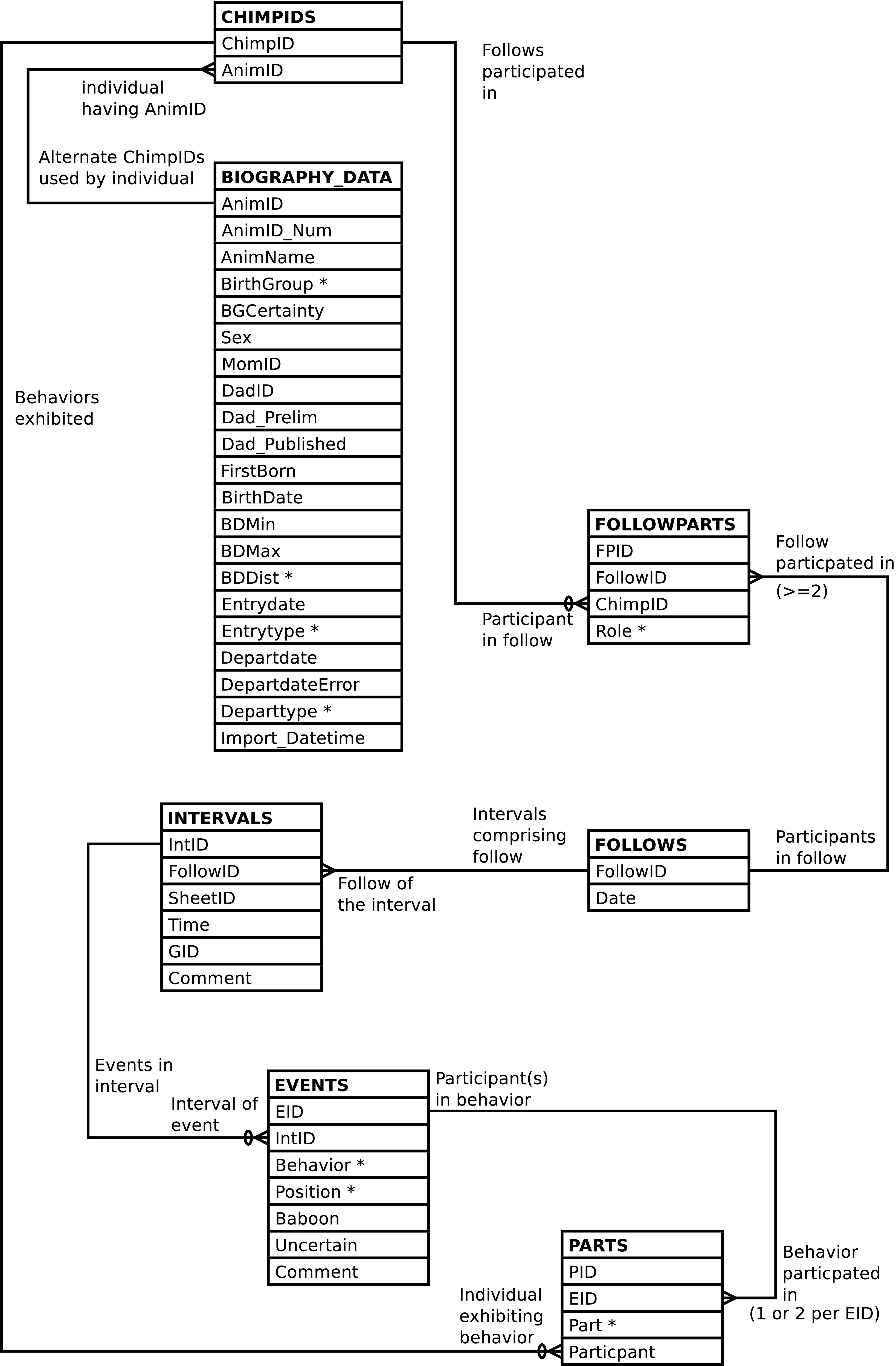
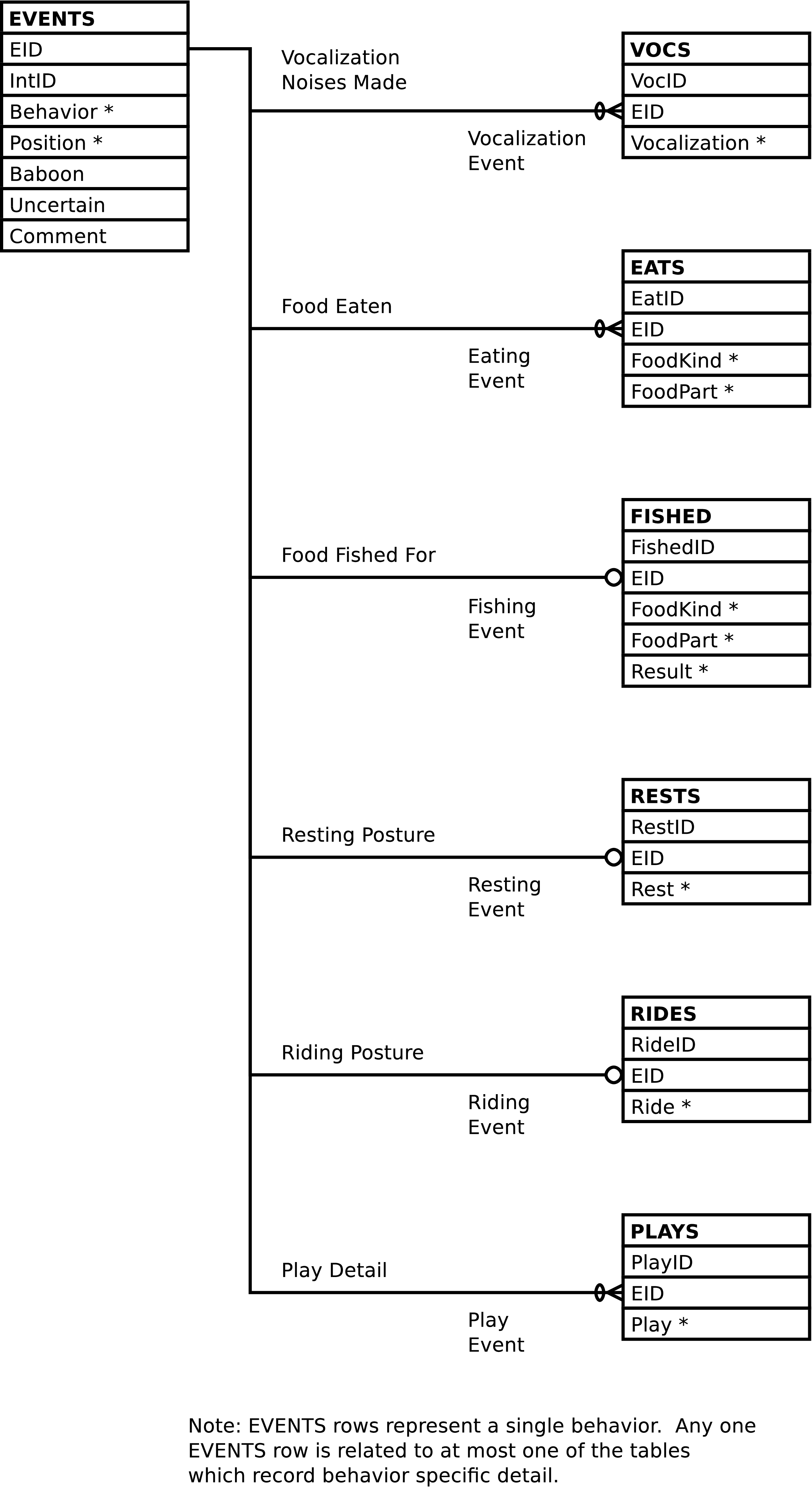
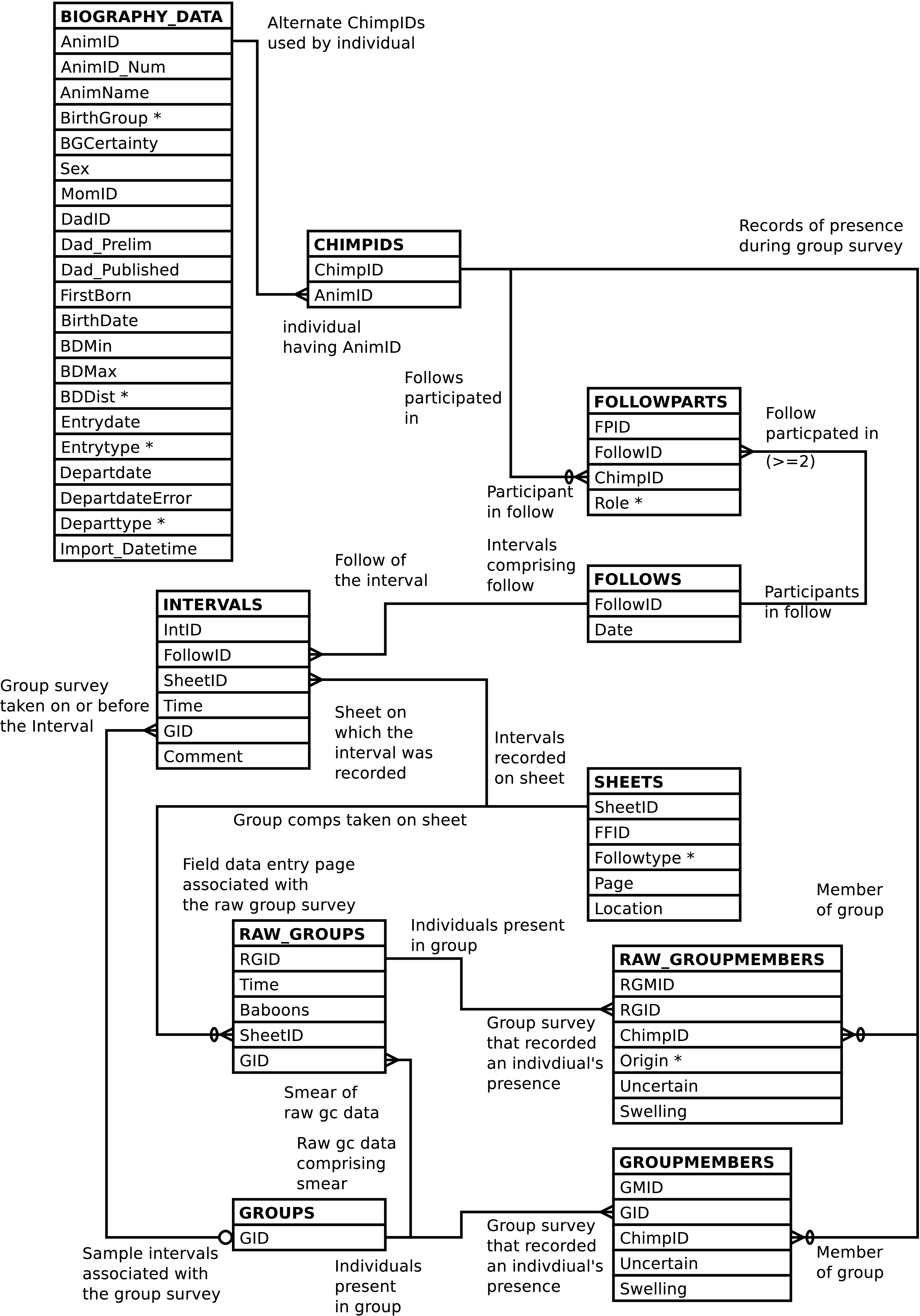
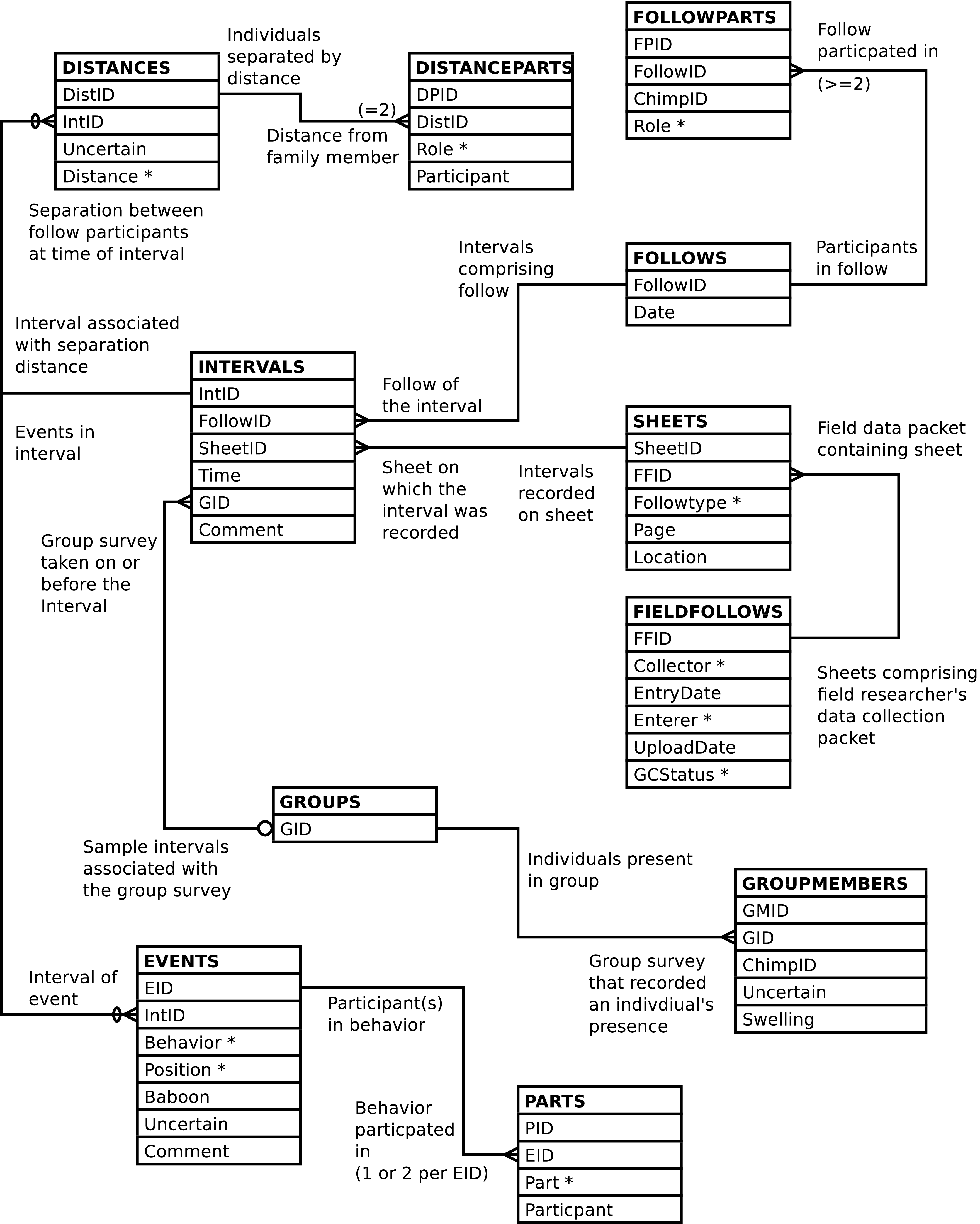
ER diagrams, Entity-Relationship diagrams, graphically show the relationships between a database's tables. ER diagrams contain a lot of information and so provide a useful high-level overview of the data contained within the database. They are particularly useful when writing queries, if there is already a general understanding of what the rows in each table represent.
Most tables have have an id, or key, column that contains a number unique to that row within its table. The id can be used, in perpetuity, to refer to its related row and distinguish it from all the other rows of the table. Ids are arbitrary, although for convenience they are often sequentially generated integers.
A relationship is established between the rows of two tables when an id value from one table appears as data in the other. The relationship notion is made most clear by way of diagrams and examples. If the next paragraph is unclear, don't worry. Have a look at the Gombe-MI diagrams below by way of example and see if that does not clear things up. The relationship concept is at the heart of relational databases and, while the underlying idea is rather simple, it took many years to develop relational database concepts so don't expect a full understanding immediately.
When an id value of a row in one table appears as data in a second table, the data in the second table can be used to retrieve the identified row from the first table.[4] When an id value of a row in the first table appears as data only once in the second table, the two tables are said to have a one-to-one relationship. One row in the first table relates to one (or possibly zero) row(s) in the second table. When a row's id value can appear in more than one row of a second table, the two tables are said to have a one-to-many relationship. One row of the first table can be related to many rows in the second table. One-to-many relationships are more common than one-to-one relationships. The relationship between the various Gombe-MI tables can be visualized in entity relationship diagrams, as shown here. In this diagram each table (entity) is a box, and each box contains a list of the table's columns. The lines between the boxes represent the relationships between the tables.
Note
If you have trouble viewing the diagrams in your browser, you may wish to view them in PDF format. The diagrams are available in The Gombe-MI Pocket Reference in PDF form.
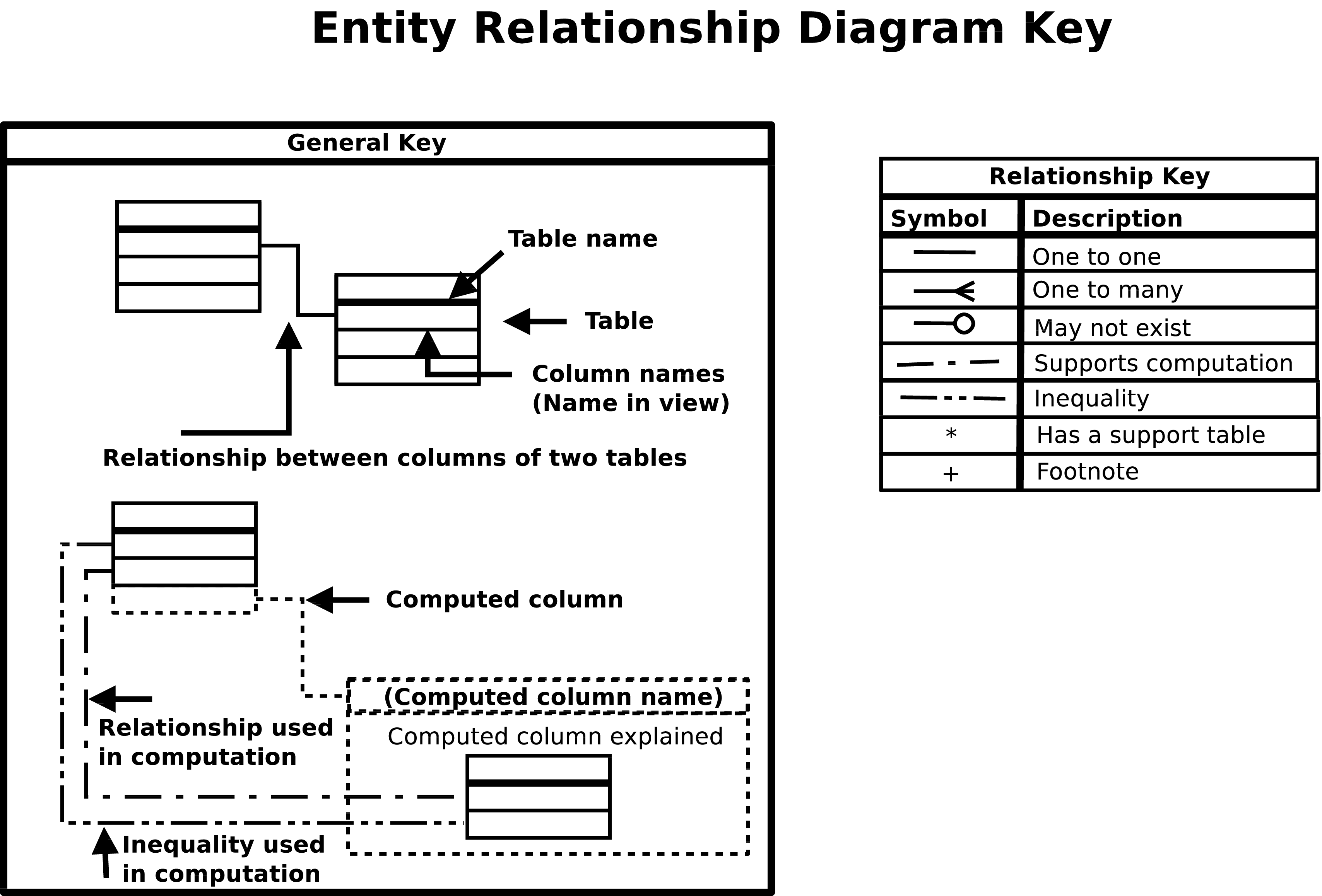
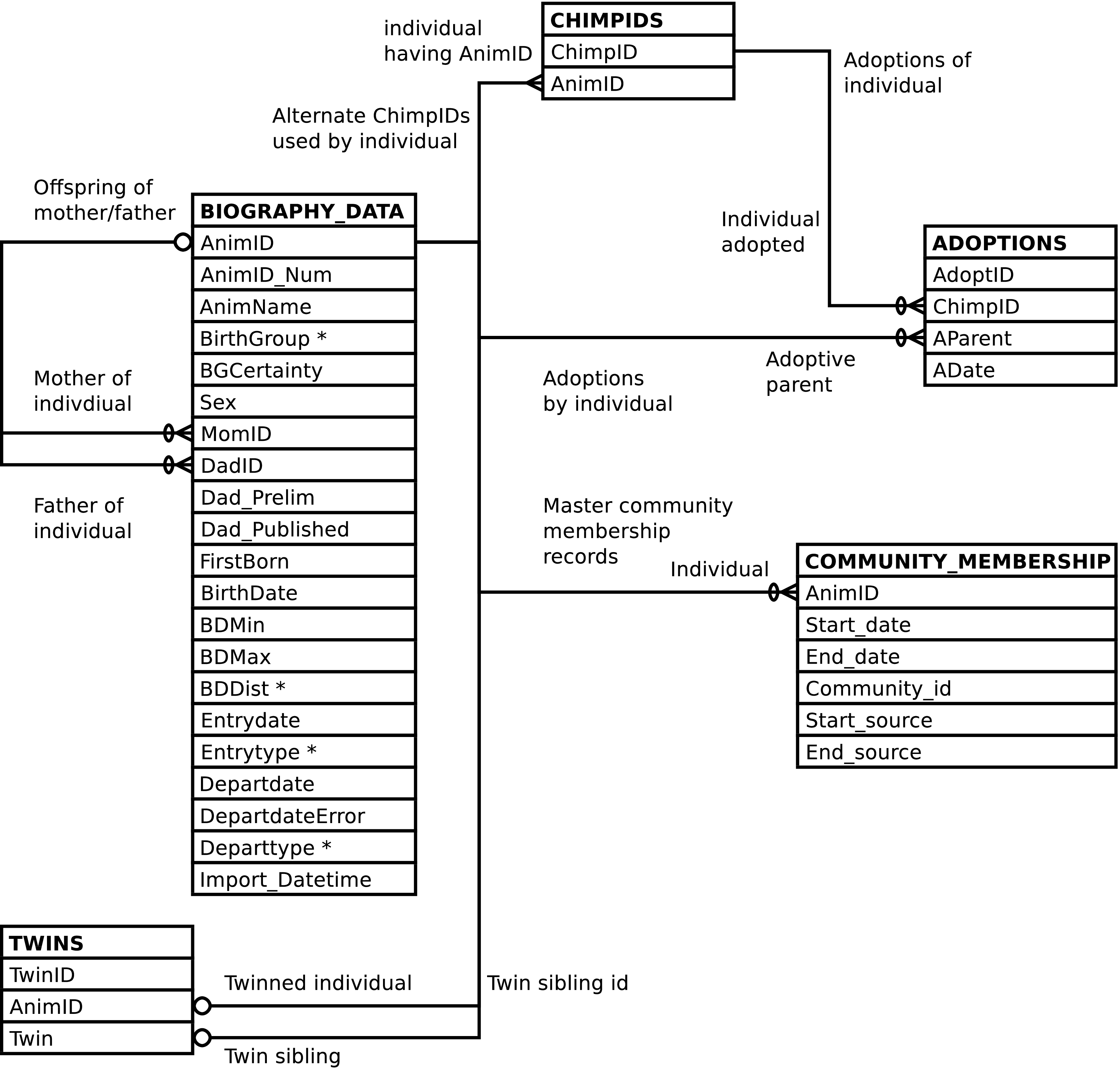
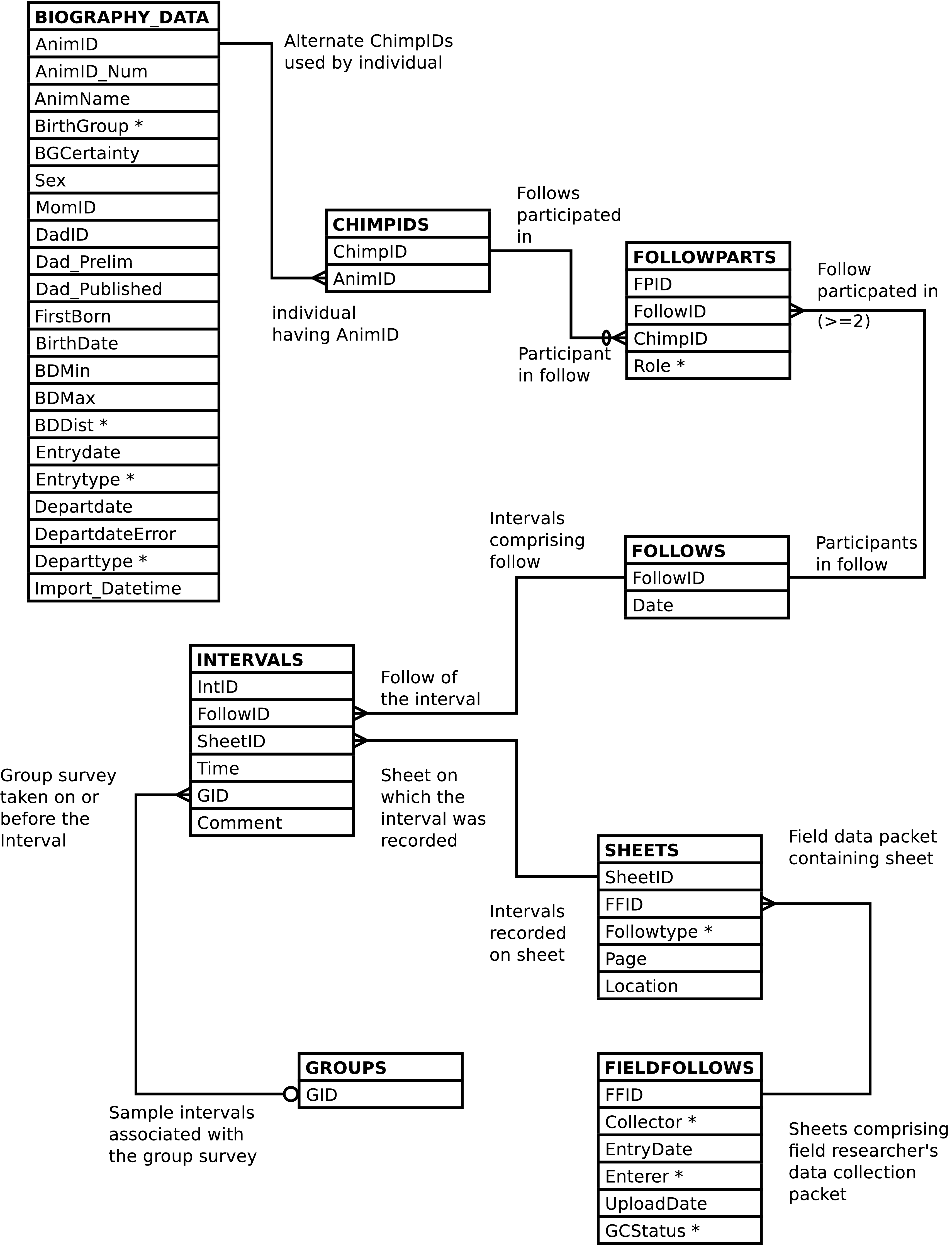
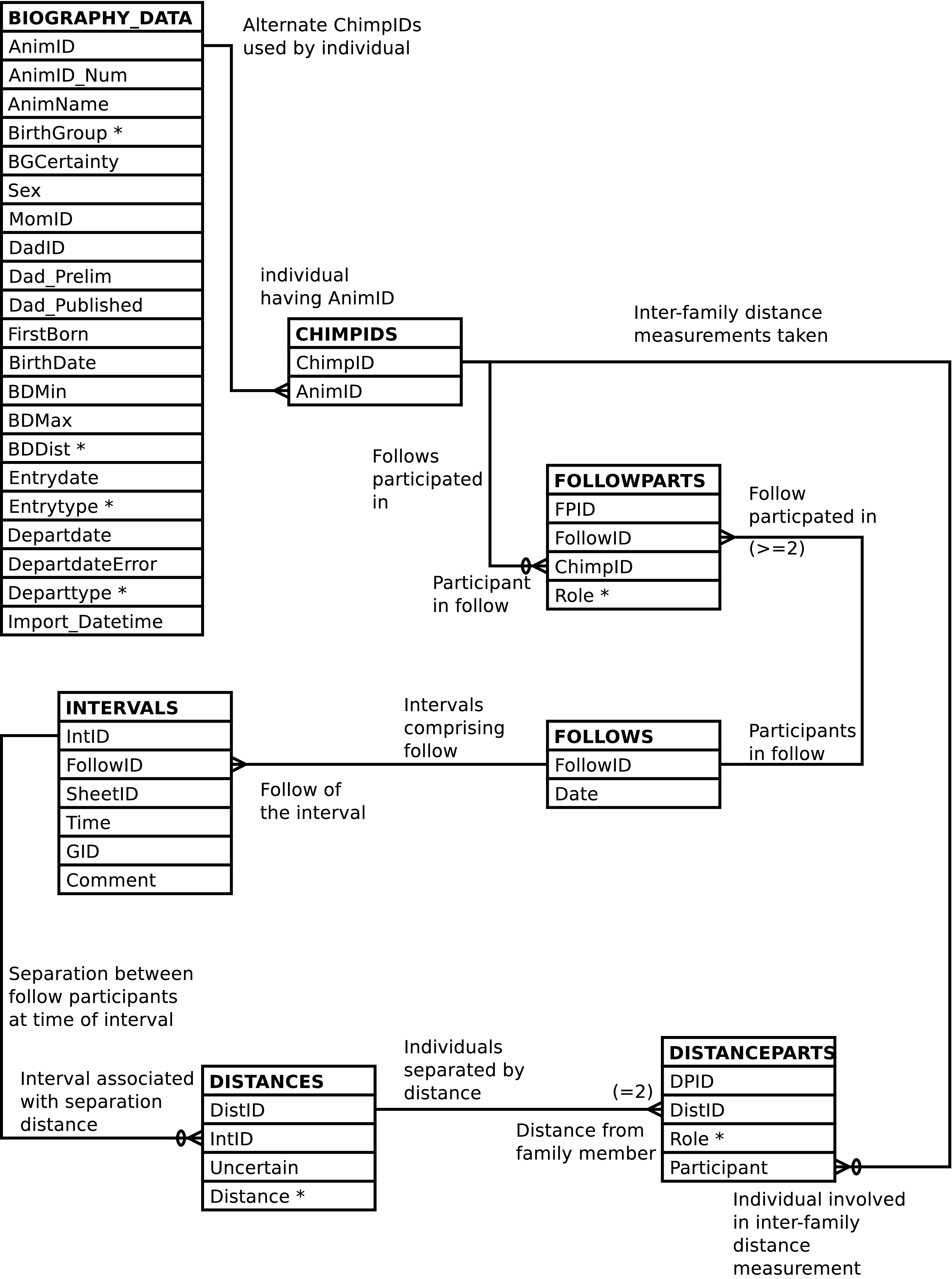
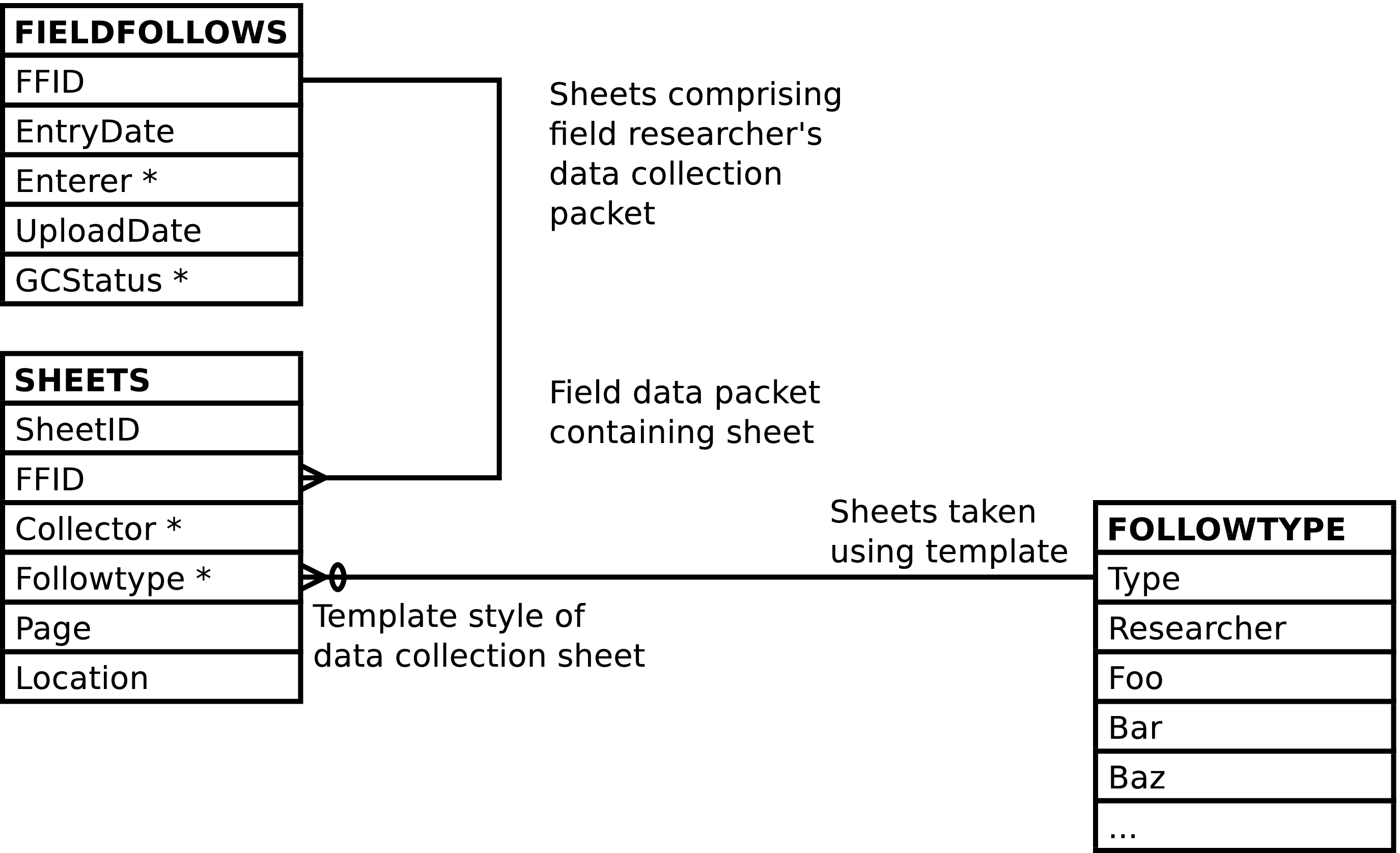
| Demography Related | |||
|---|---|---|---|
| View | One row for each | Purpose | Tables/Views used |
| BIOGRAPHY | BIOGRAPHY_DATA row | Provides an interface into the master biography table imported from Access which is invariant, and slightly easier to use. | BIOGRAPHY_DATA, TWINS |
| BIOGRAPHY_UPLOAD | BIOGRAPHY_DATA row | Provides an upload interface into the master biography table enabling easy import from Access. | BIOGRAPHY_DATA |
| CHIMPS | BIOGRAPHY_DATA row plus one row for each twin | Provides an interface into the master biography table with one extra row for each twin, which is a duplicate of the twin's BIOGRAPHY_DATA row but used when the twins are not distinguishable. | BIOGRAPHY_DATA, TWINS, CHIMPIDS |
| COMMUNITY_MEMBERSHIP_UPLOAD | COMMUNITY_MEMBERSHIP row | Provides an upload interface into the master community_membership table enabling easy import from Access. | COMMUNITY_MEMBERSHIP |
| Follow Mechanics Related | |||
|---|---|---|---|
| View | One row for each | Purpose | Tables/Views used |
| DATASHEET_EVENTS | EVENTS row per any related EATS, FISHED, PLAYS, RESTS, RIDES, or VOCS rows. | To resemble the event portion of the data entry sheets and provide a mechanism for updating event related data in the database. | FOLLOWS, INTERVALS, EVENTS, PARTS, EATS, FISHED, PLAYS, RESTS, RIDES, VOCS |
| DATASHEETS | EVENTS row per any related EATS, FISHED, PLAYS, RESTS, RIDES, or VOCS rows plus one row per DISTANCES row | To produce a report resembling the data entry sheets. | FOLLOWS, INTERVALS, EVENTS, PARTS, DISTANCES, DISTANCEPARTS, EATS, FISHED, PLAYS, RESTS, RIDES, VOCS |
| FOCAL_FOLLOWS | FOLLOWS row, per each possible paring of infant and sibling (i.e. one row per follow when there are no twins, two rows per follow when either the infants or siblings are twins, and 4 rows per follow when both the infants and siblings are twins) | To provide a simple mechanism for deleting and creating follows. | FOLLOWS, FOLLOWPARTS (3 times) |
| FOLLOW_DURATIONS | FOLLOWS row | Computes various totals of time spent observing during the follow. | FOLLOWS |
| FOLLOW_INTERVALS | INTERVALS row per INTERVALS row | FOLLOWS, FOLLOWPARTS (3 times), INTERVALS | |
| UPLOAD_BEHAVIORS | FOLLOWS row | This view returns no rows. It is used only to upload follow data into Gombe-MI. | FOLLOWS, FOLLOWPARTS, INTERVALS, EVENTS, PARTS, DISTANCES, DISTANCEPARTS |
| Follow Event Related | |||
|---|---|---|---|
| View | One row for each | Purpose | Tables/Views used |
| ACTOR_ACTEES | EVENTS row where there are 2 chimpanzees involved in an actor/actee behavioral event, events involving baboons are not included. | Provides a straightforward way to analyze directed social behaviors from the perspective of who is initiating and who receiving the behavior. | EVENTS, PARTS (twice, once for each chimpanzee involved in the behavior), FOLLOWROLES (twice, once for each chimpanzee involved in the behavior) |
| ACTOR_ACTEES_W_BABOONS | EVENTS row where there are 2 animals involved in an actor/actee behavioral event, including events involving baboons. | Provides a straightforward way to analyze directed social behaviors from the perspective of who is initiating and who receiving the behavior. | EVENTS, PARTS (twice, once for each animal involved in the behavior), FOLLOWROLES (up to twice, once for each chimpanzee involved in the behavior) |
| ASOCIAL_EVENTS | EVENTS
row having a related PARTS row with a
Part
value of S | Provides a direct way to analyze asocial behavioral events. | EVENTS, PARTS, FOLLOWROLES |
| EVENT_BOUTS | FOLLOWPARTS row per INTERVALS row, per EVENTS.Behavior value having a related PARTS row that shows the given focal involved in the given behavior -- one row per follow, per focal, per interval in which the focal is involved in a behavior (excluding behavioral events which involve a baboon), per code for the behavior involved in. | Provides per-focal, per-minute analysis for contiguous minutes of per behavior-code activity. | FOLLOWPARTS, FOLLOWROLES, INTERVALS, EVENTS, PARTS, CHIMPIDS |
| EVENT_BOUT_AGGS | FOLLOWPARTS row, per EVENTS.Behavior value having a related PARTS row that shows the given focal involved in the given behavior -- one row per follow, per focal in which the focal is involved in a behavior (excluding behavioral events which involve a baboon), per code for the behavior involved in. | Provides per-focal analysis for contiguous minutes of per behavior-code activity. | FOLLOWPARTS, FOLLOWROLES, INTERVALS, EVENTS, PARTS, CHIMPIDS |
| FAMILY_EVENTS | EVENTS row | Provides a way to review recorded behaviors in a way similar to the way data is recorded in the field. | EVENTS, PARTS (four times, once for each of the mother, infant, sibling, and other non-focal individual who may be involved in the behavior) |
| FOCAL_EVENTS | EVENTS row per focal individual involved in the behavioral event | Provides a direct way to analyze behaviors when interested in the function (mom, infant, sib, non-focal) of the chimpanzees involved in the behavior. | EVENTS, PARTS (once or twice, once for the focal and again if there is another individual), FOLLOWROLES (once or twice, once for the focal and again if there is another individual) |
| FOCAL_SOCIAL_EVENTS | EVENTS row per individual involved in the behavioral event when the individual is a focal in the follow where there are 2 chimpanzees involved in the exhibited behavior | Provides a direct way to analyze social behaviors when interested in the function (mom, infant, sib, non-focal) of the chimpanzees involved in the behavior. | EVENTS, PARTS (twice, once for the focal and once for the other individual), FOLLOWROLES (twice, once for the focal and once for the other individual) |
| NOOBS | FOLLOWS row, per FOLLOWPARTS row, per minute from 06:00 through 20:00, inclusive, but only when there is no behavioral data on the focal. | Computes minutes in each follow's day during which each focal has no data on behavior. | FOLLOWPARTS, CHIMPIDS, INTERVALS, EVENTS, PARTS |
| SOCIAL_BOUTS | FOLLOWPARTS row per INTERVALS row, per EVENTS.Behavior value having a related PARTS row that shows the given focal involved in the given behavior with a social partner, per AnimID of the social partner -- one row per follow, per focal, per social partner, per interval in which the focal is involved in a social behavior (excluding behavioral events which involve a baboon), per code for the behavior involved in. | Provides per-focal, per-social-partner, per-minute analysis for contiguous minutes of per behavior-code activity. | FOLLOWPARTS, FOLLOWROLES, INTERVALS, EVENTS, PARTS, CHIMPIDS |
| SOCIAL_BOUT_AGGS | FOLLOWPARTS row per EVENTS.Behavior value having a related PARTS row that shows the given focal involved in the given behavior with a social partner, per AnimID of the social partner -- one row per follow, per focal, per social partner (excluding behavioral events which involve a baboon), per code for the behavior involved in. | Provides per-focal, per social partner analysis for contiguous minutes of per behavior-code activity. | FOLLOWPARTS, FOLLOWROLES, INTERVALS, EVENTS, PARTS, CHIMPIDS |
| SOCIAL_EVENTS | EVENTS row, per chimpanzee, where there are 2 chimpanzees (no baboons) involved in the exhibited behavior. So, 2 rows per EVENTS row for those events, involving chimpanzees, that are social in nature. | Provides a direct way to analyze chimp social behaviors regardless of whether a chimpanzee is a focal in the follow. | EVENTS, PARTS (twice, once for each chimpanzee involved in the behavior), FOLLOWROLES (twice, once for each chimpanzee involved in the behavior) |
| SOCIAL_EVENTS_W_BABOONS | EVENTS row, per chimpanzee, where there are 2 animals involved in the exhibited behavior, baboons included. So, 2 rows per EVENTS row for those events, involving animals, that are social in nature. | Provides a direct way to analyze social behaviors regardless of whether a chimpanzee is a focal in the follow. | EVENTS, PARTS (twice, once for each chimpanzee involved in the behavior), FOLLOWROLES (twice, once for each chimpanzee involved in the behavior) |
| Follow Distance Related | |||
|---|---|---|---|
| View | One row for each | Purpose | Tables/Views used |
| DISTS | DISTANCES row per related DISTANCEPARTS row. So, 2 rows per DISTANCES row. | Provides a direct way to analyze chimp inter-familial distances using either ChimpID or role the chimp plays in the follow. | DISTANCES, DISTANCEPARTS (twice, once for each chimpanzee involved). |
| FAMILY_DISTS | DISTANCES row | Provides a direct way to analyze chimp inter-familial distances based on the role (mom, infant, sibling) the chimp plays in the follow, and a way to maintain the underlying data. | DISTANCES, DISTANCEPARTS (three times, once for each possible role played in the follow). |
Indexes are a feature of databases, a feature which greatly speeds data retrieval. In return there is a small cost in the time it takes to change table content, and cost in disk space used. Databases generally require indexes to perform efficiently. It is a good idea to index the tables each user has in their personal schema.
There is no documentation on the indexes used in Gombe-MI. In general, there is an index for each way the tables are commonly referenced. For example, if records are often looked up on the basis of date, there will be an index on the date. As a practical guide, there is an index on each of the columns at the endpoint of a “relational line” in the above entity-relationship diagrams, as well as an index on every date column. All indexes are b-tree indexes.
[4] And the reverse is true. The id of a row in the first table can be used to find the row in the second table that holds it.
Table of Contents
Note
Unless otherwise mentioned, all time values in Gombe-MI are stored[5] in Nairobi local time.
ADOPTIONS contains one row for each adoption of a chimpanzee. For the purposes of the Gombe-MI project an adoption occurs the first time one chimpanzee acts as the mother in a follow to a chimpanzee that is not their offspring.
There is no restriction on the sex of the adopting parent, nor is there a limit on the number of times a chimpanzee can be adopted.
The adopting individual must be older than the adopted individual[6] -- the AParent's BIOGRAPHY_DATA.Birthdate must be before that of the adopted individual.
The date of adoption must be during the time period in which both the adopted individual and the adopting individual are alive -- the ADOPTIONS.ADate value cannot be before the related BIOGRAPHY_DATA.Birthdate value of the ADOPTIONS.ChimpID; the ADOPTIONS.ADate value cannot be after the related BIOGRAPHY_DATA.Departdate value of the ADOPTIONS.ChimpID; the ADOPTIONS.ADate value cannot be after the related BIOGRAPHY_DATA.Departdate value of the ADOPTIONS.AParent.
The adoptive parent cannot be the biological mother of the adopted individual -- the individual's BIOGRAPHY_DATA.MomID value cannot be one of the related ADOPTIONS.AParent values.
An individual cannot be adopted twice by the same adoptive parent.
Either a permanent (ADate) or
a temporary (TmpDate) adoption date
must be present, both dates may not be NULL. When there is
both a permanent adoption date
(ADate) and a temporary adoption
date (TmpDate) the temporary date
must be before the permanent date.
Caution
Only permanently adopted individuals
(ADOPTIONS.ADate
is not NULL) generate warnings[7] when not with their adoptive parent in a group when
young, and vice-versa. No such constraints are placed on
group membership when the adoption is temporary. It is the
responsibility of the data entry team to ensure that the
presence of temporarily adopted individuals and their adoptive
parent are recorded correctly in the appropriate group.
Temporary adoptions alter the warnings regarding mother/infant pairing within group composition. For complete information on the group membership warnings surrounding adopted individuals and their adoptive parent see the GROUPMEMBERS table.
A unique integer identifying the adoption. This column is automatically maintained by the
database, cannot be changed, and must not be
NULL.
The virtual or real identifier assigned to the adopted
individual. The ChimpID code of
the adopted individual. The ChimpID value cannot be changed.
This column may not be NULL.
The identifier assigned to the adoptive parent. The
AnimID code of the adopting
individual. The AParent value cannot be changed.
This column may not be NULL.
BIOGRAPHY_DATA contains one row for every chimpanzee. It is a copy of the master file kept in MS Access and described the Gombe Chimp Database Handbook.
Note
It is recommended, and generally more convenient, to use the BIOGRAPHY view. BIOGRAPHY has all the columns of BIOGRAPHY_DATA and a few more.
Caution
Two AnimID values have special meaning to Gombe-MI.
The MGE
AnimID value is assigned to
the unknown stranger. The UNK
AnimID value is assigned to
the generic unknown individual. The significance of these codes
is that they may have NULL values in all of their columns
excepting AnimID and
AnimName. This exception is
not mentioned in the column descriptions below.
An individual's Birthdate cannot be before the individual's BDMin. An individual's BDMax cannot be before the individual's Birthdate. An individual's Entrydate cannot be before the individual's Birthdate. An individual's Departdate cannot be before the individual's Entrydate. An individual's Import_Datetime cannot be before the individual's Departdate.
Individuals cannot be observed, neither their AnimID nor any of their related CHIMPIDS.ChimpIDs can appear in the Gombe-MI system, after the individual's BIOGRAPHY.Departdate when the individual's BIOGRAPHY.Departtype indicates final departure from the study population.
The Dad_Prelim and
Dad_Published columns must be
NULL when DadID is NULL and
must not be NULL when DadID is
not NULL.
None of the following columns may be NULL unless all are
NULL: BGCertainty,
FirstBorn,
Birthdate,
BDMin,
BDMax,
BDDist,
BirthGroup ,
Entrydate,
Entrytype,
Departdate,
DepartdateError,
Departtype, and all of the
following columns are null also:
AnimID_Num
MomID
DadID. This allows the creation
of individuals about whom nothing is known excepting their
parentage of offspring.
The unique identifier assigned to the individual. It is composed entirely of upper case letters and digits and is at most 5 characters long.
The AnimID value cannot be changed. This column may not be empty, it must contain characters,
and it must contain at least one non-space character.
This column may not be NULL.
Some AnimID values are reserved and cannot be used to identify individuals within the database. See the documentation on AnimID values with special meaning to the UPLOAD_BEHAVIORS view.
The unique alphanumeric identifier assigned to the
individual for the SIV study. This value may be up to
20 characters long. This column may not be empty, it must contain characters,
and it must contain at least one non-space character. This value
may be NULL when no such identifier exists.
The name of the individual. This name must be unique.
This column may not be empty, it must contain characters,
and it must contain at least one non-space character. This column may not be NULL.
Unvalidated code used to designate the community into which the individual was born. See the Gombe Chimp Database Handbook for further information.
This column may not be empty, it must contain characters,
and it must contain at least one non-space character. This column may be NULL when the birth
community is unknown.
Code used to indicate confidence in the recorded BirthGroup.
BGCertainty Acceptable Values
CCertain
UUncertain
Code indicating the sex of the individual.
Sex Acceptable Values
MMale
FFemale
UUnknown
This column may not be NULL.
The AnimID code of the
individual's mother, when known. The mother must be
female.[8]This value may be NULL when the mother is not
known.
The AnimID code of the
individual's father, when known. The father must be
male.[9]This value may be NULL when the father is not
known.
A Boolean value indicating when paternity assignment, the
DadID column value, is
preliminary. This value may be NULL, see above.
Where and when paternity assignment has been published.
This value may be NULL, see above.
Whether or not the individual is the mother's firstborn.
FirstBorn Acceptable Values
YFirstborn
NNot the firstborn
UMay or may not be the firstborn
Minimum birth date. See the Gombe Chimp Database Handbook for further information.
Maximum birth date. See the Gombe Chimp Database Handbook for further information.
Code indicating the birth date probability distribution. See the Gombe Chimp Database Handbook for further information. The legal values for this column are defined by the BDDISTS support table.
Code indicating how the individual entered the study population. See the Gombe Chimp Database Handbook for further information. The legal values for this column are defined by the ENTRYTYPES support table.
Time between Departdate and when the individual was confirmed missing. Units are fractions of a year. Precision is 2 decimal places. This number must be non-negative. For further information see the Gombe Chimp Database Handbook.
Code indicating how the individual left the study population. See the Gombe Chimp Database Handbook for further information. The legal values for this column are defined by the DEPARTTYPES support table.
The date and time of the data import -- the time the row was created. This column defaults to the date and time of the start of the transaction which inserted the row. Hence when all the rows are inserted in a single transaction they will all have the same timestamp. Further, the column will automatically be set to the correct value upon upload when this column is omitted from the uploaded data.
This column is not part of the master Access database.
This column is time zone aware; times are output in, and expected to be input in, your local time zone. This column may not be NULL.
CHIMPIDS contains one row for every chimpanzee, plus additional rows giving twins a “virtual” identifier. The “virtual” identifier is used when the individual's identity is unknown because the twins cannot be distinguished from each other. Use of the “virtual” identifiers indicates that either of the two twins may be the individual in question. This is true even though each twin should, in CHIMPIDS, have only a single virtual identifier (in addition to the regular AnimID). In other words, the association between the “virtual” identifiers and the individual twins is arbitrary.
There must always be a row on CHIMPIDS for each row on BIOGRAPHY_DATA. This required row has a ChimpID value that duplicates the row's AnimID value. These requirements are enforced on transaction commit. The required row ensures that each chimpanzee has an identifier, one equal to the chimp's AnimID, suitable for use throughout the Gombe-MI system.
The content of the CHIMPIDS table is automatically altered under the following circumstances: When a BIOGRAPHY_DATA row is inserted a row is inserted into CHIMPIDS which has a AnimID value and a ChimpID value of the inserted BIOGRAPHY_DATA.AnimID. When a BIOGRAPHY_DATA row is deleted the related rows are deleted from CHIMPIDS. These operations are performed at the time of transaction commit. This feature should eliminate any need for manual maintenance of the CHIMPIDS table, except in the case of twins.
Tip
Often the CHIMPIDS table can be ignored; when writing queries ChimpID values in database tables may be joined directly with BIOGRAPHY_DATA.AnimID. When this is done rows which contain the “virtual” twin identifiers will disappear from the query results. Whether this is desirable depends on the intended goal.
A second way to ignore the CHIMPIDS table is to use the CHIMPS view instead of joining to BIOGRAPHY_DATA or BIOGRAPHY. In this case, when counting, care must be taken to count distinct AnimID values to avoid double-counting twins.
The “virtual” identifiers must be unique -- each ChimpID value must be related to exactly one AnimID value. The twins alternate identifiers cannot be used as AnimID values on BIOGRAPHY_DATA -- ChimpID values that differ from their row's AnimID values cannot be BIOGRAPHY_DATA.AnimID values.
Note
There is no rule requiring that twins (as defined within the TWINS table) have “virtual ids” defined on CHIMPIDS, nor is there a rule which requires that every “virtual id” be a twin, but violating these constraints may result in a system which behaves strangely.[10]
Caution
There are no rules in the system which require that twins must be referenced either by their “normal” AnimID values or by their “alias” ChimpID, used when the twins cannot be distinguished, but not by a mixture of both. It is allowed to reference one twin by their “normal” AnimID and the other by the twin's “alias” ChimpID, although this is almost surely a bad idea. Data hygiene in this regard is left to the system's users.
A 5 character identifier for
the “virtual” individual. This value cannot be
changed. This column may not be NULL.
Some ChimpID values are reserved and cannot be used to identify individuals within the database. See the documentation on AnimID values with special meaning to the UPLOAD_BEHAVIORS view.
The AnimID code of the
individual. This value cannot be changed. This column may not be NULL.
COMMUNITY_MEMBERSHIP contains one row for every contiguous period of time each individual has spent in each community. It is a copy of the master file kept in Access. Since record keeping involving transition between communities is non-obvious users are encouraged to read the description found in the Gombe Chimp Database Handbook.
The combination of AnimID and Start_date must be unique.
Note
The data in this table, AnimID excepted, is entirely unvalidated.
The unique identifier assigned to each individual. The
AnimID code of the individual
who's community tenure the row represents. This column may not be NULL.
Unvalidated code identifying the community or pair of
communities of which the individual was a part.
This column may not be NULL.
Textual description of how the start date was determined.
This column may not be NULL.
Textual description of how the end date was determined.
This column may not be NULL.
The date and time of the data import -- the time the row was created. This column defaults to the date and time of the start of the transaction which inserted the row. Hence when all the rows are inserted in a single transaction they will all have the same timestamp. Further, the column will automatically be set to the correct value upon upload when this column is omitted from the uploaded data.
This column is not part of the master Access database.
This column is time zone aware; times are output in, and expected to be input in, your local time zone. This column may not be NULL.
TWINS contains one row for every individual who is a twin. Twins are required to occur in pairs, so for every AnimID/Twin pair of values there must also be a row containing a corresponding reversed pair of values.[11]This rule is enforced on transaction commit.
Tip
Insert rows into the TWINS table in pairs, in a single transaction
A unique integer identifying the twin. This column is automatically maintained by the
database, cannot be changed, and must not be
NULL.
The identifier assigned to the individual who is a twin.
The AnimID code of the
individual. This value must be unique, no other row in the
table may share an AnimID value. This value cannot be changed.
This column may not be NULL.
The identifier assigned to the twin sibling of the
individual. The AnimID code of
the individual's twin. This value must be unique, no other row
in the table may share a Twin value. This value cannot be
changed. This column may not be NULL.
FIELDFOLLOWS contains one row for each package of Mother-Infant follow data put together by any one field researcher during the course of a day. There is one field follow for every researcher for every mother for each day for which the researcher collected data on the mother (and her infant). The mother (or infant) need not be under continuous observation for the interrupted observations to be part of a single field follow, in fact each row in FIELDFOLLOWS represents an entire day's worth of a researcher's observations of a mother (and infant). All the field follows, irrespective of the researcher in the field, which record data on any one mother (and her offspring) in any one day are combined for analysis into an “analytic follow”, usually referred to herein just as a “follow”, and are represented in the database as rows in the FOLLOWS table.
Each row in FIELDFOLLOWS must have at least one related row on Sheets.
An observer cannot be in two places at the same time -- the combination of Collector, FOLLOWS.Date, and INTERVALS.Time must be unique.
The date of the follow, the FOLLOWS.Date value, cannot be after the date of data entry, the Entrydate value. Likewise, the date of data entry, the Entrydate value, cannot be after the date the data is uploaded into the Gombe-MI system, the UploadDate value.
The date of data entry,
Entrydate, may not be NULL when
the FOLLOWS.Date is
after 2011-06-30.
The GCStatuscolumn must be
non-NULL when there is any group composition information
recorded in the database which is related to the field follow,
otherwise it must be NULL. This is tested for by checking for
the existence of rows in the RAW_GROUPS table
related by SheetID to the
Sheets table, related by
FFID to the FIELDFOLLOWS table. This
check is performed upon transaction commit.
A unique integer identifying the field follow. This column is automatically maintained by the
database, cannot be changed, and must not be
NULL.
Code identifying the person who observed the follow and recorded it's information on the template sheets. The legal values for this column are defined by the PEOPLE support table.
This column may not be NULL.
The date on which the field follow's data entry was finished.
This column may sometimes be NULL, see above.
Code identifying the person who entered the field follow information recorded on the template sheets into Gombe-MI. The legal values for this column are defined by the PEOPLE support table.
This column may not be NULL.
The date on which the field follow's data was uploaded into the Gombe-MI system.
When values for this column are not supplied as part of
the upload process, or a NULL is supplied as a data value, the
UploadDate value defaults to the current date. This column may not be NULL.
FOLLOWPARTS contains one row for every Mother-Infant follow for every individual in the family that is followed. There are at least 2 participants in every follow: there must be exactly one row for the mother and at least one row for an infant. These rules are enforced on transaction commit.
Each participant in a follow must be a member of the study population on the date of the follow. The BIOGRAPHY_DATA.Entrydate cannot be after the follow's FOLLOWS.Date value. The BIOGRAPHY_DATA.Departdate cannot be before the follow's FOLLOWS.Date.
The mother in a follow must be the mother of the infant (either biological or an adoptive mother) and, similarly the mother of, if any, the sibling -- the BIOGRAPHY_DATA.MomID of the offspring, or one of the offspring's related ADOPTIONS.AParent values, must be the BIOGRAPHY_DATA.AnimID of the mother, where the role of mother and infant or sibling is determined based on FOLLOWROLES.Function value and the AnimID value is determined using the CHIMPIDS table. When the mother is an an adoptive parent then the date of the follow cannot be before the adoption date -- the FOLLOWS.Date value cannot be before the ADOPTIONS.ADate value. The sibling, if any, in a follow must be older than the infant. Two participants in a follow may have the same role[12] (e.g. twin) if and only if the two participants have the same birth date.[13]
When twins are both participants in one follow the two twins must share a role in the follow -- must have identical Role values.
The individual(s) in the follow with the role of infant or sibling must be less than 15 years old on the date of the follow.
Note
There are no checks to ensure that the infant in the follow is the youngest living offspring, or that the sibling is the next youngest.
An individual cannot participate twice in a single follow -- there cannot be 2 FOLLOWPARTS rows with the same FollowID and related AnimID values.
A unique integer identifying the participant in the
follow. This column is automatically maintained by the
database, cannot be changed, and must not be
NULL.
The integer identifying the follow of the participant. The FollowID value cannot be changed, the row must be deleted and a new row inserted in it's place.
This column may not be NULL.
The identifier assigned to the follow participant. The ChimpID code of the individual.
This column may not be NULL.
Code indicating the individual's role in the follow. The legal values for this column are defined by the FOLLOWROLES support table.
This column may not be NULL.
FOLLOWS contains one row for every Mother-Infant follow. There is one follow for every mother for each day for which there is a record; a chimpanzee cannot be the focal in more than one follow on any given day. The mother (or infant) need not be under continuous observation for the interrupted observations to be part of a single follow, nor do all observations need to be made by the same person.
Each follow must have at least one time interval during which observation was made -- each FOLLOWS row must be at least one related row on INTERVALS.[14] This check is performed upon transaction commit.
Note
Deleting a row from the FOLLOWS table will delete the entire follow -- the system will first delete all related INTERVALS and FOLLOWPARTS rows, which will in turn delete dependent rows from other tables.
A unique integer identifying the follow. This column is automatically maintained by the
database, cannot be changed, and must not be
NULL.
INTERVALS contains one row for each interval of time during which observations were recorded as part of a follow.
Note
At the time of this writing all follow observation intervals are of 1 minute duration. The Gombe-MI system contains elements which rely on per-minute granularity.[15]
The time intervals recorded on any given template sheet must be part of a single follow -- all of the INTERVALS.FollowID values must be identical for those INTERVALS rows having a given SheetID value.
A follow cannot have overlapping intervals of observation -- the combination of Time and FollowID must be unique.
All of the time intervals related to a given group composition survey must be part of a single follow -- all of the INTERVALS.FollowID values must be identical for those INTERVALS rows having a given GID value.
Note
Deleting a row from the INTERVALS table will delete entire interval -- the system will first delete all related DISTANCES, EVENTS, and Sheets rows, which will in turn delete dependent rows from other tables.
A unique integer identifying an interval of observation
taken during a particular follow. This column is automatically maintained by the
database, cannot be changed, and must not be
NULL.
The integer identifying the follow to which the observation interval belongs.
This column may not be NULL.
The integer identifying the template sheet on which the interval observation was recorded.
The SheetID value cannot be changed. This column may not be NULL.
The time at the start of the interval of observation. The
stored value has a one minute precision; the seconds portion of
the Time value must be 0.
The Time value cannot be
before 06:00 and cannot be
after 20:00. This column may not be NULL.
The unique identifier assigned to each record of group composition. The GROUPS.GID code of the group composition time period into which the observation interval falls.
Note
Specifying a value of NULL causes the system to
automatically compute this value.
The GID value may be NULL if the observation interval is
not associated with a period of time during which group
composition was recorded.
Textual comments concerning the entire observational interval. These comments are those of the data collector in the field.
This column may not be empty, it must contain characters,
and it must contain at least one non-space character. However, the Comment value may be NULL when
there are no comments concerning the entire observation
interval.
SHEETS contains one row for every template sheet used in the field when recording follows, or in those cases where there is no longer an electronic record of exactly which intervals of a follow were written on which physical piece of paper, one row per follow per field observer involved in recording the follow (i.e. per FIELDFOLLOWS row.
Every template sheet must have a record of at least one interval -- each SHEETS row must have at least one related INTERVALS row. On the SHEETS table this condition is checked at transaction commit time, although on the INTERVALS table the check is done immediately in the case of UPDATE and at transaction commit time in the case of DELETE.
Tip
Use transactions when making changes to both SHEETS and INTERVALS to produce bundles that ensure that at transaction commit each row on SHEETS has at least one related row on INTERVALS. Insert rows first into SHEETS and then into INTERVALS, and reverse this order when deleting rows.
Note
Deleting a FIELDFOLLOWS last related row from the SHEETS table will delete the FIELDFOLLOWS row.
The Page value must be unique per
field follow (per FIELDFOLLOWS row) and there
may be at most one NULL Page value per
field follow.
A unique integer identifying the sheet. This column is automatically maintained by the
database, cannot be changed, and must not be
NULL.
The integer identifying the field follow, the set of sheets collected by a researcher in the field comprising a day's mother-infant follow, in which the sheet belongs.
The SheetID value cannot be changed. This column may not be NULL.
Code identifying the type of the follow; the type of data entry template used for data collection that determined what was on the printed page.[16] The legal values for this column are defined by the FOLLOWTYPES support table.
This column may not be NULL.
The page number written on the sheet. This number must be an integer larger than zero. Note that the system does not require the page number to be contiguous.
This value may be NULL when the page number is not known
or not recorded in electronic form.
The name of the valley or other physical location where the data written on the sheet was recorded.
This column may not be empty, it must contain characters,
and it must contain at least one non-space character. However, this column may be NULL when there
is no recorded location.
EATS contains one row for every different part of every kind of food eaten during a eating event. Each eating event, each EVENTS row having a Behavior value that designates eating, must have at least one related row on EATS[17], and may have more if different kinds of food or parts of food are eaten by the chimpanzee.
The combination of the kind of food eaten and the food part eaten must be unique per event -- the combination of EID, Foodkind, and Foodpart must be unique.
Note
Aside from the EVENTS.Comment column there is no way to record the amount of any one of the different kinds of food or parts thereof eaten by the individual.
Caution
The system does not presently validate that the part eaten is appropriate for the kind of food eaten.[18] To the system, it is perfectly acceptable to eat the kidney of a tree. It may be prudent to manually validate the existing combinations before performing analysis.
A unique identifier assigned to the combination of kind of
food and part of food eaten during the given behavioral event.
This column is automatically maintained by the
database, cannot be changed, and must not be
NULL.
The identifier assigned to the behavioral event, the EVENTS.EID, value, related to the kind of food eaten and part of food eaten.
This column may not be NULL.
Code indicating a kind of food eaten during the event. The legal values for this column are defined by the FOODKINDS support table.
This column may not be NULL.
Code indicating the food part eaten during the event. The legal values for this column are defined by the FOODPARTS support table.
This column may not be NULL.
EVENTS contains one row for every recorded non-social
behavior exhibited by each focal as well as one row for every
recorded social behavior exhibited by each focal for every social
partner, for every follow interval. Each of the focal's
non-social behaviors for the interval are represented by a single
row per behavior in EVENTS. Each of the focal's social
behaviors for the interval are represented by a single row in
EVENTS per behavior per social partner.
These rules are enforced on transaction commit by ensuring that
the combination of EVENTS.Behavior, and
all related
BIOGRAPHY_DATA.AnimID
values, related via
PARTS.Participant, and
the roles the participating individuals play in the interaction,
the PARTS.Part values
are unique per EVENTS.IntID. The
exception is that anonymous individuals are allowed duplicates;
duplicates are allowed when EVENTS.Baboon
is TRUE or when one of the individuals involved has a
AnimID value which is
either UNK
or MGE.
Tip
Social behaviors are recorded as dyadic interactions between 2 individuals. Record multiple interactions as pairs of dyadic interactions. When directionality is involved, as in mutual grooming between 2 individuals, 2 grooming events are recorded, identical except for reversed directionality.
There must always be a chimpanzee involved in the behavior -- each EVENTS row must have at least one row on PARTS, related by EID. This rule is enforced on transaction commit.
At least one of the individuals involved in the behavior must be a focal of the follow -- at least one of the related PARTS rows must have a Participant value which identifies an animal also identified in one of the related FOLLOWPARTS.ChimpID values. This rule is enforced on transaction commit on PARTS, EVENTS, and FOLLOWPARTS, and immediately on INTERVALS.
The BEHAVIORS.Behavior value identifying the kind of behavior controls quite a lot regarding the event including: whether the behavior can occur, whether a Position value is required, the identity of the individuals allowed to be involved in the behavioral event, the fashion in which individuals are allowed to participate, and whether the behavior is a social one -- whether more than one individual is involved -- and whether a baboon can be involved. For further information see the BEHAVIORS table.
When the behavior is social, recording a dyadic interaction
between two individuals, and one of the two individuals involved
plays the active part, has a
PARTS.Part value
of R (Actor), then the other
individual must have the passive role, their
PARTS.Part value must
be E (Actee); and the reverse is true
as well. Social interactions may be non-directional as well as
directional. When there is no directionality the individuals
involved in the interaction are both
labeled “participant” -- when the behavior is social
and one of the individuals has a
PARTS.Part value
of P (Participant) then the
other individual must also have a
PARTS.Part value
of P. These rules are check
upon transaction commit.
EVENTS rows recording behaviors that are social in nature are always dyadic, there must always be two related PARTS rows to record the two participants involved. The exception to this is when one of the participants is a baboon. In this case there is a single related PARTS row recording which focal is involved in the interaction and the EVENTS.Baboon column is set to indicate the baboon's involvement. This rule is enforced on transaction commit.
The individual involved in those EVENTS rows recording
behaviors which are not social, those where there is a single
individual involved in the behavior, those having a single related
PARTS row, cannot be directional, their related
related PARTS row must have a
PARTS.Part value
of S (Self). Further, a baboon may
not be involved, EVENTS.Baboon must be
FALSE. These rules are checked upon transaction
commit.
Note
Deleting a row from the EVENTS table will delete the entire event -- the system will first delete all related PARTS, EATS, FISHED, PLAYS, RESTS, RIDES, and VOCS rows.
A unique identifier assigned to each behavioral
event. This column is automatically maintained by the
database, cannot be changed, and must not be
NULL.
The identifier assigned to the follow interval, the INTERVALS.IntID, value, related to the occurrence of the recorded behavior.
This column may not be NULL.
Code indicating the behavior engaged in. The legal values for this column are defined by the BEHAVIORS support table.
This column may not be NULL.
Code indicating the position within the forest canopy where the event occurred. The legal values for this column are defined by the POSITIONS support table.
This column may not be NULL.
A Boolean value. When TRUE a baboon is a participant in
the behavior. When FALSE a baboon is not a
participant.
This column may not be NULL.
A Boolean value. When TRUE the recorded behavior is in
doubt.[19] When FALSE the recorded behavior was clearly
observed and is not in doubt. See the Gombe
Chimp Database Handbook for further
information.
This column may not be NULL.
Textual comments concerning the specific behavioral event. These comments are those of the data collector in the field.
This column may not be empty, it must contain characters,
and it must contain at least one non-space character. However, the Comment value may be NULL when
there are no comments concerning the event.
FISHED contains one row to record the part and the kind of food fished for during each fishing event. Each fishing event, each EVENTS row having a Behavior value that designates fishing, must have exactly one related row on FISHED[20], and may have more if different kinds of food are fished for by the chimpanzee.
Only those kinds of food designated
as “fishable” may be fished for --
FISHED.Foodkind may contain only those
FOODKINDS.Foodkind
values where the related
FOODKINDS.Fishable
value is TRUE.
Only those parts of food designated
as “fishable” may be fished for --
FISHED.Foodpart may contain only those
FOODPARTS.Foodpart
values where the related
FOODPARTS.Fishable
value is TRUE.
Caution
The system does not presently validate that the part fished for is appropriate for the kind of food fished for. It may be prudent to manually validate the existing combinations before performing analysis.
A unique identifier assigned to the kind of food fished
for during the given behavioral event. This column is automatically maintained by the
database, cannot be changed, and must not be
NULL.
The identifier assigned to the behavioral event, the EVENTS.EID, value, related to the kind of food fished for.
This column may not be NULL.
Code indicating a kind of food fished for during the event. The legal values for this column are defined by the FOODKINDS support table.
This column may not be NULL.
Code indicating the food part fished for during the event. The legal values for this column are defined by the FOODPARTS support table.
This column may not be NULL.
PARTS contains one row for every individual, whether a focal
in the follow or not[21], involved in each recorded behavior (each
EVENTS row). Therefore there are always
either 1 or 2 PARTS rows per EVENTS row.
Individuals which are unrecognized or otherwise anonymous, the
individuals with AnimID values
of UNK
or MGE, have rows in PARTS when
they are involved in the behavior, but baboons do not.
An individual can be involved in a given behavioral event only once -- the related BIOGRAPHY_DATA.AnimID must be unique per EID.
Each participant in an event must be a member of the study population on the date of the follow. The BIOGRAPHY_DATA.Entrydate cannot be after the follow's FOLLOWS.Date value. The BIOGRAPHY_DATA.Departdate cannot be before the follow's FOLLOWS.Date.
A unique identifier assigned to the individual involved in
the given behavioral event. This column is automatically maintained by the
database, cannot be changed, and must not be
NULL.
The identifier assigned to the behavioral event, the EVENTS.EID, value, related to the recorded participant.
This column may not be NULL.
One of the following codes indicating the role the designated individual plays in the behavior:
R(Actor)The individual has the active role in the behavior, initiating or sustaining it.
E(Actee)The individual has the passive role in the behavior, receiving attention or contact.
P(Participant)The individual is neither active nor passive, such concepts do not apply or are not appropriate to the behavior or the data collection protocol.
S(Self)The individual is the sole participant in the behavior.
This column may not be NULL.
The identifier assigned to the individual involved in the behavior. The ChimpID code of the individual.
This column may not be NULL.
PLAYS contains one row for every different play activity engaged in during a play event. Each play event, each EVENTS row having a Behavior value that designates a play type event, must have at least one related row on PLAYS[22], and may have more if the playing chimpanzee engages in different play activities during the play event.
The play activity must be unique per event -- the combination of EID and Play must be unique.
Note
Aside from the EVENTS.Comment column there is no way to record the number or duration of any one of the different play activities engaged in by the individual during the play event.
A unique identifier assigned to the play activity engaged
in during the given behavioral event. This column is automatically maintained by the
database, cannot be changed, and must not be
NULL.
The identifier assigned to the behavioral event, the EVENTS.EID, value, related to the play activity.
This column may not be NULL.
Code indicating a play activity engaged in during the event. The legal values for this column are defined by the PLAY_TYPES support table.
This column may not be NULL.
RESTS contains one row to record the resting posture assumed during each resting event. Each resting event, each EVENTS row having a Behavior value that designates a resting type event, must have exactly one related row on RESTS.[23]
Note
Aside from the EVENTS.Comment column there is no way to record the duration of the resting posture assumed by the individual during the resting event.
A unique identifier assigned to the resting posture
assumed during the given behavioral event. This column is automatically maintained by the
database, cannot be changed, and must not be
NULL.
The identifier assigned to the behavioral event, the EVENTS.EID, value, related to the resting posture assumed.
This column may not be NULL.
Code indicating a resting posture assumed during the event. The legal values for this column are defined by the RESTING_POSTURES support table.
This column may not be NULL.
RIDES contains one row which records the riding posture assumed during each riding event. Each riding event, each EVENTS row having a Behavior value that designates a riding type event, must have exactly one related row on RIDES.[24]
Note
Aside from the EVENTS.Comment column there is no way to record duration of the riding posture assumed by the individual during the riding event.
A unique identifier assigned to the riding posture
assumed during the given behavioral event. This column is automatically maintained by the
database, cannot be changed, and must not be
NULL.
The identifier assigned to the behavioral event, the EVENTS.EID, value, related to the riding posture assumed.
This column may not be NULL.
Code indicating a riding posture assumed during the event. The legal values for this column are defined by the RIDING_POSTURES support table.
This column may not be NULL.
VOCS contains one row for every different kind of vocalization made during a vocalization event. Each vocalization event, each EVENTS row having a Behavior value that designates a vocalization, must have at least one related row on VOCS[25], and may have more if different kinds of vocalizations are made by the vocalizing chimpanzee.
The kind of vocalization must be unique per event -- the combination of EID and Vocalization must be unique.
Note
Aside from the EVENTS.Comment column there is no way to record the number or volume of any one of the different kinds of vocalizations made by the individual during the vocalization event.
A unique identifier assigned to the kind of vocalization
made in the given behavioral event. This column is automatically maintained by the
database, cannot be changed, and must not be
NULL.
The identifier assigned to the behavioral event, the EVENTS.EID, value, related to the kind of vocalization made.
This column may not be NULL.
Code indicating a kind of vocalization made as the event occurred. The legal values for this column are defined by the VOCALIZATIONS support table.
This column may not be NULL.
DISTANCEPARTS contains exactly 2 rows for each recorded distance, one row for each of the individuals between whom the distance was measured. To restate, there are always exactly 2 rows on DISTANCEPARTS for every DISTANCES row. This check is performed on transaction commit.
The individuals between whom the distance is measured can only be those individuals who are participants in the follow -- each Participant value in DISTANCEPARTS has a related CHIMPIDS.AnimID value, this value must be that of a CHIMPIDS.AnimID related to one of the follows' FOLLOWPARTS.ChimpID values. This check is performed on transaction commit on update to FOLLOWPARTS and insert or update of DISTANCEPARTS, and otherwise immediately.
The individual must have the same role (i.e., mother, infant, twin1, etc.) on DISTANCEPARTS as the individual does in the rest of the follow -- the DISTANCEPARTS.Role value for each individual must match the value found in the related FOLLOWPARTS.Role. This check is performed on transaction commit on changes to DISTANCEPARTS and FOLLOWPARTS and immediately upon changes to INTERVALS and DISTANCES.[26]
Distance must be measured between two different individuals -- the combination of DistID and the related CHIMPIDS.AnimID must be unique.
Distance can be measured between two individuals at most once per interval.
If there is a group composition survey for the related interval then the survey must include the individuals between whom the distance was measured -- when there is a related GROUPS row then the related GROUPMEMBERS rows must include rows for the individuals identified in the DISTANCEPARTS rows. This check is performed upon transaction commit on changes to INTERVALS and delete of GROUPMEMBERS rows, and immediately otherwise.
A unique integer identifying the row recording one
participant in the inter-individual distance measurement.
This column is automatically maintained by the
database, cannot be changed, and must not be
NULL.
The identifier assigned to the distance measurement, the DISTANCES.DistID value, of which the individual was a participant.
This column may not be NULL.
Code indicating the individual's role in the follow. The legal values for this column are defined by the FOLLOWROLES support table.
This column may not be NULL.
The identifier assigned to the individual. The ChimpID code of the individual.
This column may not be NULL.
DISTANCES contains one row for each recorded distance between follow participants. Note that codes are used to represent various distance ranges, and that codes have varied over time. For more information see the Gombe Chimp Database Handbook.
When the Distance value
is 99, observed but unknown, the
Uncertain value must be TRUE.
Note
Deleting a row from the DISTANCES table will delete the entire record of the distance -- the system will first delete all related DISTANCEPARTS rows.
A unique integer identifying the row recording the
distance. This column is automatically maintained by the
database, cannot be changed, and must not be
NULL.
The identifier assigned to the follow interval, the INTERVALS.IntID, value, during which the distance measurement was taken.
This column may not be NULL.
A Boolean flag indicating whether the observer was certain
of the recorded distance measurement. TRUE when the distance
measurement is not certain, FALSE when certain.
This column may not be NULL.
Code indicating the distance between two followed individuals. The legal values for this column are defined by the DISTANCECODES support table.
This column may not be NULL.
Caution
The data validation rules discussed in this section are subject to change as the system continues to be developed.
The data in GROUPMEMBERS is the result of an automated analysis called smearing which spreads the group composition survey results over larger time intervals. GROUPMEMBERS contains one row for each individual which analysis determines is a member of the surveyed group for each analyzed group composition time interval.
Caution
At present there is extremely limited automated group composition analysis and the GROUPMEMBERS table contains one row per RAW_GROUPMEMBERS row.
An individual can be recorded present in a group at most once -- the combination of GID and the related CHIMPIDS.AnimID must be unique.
A warning is generated when an individual is in a
group comp, when that individual is is less than
5 years old, and their current mother is not in the
group comp. The current mother is the biological mother (the
mother indicated when the young individual has a
BIOGRAPHY_DATA.MomID
which is not NULL) if the young individual is never adopted or
adopted after the date of the group comp. The current mother is
the adoptive mother if the date of the group comp is after the
date of permanent adoption (after the, non-NULL,
ADOPTIONS.ADate).
In the case of multiple permanent adoptions the current mother
is the most recent adoptive mother as of the date of the group
comp. When the biological mother is unknown and there are no
known adoptive parents then there are no requirements regarding
presence of a parent. These checks are performed by the warning
system and so do not occur until the warning system is
run.
The reverse is also true; a warning is generated when the most current “mother” is present in the group composition and any offspring, biological or permanently adopted on or before the date of the follow, in the study as of the date of the follow, less than 5 years old are not present. As above, in the case of adoption, only the current mother/offspring relationship is considered. As above, these checks are performed by the warning system and so do not occur until the warning system is run.
Temporary adoptions do not generate warnings, with the exception that a warning is generated if the focals of a follow are involved in a temporary adoption and either the mother or the infant appears in the group comp without the other.
Note
When an adoption is temporary the infant need not be with the temporary adoptive parent. Significantly, the infant need not be with any parent. The presumption is that temporary adoption may be due to infant abandonment, and the establishment of a temporary adoption is what the system could (but does not) use to flag this situation. But unless a temporary adoption changes at a later date into a permanent adoption, temporary adoptions have no end date.
Rather than have temporary adoptions create situations where the temporarily adopted individual thenceforth is not required to be with any parent, the system uses the existence of a mother/infant follow involving a temporary parent as the flag which triggers suspension of young-infants-must-be-with-parents warnings.
Note
At the various time interval endpoints, the date of permanent adoption, the date of entry into the study, and the date of departure from the study, the enforced rules regarding chimps less than 5 years and their real or permanently adoptive mothers are interpreted in such a way as to loosen the requirements and exclude the date of the interval endpoint.[27] This is because individuals may be born, die, be adopted, etc., at any point during the day.
Caution
Because the system sometimes but not always expects offspring less than 5 years to be part of their “mother's” group composition care must be taken during analysis to ensure that results are not skewed based on whether or not the offspring's presence is forced.
Caution
Presence in the study population is determined by whether the date of the follow is after an individual's BIOGRAPHY_DATA.Entrydate and before the individual's BIOGRAPHY_DATA.Departdate. Because the individual need not be in the study population for the entire day on the date of entry into the study population or the date of departure from the study population the above rules regarding offspring less than 5 years old do not require the mother to be with the offspring on these two days. Unless care is taken during analysis this censoring could lead to biased results.
The perineal swelling
(Swelling) value must be NULL
unless the individual is female. The perineal swelling may not be
more than 0 unless the individual is at
least 7 years old.
A unique integer identifying the row recording an
individual's presence in the group composition survey.
This column is automatically maintained by the
database, cannot be changed, and must not be
NULL.
A unique integer identifying the group composition survey
during which the individual was found. This column may not be NULL.
The identifier assigned to the group member. The ChimpID code of the individual.
This column may not be NULL.
A Boolean flag indicating whether the identity of the
individual is tentative. TRUE when the individual's identity
is not certain, FALSE when certain.
This column may not be NULL.
The data in GROUPS is the result of an automated analysis called smearing which spreads the group composition survey results over larger time intervals. GROUPMEMBERS contains one row for every time interval over which is automatically analyzed.
Caution
At present there is extremely limited automated group composition analysis and the GROUPS table contains one row per RAW_GROUPS row.
The group composition membership (a GROUPS row) is related to behavioral intervals (INTERVALS rows) based on the group composition time (the RAW_GROUPS.Time value). -- All intervals with times starting with (inclusive of) the -- group comp time through the interval (exclusive of) the -- next group comp time are connected to the group comp.
Each group composition survey must record the presence of at least one individual, the individual who has the role of mother in the follow -- there must be related row on the GROUPMEMBERS table with the mother's AnimID related to the the ChimpID value. This check is performed upon transaction commit when rows are added to the GROUPS table or when rows are deleted from the GROUPMEMBERS table or when rows are inserted or updated on the FOLLOWPARTS table or when rows are updated on the INTERVALS table, and performed immediately when a row is updated on the GROUPMEMBERS table.[28]
Each group composition survey must be related to at least one follow interval -- there must be at least one related row on the INTERVALS table. This check is performed upon transaction commit.
Note that there are some periods of time when group composition was not collected. There are no rules regarding when this occurred; the system permits group composition to be missing no matter the date.[29]
Tip
Given the data integrity rules and their manner of
enforcement group composition survey data must be added to the
database within a single transaction is as follows: Create a
GROUPS row and then those related GROUPMEMBERS
rows required to satisfy the data integrity requirements, update
the related INTERVALS rows with the new
GID value, then relate the group
composition survey data to a follow either by updating (a)
previously created INTERVALS row(s) inserted
with a NULL
INTERVALS.GID
value or create new INTERVALS row(s) with the
GID value of the new GROUPS row.
RAW_GROUPMEMBERS contains one row for each individual found to be a member of the surveyed group for each group composition survey.
Note
The data in RAW_GROUPMEMBERS is interpreted and “smeared” into the GROUPMEMBERS table, which provides a more direct link between the follow intervals and the group composition data. However, although the RAW_GROUPMEMBERS data is copied into the GROUPMEMBERS table, any sort of intelligent smearing is not yet implemented.
Warning
Almost none of the data validation checks described in this section are implemented. They are all subject to change.
An individual can be recorded present in a group at most once -- the combination of RGID and the related CHIMPIDS.AnimID must be unique.
Note
See the GROUPMEMBERS for information regarding when mothers are expected to be present in a group composition with their young offspring.
Caution
Because offspring less than 5 years are sometimes but not always forced to be part of their “mother's” group composition care must be taken during analysis to ensure that results are not skewed based on whether or not the offspring's presence is forced.
Caution
Presence in the study population is determined by whether the date of the follow is after an individual's BIOGRAPHY_DATA.Entrydate and before the individual's BIOGRAPHY_DATA.Departdate. Because the individual need not be in the study population for the entire day on the date of entry into the study population or the date of departure from the study population the above rules regarding offspring less than 5 years old do not require the mother to be with the offspring on these two days. Unless care is taken during analysis this censoring could lead to biased results.
The perineal swelling
(Swelling) value must be NULL
unless the individual is female. The perineal swelling may not be
more than 0 unless the individual is at
least 7 years old.
A unique integer identifying the row recording an
individual's presence in the group composition survey.
This column is automatically maintained by the
database, cannot be changed, and must not be
NULL.
A unique integer identifying the group composition survey
during which the individual was found. This column may not be NULL.
The identifier assigned to the group member. The ChimpID code of the individual.
This column may not be NULL.
Code indicating the source that places the individual in the group. The legal values for this column are defined by the GM_ORIGINS support table.
This column may not be NULL.
A Boolean flag indicating whether the identity of the
individual is tentative. TRUE when the individual's identity
is not certain, FALSE when certain.
This column may not be NULL.
RAW_GROUPS contains one row for every survey of group composition.
Note
The data in RAW_GROUPS is interpreted and “smeared” into the GROUPS table, which provides a more direct link between the follow intervals and the group composition data. However, this is not yet implemented.
Warning
Almost none of the data validation checks described in this section are implemented. They are all subject to change.
Each group composition survey must record the presence of at least one individual, the individual who has the role of mother in the follow -- there must be related row on the RAW_GROUPMEMBERS table with the mother's AnimID related to the the ChimpID value. This check is performed upon transaction commit when rows are added to the RAW_GROUPS table or when rows are deleted from the RAW_GROUPMEMBERS table or when rows are inserted or updated on the FOLLOWPARTS table or when rows are updated on the INTERVALS table, and performed immediately when a row is updated on the RAW_GROUPMEMBERS table.[30]
Each group composition survey must be related to at least one follow sheet -- there must be at least one related row on the Sheets table. This check is performed upon transaction commit.
The time of the group composition must be unique per follow; the combination of Time and the related INTERVALS.FollowID must be unique.
Note that there are some periods of time when group composition was not collected. There are no rules regarding when this occurred; the system permits group composition to be missing no matter the date.[31]
Tip
Given the data integrity rules and their manner of
enforcement group composition survey data must be added to the
database within a single transaction is as follows: Create a
RAW_GROUPS row and then those related RAW_GROUPMEMBERS
rows required to satisfy the data integrity requirements, update
the related INTERVALS rows with the new
GID value, then relate the group
composition survey data to a follow either by updating (a)
previously created INTERVALS row(s) inserted
with a NULL
INTERVALS.GID
value or create new INTERVALS row(s) with the
GID value of the new RAW_GROUPS row.
A unique integer identifying the group composition survey.
This column is automatically maintained by the
database, cannot be changed, and must not be
NULL.
A Boolean flag indicating whether one or more baboons are
present. This column may be NULL when it is not known whether
a baboon is present.
Warning
In the data converted from MS Access this column is set
to FALSE whenever there is no data. This may or may not
indicate that baboons are absent; analysis may show that this
simply means that the data was not collected. At the time of
this writing the database content has not been updated to
reflect when group composition surveys flagged the presence of
baboons and when they did not.
The integer identifying the template sheet on which the group composition was recorded.
This column may not be NULL.
Integer identifying the process (“smeared”) group survey analysis row into which the raw group survey data was incorporated.
When group survey analysis is automated this column will
not allowed to be NULL. In the meantime this column may be
NULL when there is no automated analysis.
[5] in a database data type which ignores the time zone of the database user
[6] An additional age requirement may be worthwhile; the adoptive parent could be a mere 1 day older than the adopted youth.
[7] Generated by the warning system.
[8] There are a number of other checks which make sense, and are desirable; checking that the mother is old enough to have given birth, not yet dead, etc. However, we're leaving this to the upstream data maintainers.
[9] See the footnote above regarding MomID.
[10] Then again, it may not behave strangely. It is up to you to understand how the system works, the implications of your choices, and to determine how the system best meets your needs.
[11] To be through, there should also be rules which say twins must have identical birthdays, mothers, etc. There are no such rules.
[12] Technically, may have the same FOLLOWROLES.Function value.
[13] Or if any of the birth dates involved are NULL.
[14] Note however that nothing need be observed during a follow. Although the INTERVALS row must exist there is no requirement that an INTERVALS row have any related data, so the system does not require any behavioral or inter-focal distance data.
[15] See Appendix C for a list of the assumptions regarding interval duration.
[16] Presumably, the meaning of the data collected as determined by the data collection protocol in use did not change without a change in the print format of the data collection sheet.
[17] If the food eaten is unknown this should be indicated with a FOODKINDS code which designates an unknown food. Likewise, if the part of the food eaten is unknown indicate this with a FOODPARTS code which designates that the part is unknown.
[18] While this is not hard to do this kind of validation is not a priority.
[19] Note that the system contains no way to designate that the identity of a participant in the behavior is uncertain.
[20] If the food fished for is unknown this should be indicated with a FOODKINDS code which designates an unknown food. Likewise, if the part of the food fished for is unknown indicate this with a FOODPARTS code which designates that the part is unknown.
[21] An improved design would have an additional column, automatically maintained by the system, on PARTS to record the role the participant plays in the follow, i.e., mother, infant, sib, or non-focal. This would be analogous to the DISTANCEPARTS.Role column. Such a column would simplify both the data validation coding and database querying. See also the footnote regards improving the DISTANCEPARTS design.
[22] If the play activity occurring is unknown this should be indicated with a PLAY_TYPES code which designates an unknown play activity.
[23] If the resting posture assumed is unknown this should be indicated with a RESTING_POSTURES code which designates an unknown resting posture.
[24] If the riding posture assumed is unknown this should be indicated with a RIDING_POSTURES code which designates an unknown riding posture.
[25] If the vocalization made is unknown this should be indicated with a VOCALIZATIONS code which designates an unknown vocalization.
[26] An improved design would have the trigger automatically set the value of DISTANCEPARTS.Role based on the individual's FOLLOWPARTS.Role. Among other advantages, the columns on the FAMILY_DISTS view that expose the role could be removed.
[27] At any rate this is the intended design. These sorts of corner cases are always tricky and there may be bugs.
[28] The infant and the sibling need not be in the group.
[29] The system takes advantage of this; because group composition is not required the group composition can be uploaded independently, after upload of the follow related data.
[30] The infant and the sibling need not be in the group.
[31] The system takes advantage of this; because group composition is not required the group composition can be uploaded independently, after upload of the follow related data.
Table of Contents
- Demography Related Support Tables
- Follow Mechanics Related Support Tables
- BEHAVIOR_TRANS (Behavior Translation Table)
- DISTANCE_TRANS (Distance Translation Table)
- FOLLOWROLES (Roles of Follow Participants)
- FOLLOWTYPES (Follow Data Entry Sheet Types)
- FOODPART_TRANS (Food Part Translation Table)
- GC_TRANS (Group Composition Translation Table)
- PEOPLE
- PLAY_TRANS (Play Translation Table)
- VOC_TRANS (Vocalization Translation Table)
- Follow Event Related Support Tables
- Follow Distance Related Support Tables
- Group Related Support Tables
The system's support tables, sometimes called lookup tables, describe the vocabulary of the system's coded data. As such, the content of these tables defines how the system is used and so it is important to understand the content of these tables.
Each of the support tables has a column used as a key, which
contains the validated vocabulary, and a column which describes the
key, the Descr column. The name of the key
column is chosen to describe it's content.
The Descr column always has the same name. It
contains a short textual description of the vocabulary item
represented by the row.
The Gombe-MI system strives, as much as possible, to have the semantics of the data be encoded in support tables instead of in logic embedded within the system. In those cases where certain values have meaning that is encoded in the system's logic this is noted in each support table's “Special Values” section. Special values are of two kinds: values that have meaning to the system as a whole and values that are coded within the data upload process which transforms the notation used in the field into the codes and structure of the Gombe-MI system.
BDDISTS contains one row for every code representing a probability distribution pertinent to birth date.
ENTRYTYPES contains one row per chimpanzee entrytype.
DEPARTTYPES contains one row per chimpanzee departtype.
A Boolean value indicating whether or not there is a possibility for further observation of the individual after departure.
This column may not be NULL.
BEHAVIOR_TRANS contains one row for every behavior code as written in the field, plus one row for every column representing an observed behavior. It is used by the UPLOAD_BEHAVIORS view to translate the codes and column markings made in the field to the behavior codes used within the Gombe-MI system.[32]
The BEHAVIOR_TRANS table is different from other Gombe-MI support tables in that its values are used only to support the behavioral data upload process, the values do not define a vocabulary used for Gombe-MI database content.
The GO_Self must be
NULL when Grooms_Other is
TRUE and otherwise must be non-NULL.
The With_Ma column is
only meaningful when Play_Val
and Ride_Val are NULL and
Grooms_Other and
Grooms_By are FALSE.
Further, it is meaningful only for those rows representing
behavioral codes which occur as values in columns, not for those
rows representing uploaded columns, and has no effect on the
mother's behavioral data.
The BEHAVIOR_TRANS table is keyed by the Old_Behavior column. This column indicates how the behavior is denoted in the field on the the data collection sheet. The values in this column are unusual in that they are of one of two different sorts. When the field data collector writes one or more behavior codes onto the data collection sheet each of the codes written should appear as a Old_Behavior value in a BEHAVIOR_TRANS row. When the field data collector makes check-marks or puts similar marks on the data collection sheet to represent the observation of a behavior then there should be a row in BEHAVIOR_TRANS with a Old_Behavior value which is the name of the column into which the check-mark is made. In this case the column name value in the Old_Behavior column should be one of the column names of the UPLOAD_BEHAVIORS view, written in lower case.[33]
Behavior code to be used within Gombe-MI. The legal values for this column are defined by the BEHAVIORS support table.
This column may not be NULL.
Position code to be used when the uploaded row contains no indication of what position within the canopy is associated with the behavior. The legal values for this column are defined by the POSITIONS support table.
This value must be NULL when a position value is not
required by the behavior.
A Boolean value indicating whether behavioral events deriving from the given old behavior code should always be denoted uncertain (EVENTS.Uncertain).
This column may not be NULL.
A Boolean value indicating whether another uploaded column contains the chimpids (animids) of individuals groomed by the focal. The actual referenced chimpid containing column and the treatment of its content is determined by the UPLOAD_BEHAVIORS view.
A Boolean value indicating whether self-grooming is
denoted by having the focal's own chimpid listed along with
the other individuals the focal is grooming. A value of
TRUE indicates that self-grooming is denoted by listing the
focal's chimpid along with the other groomed individuals. A
value of FALSE indicates that self-grooming is not denoted
in this fashion.
This value may be NULL. See above.
A Boolean value indicating whether another uploaded column contains the chimpids (animids) of individuals who groomed the focal. The actual referenced chimpid containing column and the treatment of its content is determined by the UPLOAD_BEHAVIORS view.
Play code to be used when the uploaded row contains no indication of what play code is associated with the behavior. The legal values for this column are defined by the PLAY_TYPES support table.
When this value is not NULL another uploaded column
contains the chimpids (animids) of individuals who played with the
focal. The actual referenced chimpid containing column and the
treatment of its content is determined by the
UPLOAD_BEHAVIORS view.
This value must be NULL when a play value is not
required/when the behavior is not a play behavior.
Resting posture code to be used when the uploaded row contains no indication of what resting posture code is associated with the behavior. The legal values for this column are defined by the RESTING_POSTURES support table.
This value must be NULL when a resting value is not
required/when the behavior is not a resting behavior.
Riding posture code to be used when the uploaded row contains no indication of what riding posture code is associated with the behavior. The legal values for this column are defined by the RIDING_POSTURES support table.
This value must be NULL when a riding value is not
required/when the behavior is not a riding behavior.
Vocalization code to be used when the uploaded row contains no indication of what vocalization code is associated with the behavior. The legal values for this column are defined by the RIDING_POSTURES support table.
This value must be NULL when a vocalization value is
not required/when the behavior is not a vocalization
behavior.
A Boolean value indicating whether another pair of uploaded columns contains the food parts and food kinds detailing the food eaten by the focal. The actual referenced columns containing food detail and the treatment of its content is determined by the UPLOAD_BEHAVIORS view.
A Boolean value indicating whether another pair of uploaded columns contains the food parts and food kinds detailing the food fished for by the focal. The actual referenced columns containing food detail and the treatment of its content is determined by the UPLOAD_BEHAVIORS view.
Default Foodpart code to be used when the uploaded row contains no indication of what foodpart code is associated with the fishing behavior. The legal values for this column are defined by the FOODPARTS support table.
This value must be NULL when a foodpart is not
required/when the behavior is not a fishing behavior.
Default Foodkind code to be used when the uploaded row contains no indication of what foodkind code is associated with the fishing behavior. The legal values for this column are defined by the FOODKINDS support table.
This value must be NULL when a foodpart is not
required/when the behavior is not a fishing behavior.
A Boolean value indicating whether or not the infant is
allowed to have this behavior code written into the
Inf_Behavior column. A
value of TRUE indicates the infant is allowed to have the
behavior code. A value of FALSE indicates the infant is not
allowed to have the behavior code. This column may not be NULL.
Caution
Do not rely on this column as a means of preventing the database from recording certain infant behaviors. The BEHAVIORS table should be used for that purpose. This column serves only to help ensure that uploaded data is not misinterpreted when transformed into database content.
A Boolean value indicating whether or not individuals
exhibiting this behavior are doing so in a directed fashion
with the mother. TRUE means the mother is a social partner,
the “actee”, even though there is no other
indication of this. FALSE means the mother is not
automatically made a social partner. This column may not be NULL.
A Boolean value indicating whether the behavior is recorded twice on the data collection sheet, once for each focal.
For further information see above.
In order to process the indicated columns the UPLOAD_BEHAVIORS view requires that BEHAVIOR_TRANS contain rows for the following Old_Behavior values:
ma_foodpartma_fishpartma_groomingma_groomed_byma_playma_vocinf_foodpartinf_fishpartinf_nurseinf_travelinf_eatinf_solitary_playinf_restinf_ride_on_bellyinf_ride_on_backinf_ride_on_unkinf_dangleinf_rejectioninf_touching_anotherinf_groominginf_being_groomedinf_social_playinf_displayinf_cryinf_vocinf_beginf_assrinf_sex_relatedinf_tooluseinf_directaggressiondevbehsib_foodpartsib_fishpartsib_groomingsib_groomed_bysib_playsib_voc
DISTANCE_TRANS contains one row for every distance code as written in the field, plus one row for every column representing an observed inter-focal distance. It is used by the UPLOAD_BEHAVIORS view to translate the codes and markings in columns which are made in the field to the distance codes used within the Gombe-MI system.[34]
The DISTANCE_TRANS table is different from other Gombe-MI support tables in that its values are used only to support the behavioral data upload process, the values do not define a vocabulary used for Gombe-MI database content.
The DISTANCE_TRANS table is keyed by the Old_Distance column. This column indicates how the distance is denoted in the field on the the data collection sheet. The values in this column are unusual in that they are of one of two different sorts. When the field data collector writes one or more distance codes onto the data collection sheet each of the codes written should appear as a Old_Distance value in a DISTANCE_TRANS row. When the field data collector makes check-marks or puts similar marks on the data collection sheet to represent the observation of a distance then there should be a row in DISTANCE_TRANS with a Old_Distance value which is the name of the column into which the check-mark is made. In this case the column name value in the Old_Distance column should be one of the column names of the UPLOAD_BEHAVIORS view, written in lower case.[35]
Distance code to be used within Gombe-MI. The legal values for this column are defined by the DISTANCECODES support table.
This column may not be NULL.
A Boolean value indicating whether inter-focal distance measurements deriving from the given old distance code should always be denoted uncertain (EVENTS.Uncertain).
This column may not be NULL.
In order to process the indicated columns the UPLOAD_BEHAVIORS view requires that DISTANCE_TRANS contain rows for the following Old_Distance values:
inf_distance_1inf_distance_2inf_distance_3inf_distance_4inf_distance_5inf_distance_over_5m
FOLLOWROLES contains one row for every possible role of the individuals which are followed. E.g. Mother, Infant, Sibling, Twin1[36], etc.
The biological relationship of the role. Must be one of:
MMother
IInfant
SSibling
The Function value cannot be changed. This column may not be NULL.
The Role may not have a value
of NF.
The NF code has the reserved
meaning “Not a focal in the follow”.
The Role
values M,
I,
and S have special meaning to
the UPLOAD_BEHAVIORS view. See the
documentation of the view for more information.
FOLLOWTYPES contains one row for every type of data entry
sheet (template) used in the field. For further information see
the templates.xlsx spreadsheet and related
documentation.
The Descr column is the appropriate place to put notes on the data collection protocol(s) or template sheets used with the given type of follow, as well as the list of templates which make up the type.[37]
A Boolean value indicating whether a behavior code is
always recorded on the sheet, for particular
mother/infant/sibling behaviors, or whether the behavior
code is implied by the presence of data in another column.
A value of TRUE means that the behavior code is implied by
the presence of data in certain columns. A value of FALSE
means that behavior codes are always present in the data for
these columns.
For further information on which behaviors and which columns are affected by the Implied_Behavior value see the documentation of the UPLOAD_BEHAVIORS view.
This column may not be NULL.
All columns but Type, Implied_Behavior, and Descr are Boolean.[38]True indicates that the data represented by the column name was collected using the data collection protocol associated with the data entry sheets of the given follow type. Note that the data may have been collected either as a column or in notes.
FOODPART_TRANS contains one row for every food part code as written in the field. It is used by the UPLOAD_BEHAVIORS program to translate the foodpart codes as written in the field to the food part codes used within the Gombe-MI system.[39]
The FOODPART_TRANS table is different from other Gombe-MI support tables in that its values are used only to support the behavioral data upload process, the values do not define a vocabulary used for Gombe-MI database content.
The FOODPART_TRANS table is keyed by the Old_Foodpart column. This column contains the foodpart codes written onto the data collection sheet in the field.
Foodpart code to be used within Gombe-MI. The legal values for this column are defined by the FOODPARTS support table.
This column may not be NULL.
GC_TRANS contains one row for every mark written in the field onto the group composition portion of the data collection sheets, in the cells of the columns which record chimpanzee or baboon presence. It is used by the Upload_GC program to translate the codes and markings in columns as made in the field to determine how the information is represented within the Gombe-MI system.[40]
The GC_TRANS table is different from other Gombe-MI support tables in that its values are used only to support the group composition data upload process, the values do not define a vocabulary used for Gombe-MI database content.
There can only be a swelling when the individual is in the
group composition -- the Swelling
value must be NULL when Present is
FALSE.
There must be a code indicating where the data came from
when the individual is present, and otherwise there must not --
the Origin column cannot be NULL
when Present is TRUE, and the
Origin column must be NULL when
Present is FALSE.
The GC_TRANS table is keyed by the Mark column. This
column indicates what marks are made in the cells of the
columns which correspond to chimpanzees. The Mark column may
not be NULL, but may be the empty string.
A Boolean value indicating whether the designated mark means the individual should be included in the group composition -- whether there should be a row on RAW_GROUPMEMBERS.
This column may not be NULL.
A Boolean value indicating the RAW_GROUPMEMBERS.Uncertain value to use when this mark appears on the group comp sheet.
This column may not be NULL.
Swelling value to be stored in the RAW_GROUPMEMBERS.Swelling when the designated mark is used.
This value may be NULL when the RAW_GROUPMEMBERS.Swelling value is to be NULL.
Origin value to be stored in the RAW_GROUPMEMBERS.Origin when the designated mark is used.
See the GC_TRANS description above for
when this value may and may not be NULL.
Notes on the GC_TRANS row and the
Mark value. Because it can be hard
to distinguish NULL from the empty string, no characters,
the Notes column is provided. Any notes on the row's
Mark value or anything else related
to the row may be be stored in this column.
This value may be NULL when notes are not needed.
PEOPLE contains one row for every person involved in data collection or data entry.
PLAY_TRANS contains one row for every play code as written in the field. It is used by the UPLOAD_BEHAVIORS view to translate the codes written in the field to the play codes used within the Gombe-MI system.
The PLAY_TRANS table is different from other Gombe-MI support tables in that it's values are used only to support the behavioral data upload process, the values do not define a vocabulary used for Gombe-MI database content.
Play code to be used within Gombe-MI. The legal values for this column are defined by the PLAY_TYPES support table.
This column may not be NULL.
VOC_TRANS contains one row for every vocalization code as written in the field. It is used by the UPLOAD_BEHAVIORS view to translate the codes written in the field to the vocalization codes used within the Gombe-MI system.
The VOC_TRANS table is different from other Gombe-MI support tables in that it's values are used only to support the behavioral data upload process, the values do not define a vocabulary used for Gombe-MI database content.
Vocalization code to be used within Gombe-MI. The legal values for this column are defined by the VOCALIZATIONS support table.
This column may not be NULL.
BEHAVIORS contains one row for every category of behavior defined (past or present) in the data collection protocol. The BEHAVIORS table controls many aspects of the validation that occurs involving behavioral events, it is central to the system.
Behavior codes are classified into particular types, depending on what sort of supplemental information on the behavior is recorded. The classification is driven by code value in the BEHAVIORS.Type column. The type codes are as follows:
The BEHAVIORS.Type values
EEating. There must be one or more related rows on the EATS table with further information on what was eaten. There can be no related rows on the FISHED, PLAYS, RESTS, RIDES, or VOCS tables.
FFishing. There must be exactly one related rows on the FISHED table with further information on what was eaten. There can be no related rows on the EATS, PLAYS, RESTS, RIDES, or VOCS tables.
OOther. There can be no related rows on the EATS, FISHED, PLAYS, RESTS, RIDES, or VOCS tables.
PPlaying. There must be one or more related rows on the PLAYS table with further information regarding the play. There can be no related rows on the EATS, FISHED, RESTS, RIDES, or VOCS tables.
RRiding. There must be exactly one related rows on the RIDES table with further information on riding posture. There can be no related rows on the EATS, FISHED, PLAYS, RESTS, or VOCS tables.
TResting. There must be exactly one related rows on the RESTS table with further information on resting posture. There can be no related rows on the EATS, FISHED, PLAYS, RIDES, or VOCS tables.
VVocalization. There must be one or more related rows on the VOCS table with further information on the vocalization. There can be no related rows on the EATS, FISHED, PLAYS, RESTS, or RIDES tables.
The Position value determines
whether a position within the forest canopy is required to be part
of the record of the event. When TRUE EVENTS
rows having this Behavior value must
have a non-NULL
EVENTS.Position value.
When FALSE the EVENTS row must have a NULL
EVENTS.Position value.
This check is performed immediately on insert or update of
EVENTS and upon transaction commit on update
of BEHAVIORS.
The control over which behaviors can occur when others occur is supplied by the 4 Boolean columns Restricted, Exclusive_Behavior. Mom_Restricted and, Mom_Exclusive_Behavior. The Restricted and Exclusive_Behavior columns apply to the infant and the sibling. The Mom_Restricted and Mom_Exclusive_Behavior columns apply to the mother, otherwise the functionality supplied is identical. For this reason only the Restricted and Exclusive_Behavior columns are described in the following few paragraphs.
When Restricted is TRUE the
behavior cannot be related to an INTERVALS row
also related to another behavior involving the same focal
designated Exclusive_Behavior unless
the focal is the actee
(PARTS.Part =
'E'), or unless all such behavioral events are
uncertain[42]. When FALSE the behavior can occur with any other.
This check is performed immediately, except when data in the
EVENTS is changed table in which case the check
takes place upon transaction commit.
Tip
It is expected that many point sample behaviors
will have a TRUE Exclusive_Behavior value to ensure that
they do not happen when, e.g, resting or dangling is occurring,
although this does not have to be the case.
Behaviors that exclude some others, those with a TRUE
Restricted value, must also be behaviors
that are excluded, they must have a TRUE
Exclusive_Behavior value.
Social behaviors, behaviors involving 2 individuals[43], are said to be either directional or
non-directional. Directional behaviors are those where one of the
individuals involved initiates or sustains the behavior
(the “actor”), the code for which
is R (actoR), and the other
individual is acted upon (the "actee"), the code for which
is E (acteE). In non-directional
social behavior either the 2 individuals involved play an equal
part or directionality is simply unknown. In either case the 2
individuals involved in social non-directed behavior are both
labeled “participant”, the code for which
is P (Participant).
The individual involved in non-social behaviors, those that
involve only a single individual, are designated
as “self” -- the single
PARTS.Part value is
always S (Self).
The BEHAVIORS columns Mom_Actor,
Sib_Actor, and
Infant_Actor control whether,
respectively, the mother in the follow, the sibling in the follow,
or the infant in the follow are allowed to be actors -- whether
their respective
PARTS.Part value is
allowed to be R. Should the mother,
sibling, or infant be allowed to be an actor then the respective
Mom_W_NF_Actee,
Sib_W_NF_Actee, and
Infant_W_NF_Actee column must contain
a value, otherwise the respective column must be NULL. The
Mom_W_NF_Actee,
Sib_W_NF_Actee, and
Infant_W_NF_Actee columns determine
whether an individual who is not a focal in the follow is allowed
to be involved in the behavioral event as an actee.
The Both_Directions column
controls whether or not reciprocal directed behaviors are allowed.
I.e., whether or not behaviors which are directed, have an actor
and an actee, such as grooming, are allowed to be mutual;
e.g. whether simultaneous mutual grooming is allowed between any
given pair of individuals. TRUE means that reciprocal directed
behaviors are allowed. FALSE means they are not. The
Both_Directions column must be
non-NULL when there is a possibility of directed interaction --
when any of the BEHAVIORS columns
Mom_Actor,
Mom_Actee,
Mom_W_NF_Actor,
Mom_W_NF_Actee,
Sib_Actor,
Sib_Actee,
Sib_W_NF_Actor,
Sib_W_NF_Actee,
Infant_Actor,
Infant_Actee,
Infant_W_NF_Actor, or
Infant_W_NF_Actee are TRUE and must
be NULL otherwise. This check is performed upon transaction
commit, except that when the BEHAVIORS table is
updated the check is performed immediately.
The BEHAVIORS columns Mom_Participant, Sib_Participant, Infant_Participant and their respective Mom_W_NF_Actor, Sib_W_NF_Actor, and Infant_W_NF_Actor columns behave as the columns described just above only with respect to the “participant” role.
The BEHAVIORS columns Mom_Self,
Sib_Self,
Infant_Self control whether,
respectively, the mother in the follow, the sibling in the follow,
or the infant in the follow are allowed to be involved in the
behavior without another individual -- whether their respective
PARTS.Part value is
allowed to be S.
If there is a record of a non-social interaction for an individual then the individual may not also be involved in a non-directed social interaction of this kind during the interval -- if an EVENTS row exists with a single related PARTS row[44]then there may not be other EVENTS rows related to the INTERVALS row with 2 related PARTS rows where either of the 2 PARTS rows has a Participant value identifying the individual in question.[45] This check occurs upon transaction commit.
The Baboon column must be
non-NULL when the other BEHAVIORS columns allow a non-focal to
be involved in the behavior, otherwise
Baboon must be NULL.
The Swahili name of the behavior. This column may not be empty, it must contain characters,
and it must contain at least one non-space character. This column
may be NULL, which is usually an indication that no Swahili
name was used on the data collection templates.[46]
A code designating the behavior as one of a certain type. See the overall description of BEHAVIORS above for further information.
This column may not be NULL. The value of this column cannot be
changed.
A Boolean value; whether or not the event must have a Position value.
This column may not be NULL.
A Boolean value. When TRUE pairs of individuals may
exhibit the behavior twice, each with the directionality of the
other reversed. See the overall description of
BEHAVIORS above for further
information.
This column must be NULL when directed behavior is
allowed and otherwise must not be NULL. See the overall
description of BEHAVIORS above for further
information.
A Boolean value. When TRUE the behavior is designated
as one that excludes the possibility of the infant or
sibling simultaneously having one of the behaviors
marked “on the minute”. When FALSE the
behavior does not exclude any others. See the overall
description of BEHAVIORS above for further
information.
This column may not be NULL.
A Boolean value. When TRUE the behavior is designated as
an infant or sibling behavior that cannot occur with behaviors
designated as occurring “restricted”. When FALSE
the behavior can occur with any other. See the overall
description of BEHAVIORS above for further
information.
This column may not be NULL.
A Boolean value. When TRUE the behavior is designated
as one that excludes the possibility of the mother
simultaneously having one of the behaviors marked “on
the minute for the mom”. When FALSE the behavior
does not exclude any others. See the overall description of
BEHAVIORS above for further
information.
This column may not be NULL.
A Boolean value. When TRUE the behavior is designated as
one that cannot involve the mother at the same time as those
behaviors designated as “mom restricted”. When
FALSE the behavior can occur with any other. See the
overall description of BEHAVIORS above for
further information.
This column may not be NULL.
A Boolean value. Whether or not the focal that is the mother may be an actor in this kind of behavioral event. See the overall description of BEHAVIORS above for further information.
This column may not be NULL.
A Boolean value. Whether or not the focal that is the mother may be an actee in this kind of behavioral event. See the overall description of BEHAVIORS above for further information.
This column may not be NULL.
A Boolean value. Whether or not the focal that is the mother may be a participant in this kind of behavior in a non-directed but social way, a way involving 2 individuals. See the overall description of BEHAVIORS above for further information.
This column may not be NULL.
A Boolean value. Whether or not the focal that is the mother may be involved this kind of behavior in a non-social way, as the sole individual involved. See the overall description of BEHAVIORS above for further information.
This column may not be NULL.
A Boolean value. Whether or not an individual who is not a focal may be involved in the behavioral event as an actor when the focal mother is also involved in the behavioral event. See the overall description of BEHAVIORS above for further information.
The value of this column may be NULL; see the overall
description of BEHAVIORS above for further
information.
A Boolean value. Whether or not an individual who is not a focal may be involved in the behavioral event as an actee when the focal mother is also involved in the behavioral event. See the overall description of BEHAVIORS above for further information.
The value of this column may be NULL; see the overall
description of BEHAVIORS above for further
information.
A Boolean value. Whether or not an individual who is not a focal may be involved in the behavioral event as a non-directional participant when the focal mother is also involved in the behavioral event. See the overall description of BEHAVIORS above for further information.
The value of this column may be NULL; see the overall
description of BEHAVIORS above for further
information.
A Boolean value. Whether or not the focal that is the sibling may be an actor in this kind of behavioral event. See the overall description of BEHAVIORS above for further information.
This column may not be NULL.
A Boolean value. Whether or not the focal that is the sibling may be an actee in this kind of behavioral event. See the overall description of BEHAVIORS above for further information.
This column may not be NULL.
A Boolean value. Whether or not the focal that is the sibling may be a participant in this kind of behavior in a non-directed but social way, a way involving 2 individuals. See the overall description of BEHAVIORS above for further information.
This column may not be NULL.
A Boolean value. Whether or not the focal that is the sibling may be involved this kind of behavior in a non-social way, as the sole individual involved. See the overall description of BEHAVIORS above for further information.
This column may not be NULL.
A Boolean value. Whether or not an individual who is not a focal may be involved in the behavioral event as an actor when the focal sibling is also involved in the behavioral event. See the overall description of BEHAVIORS above for further information.
The value of this column may be NULL; see the overall
description of BEHAVIORS above for further
information.
A Boolean value. Whether or not an individual who is not a focal may be involved in the behavioral event as an actee when the focal sibling is also involved in the behavioral event. See the overall description of BEHAVIORS above for further information.
The value of this column may be NULL; see the overall
description of BEHAVIORS above for further
information.
A Boolean value. Whether or not an individual who is not a focal may be involved in the behavioral event as a non-directional participant when the focal sibling is also involved in the behavioral event. See the overall description of BEHAVIORS above for further information.
The value of this column may be NULL; see the overall
description of BEHAVIORS above for further
information.
A Boolean value. Whether or not the focal that is the infant may be an actor in this kind of behavioral event. See the overall description of BEHAVIORS above for further information.
This column may not be NULL.
A Boolean value. Whether or not the focal that is the infant may be an actee in this kind of behavioral event. See the overall description of BEHAVIORS above for further information.
This column may not be NULL.
A Boolean value. Whether or not the focal that is the infant may be a participant in this kind of behavior in a non-directed but social way, a way involving 2 individuals. See the overall description of BEHAVIORS above for further information.
This column may not be NULL.
A Boolean value. Whether or not the focal that is the infant may be involved this kind of behavior in a non-social way, as the sole individual involved. See the overall description of BEHAVIORS above for further information.
This column may not be NULL.
A Boolean value. Whether or not an individual who is not a focal may be involved in the behavioral event as an actor when the focal infant is also involved in the behavioral event. See the overall description of BEHAVIORS above for further information.
The value of this column may be NULL; see the overall
description of BEHAVIORS above for further
information.
A Boolean value. Whether or not an individual who is not a focal may be involved in the behavioral event as an actee when the focal infant is also involved in the behavioral event. See the overall description of BEHAVIORS above for further information.
The value of this column may be NULL; see the overall
description of BEHAVIORS above for further
information.
A Boolean value. Whether or not an individual who is not a focal may be involved in the behavioral event as a non-directional participant when the focal infant is also involved in the behavioral event. See the overall description of BEHAVIORS above for further information.
The value of this column may be NULL; see the overall
description of BEHAVIORS above for further
information.
A Boolean value. When TRUE baboons are allowed to be
involved in this kind of behavioral event in place of a
non-focal chimpanzee -- the related
EVENTS.Baboon column
may be TRUE. When FALSE baboons may not be involved in this
kind of behavioral event -- the related
EVENTS.Baboon column
must be FALSE.
The value of this column may be NULL; see the overall
description of BEHAVIORS above for further
information.
FISHING_RESULTS contains one row for every code designating a fishing attempt result.
FOODKINDS contains one row for every code designating a kind of food eaten by chimpanzees.
The Scientific value (when
non-NULL) must be unique.
The scientific name for the kind of food. This column may not be empty, it must contain characters,
and it must contain at least one non-space character.
This column may not be NULL.
A Boolean value indicating whether the food can be fished
for. TRUE indicates that the food can be fished for.
FOODPARTS contains one row for every code designating a kind of food eaten by chimpanzees.
The Swahili value (when
non-NULL) must be unique.
The Swahili name for the kind of food. This column may not be empty, it must contain characters,
and it must contain at least one non-space character.
NULL
A Boolean value indicating whether the food can be fished
for. TRUE indicates that the food can be fished for.
POSITIONS contains one row for every code designating position within the forest canopy defined (past or present) in the data collection protocol.
PLAY_TYPES contains one row for every designated play activity defined (past or present) in the data collection protocol.
RESTING_POSTURES contains one row for every designated resting posture defined (past or present) in the data collection protocol.
RIDING_POSTURES contains one row for every designated riding posture defined (past or present) in the data collection protocol.
DISTANCECODES contains one row for every distance category defined (past or present) in the data collection protocol.
GCSTATUSES contains one row for every group composition status. These values indicate the state or source of all the group composition information related to any one follow.
The value A
indicates that the row has been automatically created by the
system.[47]
GM_ORIGINS contains one row for every group membership origin code. These codes indicate the origin of the group composition data for the particular group member.
[32] This provides a degree of flexibility when it comes to adding to the behaviors observed in the field. In cases where the field data collector writes behavior codes onto the data collection sheet there (may) need to be no changes made to the Gombe-MI system's code to accommodate the new data. In cases where the field data collector puts check-marks (or similar) into columns the UPLOAD_BEHAVIORS view must have the names of these kinds of columns written into it's source code and so program changes are required to accommodate additional columns of this sort.
[33] The decision to use the names of the columns of the UPLOAD_BEHAVIORS view, in lower case, rather than an exact match of the names of the columns that are written on the field data collection sheets is somewhat arbitrary. The system as written does make it simpler to maintain the UPLOAD_BEHAVIORS view since the programmer can be less aware of the details of data entry as it occurs in the field.
[34] See the above footnote regarding the flexibility provided by the BEHAVIOR_TRANS table.
[35] See the above footnote in the BEHAVIOR_TRANS documentation regarding the design decisions surrounding the use of column names.
[36] Note that the system does not require a separate FOLLOWROLES row for, e.g., twins since when there are multiple infants or siblings they must have the same birth date.
[37] It might or might not make sense to have a separate textual column which lists the templates that make up the type.
[38] These Boolean columns are documented in a table, differently from the documentation of other columns in this document, due to their substantial similarity.
[39] See the above footnote regarding the flexibility provided by the BEHAVIOR_TRANS table.
[40] See the above footnote regarding the flexibility provided by the BEHAVIOR_TRANS table.
[41] The database contains no provision for recording the certainty of individual vocalizations. The Uncertain column is related to the entire EVENTS row.
[43] Non-social behaviors, the only other sort, involve a single individual.
[45] So, for example, an individual may not self-play while playing with another individual. The general notion of non-directed social interactions is such that, we hope, this rule excludes dis-allowed behavioral combinations but does not interfere with the storage of legitimate behaviors in the database.
[46] And is not, of course, any reflection on the richness of the Swahili language vocabulary, which, based on this author's brief encounter with Gombe-MI project's data collection templates, was thought be so rich as to have a single word for vocalizations-uttered-while-engaged-in-copulation. As it turns out, the word translates as romance -- which was a little disappointing.
[47] By the infer_gc() function.
Table of Contents
- Demography Related Views
- Follow Mechanics Related Views
- Follow Event Related Views
- ACTOR_ACTEES (Dyadic Directed Behavioral Events)
- ACTOR_ACTEES_W_BABOONS (Dyadic Directed Behavioral Events w. Baboons)
- ASOCIAL_EVENTS (Non-Social Behavioral Events)
- EVENT_BOUTS (Analysis of the focals' Behavioral Bouts, per Minute)
- EVENT_BOUT_AGGS (Analysis of the focals' Behavioral Bouts, per Bout)
- FAMILY_EVENTS (Behavioral Events With the Focals Identified by Column)
- FOCAL_EVENTS (All Behavioral Events With the Focals Distinguished)
- FOCAL_SOCIAL_EVENTS (Dyadic Behavioral Events Involving a Focal)
- NOOBS (Times During Which a Focal has no Behavioral Observations)
- SOCIAL_BOUTS (Analysis of the focals' Behavioral Bouts, per Partner, per Minute)
- SOCIAL_BOUT_AGGS (Analysis of Social Bouts, per Social Partner per Bout)
- SOCIAL_EVENTS (Dyadic Behavioral Events Involving Chimpanzees)
- SOCIAL_EVENTS_W_BABOONS (Dyadic Behavioral Events Including Baboons)
- Follow Distance Related Views
- Group Related Views
The database structures holding the Gombe-MI data are constructed in a fashion which enables arbitrary and efficient data retrieval. Because these tables and their relationships are not necessarily convenient or understandable to the average user of the Gombe-MI system, the system uses the view database feature to provide simplified “pictures” of the data. Views are nothing more than queries, queries which appear to be tables. Views differ from tables only in that some views may not be used to change (insert, update, or delete) the underlying data.
BIOGRAPHY contains one row per BIOGRAPHY_DATA row. It provides a stable interface into the imported Access table BIOGRAPHY_DATA, allowing the underlying table to change without affecting Gombe-MI.
This view should be used instead of
BIOGRAPHY_DATA. The view contains all of
BIOGRAPHY_DATA's columns, plus the
AnimID of the individual's twin,
from TWINS.Twin, if a
twin. Of course in most cases there is no twin and the
Twin column will be NULL.
Figure 5.1. Query Defining the BIOGRAPHY View
SELECT biography_data.animid AS animid

     , biography_data.animid_num AS animid_num

     , biography_data.animname AS animname

     , biography_data.birthgroup AS birthgroup

     , biography_data.bgcertainty AS bgcertainty

     , biography_data.sex AS sex

     , biography_data.momid AS momid

     , biography_data.dadid AS dadid

     , biography_data.dad_prelim AS dad_prelim

     , biography_data.dad_published AS dad_published

     , biography_data.firstborn AS firstborn

     , biography_data.birthdate AS birthdate

     , biography_data.bdmin AS bdmin

     , biography_data.bdmax AS bdmax

     , biography_data.bddist AS bddist

     , biography_data.entrydate AS entrydate

     , biography_data.entrytype AS entrytype

     , biography_data.departdate AS departdate

     , biography_data.departdateerror AS departdateerror

     , biography_data.departtype AS departtype

     , biography_data.import_datetime AS import_datetime

     , twins.twin AS twin

  FROM biography_data

       LEFT OUTER JOIN twins ON (twins.animid = biography_data.animid)
;
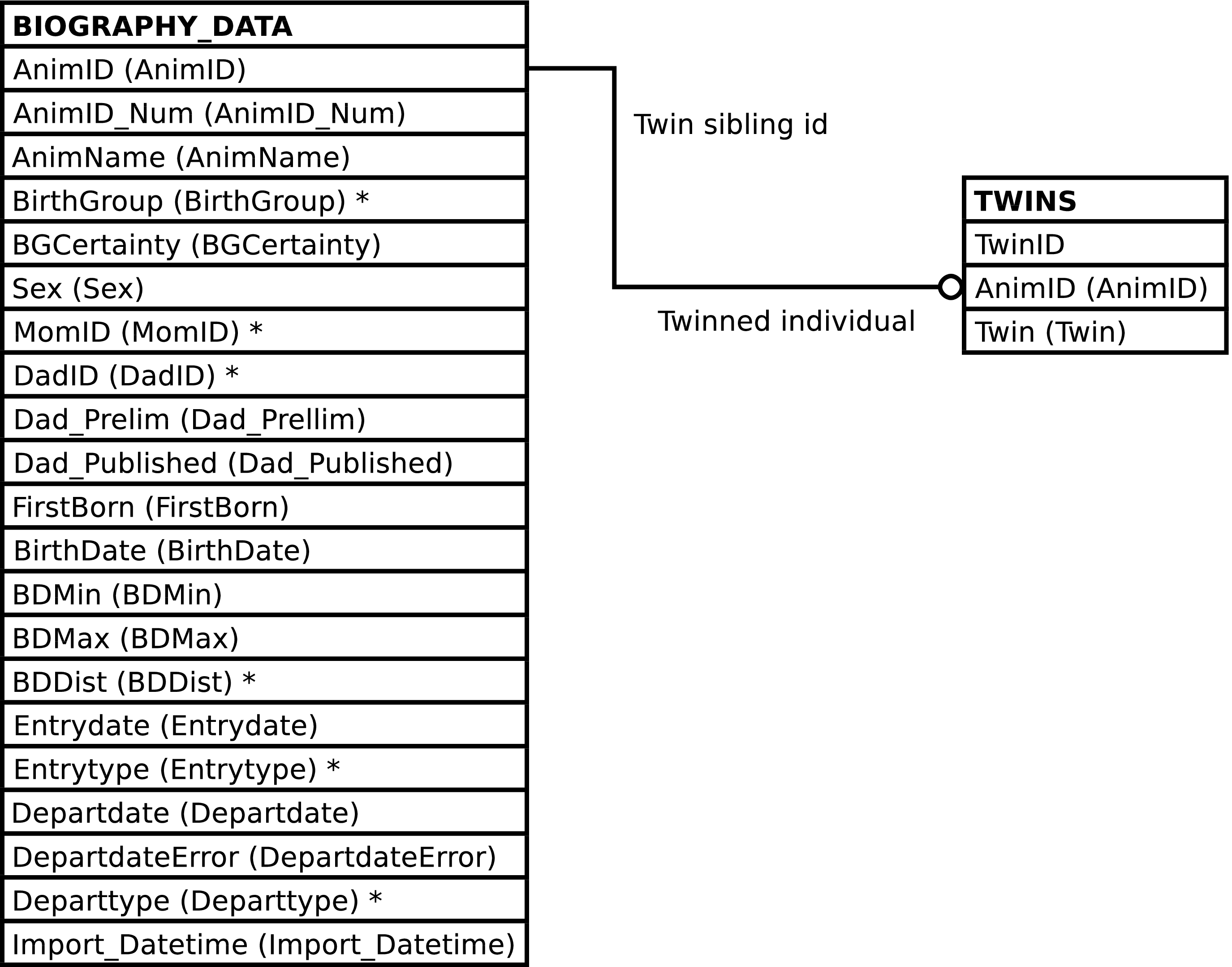
| Column | From | Description |
|---|---|---|
| AnimID | BIOGRAPHY_DATA.AnimID | Identifier of the individual. |
| AnimID_Num | BIOGRAPHY_DATA.AnimID_Num | Identifier for the individual in the SIV study. |
| AnimName | BIOGRAPHY_DATA.AnimName | Name of the individual. |
| BirthGroup | BIOGRAPHY_DATA.BirthGroup | Birth community of the individual. |
| BGCertainty | BIOGRAPHY_DATA.BGCertainty | Certainty of the individual's birth community. |
| Sex | BIOGRAPHY_DATA.Sex | Sex of the individual. |
| MomID | BIOGRAPHY_DATA.MomID | Identifier of the individual's mother. |
| DadID | BIOGRAPHY_DATA.DadID | Identifier of the individual's father. |
| Dad_Prelim | BIOGRAPHY_DATA.Dad_Prelim | Whether paternity is preliminary. |
| Dad_Published | BIOGRAPHY_DATA.Dad_Published | Whether paternity has been published. |
| FirstBorn | BIOGRAPHY_DATA.FirstBorn | Whether the individual is the mother's firstborn. |
| Birthdate | BIOGRAPHY_DATA.Birthdate | Birth date of the individual. |
| BDMin | BIOGRAPHY_DATA.BDMin | Minimum possible birth date. |
| BDMax | BIOGRAPHY_DATA.BDMax | Maximum possible birth date. |
| BDDist | BIOGRAPHY_DATA.BDDist | Probability distribution of the individual's birth date estimate. |
| Entrydate | BIOGRAPHY_DATA.Entrydate | Individual's date of entry into the study. |
| Entrytype | BIOGRAPHY_DATA.Entrytype | Individual's method of entry into the study. |
| Departdate | BIOGRAPHY_DATA.Departdate | Individual's date of departure from the study. |
| DepartdateError | BIOGRAPHY_DATA.DepartdateError | Degree of error in departure date. |
| Departtype | BIOGRAPHY_DATA.Departtype | Method of individual's departure from the study. |
| ImportDatetime | BIOGRAPHY_DATA.Import_Datetime | Timestamp of import from the master Access database. |
| Twin | TWINS.Twin | Identifier of the individual's twin. |
INSERTing into BIOGRAPHY inserts rows into
BIOGRAPHY_DATA as expected. A row is
inserted into the TWINS table if the
Twin value is non-NULL, otherwise a
TWINS row is not inserted.
Updating BIOGRAPHY updates the rows of
BIOGRAPHY_DATA as expected. Setting the
Twin column to NULL results in deletion of a related
TWINS row, if any exists. Setting the Twin
column to a non-NULL value either updates the existing
TWINS.Twin value or
creates a new TWINS row, as
necessary.
Deleting rows from BIOGRAPHY deletes rows from BIOGRAPHY_DATA and TWINS, as expected.
The purpose of the BIOGRAPHY_UPLOAD view is to provide a convenient interface for uploading the master Access biography table into the Gombe-MI BIOGRAPHY_DATA table. It contains columns for each of the columns in the master Access biography table, named as they are named in the master table.
Caution
Character case is significant in BIOGRAPHY_UPLOAD's column names. The column names must be written exactly as shown (and enclosed in double quote characters (") when used in SQL). This is to match Duke's column names and avoid having to change the column headings when uploading Duke's data.
BIOGRAPHY_UPLOAD provides features upon data INSERT to ease
the upload process. It serves to translate the column names in
the master Access biography table into the column names in
BIOGRAPHY_DATA. It removes trailing spaces from
all textual columns. The
BIOGRAPHY_DATA.Dad_Prelim
column is set to TRUE when the BIOGRAPHY_UPLOAD.B_DadID column
ends in _prelim and FALSE
otherwise. The suffix _prelim is
removed from the BIOGRAPHY_UPLOAD.B_DadID value when it is stored
in the
BIOGRAPHY_DATA.DadID
column.
Figure 5.3. Query Defining the BIOGRAPHY_UPLOAD View
SELECT biography_data.animid::TEXT AS "B_AnimID"

     , biography_data.animid_num::TEXT AS "B_AnimID_num"

     , biography_data.animname::TEXT AS "B_AnimName"

     , biography_data.birthgroup::TEXT AS "B_BirthGroup"

     , biography_data.bgcertainty::TEXT AS "B_BGCertainty"

     , biography_data.sex::TEXT AS "B_Sex"

     , biography_data.momid::TEXT AS "B_MomID"

     , CASE

         WHEN biography_data.dad_prelim THEN

           (biography_data.dadid || 'gmi_dadid_prelim')::TEXT

         ELSE

           biography_data.dadid::TEXT

       END AS "B_DadID"

     , biography_data.dad_published AS "B_DadID_publication_info"

     , biography_data.firstborn::TEXT AS "B_FirstBorn"

     , biography_data.birthdate AS "B_Birthdate"

     , biography_data.bdmin AS "B_BDMin"

     , biography_data.bdmax AS "B_BDMax"

     , biography_data.bddist::TEXT AS "B_BDDist"

     , biography_data.entrydate AS "B_Entrydate"

     , biography_data.entrytype::TEXT AS "B_Entrytype"

     , biography_data.departdate AS "B_Departdate"

     , biography_data.departdateerror AS "B_DepartdateError"

     , biography_data.departtype::TEXT AS "B_Departtype"

  FROM biography_data
;
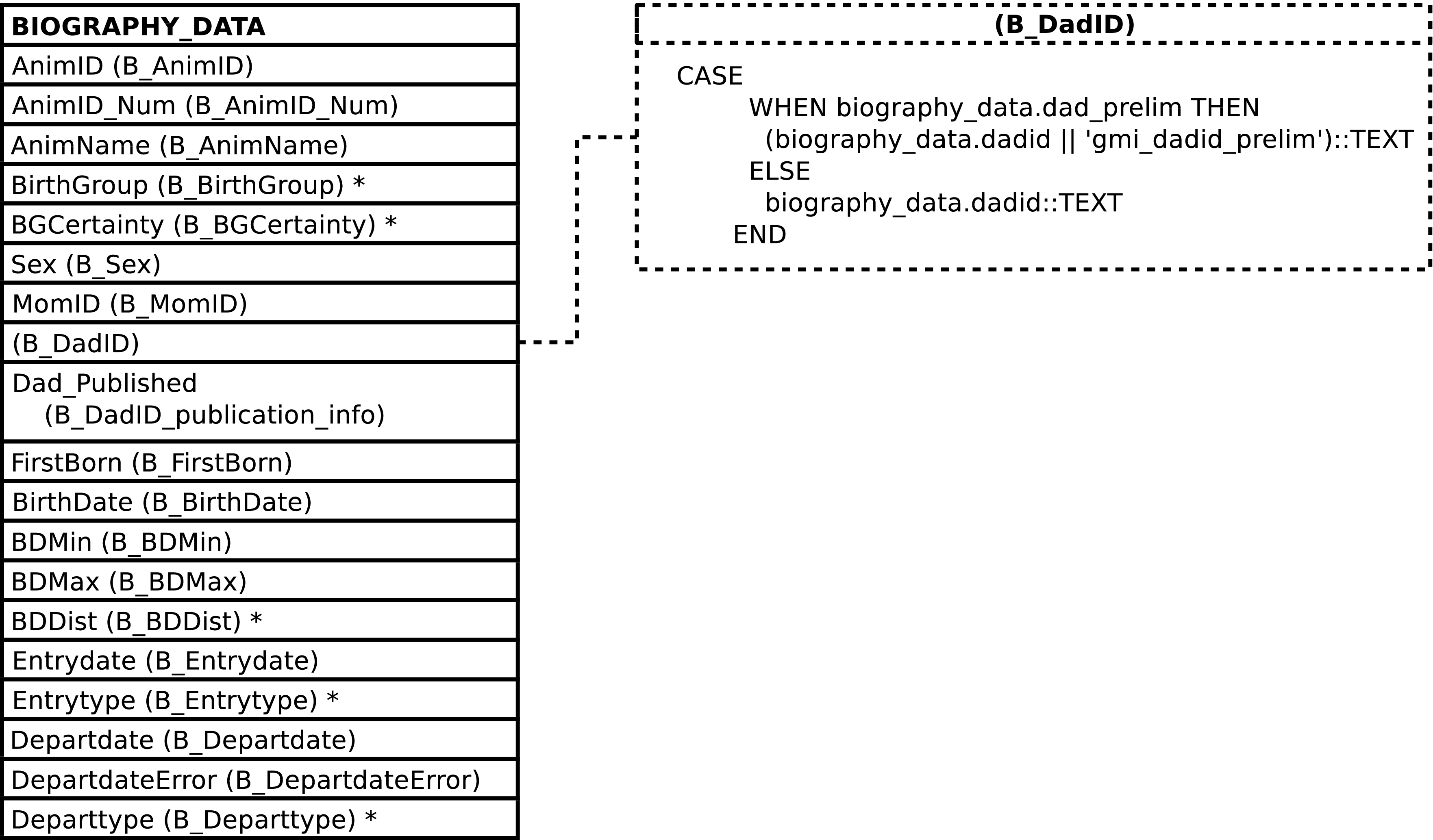
Because there is nearly[48] a one-to-one match between the columns in this view and the master Access table there is no additional documentation of this view's columns. See the Gombe Chimp Database Handbook and the BIOGRAPHY_DATA table for further information.
INSERTing into this view trims trailing spaces from all inserted textual data. Non-textual data is inserted unaltered.
Although it is not recommended to do anything other than INSERT into this view as part of a bulk upload of the master Access biography table, there are no special restrictions on the use of this view. SELECT, INSERT, UPDATE, and DELETE are all allowed and perform the expected operations on the underlying table.
CHIMPS contains one row per BIOGRAPHY_DATA
row plus one extra row for each twin. The additional rows are
duplicates of each twin, and are used only when the twins are were
indistinguishable in the field (e.g., observers
used TW1 or TW2 in place of
the twin's name).
This view should be used for querying instead of
BIOGRAPHY_DATA, so long as it is safe to
consider the temporary identifiers used when the twins cannot be
distinguished as representative of individuals that are identical
to, but distinct from, the twins themselves.[49] The CHIMPS view contains all of
BIOGRAPHY_DATA's columns, plus the
ChimpID column, plus the
AnimID of the individual's twin,
from TWINS.Twin, if a
twin. Of course in most cases there is no twin and the
Twin column will be NULL.[50]
Figure 5.5. Query Defining the CHIMPS View
SELECT chimpids.chimpid AS chimpid

     , biography_data.animid AS animid

     , biography_data.animid_num AS animid_num

     , biography_data.animname AS animname

     , biography_data.birthgroup AS birthgroup

     , biography_data.bgcertainty AS bgcertainty

     , biography_data.sex AS sex

     , biography_data.momid AS momid

     , biography_data.dadid AS dadid

     , biography_data.dad_prelim AS dad_prelim

     , biography_data.dad_published AS dad_published

     , biography_data.firstborn AS firstborn

     , biography_data.birthdate AS birthdate

     , biography_data.bdmin AS bdmin

     , biography_data.bdmax AS bdmax

     , biography_data.bddist AS bddist

     , biography_data.entrydate AS entrydate

     , biography_data.entrytype AS entrytype

     , biography_data.departdate AS departdate

     , biography_data.departdateerror AS departdateerror

     , biography_data.departtype AS departtype

     , biography_data.import_datetime AS import_datetime

     , twins.twin AS twin

  FROM biography_data

       JOIN chimpids ON (chimpids.animid = biography_data.animid)

       LEFT OUTER JOIN twins ON (twins.animid = biography_data.animid)
;
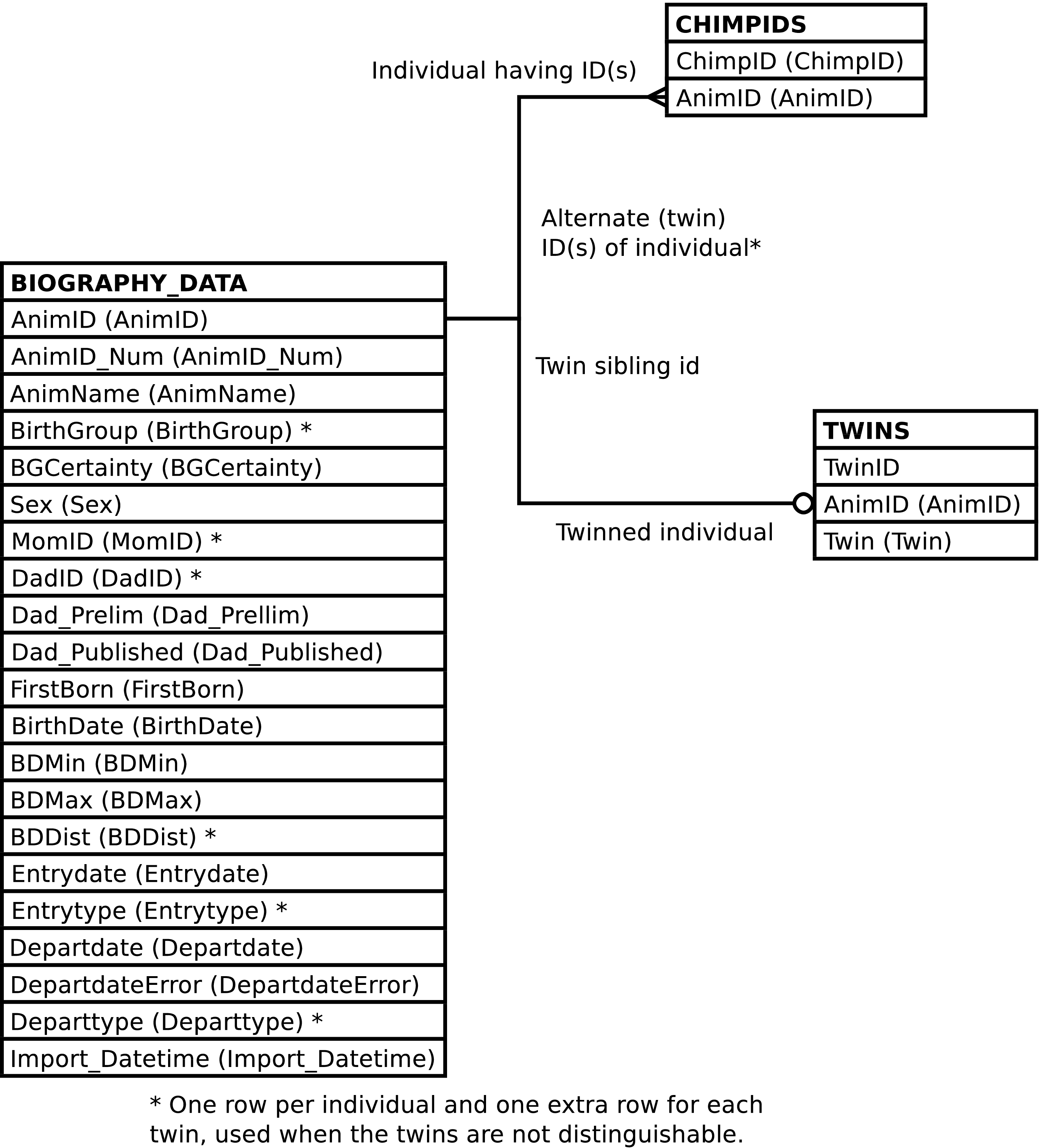
| Column | From | Description |
|---|---|---|
| ChimpID | CHIMPIDS.ChimpID | Identifier or alternate identifier of the individual. |
| AnimID | BIOGRAPHY_DATA.AnimID | Identifier of the individual. |
| AnimID_Num | BIOGRAPHY_DATA.AnimID_Num | Identifier of the individual used in SIV study. |
| AnimName | BIOGRAPHY_DATA.AnimName | Name of the individual. |
| BirthGroup | BIOGRAPHY_DATA.BirthGroup | Birth community of the individual. |
| BGCertainty | BIOGRAPHY_DATA.BGCertainty | Certainty of the individual's birth community. |
| Sex | BIOGRAPHY_DATA.Sex | Sex of the individual. |
| MomID | BIOGRAPHY_DATA.MomID | Identifier of the individual's mother. |
| DadID | BIOGRAPHY_DATA.DadID | Identifier of the individual's father. |
| Dad_Prelim | BIOGRAPHY_DATA.Dad_Prelim | Whether paternity is preliminary. |
| Dad_Published | BIOGRAPHY_DATA.Dad_Published | Whether paternity has been published. |
| FirstBorn | BIOGRAPHY_DATA.FirstBorn | Whether the individual is the mother's firstborn. |
| Birthdate | BIOGRAPHY_DATA.Birthdate | Birth date of the individual. |
| BDMin | BIOGRAPHY_DATA.BDMin | Minimum possible birth date. |
| BDMax | BIOGRAPHY_DATA.BDMax | Maximum possible birth date. |
| BDDist | BIOGRAPHY_DATA.BDDist | Probability distribution of the individual's birth date estimate. |
| Entrydate | BIOGRAPHY_DATA.Entrydate | Individual's date of entry into the study. |
| Entrytype | BIOGRAPHY_DATA.Entrytype | Individual's method of entry into the study. |
| Departdate | BIOGRAPHY_DATA.Departdate | Individual's date of departure from the study. |
| DepartdateError | BIOGRAPHY_DATA.DepartdateError | Degree of error in departure date. |
| Departtype | BIOGRAPHY_DATA.Departtype | Method of individual's departure from the study. |
| ImportDatetime | BIOGRAPHY_DATA.Import_Datetime | Timestamp of import from the master Access database. |
| Twin | TWINS.Twin | Identifier of the individual's twin. |
The CHIMPS view cannot be INSERTed into, UPDATEed, or DELETEd from.
Tip
Use the BIOGRAPHY view instead.
The purpose of the COMMUNITY_MEMBERSHIP_UPLOAD view is to provide a convenient interface for uploading the master Access community_membership table into the Gombe-MI COMMUNITY_MEMBERSHIP table. It contains columns for each of the columns in the master Access community_membership table, named as they are named in the master table.
COMMUNITY_MEMBERSHIP_UPLOAD provides two features to ease the upload process. It serves to translate the column names in the master Access community_membership table into the column names in COMMUNITY_MEMBERSHIP. And it removes trailing spaces from all textual columns.
Figure 5.7. Query Defining the COMMUNITY_MEMBERSHIP_UPLOAD View
SELECT community_membership.animid::TEXT AS cm_b_animid

     , community_membership.start_date AS cm_start_date

     , community_membership.end_date AS cm_end_date

     , community_membership.community_id::TEXT AS cm_cl_community_id

     , community_membership.start_source AS cm_start_source

     , community_membership.end_source AS cm_end_source

  FROM community_membership
;
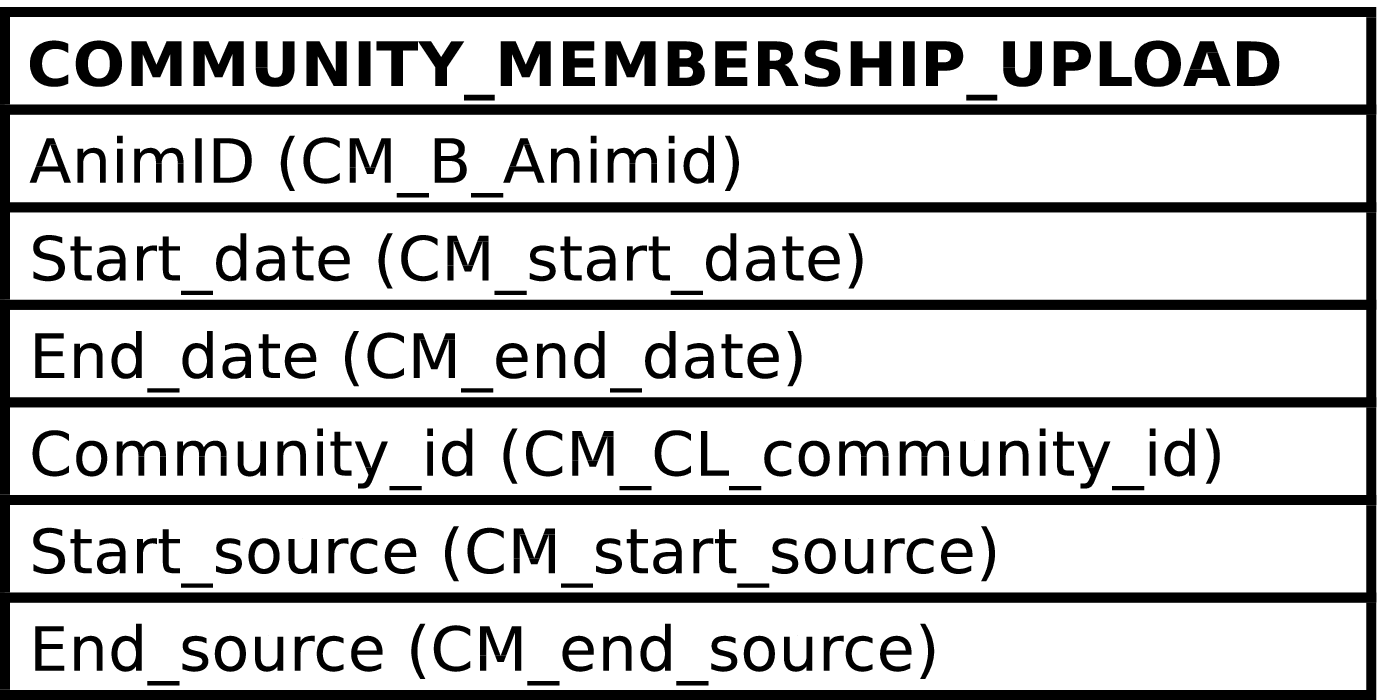
Because there is a one-to-one match between the columns in this view and the master Access table there is no additional documentation of this view's columns. See the Gombe Chimp Database Handbook and the COMMUNITY_MEMBERSHIP table for further information.
INSERTing into this view trims trailing spaces from all inserted textual data. Non-textual data is inserted unaltered.
Although it is not recommended to do anything other than INSERT into this view as part of a bulk upload of the master Access community_membership table, there are no special restrictions on the use of this view. SELECT, INSERT, UPDATE, and DELETE are all allowed and perform the expected operations on the underlying table.
FOCAL_FOLLOWS contains one row per FOLLOWS row.
The purpose of the FOCAL_FOLLOWS view is to provide a convenient interface for deleting and creating follows.
In the case of twins, the column suffixed with the number “2” always contains the twin with the ChimpID which is alphabetically last.
Figure 5.9. Query Defining the FOCAL_FOLLOWS View: Part I
SELECT follows.followid AS followid

     , follows.date AS date

     , moms.chimpid AS mom

     , infants.infant AS infant

     , infants.infant2 AS infant2

     , sibs.sib AS sib

     , sibs.sib2 AS sib2

  FROM follows

         JOIN followparts AS moms

              ON (moms.followid = follows.followid)

         JOIN followroles AS momroles

              ON (momroles.role = moms.role

                  AND momroles.function = 'M')

         JOIN (SELECT q.followid AS followid

                    , q.infant1 AS infant

                    , CASE

                        WHEN q.infant2 = q.infant1

                          THEN NULL

                        ELSE

                          q.infant2

                        END AS infant2

                 FROM

                   (SELECT followparts.followid AS followid

                         , FIRST_VALUE(followparts.chimpid) OVER w AS infant1

                         , LAST_VALUE(followparts.chimpid) OVER w AS infant2

                         , ROW_NUMBER() OVER w AS rn

                      FROM followparts

                           JOIN followroles

                                ON (followroles.role = followparts.role

                               AND followroles.function = 'I')

                      WINDOW w AS (PARTITION BY followparts.followid

                                   ORDER BY followparts.chimpid

                                   RANGE BETWEEN UNBOUNDED PRECEDING

                                         AND UNBOUNDED FOLLOWING)

                   ) AS q

                 WHERE q.rn = 1

              ) AS infants

              ON (infants.followid = follows.followid)
Figure 5.10. Query Defining the FOCAL_FOLLOWS View: Part II
         LEFT OUTER JOIN

              (SELECT q.followid AS followid

                    , q.sib1 AS sib

                    , CASE

                        WHEN q.sib2 = q.sib1

                          THEN NULL

                        ELSE

                          q.sib2

                        END AS sib2

                 FROM

                   (SELECT followparts.followid AS followid

                         , FIRST_VALUE(followparts.chimpid) OVER w AS sib1

                         , LAST_VALUE(followparts.chimpid) OVER w AS sib2

                         , ROW_NUMBER() OVER w AS rn

                      FROM followparts

                           JOIN followroles

                                ON (followroles.role = followparts.role

                               AND followroles.function = 'S')

                      WINDOW w AS (PARTITION BY followparts.followid

                                   ORDER BY followparts.chimpid

                                   RANGE BETWEEN UNBOUNDED PRECEDING

                                         AND UNBOUNDED FOLLOWING)

                   ) AS q

                 WHERE q.rn = 1

              ) AS sibs

              ON (sibs.followid = follows.followid)
;
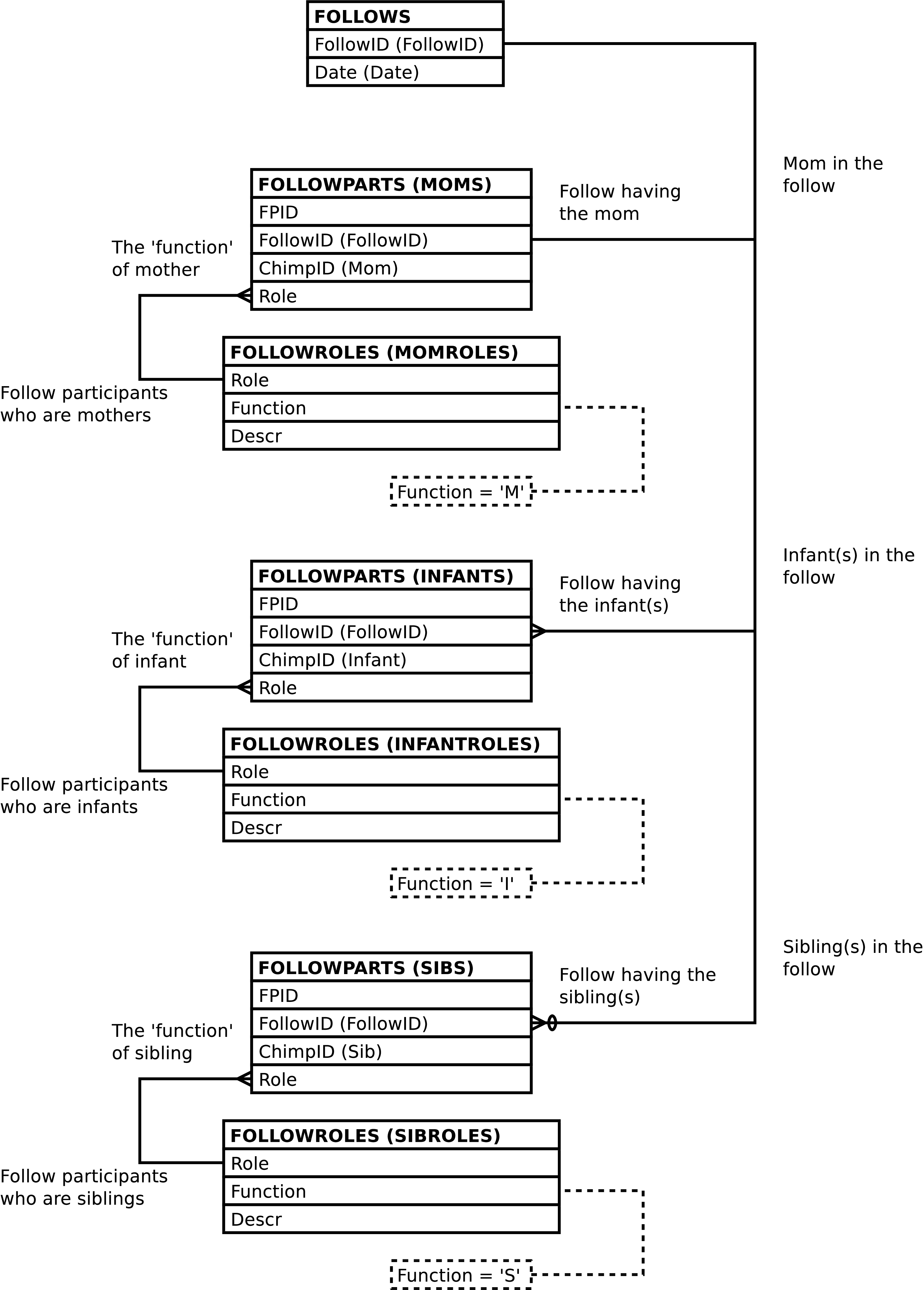
| Column | From | Description |
|---|---|---|
| FollowID | FOLLOWS.FollowID | Unique integer identifying the follow. |
| Date | FOLLOWS.Date | The date of the follow. |
| Mom | FOLLOWPARTS.ChimpID | The ChimpID of the mother in the follow. |
| Infant | FOLLOWPARTS.ChimpID | The ChimpID of an infant in the follow. |
| Infant2 | FOLLOWPARTS.ChimpID | The ChimpID of a
second infant in the follow, or NULL if the infant
is not a twin. |
| Sib | FOLLOWPARTS.ChimpID | The ChimpID of a
sibling in the follow, or NULL if there is no
sibling focal. |
| Sib2 | FOLLOWPARTS.ChimpID | The ChimpID of a
second sibling in the follow, or NULL if the sibling
is not a twin. |
Altering the FOCAL_FOLLOWS view alters the content of the underlying tables in the fashion described below.
Inserting a row into the FOCAL_FOLLOWS view inserts a
row into the FOLLOWS table, as expected.
A row is also inserted into the
FOLLOWPARTS table for each non-NULL
Mom,
Infant,
Infant2,
Sib, and
Sib2 value. The inserted
FOLLOWPARTS.ChimpID
value is the Mom,
Infant,
Infant2,
Sib, or
Sib2 value and the
FOLLOWPARTS.Role
value is set to the
corresponding M,
I,
or S value.
Note
On insert there is no distinction between
Infant and
Infant2, nor a distinction
between Sib and
Sib2. Either may contain
the alphabetically larger
ChimpID, and when not a
twin, either may be NULL.
Note
When inserting into FOCAL_FOLLOWS it is not
recommended to set the
FollowID value. Omitting
this column or supplying a NULL value will allow the
system to automatically generate an id.
Updating the columns of the FOCAL_FOLLOWS view updates the underlying tables as expected with the following exceptions:
Setting any one of the
Mom,
Infant, or
Sib values to NULL deletes
the corresponding FOLLOWPARTS row.
Setting any one of the
Mom,
Infant, or
Sib values to non-NULL,
where the original value was NULL inserts a corresponding
row into the FOLLOWPARTS table as
described above regards insertion into FOCAL_FOLLOWS.
Tip
Updating the columns of FOCAL_FOLLOWS, Date excepted, will probably result in data integrity violations. Deleting and re-uploading the follow may be a better option.
Note
On update there is no distinction between
Infant and
Infant2, nor a distinction
between Sib and
Sib2. Either may contain
the alphabetically larger
ChimpID, and when not a
twin, either may be NULL.
However, it is an error to attempt to “swap” twins -- e.g., by setting the Infant value to the Infant2 value or vice-versa.
Deleting rows from FOCAL_FOLLOWS deletes rows from the underlying tables as expected. Because deleting a row from FOLLOWS automatically deletes all information related to the follow this is a convenient way to remove follows from the database.
DATASHEETS contains one row per EVENTS row plus one row per DISTANCES row. It's purpose is to produce a report resembling[51] the data entry sheets.
The columns of the DATASHEETS view resemble the columns on the field data entry collection sheets. Due to the large number of these columns and the degree to which data is transformed when uploaded into GOMBE-MI the details regarding individual columns are not documented.
Figure 5.12. Query Defining the DATASHEETS View: Part I
SELECT *

  FROM

    (SELECT datasheet_events.followid AS followid

          , datasheet_events.intid AS intid

          , datasheet_events.date AS date

          , datasheet_events.time AS time

          , datasheet_events.mom AS mom

          , datasheet_events.infant AS infant

          , datasheet_events.infant2 AS infant2

          , datasheet_events.sib AS sib

          , datasheet_events.sib2 AS sib2

          , datasheet_events.eid AS eid

          , datasheet_events.behavior AS e_behavior

          , datasheet_events.position AS e_position

          , datasheet_events.uncertain AS e_uncertain

          , datasheet_events.e_mom AS e_mom

          , datasheet_events.e_mompart AS e_mompart

          , datasheet_events.e_mom_foodpart AS e_mom_foodpart

          , datasheet_events.e_mom_foodkind AS e_mom_foodkind

          , datasheet_events.e_mom_fishpart AS e_mom_fishpart

          , datasheet_events.e_mom_fishkind AS e_mom_fishkind

          , datasheet_events.e_mom_fishresult AS e_mom_fishresult

          , datasheet_events.e_mom_voc AS e_mom_voc

          , datasheet_events.e_mom_play AS e_mom_play

          , datasheet_events.e_mom_rest AS e_mom_rest

          , datasheet_events.e_infant AS e_infant

          , datasheet_events.e_infantpart AS e_infantpart

          , datasheet_events.e_infant_foodpart AS e_infant_foodpart

          , datasheet_events.e_infant_foodkind AS e_infant_foodkind

          , datasheet_events.e_infant_fishpart AS e_infant_fishpart

          , datasheet_events.e_infant_fishkind AS e_infant_fishkind

          , datasheet_events.e_infant_fishresult AS e_infant_fishresult

          , datasheet_events.e_infant_voc AS e_infant_voc

          , datasheet_events.e_infant_play AS e_infant_play

          , datasheet_events.e_infant_ride AS e_infant_ride

          , datasheet_events.e_infant_rest AS e_infant_rest

          , datasheet_events.e_sib as e_sib

          , datasheet_events.e_sibpart AS e_sibpart

          , datasheet_events.e_sib_foodpart AS e_sib_foodpart

          , datasheet_events.e_sib_foodkind AS e_sib_foodkind

          , datasheet_events.e_sib_fishpart AS e_sib_fishpart

          , datasheet_events.e_sib_fishkind AS e_sib_fishkind

          , datasheet_events.e_sib_fishresult AS e_sib_fishresult

          , datasheet_events.e_sib_voc AS e_sib_voc

          , datasheet_events.e_sib_play AS e_sib_play

          , datasheet_events.e_sib_ride AS e_sib_ride

          , datasheet_events.e_sib_rest AS e_sib_rest

          , datasheet_events.e_nonfocal AS e_nonfocal

          , datasheet_events.e_nonfocalpart as e_nonfocalpart

          , datasheet_events.e_baboon AS e_baboon

          , datasheet_events.e_baboonpart AS e_baboonpart
Figure 5.13. Query Defining the DATASHEETS View: Part II
          , NULL AS d_distid

          , NULL AS d_uncertain

          , NULL AS d_mom

          , NULL AS d_infant

          , NULL AS d_sib

          , NULL AS d_distance

          , datasheet_events.i_comment AS i_comment

          , datasheet_events.e_comment AS e_comment

        FROM datasheet_events
Figure 5.14. Query Defining the DATASHEETS View: Part III
     UNION

     SELECT family_dists.followid AS followid

          , family_dists.intid AS intid

          , family_dists.date AS date

          , family_dists.time AS time

          , family_dists.mom AS mom

          , family_dists.infant AS infant

          , family_dists.infant2 AS infant2

          , family_dists.sib AS sib

          , family_dists.sib2 AS sib2

          , NULL AS eid

          , NULL AS e_behavior

          , NULL AS e_position

          , NULL AS e_uncertain

          , NULL AS e_mom

          , NULL AS e_mompart

          , NULL AS e_mom_foodpart

          , NULL AS e_mom_foodkind

          , NULL AS e_mom_fishpart

          , NULL AS e_mom_fishkind

          , NULL AS e_mom_fishresult

          , NULL AS e_mom_voc

          , NULL AS e_mom_play

          , NULL AS e_mom_rest

          , NULL AS e_infant

          , NULL AS e_infantpart

          , NULL AS e_infant_foodpart

          , NULL AS e_infant_foodkind

          , NULL AS e_infant_fishpart

          , NULL AS e_infant_fishkind

          , NULL AS e_infant_fishresult

          , NULL AS e_infant_voc

          , NULL AS e_infant_play

          , NULL AS e_infant_ride

          , NULL AS e_infant_rest

          , NULL AS e_sib

          , NULL AS e_sibpart

          , NULL AS e_sib_foodpart

          , NULL AS e_sib_foodkind

          , NULL AS e_sib_fishpart

          , NULL AS e_sib_fishkind

          , NULL AS e_sib_fishresult

          , NULL AS e_sib_voc

          , NULL AS e_sib_play

          , NULL AS e_sib_ride

          , NULL AS e_sib_rest

          , NULL AS e_nonfocal

          , NULL AS e_nonfocalpart

          , NULL AS e_baboon

          , NULL AS e_baboonpart
Figure 5.15. Query Defining the DATASHEETS View: Part IV
          , family_dists.distid AS d_distid

          , family_dists.uncertain AS d_uncertain

          , family_dists.d_mom AS d_mom

          , family_dists.d_infant AS d_infant

          , family_dists.d_sib AS d_sib

          , family_dists.distance AS d_distance

          , family_dists.i_comment AS i_comment

          , NULL AS e_comment

       FROM family_dists

    ) AS q

  ORDER BY q.date

         , q.time

         , q.e_behavior

         , q.e_mom IS NULL

         , q.e_infant IS NULL

         , q.e_nonfocal

         , q.d_mom IS NULL

         , q.d_infant IS NULL
;
Figure 5.16. Entity Relationship Diagram of the DATASHEETS View
The DATASHEETS view is a combination of the DATASHEET_EVENTS and FAMILY_DISTS views, organized and sorted in a fashion such that the rows “interleave”. See the documentation on these views for further detail regards the content of the DATASHEETS view.
Only SELECT is allowed on
DATASHEETS. INSERT, UPDATE,
and DELETE are not allowed.
Related views which may be used to modify the database are: DATASHEET_EVENTS, FAMILY_EVENTS, FAMILY_DISTS, and FOLLOW_INTERVALS.
DATASHEET_EVENTS contains one row per EVENTS row. It's primary purpose is to produce a report resembling the behavioral event portion of the data entry sheets. It is also possible to use the DATASHEET_EVENTS view to alter database content. For more on this see below.
The columns of the DATASHEET_EVENTS view resemble the behavior related columns on the field data entry collection sheets. Due to the large number of these columns and the degree to which data is transformed when uploaded into GOMBE-MI the details regarding individual columns are not documented.
The overall structure of the DATASHEET_EVENTS view is as
follows: The FAMILY_EVENTS view is extended,
per possible participant, with all of the columns that appear in
the EVENTS related “sub-tables”.
So, for example, there are vocalization columns containing
VOCS.Vocalization
values for each of: mother, infant, sib, and non-focal. If the
behavioral event is not a vocalization or respective individual
is not involved in the behavioral event then the value of the
individual's vocalization column is NULL. If the behavioral
event is a vocalization then the column(s) corresponding to the
individual(s) involved in the event contain the vocalization
made by the respective individual. This pattern is repeated for
all of the EVENTS
table's “sub-tables”.
Figure 5.17. Query Defining the DATASHEET_EVENTS View: Part I
SELECT family_events.followid AS followid

     , family_events.intid AS intid

     , family_events.eid AS eid

     , family_events.e_mompid AS e_mompid

     , family_events.e_infantpid AS e_infantpid

     , family_events.e_sibpid AS e_sibpid

     , family_events.e_nonfocalpid AS e_nonfocalpid

     , family_events.date AS date

     , family_events.time AS time

     , family_events.mom AS mom

     , family_events.infant AS infant

     , family_events.infant2 AS infant2

     , family_events.sib AS sib

     , family_events.sib2 AS sib2

     , family_events.behavior AS behavior

     , family_events.position AS position

     , family_events.uncertain AS uncertain
Figure 5.18. Query Defining the DATASHEET_EVENTS View: Part II
     , family_events.e_mom AS e_mom

     , family_events.e_mompart AS e_mompart

     , CASE

         WHEN family_events.e_mom IS NOT NULL THEN

           mom_eats.foodpart

         ELSE

           NULL

       END AS e_mom_foodpart

     , CASE

         WHEN family_events.e_mom IS NOT NULL THEN

           mom_eats.foodkind

         ELSE

           NULL

       END AS e_mom_foodkind

     , CASE

         WHEN family_events.e_mom IS NOT NULL THEN

           mom_fished.foodpart

         ELSE

           NULL

       END AS e_mom_fishpart

     , CASE

         WHEN family_events.e_mom IS NOT NULL THEN

           mom_fished.foodkind

         ELSE

           NULL

       END AS e_mom_fishkind

     , CASE

         WHEN family_events.e_mom IS NOT NULL THEN

           mom_fished.result

         ELSE

           NULL

       END AS e_mom_fishresult

     , CASE

         WHEN family_events.e_mom IS NOT NULL THEN

           mom_vocs.vocalization

         ELSE

           NULL

       END AS e_mom_voc

     , CASE

         WHEN family_events.e_mom IS NOT NULL THEN

           mom_plays.play

         ELSE

           NULL

       END AS e_mom_play

     , CASE

         WHEN family_events.e_mom IS NOT NULL THEN

           mom_rests.rest

         ELSE

           NULL

       END AS e_mom_rest
Figure 5.19. Query Defining the DATASHEET_EVENTS View: Part III
     , family_events.e_infant AS e_infant

     , family_events.e_infantpart AS e_infantpart

     , CASE

         WHEN family_events.e_infant IS NOT NULL THEN

           inf_eats.foodpart

         ELSE

           NULL

       END AS e_infant_foodpart

     , CASE

         WHEN family_events.e_infant IS NOT NULL THEN

           inf_eats.foodkind

         ELSE

           NULL

       END AS e_infant_foodkind

     , CASE

         WHEN family_events.e_infant IS NOT NULL THEN

           inf_fished.foodpart

         ELSE

           NULL

       END AS e_infant_fishpart

     , CASE

         WHEN family_events.e_infant IS NOT NULL THEN

           inf_fished.foodkind

         ELSE

           NULL

       END AS e_infant_fishkind

     , CASE

         WHEN family_events.e_infant IS NOT NULL THEN

           inf_fished.result

         ELSE

           NULL

       END AS e_infant_fishresult

     , CASE

         WHEN family_events.e_infant IS NOT NULL THEN

           inf_vocs.vocalization

         ELSE

           NULL

       END AS e_infant_voc

     , CASE

         WHEN family_events.e_infant IS NOT NULL THEN

           inf_plays.play

         ELSE

           NULL

       END AS e_infant_play

     , CASE

         WHEN family_events.e_infant IS NOT NULL THEN

           inf_rides.ride

         ELSE

           NULL

       END AS e_infant_ride

     , CASE

         WHEN family_events.e_infant IS NOT NULL THEN

           inf_rests.rest

         ELSE

           NULL

       END AS e_infant_rest
Figure 5.20. Query Defining the DATASHEET_EVENTS View: Part IV
     , family_events.e_sib as e_sib

     , family_events.e_sibpart AS e_sibpart

     , CASE

         WHEN family_events.e_sib IS NOT NULL THEN

           sib_eats.foodpart

         ELSE

           NULL

       END AS e_sib_foodpart

     , CASE

         WHEN family_events.e_sib IS NOT NULL THEN

           sib_eats.foodkind

         ELSE

           NULL

       END AS e_sib_foodkind

     , CASE

         WHEN family_events.e_sib IS NOT NULL THEN

           sib_fished.foodpart

         ELSE

           NULL

       END AS e_sib_fishpart

     , CASE

         WHEN family_events.e_sib IS NOT NULL THEN

           sib_fished.foodkind

         ELSE

           NULL

       END AS e_sib_fishkind

     , CASE

         WHEN family_events.e_sib IS NOT NULL THEN

           sib_fished.result

         ELSE

           NULL

       END AS e_sib_fishresult

     , CASE

         WHEN family_events.e_sib IS NOT NULL THEN

           sib_vocs.vocalization

         ELSE

           NULL

       END AS e_sib_voc

     , CASE

         WHEN family_events.e_sib IS NOT NULL THEN

           sib_plays.play

         ELSE

           NULL

       END AS e_sib_play

     , CASE

         WHEN family_events.e_sib IS NOT NULL THEN

           sib_rides.ride

         ELSE

           NULL

       END AS e_sib_ride

     , CASE

         WHEN family_events.e_sib IS NOT NULL THEN

           sib_rests.rest

         ELSE

           NULL

       END AS e_sib_rest
Figure 5.21. Query Defining the DATASHEET_EVENTS View: Part V
     , family_events.e_nonfocal AS e_nonfocal

     , family_events.e_nonfocalpart as e_nonfocalpart

     , family_events.e_baboon AS e_baboon

     , family_events.e_baboonpart AS e_baboonpart

     , family_events.e_comment AS e_comment

     , family_events.i_comment AS i_comment
Figure 5.22. Query Defining the DATASHEET_EVENTS View: Part VI
  FROM family_events

         LEFT OUTER JOIN vocs AS mom_vocs

           ON (mom_vocs.eid = family_events.eid

               AND family_events.e_mom IS NOT NULL)

         LEFT OUTER JOIN plays AS mom_plays

           ON (mom_plays.eid = family_events.eid

               AND family_events.e_mom IS NOT NULL)

         LEFT OUTER JOIN rests AS mom_rests

           ON (mom_rests.eid = family_events.eid

               AND family_events.e_mom IS NOT NULL)

         LEFT OUTER JOIN eats AS mom_eats

           ON (mom_eats.eid = family_events.eid

               AND family_events.e_mom IS NOT NULL)

         LEFT OUTER JOIN fished AS mom_fished

           ON (mom_fished.eid = family_events.eid

               AND family_events.e_mom IS NOT NULL)

         LEFT OUTER JOIN vocs AS inf_vocs

           ON (inf_vocs.eid = family_events.eid

               AND family_events.e_infant IS NOT NULL)

         LEFT OUTER JOIN plays AS inf_plays

           ON (inf_plays.eid = family_events.eid

               AND family_events.e_infant IS NOT NULL)

         LEFT OUTER JOIN rides AS inf_rides

           ON (inf_rides.eid = family_events.eid

               AND family_events.e_infant IS NOT NULL)

         LEFT OUTER JOIN rests AS inf_rests

           ON (inf_rests.eid = family_events.eid

               AND family_events.e_infant IS NOT NULL)

         LEFT OUTER JOIN eats AS inf_eats

           ON (inf_eats.eid = family_events.eid

               AND family_events.e_infant IS NOT NULL)

         LEFT OUTER JOIN fished AS inf_fished

           ON (inf_fished.eid = family_events.eid

               AND family_events.e_infant IS NOT NULL)

         LEFT OUTER JOIN vocs AS sib_vocs

           ON (sib_vocs.eid = family_events.eid

               AND family_events.e_sib IS NOT NULL)

         LEFT OUTER JOIN plays AS sib_plays

           ON (sib_plays.eid = family_events.eid

               AND family_events.e_sib IS NOT NULL)

         LEFT OUTER JOIN rides AS sib_rides

           ON (sib_rides.eid = family_events.eid

               AND family_events.e_sib IS NOT NULL)

         LEFT OUTER JOIN rests AS sib_rests

           ON (sib_rests.eid = family_events.eid

               AND family_events.e_sib IS NOT NULL)

         LEFT OUTER JOIN eats AS sib_eats

           ON (sib_eats.eid = family_events.eid

               AND family_events.e_sib IS NOT NULL)

         LEFT OUTER JOIN fished AS sib_fished

           ON (sib_fished.eid = family_events.eid

               AND family_events.e_sib IS NOT NULL);
Figure 5.23. Entity Relationship Diagram of the DATASHEET_EVENTS View
The DATASHEET_EVENTS view contains all the columns in the FAMILY_EVENTS view. In the interest of brevity these columns are not documented here. Please refer to the table describing the columns of FAMILY_EVENTS for information on these columns.
The columns on DATASHEET_EVENTS that are unique to the view are all from the EVENTS “sub-tables”: EATS, FISHED, PLAYS, RESTS, RIDES, and VOCS. Each column in these “sub-tables” occurs three times in the DATASHEET_EVENTS view, once for the mother, once for the infant and once for the sibling. Rather than document each column 3 times, once for each of the focals, the columns are documented only once in the table below. The columns documented below have either Mom, Infant, or Sib in place of <focal> in their column names.
The exception is the E_<focal>_ride column. There is no such column for the mother, although there is for the infant and the sibling.
| Column | From | Description |
|---|---|---|
| E_<focal>_Foodpart | EATS.Foodpart | Code indicating the food part eaten by the
focal during the event, or NULL if the focal was not
involved in a eating event. |
| E_<focal>_Foodkind | EATS.Foodkind | Code indicating (one of) the food kind(s) eaten
by the focal during the event, or NULL if the focal
was not involved in a eating event. |
| E_<focal>_Fishpart | FISHED.Foodpart | Code indicating (one of) the food part(s)
fished for by the focal during the event, or NULL if
the focal was not involved in a fishing event. |
| E_<focal>_Fishkind | FISHED.Foodkind | Code indicating the food kind fished for by the
focal during the event, or NULL if the focal was not
involved in a fishing event. |
| E_<focal>_Fishresult | FISHED.Result | Code indicating the result of the focal's
fishing attempt, or NULL if the focal was not
involved in a fishing event. |
| E_<focal>_Voc | VOCS.Vocalization | Code indicating (one of) the focal's
vocalizations made during the vocalization event, or
NULL if the focal was not involved in a vocalization
event. |
| E_<focal>_Play | PLAYS.Play | Code indicating (one of) the focal's play
activities conducted during the playing event, or
NULL if the focal was not involved in a playing
event. |
| E_<focal>_Ride | RIDES.Ride | Code indicating the focal's riding posture
during the riding event, or NULL if the focal was
not involved in a riding event. |
| E_<focal>_Rest | RESTS.Rest | Code indicating the focal's resting posture
during the resting event, or NULL if the focal was
not involved in a resting event. |
Altering the DATASHEET_EVENTS view alters the content of the underlying tables in the fashion described below.
Related views which also may be used to modify the database are: DATASHEETS, FAMILY_EVENTS, and FOLLOW_INTERVALS.
Inserting into DATASHEET_EVENTS first tests to see if
the inserted row already exists in
FAMILY_EVENTS. Unlike usual, a NULL
inserted value, or omitting the column from the insert
statement, matches any existent data value.[52] It is an error if more than one row in
FAMILY_EVENTS matches the inserted
row.[53]
If the inserted row does not already exist in FAMILY_EVENTS, inserting a row into the DATASHEET_EVENTS view inserts one row into either the FAMILY_EVENTS view, for insertion into the underlying EVENTS and PARTS tables. For further information see the FAMILY_EVENTS insert documentation.
Inserting into DATASHEET_EVENTS can also insert a row into the EVENTS “sub-tables”: EATS, FISHED, PLAYS, RESTS, RIDES, and VOCS. If the inserted row already exists on FAMILY_EVENTS then inserting into DATASHEET_EVENTS can add additional rows to the “sub-tables” related to the existing EVENTS row; as might be required, for example, when a single vocalization event is comprised of are multiple vocalizations .
It is an error to attempt to insert data into an EVENTS “sub-table” using a column pertaining to a focal when that focal is not involved in the given behavioral event. For example, it is an error to attempt to use the E_Mom_Voc column to associate a vocalization with a behavioral event involving only the infant.[54]
Updating a row in DATASHEET_EVENTS updates a row in the FAMILY_EVENTS view, updating the underlying EVENTS and PARTS tables. For further information see the FAMILY_EVENTS update documentation.
Updating DATASHEET_EVENTS can update or delete rows from EATS, FISHED, PLAYS, RESTS, RIDES, and VOCS.
Note
The examples below explicitly specify an
EVENTS.EID
value. This is solely for the purpose of brevity. Any valid
WHERE clause could be used instead to
designate the desired row in
EVENTS.
If the old values for a mom, infant, or sib
EVENTS “sub-table” row are
not NULL and the new values are all NULL then the old
row is deleted. The following example removes the
mother's HOO vocalization from the event
with an
EVENTS.EID
of 1234:
Example 5.1. Deleting The Mother's VOCS Row
UPDATE datasheet_events

       SET e_mom_voc = NULL

       WHERE eid = 1234

             AND e_mom_voc = 'HOO';
Caution
If the old vocalization value is not specified then all VOCS rows related to the event will be deleted.
If old values exist, they are replaced by new values.
Assuming the mother is involved in a vocalization the event
with an
EVENTS.EID
of 1234, the following example changes
the UNK vocalization
to HOO:
Example 5.2. Changing A Vocalization
UPDATE datasheet_events

       SET e_mom_voc = 'HOO'

       WHERE eid = 1234

             AND e_mom_voc = 'UNK';
Note
The ChimpID values need
not correspond to the roles the individuals play in the
follow because data is associated with chimp id values,
not focal roles. The presence of focal roles in the
column names of the view is, in some sense, artificial.
For example, the following changes the focal involved with
a vocalization event from mother to sibling, and changes
the vocalization made from UNK
to HOO:
Example 5.3. Changing a Vocalization Event to Involve the Sibling Instead of the Mom and Changing the Vocalization Made
UPDATE datsheet_events

       SET e_mom_voc = 'HOO'

         , e_mom = 'SB'  -- SB is the sibling's ChimpID

       WHERE eid = 1234

             AND e_mom_voc = 'UNK';
The above is sufficient to re-use the exiting
PARTS row, changing the mother's
ChimpID value to the siblings,
and reuse the existing VOCS row,
changing the vocalization. When the result is
queried SB will show up as a sibling
with a sibling vocalization
of HOO.
Updating NULL values, when all related values are
NULL, in the columns of the EATS,
FISHED, PLAYS,
RESTS, RIDES, or
VOCS tables, inserts a new row into one of
these tables.
To insert a new row in FISHED for
the mother, when all of the mom's FISHED
data is NULL (E_Mom_Fishpart, E_Mom_Fishkind,
E_Mom_Fishresult), update the mom's FISHED
data. The following example shows how to do this, changing
an “other” behavior into a fishing
behavior.
Example 5.4. Changing a Mother's Behavior into a Fishing Behavior and Inserting a FISHED Row For the Mother
UPDATE datasheet_events

       SET behavior = 'F'  --  F is fishing

         , e_mom_fishpart = 'A'

         , e_mom_fishkind = 'B'

         , e_mom_fishresult = 'C'

       WHERE eid = 1234;
Caution
As with FAMILY_EVENTS,
FAMILY_DISTS, and
FOLLOW_INTERVALS the focal associated
with the name of the column is not relevant when inserting
new rows via an UPDATE statement. If the
DATASHEET_EVENTS row represents an observation of the
mother vocalizing, setting the E_Infant_Voc value will
give the mother an additional vocalization row on the
VOCS table.
It is easy to unintentionally add additional rows to
EATS, FISHED,
PLAYS, RESTS,
RIDES, or VOCS. To
avoid this do not attempt to update an existing NULL
value in EATS, FISHED,
PLAYS, RESTS,
RIDES, or VOCS.
Instead update the non-NULL value, no matter if the
focal is changing and the name of the column containing
the old value does not pertain to the new focal. There is
an example of this above.
To insert a new row in FISHED for the mother, regardless of whether the mother has existing related rows on FISHED for the given behavioral event, update the infant or sibling's FISHED data.[55] The following example shows how to do this:[56]
Example 5.5. Unconditionally Inserting a FISHED Row For the Mother
UPDATE datasheet_events

       SET e_infant_fishpart = 'A'  -- note change of "infant's" data

         , e_infant_fishkind = 'B'

         , e_infant_fishresult = 'C'

       WHERE eid = 1234;
It is an error to attempt to update the values of any columns not derived from the EVENTS, PARTS, EATS, FISHED, PLAYS, RESTS, RIDES, or VOCS tables. It is also an error to attempt to change the E_BaboonPart value.
When updated, DATASHEET_EVENTS raises a notice containing the number of rows altered. A row is counted only once, when updating the row changes the database content in any way.
FOLLOW_DURATION contains one row per follow. It's purpose is to compute the various totals regards observation time per follow.
Figure 5.24. Query Defining the FOLLOW_DURATIONS View
SELECT follows.followid AS followid

     , COUNT(*) AS followmins

     , (SELECT COUNT(*)

          FROM intervals AS badintervals

          WHERE badintervals.followid = follows.followid

                AND NOT EXISTS

                     (SELECT 1

                        FROM events

                        WHERE events.intid = badintervals.intid

                        LIMIT 1)

                AND NOT EXISTS

                     (SELECT 1

                        FROM distances

                        WHERE distances.intid = badintervals.intid

                        LIMIT 1)

       ) AS emptymins

     , EXTRACT(EPOCH FROM (MAX(intervals.time) - MIN(intervals.time)))

       / 60 + 1 AS spanmins

  FROM follows

       JOIN intervals ON (intervals.followid = follows.followid)

  GROUP BY follows.followid
;

| Column | From | Description |
|---|---|---|
| FollowID | FOLLOWS.FollowID | Unique integer identifying the follow. |
| FollowMins (Attempted Observational Minutes) | Computed | The number of minutes during which observations where attempted. |
| EmptyMins (Bad Observational Minutes) | Computed | The number of minutes during which observations where attempted but no data was collected. No data is collected if there are no EVENTS rows related to the interval and no DISTANCES rows related to the interval. |
| SpanMins (Span of Minutes in Follow) | Computed. | The number of minutes, including endpoints, between the first observation of the follow and the last observation of the follow. |
FOLLOW_INTERVALS contains one row per FOLLOWS row per INTERVALS row. So, one row per minute of each follow.
The purpose of the FOLLOW_INTERVALS view is to provide a convenient interface for deleting, creating, and altering INTERVALS rows and for creating Sheets and FIELDFOLLOWS rows.
See the description of the FOCAL_FOLLOWS view for more information regarding the handling of twins.
Figure 5.26. Query Defining the FOLLOW_INTERVALS View
SELECT focal_follows.followid AS followid

     , intervals.intid AS intid

     , intervals.sheetid AS sheetid

     , fieldfollows.ffid AS ffid

     , focal_follows.date AS date

     , focal_follows.mom AS mom

     , focal_follows.infant AS infant

     , focal_follows.infant2 AS infant2

     , focal_follows.sib AS sib

     , focal_follows.sib2 AS sib2

     , intervals.time AS time

     , intervals.gid AS gid

     , intervals.comment AS comment

     , sheets.followtype AS followtype

     , sheets.page AS page

     , sheets.location AS location

     , fieldfollows.collector AS collector

     , fieldfollows.entrydate AS entrydate

     , fieldfollows.enterer AS enterer

     , fieldfollows.uploaddate AS uploaddate

     , fieldfollows.gcstatus AS gcstatus

  FROM focal_follows

         JOIN intervals ON (intervals.followid = focal_follows.followid)

         JOIN sheets ON (sheets.sheetid = intervals.sheetid)

         JOIN fieldfollows ON (fieldfollows.ffid = sheets.ffid)
;
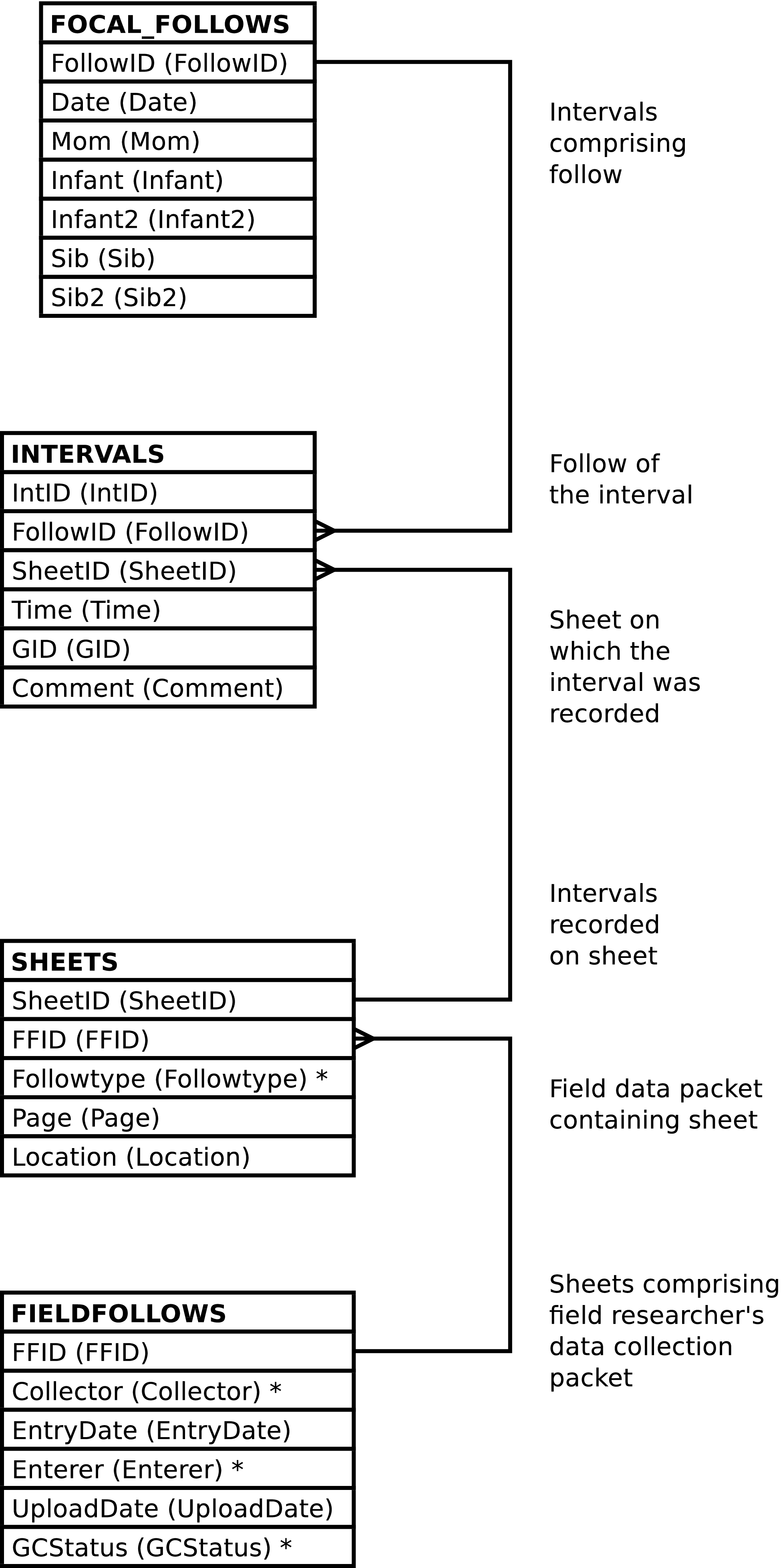
| Column | From | Description |
|---|---|---|
| FollowID | FOLLOWS.FollowID | Unique integer identifying the follow. |
| IntID | INTERVALS.IntID | Unique integer identifying the interval. |
| SheetID | INTERVALS.SheetID | The integer identifying the data collection sheet on which the interval was recorded. |
| FFID | FIELDFOLLOWS.FFID | The integer identifying the field follow, the set of sheets collected by a researcher in the field comprising a day's mother-infant follow, in which the sheet belongs. |
| Date | FOLLOWS.Date | The date of the follow. |
| Mom | FOLLOWPARTS.ChimpID | The ChimpID of the mother in the follow. |
| Infant | FOLLOWPARTS.ChimpID | The ChimpID of an infant in the follow. |
| Infant2 | FOLLOWPARTS.ChimpID | The ChimpID of a
twin infant in the follow, or NULL when the infant
is not a twin. |
| Sib | FOLLOWPARTS.ChimpID | The ChimpID of a
sibling in the follow, or NULL when there is not
sibling focal in the follow. |
| Sib2 | FOLLOWPARTS.ChimpID | The ChimpID of a
twin sibling in the follow, or NULL when there is no
sibling or the sibling is not a twin. |
| Time | INTERVALS.Time | The time of the interval. |
| GID | INTERVALS.GID | The identifier of the group composition related
to the interval. The system will automatically
compute this when a NULL value is supplied upon
insert or update. |
| Comment | INTERVALS.Comment | The comment on the interval. |
| Followtype | Sheets.Followtype | Code indicating the data collected on the data collection sheet. |
| Page | Sheets.Page | The page number on the field data collection sheet. |
| Location | Sheets.Location | The valley location information on the field data collection sheet. |
| Collector | FIELDFOLLOWS.Collector | The field researcher who collected the information on the field data collection sheet. |
| Entrydate | FIELDFOLLOWS.Entrydate | The date the data entry technician converted the information on the field data collection sheet into electronic form. |
| Enterer | FIELDFOLLOWS.Enterer | The data entry technician who converted the information on the field data collection sheet into electronic form. |
| UploadDate | FIELDFOLLOWS.UploadDate | The date and time the information on the field data collection sheet was uploaded into into the database. |
| GCStatus | FIELDFOLLOWS.GCStatus | The code indicating the status of the group
composition information, or NULL if there is no
group composition information. |
Altering the FOLLOW_INTERVALS view alters the content of the underlying INTERVALS table in the fashion described below. Inserting into FOLLOW_INTERVALS can also insert into the Sheets and FIELDFOLLOWS table. The FOLLOWS and related FOLLOWPARTS rows must exist; the content of these tables is never altered.
Inserting a row into the FOLLOW_INTERVALS view inserts a row into the INTERVALS table, as expected.
When inserting INTERVALS rows using FOLLOW_INTERVALS the follow must be specified. The follow may be specified in either or both of the following 2 ways:
A FollowID may be supplied.
Date, Mom and, Infant values all may be supplied.
Note
In the case of twins, either twin may be supplied as the Infant, or the Infant2 (or likewise with the sibling columns). The correct follow will be identified so long as the indicated twin is a focal in the follow.
However, if a
RETURNINGclause is used the twins will be returned in column names as if queried, irrespective of how specified in the inserted values.
Caution
FOLLOW_INTERVALS inserts only when there is a FOLLOWS row that matches the above selection criteria. If no row matches the database content is not altered. Note that no row will match if conflicting information is supplied.
Note
When inserting into FOLLOW_INTERVALS it is not
recommended to set the
IntID value. Omitting
this column or supplying a NULL value will allow the
system to automatically generate an id.
Inserting a row into FOLLOW_INTERVALS will also insert a row into Sheets if the specified related Sheets row does not already exist.
The related Sheets row may be specified in either or both of the following 2 ways:
Additional Sheets column values may
be supplied. (The
Followtype,
Location, and
FFID values.) As usual,
omitting any column is the same as specifying a NULL
value. It is an error for any of the supplied, non-NULL,
values to conflict with the content of an existing
Sheets row when the row is related to the
newly inserted INTERVALS row. If there is
no existing Sheets row then the supplied
values are stored in a newly created
Sheets row.
Note
When inserting into FOLLOW_INTERVALS and creating a
new Sheets row it is not recommended to
set the SheetID value.
Omitting this column or supplying a NULL value will
allow the system to automatically generate an id.
Inserting a row into FOLLOW_INTERVALS will also insert a row into FIELDFOLLOWS if the specified related FIELDFOLLOWS row does not already exist.
The related FIELDFOLLOWS row may be specified in either or both of the following 2 ways:
A FFID value may be supplied.
A Collector value may be supplied.
Note
Supplying a Collector value serves to identify a FIELDFOLLOWS row only when there is already a relationship between the follow and a field follow conducted by the designated collector. If the field data collector is not already in the database as having collected data for the follow, (or has, for some reason, performed more than one bout of data collection regards the follow) then the system cannot use the collector to identify a single, existent, field follow to relate to the new interval.
Additional FIELDFOLLOWS column
values may be supplied. (The
Entrydate,
Enterer,
UploadDate,
GCStatus values.) As
usual, omitting any column is the same as specifying a
NULL value. It is an error for any of the supplied,
non-NULL, values to conflict with the content of an
existing FIELDFOLLOWS row when the row is
related to the newly inserted INTERVALS
row. If there is no existing FIELDFOLLOWS
row then the supplied values are stored in a newly created
FIELDFOLLOWS row.
Note
When inserting into FOLLOW_INTERVALS and creating a
new FIELDFOLLOWS row it is not
recommended to set the
FFID value. Omitting
this column or supplying a NULL value will allow the
system to automatically generate an id.
Note
While the system does not dis-allow multiple FIELDFOLLOWS row per Collector per FOLLOWS row, just in case a single researcher's daily follow sheets of a single mother/infant pair are somehow separated into two packets that are subsequently entered into the system at different times, inserting into FOLLOW_INTERVALS ensures that there is always a single FIELDFOLLOWS row per field data collector per date per mother/infant pair.
This view returns no rows, it is used only to upload follow data. This view exists instead of a custom upload program.
The columns of the UPLOAD_BEHAVIORS view resemble the
columns on the field data entry collection sheets. Only some of
these columns are required, others may be present or omitted
depending on the template type of the sheet used in the field.
Omitting a column is equivalent to including the column and
specifying a NULL value for all the column's rows. Required
columns are either documented as such below or are required to
have non-NULL values in the database.
Note
The UPLOAD_BEHAVIORS view does not validate the existence or absence of specific columns based on the template type. It is up to the data entry staff to use the correct columns.
Note
Depending on the program used to upload data into this view, the case of the column names can be significant. All column names, in this view and everywhere else in Gombe-MI, are in lower case. Column names are written here in mixed case as a lexical convention so that column names can be easily discerned from regular text. The use of the underscore character in place of spaces in the column names is always significant.
It is recommended to always use lower case column names when uploading data.
ChimpID values of the focals are not required to be consistent throughout the follow. The first row containing data for any given follow will have it's ChimpID values used as FOLLOWPARTS.ChimpID values. The ChimpID values supplied in each line uploaded are used as PARTS.Participant values for the behavioral interactions the line records and as DISTANCEPARTS.Participant values for the inter-focal distances the line records. The AnimID values of the focals must remain consistent from line to line of any given focal, but the ChimpID used may vary from line to line.
If any of a follow's uploaded lines contains a Sibling value then all the uploaded lines for the follow must contain a Sibling value. This is true not only for the lines uploaded in any given file but is also must be the case if a follow's lines are uploaded in multiple files.
If Sibling is NULL
then it is an error for any of the following columns to contain
data:
The time values, Time_Converted_Mil, in the uploaded lines cannot decrease when examined in line-number order on a per-fieldfollow basis (i.e. per date/mom/field-data-collector). However, subsequent uploads may add new intervals to an existing follow irrespective of the times of pre-existent behavioral intervals.
The page number values,
Page, in the uploaded lines
cannot decrease when examined in line-number order on a
per-fieldfollow basis. However, a NULL page number can occur on
any line. Further, this restriction is per file uploaded.
Subsequent uploads may add additional behavioral information to
any existing or newly uploaded page regardless of page
number.
The Bad_Observation column affects the certitude of all data recorded on the line. It may contain the following values:
- No characters or
NULL All the data recorded on the line is certain, unless another column's value indicates otherwise.
YorWAll the data recorded on the line is uncertain.
MThe data related to the mother is uncertain.
IorTThe data related to the infant is uncertain.
SorKThe data related to the sibling is uncertain.
M/IorM,TThe data related to the mother and the data related to the infant is uncertain.
M/SorM,KThe data related to the mother and the data related to the sibling is uncertain.
I/SorK,TThe data related to the infant and the data related to the sibling is uncertain.
The Sib_Bad_Observation column is used to denote uncertainty regarding data contained in the sibling related columns -- those columns beginning with “sib_”. Sib_Bad_Observation is used in conjunction with Bad_Observation.
Any given behavioral or distance observation is denoted uncertain when uncertainty is indicated either by the Bad_Observation or Sib_Bad_Observation columns or by the data value of the given observation.
The uploaded behavior
code - is ignored.
Behavior codes are translated from the code or column written on paper in the field into the codes used within Gombe-MI by reference to the BEHAVIOR_TRANS table. This provides a degree of flexibility; adding new rows to BEHAVIOR_TRANS (and BEHAVIORS) may allow new behavioral observations to be collected and uploaded into Gombe-MI without having to modify the system's code.
The behavior code to use for the eating behavior
associated with the
Ma_Foodpart,
Ma_Foodkind,
Inf_Foodpart,
Inf_Foodkind,
Sib_Foodpart, and
Sib_Foodkind columns and the fishing
behavior associated with the
Ma_Fishpart,
Ma_Fishkind,
Inf_Fishpart,
Inf_Fishkind,
Sib_Fishpart, and
Sib_Fishkind columns is
determined by looking up ma_foodpart,
inf_foodpart,
sib_foodpart,
ma_fishpart,
inf_fishpart, and
sib_fishpart on the
BEHAVIOR_TRANS table. (The foodkind and
fishkind columns have no row on
BEHAVIOR_TRANS.
When there are multiple food part codes in the Ma_Foodpart, Inf_Foodkind, Sib_Foodkind, Ma_Fishpart, Inf_Fishkind, or Sib_Fishkind columns a separate row on EATS or FISHED is created for each of them. The Ma_Foodkind, Inf_Foodkind, Sib_Foodkind, Ma_Fishkind, Inf_Fishkind, or Sib_Fishkind value is used as the Foodkind or Foodkind value for each such created row.
When the uploaded followtype
value identifies a row on FOLLOWTYPES with a
FOLLOWTYPES.Implied_Behavior
value of TRUE UPLOAD_BEHAVIORS looks up the following column
names in BEHAVIOR_TRANS to determine the
implied behavior code:
When
FOLLOWTYPES.Implied_Behavior
is TRUE the implied behavior code is only used if the data in
the above columns has not been processed due to the presence of
an uploaded behavior code. The implied behavior code is
therefore the default behavior when no behavior code is
listed.
When
FOLLOWTYPES.Implied_Behavior
is FALSE the data in these columns is processed only when an
appropriate[57] behavior value is encountered. Should there be no
such behavior code UPLOAD_BEHAVIORS will raise an error if the
above columns contain data.
The following columns always imply a behavior[58]:
BEHAVIOR_TRANS
Controls other aspects of the upload process. When
BEHAVIOR_TRANS.Dups
is TRUE, and the behavior is between focals, and the behavior
is uploaded as a behavior code and not a column dedicated to a
specific behavior[59], UPLOAD_BEHAVIORS
expects that the behavior to be recorded twice on the uploaded
line, once for each focal. If this is not the case an error is
reported. If either (or both) of the observations is uncertain
then the observation is recorded in the database (once) as
uncertain. If the
EVENTS.Position
values do not match an error is reported.
BEHAVIOR_TRANS.Play_Val,
, as well as the name of the column, controls whether the
behavior is considered a social play behavior. When
BEHAVIOR_TRANS.Play_Val
is non-NULL, or the
Inf_Social_Play column data
is under consideration and the infant is not the individual
listed in the Inf_Social_Play
column, and the behavior is between focals, UPLOAD_BEHAVIORS
considers the play to be a directed (actor/actee) behavior. The
program also checks for reciprocal actor/actee play
relationships between focals, having identical
EVENTS.Behavior
codes, and, if found, ensures that the 2 observations recorded
in the field are uploaded into the database as a single mutual
behavioral interaction, as a single EVENTS row
having PARTS.Part
values of P. So, for
example, when an uploaded line records the mother playing with
the infant (in a directed fashion) and the infant playing with
the mother (in a directed fashion, both events having the same
code for play) a single mutual (undirected) play event is
recorded in the database. If either (or both) of the
observations is uncertain then the observation is recorded in
the database (once) as uncertain. If the
EVENTS.Position
values do not match an error is reported.
When
BEHAVIOR_TRANS.Play_Val
is non-NULL, or the
Inf_Social_Play column data is
under consideration, and the behavior is not between focals,
UPLOAD_BEHAVIORS considers the play to be mutual -- the
PARTS.Part values are
set to P.
When the Inf_Social_Play column data lists the focal infant the behavior is considered to be self-play.
Caution
The “old Excel” data format does not designate self-play by listing the focal infant in the Inf_Social_Play column. Instead self-play is designated by use of the Inf_Solitary_Play column. In order to accommodate the “new Excel” data format the rules for Inf_Social_Play were altered to allow the coding for self-play regardless of whether old or new data is uploaded. Consequently, should the old data need to be re-uploaded, improper data may be silently ignored and incorrect self-play behaviors may be inadvertently uploaded into the system.
BEHAVIOR_TRANS.Grooms_Other,
as well as the data in the
Inf_Grooming column, controls
whether the behavior is considered one where the focal grooms
another individual;
BEHAVIOR_TRANS.Grooms_By,
as well as the data in the
Inf_Being_Groomed column,
controls whether the behavior is considered to be one where the
focal is groomed by another individual; and a non-NULL
BEHAVIOR_TRANS.Ride_Val
column indicates that the behavior is considered to be one where
the focal rides on another individual. When the grooming
behavior is identified by a code rather than by ChimpIDs entered
into a column it is an error to upload a behavior code with a
BEHAVIOR_TRANS.Grooms_Other,
or Grooms_By value of TRUE,
or a Ride_Val
or Play_Val value which is non-NULL
without at least one ChimpID value in a corresponding column to
provide a social partner for the focal.
Unless UPLOAD_BEHAVIORS is to take the mother's grooming
and play partners from separate columns on any one uploaded line
the individuals with whom the mother groomed and played with
must either both be recorded in a single column or be recorded
in separate columns -- unless
Ma_GP_Combined is FALSE
there cannot be data in both
Ma_Groomingplay and
Ma_Grooming, nor may there be
data in both Ma_Groomingplay
and Ma_Play.[60]
It is an error to upload a row where the mother's grooming and play partners are combined into a single column and there is more than one grooming and play partner; UPLOAD_BEHAVIORS is then unable to determine which partners were play partners and which were grooming partners.
The Gombe Chimp Database Handbook reserves some AnimID values to carry special meaning. These may not be used as BIOGRAPHY_DATA.AnimID values or as CHIMPIDS.ChimpID values. These special values have the following effect when uploaded into UPLOAD_BEHAVIORS:
Reserved AnimID Values
?In most cases the focal is recorded as interacting with the
UNKChimpID (in PARTS.Participant) and the EVENTS.Uncertain value is set toTRUE.In the case of the Inf_Rejection column the focal is recorded as interacting with the mother and the EVENTS.Uncertain value is set to
TRUE.In the case of the Inf_Display column the focal (the infant) is recorded as interacting with herself and the EVENTS.Uncertain value is set to
TRUE.YIn most cases the focal is recorded as interacting with the
UNKChimpID (in PARTS.Participant).In the case of the Inf_Ride_On_Belly, Inf_Ride_On_Back, Inf_Ride_On_Unk, Inf_Dangle, and Inf_Rejection columns the focal is recorded as interacting with the mother.
In the case of the Inf_Display column the focal (the infant) is recorded as interacting with herself.
NYAThe focal is recorded as interacting with a baboon -- EVENTS.Baboon is set to
TRUEand there is not a PARTS row recording the focal's behavioral partner.
UPLOAD_BEHAVIORS does not vary the
FISHED.Result value
when recording a fishing event. The value used is
always S to indicate
successful fishing.
The Inf_Cry and Inf_Voc data are added to the database as a single vocalization event (a single EVENTS row) in which, possibly, more than one sound is made (possibly having more than one related VOCS rows).
The
Comments column is examined
on upload and sometimes altered and a new behavioral event
created. When the Comments
column contains the character
sequence DEVBEH! (case sensitive) and
the columns Inf_Nurse,
Inf_Eat,
Inf_Travel,
Inf_Solitary_Play,
Inf_Rest,
Inf_Ride_On_Belly,
Inf_Ride_On_Back,
Inf_Ride_On_Unk,
Inf_Dangle,
Inf_Touching_Another,
Inf_Grooming,
Inf_Being_Groomed and
Inf_Social_Play are all empty
then the comment text is examined to see if
the DEVBEH! characters are immediately
followed by at least one character surrounded by square
braces, []. If not an error is raised. If
so then the a behavioral event is recorded in the database, the
behavior code being obtained from the
BEHAVIOR_TRANS.Old_Behavior
value where the
BEHAVIOR_TRANS.Old_Behavior
is devbeh,
the DEVBEH! character sequence, the
square braces with follow it and the text enclosed by the square
braces are recorded in the
EVENTS.Comment value
of the newly created behavioral event.[61]
Figure 5.28. Query Defining the UPLOAD_BEHAVIORS View: Part I
SELECT NULL::TEXT AS followtype

     , NULL::DATE AS entrydate

     , NULL::TEXT as entered_by

     , NULL::TEXT AS researcher

     , NULL::DATE AS date

     , NULL::INT AS page

     , NULL::TEXT AS location

     , NULL::TEXT AS mother

     , NULL::TEXT AS infant

     , NULL::TEXT AS sibling

     , NULL::TEXT AS time_on_sheet

     , NULL::TIME AS time_converted_mil

     , NULL::TEXT AS time_type

     , NULL::TEXT AS bad_observation

     , NULL::TEXT AS rain

     , NULL::TEXT AS ma_behavior

     , NULL::TEXT AS ma_foodpart

     , NULL::TEXT AS ma_foodkind

     , NULL::TEXT AS ma_fishpart

     , NULL::TEXT AS ma_fishkind

     , NULL::BOOLEAN AS ma_gp_combined

     , NULL::TEXT AS ma_groomingplay

     , NULL::TEXT AS ma_grooming

     , NULL::TEXT AS ma_play

     , NULL::TEXT AS ma_groomed_by

     , NULL::TEXT AS ma_voc
Figure 5.29. Query Defining the UPLOAD_BEHAVIORS View: Part II
     , NULL::TEXT AS inf_behavior

     , NULL::TEXT AS inf_foodpart

     , NULL::TEXT AS inf_foodkind

     , NULL::TEXT AS inf_fishpart

     , NULL::TEXT AS inf_fishkind

     , NULL::TEXT AS inf_distance_to_ma

     , NULL::TEXT AS inf_nurse

     , NULL::TEXT AS inf_travel

     , NULL::TEXT AS inf_eat

     , NULL::TEXT AS inf_solitary_play

     , NULL::TEXT AS inf_rest

     , NULL::TEXT AS inf_distance_1

     , NULL::TEXT AS inf_distance_2

     , NULL::TEXT AS inf_distance_3

     , NULL::TEXT AS inf_distance_4

     , NULL::TEXT AS inf_distance_5

     , NULL::TEXT AS inf_distance_over_5m

     , NULL::TEXT AS inf_ride_on_belly

     , NULL::TEXT AS inf_ride_on_back

     , NULL::TEXT AS inf_ride_on_unk

     , NULL::TEXT AS inf_dangle

     , NULL::TEXT AS inf_rejection

     , NULL::TEXT AS inf_touching_another

     , NULL::TEXT AS inf_grooming

     , NULL::TEXT AS inf_being_groomed

     , NULL::TEXT AS inf_social_play

     , NULL::TEXT AS inf_display

     , NULL::TEXT AS inf_cry

     , NULL::TEXT AS inf_voc

     , NULL::TEXT AS inf_beg

     , NULL::TEXT AS inf_assr

     , NULL::TEXT AS inf_sex_related

     , NULL::TEXT AS inf_tooluse

     , NULL::TEXT AS inf_directaggression

     , NULL::TEXT AS sib_bad_observation

     , NULL::TEXT AS sib_behavior

     , NULL::TEXT AS sib_foodpart

     , NULL::TEXT AS sib_foodkind

     , NULL::TEXT AS sib_fishpart

     , NULL::TEXT AS sib_fishkind

     , NULL::TEXT AS sib_play

     , NULL::TEXT AS sib_grooming

     , NULL::TEXT AS sib_groomed_by

     , NULL::TEXT AS sib_ride

     , NULL::TEXT AS sib_distance_to_ma

     , NULL::TEXT AS sib_distance_to_infant

     , NULL::TEXT AS sib_voc

     , NULL::TEXT AS comments

  WHERE _raise_gombemi_exception(

          'Cannot select UPLOAD_BEHAVIORS'

          || ': The only use of the UPLOAD_BEHAVIORS view is to insert'

          || ' new data into the 1-minute interval related portion of'

          || ' Gombe-MI')
;
Figure 5.30. Entity Relationship Diagram of the UPLOAD_BEHAVIORS View
| Column | Uploads into | Description |
|---|---|---|
| Followtype | Sheets.Followtype | Code indicating the set of data collected.
This column may not be NULL. Leading and trailing spaces in the data are
removed. |
| Entrydate | FIELDFOLLOWS.Entrydate |
Date the data collection sheet was entered into an electronic form. This value may be |
| Entered_By | FIELDFOLLOWS.Enterer |
Code for the person who entered the data into
electronic form. This column may not be Leading and trailing spaces in the data are removed. The coded data is case sensitive. |
| Researcher | FIELDFOLLOWS.Collector |
Written out name of the person who collected the
data in the field. This column may not be Leading and trailing spaces in the data are removed and case is ignored. |
| Date | FOLLOWS.Date | Date of the follow. This column may not be NULL. |
| Page | Sheets.Page | Page number of the data collection sheet on which
the data is written. All of any one follow's data rows
having NULL page numbers are considered to have been
written on a single sheet (a sheet having a NULL page
number). |
| Location | Sheets.Location | Location of follow. Leading and trailing spaces in the data are removed. |
| Mother | FOLLOWPARTS.ChimpID, FOLLOWPARTS.Role, PARTS.Participant, DISTANCEPARTS.Participant |
ChimpID of the mother in the follow. The
related
FOLLOWPARTS.Role
value is always set
to Leading and trailing spaces in the data are removed. |
| Infant | FOLLOWPARTS.ChimpID, FOLLOWPARTS.Role, PARTS.Participant, DISTANCEPARTS.Participant |
ChimpID of the infant in the follow. The
related
FOLLOWPARTS.Role
value is always set
to Leading and trailing spaces in the data are removed. |
| Sibling | FOLLOWPARTS.ChimpID, FOLLOWPARTS.Role, PARTS.Participant, DISTANCEPARTS.Participant |
ChimpID of the sibling in the follow. The
related
FOLLOWPARTS.Role
value is always set
to Leading and trailing spaces in the data are
removed. This column may be |
| Time_On_Sheet | The content of this column is ignored. | Time value written on data collection sheet. |
| Time_Converted_Mil | INTERVALS.Time | Time of the 1-minute interval in 24-hour clock format. Note that the format of the time is not validated beyond ensuring that it conforms to some legal PostgreSQL time syntax. |
| Time_Type | The content of this column is ignored. | Code indicating time system used in time written on data entry sheet. |
| Bad_Observation | DISTANCES.Uncertain, EVENTS.Uncertain | This column is used in conjunction with other columns to indicate observation certainty. See the description of how certainty is determined above. |
| Rain | The content of this column is ignored. | Indication of whether or not it was raining. |
| Ma_Behavior | EVENTS.Behavior | Mother's behavior codes. This is translated into the codes used within Gombe-MI by reference to the BEHAVIOR_TRANS table. Multiple behaviors are separated from each other
by the |
| Ma_Foodpart | EATS.Foodpart | Mother's food part codes of food eaten. This is translated into the codes used within Gombe-MI by reference to the FOODPART_TRANS table. Multiple food part codes are separated from
each other by the |
| Ma_Foodkind | EATS.Foodkind | Mother's food kind code of food eaten. |
| Ma_Fishpart | FISHED.Foodpart | Mother's food part codes of foods fished for. This is translated into the codes used within Gombe-MI by reference to the FOODPART_TRANS table. Multiple food part codes are separated from
each other by the |
| Ma_Fishkind | FISHED.Foodkind | Mother's food kind code of food fished for. |
| Ma_GP_Combined (Mother's Grooming and Play Partners are Combined) | This column controls how other columns are interpreted. |
When this value is Note that this column only affects observations of the mother doing the grooming or play. Observations of others grooming or playing with the mother are not influenced. |
| Ma_Groomingplay | PARTS.Participant |
Chimpids (or other
code) identifying the
individuals whom the mother either groomed or played
with. These are delimited with
commas ( See above for information on how the determination is made as to whether play is mutual or directed. |
| Ma_Grooming | PARTS.Participant | Chimpids (or other
code) identifying the
individuals whom the mother groomed.
These are delimited with
commas (,)
and all whitespace is ignored. |
| Ma_Play | PARTS.Participant |
Chimpids (or other
code) identifying the
individuals whom the mother played with.
These are delimited with
commas ( See above for information on how the determination is made as to whether play is mutual or directed. |
| Ma_Groomed_By | PARTS.Participant | Chimpids (or other
code) identifying the
individuals whom the mother was groomed
by. These are delimited with
commas (,)
and all whitespace is ignored.
See above
for special ChimpID values recognized by this column. |
| Ma_Voc (Mother's Vocalization Codes | VOCS.Vocalization and others | Mother's vocalization codes, separated by the comma (,) character. This is translated into the codes used within Gombe-MI by reference to the VOC_TRANS table. Whitespace is ignored. |
| Inf_Behavior | EVENTS.Behavior | Infant's behavior codes. This is translated into the codes used within Gombe-MI by reference to the BEHAVIOR_TRANS table. Multiple behaviors are separated from each other
by the |
| Inf_Foodpart | EATS.Foodpart | Infant's food part codes of food eaten. This is translated into the codes used within Gombe-MI by reference to the FOODPART_TRANS table. Multiple food part codes are separated from
each other by the |
| Inf_Foodkind | EATS.Foodkind | Infant's food kind code of food eaten. |
| Inf_Fishpart | FISHED.Foodpart | Infant's food part codes of foods fished for. This is translated into the codes used within Gombe-MI by reference to the FOODPART_TRANS table. Multiple food part codes are separated from
each other by the |
| Inf_Fishkind | FISHED.Foodkind | Infant's food kind code of food fished for. |
| Inf_Distance_To_Ma (Code for Infant's Distance To Mother) | DISTANCES.Distance and others | A
DISTANCECODES.Distance
value indicating the distance between mother and
infant. This column may not be The related
DISTANCEPARTS.Role
values are always set
to |
| Inf_Nurse (Infant Nurses on Mother) | EVENTS.Behavior and others | Whether the infant is nursing on the mother.
The legal values are: Y, meaning true; NULL meaning false; and ?, meaning true but uncertain. The column name is looked up in the BEHAVIOR_TRANS table to determine
the behavior code and control other aspects of the
event recorded in Gombe-MI. |
| Inf_Travel | EVENTS.Behavior and others | Whether the infant is traveling.
The legal values are: Y, meaning true; NULL meaning false; and ?, meaning true but uncertain. The column name is looked up in the BEHAVIOR_TRANS table to determine
the behavior code and control other aspects of the
event recorded in Gombe-MI. |
| Inf_Eat | EVENTS.Behavior and others | Whether the infant is eating. The legal values are: Y, meaning true; NULL meaning false; and ?, meaning true but uncertain.
The column name is looked up in the BEHAVIOR_TRANS table to determine
the behavior code and control other aspects of the
event recorded in Gombe-MI. |
| Inf_Solitary_Play | PLAYS.Play and others | Infant's solitary play code. This is translated into the codes used within Gombe-MI by reference to the PLAY_TRANS table. Whitespace is ignored. |
| Inf_Rest | EVENTS.Behavior and others | Whether the infant is resting. The legal values are: Y, meaning true; NULL meaning false; and ?, meaning true but uncertain.
The column name is looked up in the BEHAVIOR_TRANS table to determine
the behavior code and control other aspects of the
event recorded in Gombe-MI. |
| Inf_Distance_1 | DISTANCES.Distance and others | An indication of distance between mother and
infant. The column name is looked up in the DISTANCE_TRANS table to determine
the behavior code recorded in Gombe-MI. The legal values are: The related
DISTANCEPARTS.Role
values are always set
to |
| Inf_Distance_2 | DISTANCES.Distance and others | An indication of distance between mother and
infant. The column name is looked up in the DISTANCE_TRANS table to determine
the behavior code recorded in Gombe-MI. The legal values are: The related
DISTANCEPARTS.Role
values are always set
to |
| Inf_Distance_3 | DISTANCES.Distance and others | An indication of distance between mother and
infant. The column name is looked up in the DISTANCE_TRANS table to determine
the behavior code recorded in Gombe-MI. The legal values are: The related
DISTANCEPARTS.Role
values are always set
to |
| Inf_Distance_4 | DISTANCES.Distance and others | An indication of distance between mother and
infant. The column name is looked up in the DISTANCE_TRANS table to determine
the behavior code recorded in Gombe-MI. The legal values are: The related
DISTANCEPARTS.Role
values are always set
to |
| Inf_Distance_5 | DISTANCES.Distance and others | An indication of distance between mother and
infant. The column name is looked up in the DISTANCE_TRANS table to determine
the behavior code recorded in Gombe-MI. The legal values are: The related
DISTANCEPARTS.Role
values are always set
to |
| Inf_Distance_Over_5m | DISTANCES.Distance and others | An indication of distance between mother and
infant. The column name is looked up in the DISTANCE_TRANS table to determine
the behavior code recorded in Gombe-MI. The legal values are: The related
DISTANCEPARTS.Role
values are always set
to |
| Inf_Ride_On_Belly | RIDES.Ride and others | Chimpid (or other code) identifying the individual on whom the infant is riding dorsally. Whitespace is ignored. See above for special ChimpID values recognized by this column. The column name is looked up in the BEHAVIOR_TRANS table to determine the behavior code and control other aspects of the event recorded in Gombe-MI. |
| Inf_Ride_On_Back | RIDES.Ride and others | Chimpid (or other code) identifying the individual on whom the infant is riding ventrally. Whitespace is ignored. See above for special ChimpID values recognized by this column. The column name is looked up in the BEHAVIOR_TRANS table to determine the behavior code and control other aspects of the event recorded in Gombe-MI. |
| Inf_Ride_On_Unk | RIDES.Ride and others | Chimpid (or other code) identifying the individual on whom the infant is riding when the riding posture is unknown. Whitespace is ignored. See above for special ChimpID values recognized by this column. The column name is looked up in the BEHAVIOR_TRANS table to determine the behavior code and control other aspects of the event recorded in Gombe-MI. |
| Inf_Dangle | EVENTS.Behavior and others | Chimpid (or other code) identifying the individual from whom the infant is dangling. Whitespace is ignored. See above for special ChimpID values recognized by this column. The column name is looked up in the BEHAVIOR_TRANS table to determine the behavior code and control other aspects of the event recorded in Gombe-MI. |
| Inf_Rejection | EVENTS.Behavior and others | Chimpid (or other code) identifying the individual rejecting the infant. Whitespace is ignored. See above for special ChimpID values recognized by this column. The column name is looked up in the BEHAVIOR_TRANS table to determine the behavior code and control other aspects of the event recorded in Gombe-MI. |
| Inf_Touching_Another | EVENTS.Behavior and others | Chimpids (or other code) identifying the individuals involved (in a non-directed fashion) in touch with the infant. Whitespace is ignored. See above for special ChimpID values recognized by this column. The column name is looked up in the BEHAVIOR_TRANS table to determine the behavior code and control other aspects of the event recorded in Gombe-MI. |
| Inf_Grooming | EVENTS.Behavior and others | Chimpids (or other code) identifying the individuals whom the infant is grooming. Whitespace is ignored. See above for special ChimpID values recognized by this column. The column name is looked up in the BEHAVIOR_TRANS table to determine the behavior code and control other aspects of the event recorded in Gombe-MI. |
| Inf_Being_Groomed | EVENTS.Behavior and others | Chimpids (or other code) identifying the individuals who are grooming the infant. Whitespace is ignored. See above for special ChimpID values recognized by this column. The column name is looked up in the BEHAVIOR_TRANS table to determine the behavior code and control other aspects of the event recorded in Gombe-MI. |
| Inf_Social_Play | EVENTS.Behavior and others | Chimpids (or other code) identifying the individuals participating in play with the infant. Whitespace is ignored. See above for special ChimpID values recognized by this column. The column name is looked up in the BEHAVIOR_TRANS table to determine the behavior code and control other aspects of the event recorded in Gombe-MI. |
| Inf_Display | EVENTS.Behavior and others | Chimpids (or other code) indicator of whether the infant is displaying and to which individuals. Whitespace is ignored. See above for special ChimpID values recognized by this column. The column name is looked up in the BEHAVIOR_TRANS table to determine the behavior code and control other aspects of the event recorded in Gombe-MI. |
| Inf_Cry | VOCS.Vocalization and others | Whether the infant is crying.
The legal values are: Y, meaning true; NULL meaning false; and ?, meaning true but uncertain. The column name is looked up in the BEHAVIOR_TRANS table to determine
the behavior code and control other aspects of the
event recorded in Gombe-MI. |
| Inf_Voc (Infant's Vocalization Codes | VOCS.Vocalization and others | Infant's vocalization codes, separated by the comma (,) character. This is translated into the codes used within Gombe-MI by reference to the VOC_TRANS table. Whitespace is ignored. |
| Inf_Beg | EVENTS.Behavior and others | Chimpids (or other code) identifying the individuals from which the infant is begging. Whitespace is ignored. See above for special ChimpID values recognized by this column. The column name is looked up in the BEHAVIOR_TRANS table to determine the behavior code and control other aspects of the event recorded in Gombe-MI. |
| Inf_ASSR | EVENTS.Behavior and others | Chimpids (or other code) identifying the individuals against whom the infant is ASSR-ing. Whitespace is ignored. See above for special ChimpID values recognized by this column. The column name is looked up in the BEHAVIOR_TRANS table to determine the behavior code and control other aspects of the event recorded in Gombe-MI. |
| Inf_Sex_Related | EVENTS.Behavior and others | Chimpids (or other code) identifying the individuals with whom the infant is engaging in sex related behavior. The behavior is directed and the infant is the actor. Whitespace is ignored. See above for special ChimpID values recognized by this column. The column name is looked up in the BEHAVIOR_TRANS table to determine the behavior code and control other aspects of the event recorded in Gombe-MI. |
| Inf_Tooluse | EVENTS.Behavior and others | Whether the infant is using a tool. The legal values are: Y, meaning true; NULL meaning false; and ?, meaning true but uncertain.
The column name is looked up in the BEHAVIOR_TRANS table to determine
the behavior code and control other aspects of the
event recorded in Gombe-MI. |
| Inf_Directaggression | EVENTS.Behavior and others | Chimpids (or other code) identifying the individuals against whom the infant is engaging in direct aggression. The behavior is directed and the infant is the actor. Whitespace is ignored. See above for special ChimpID values recognized by this column. The column name is looked up in the BEHAVIOR_TRANS table to determine the behavior code and control other aspects of the event recorded in Gombe-MI. |
| Sib_Bad_Observation | DISTANCES.Uncertain, EVENTS.Uncertain | This column is used in conjunction with other
columns to indicate observation certainty of sibling
related data. The legal values for this column
are: Y, meaning the sibling
data is
uncertain; - or
NULL meaning the Sib_Bad_Observation column does not
influence whether sibling related data is uncertain.
See the description of
how certainty is determined above. |
| Sib_Behavior | EVENTS.Behavior | Sibling's behavior codes. This is translated into the codes used within Gombe-MI by reference to the BEHAVIOR_TRANS table. Multiple behaviors are separated from each
other by the |
| Sib_Foodpart | EATS.Foodpart | Sibling's food part codes of food eaten. This is translated into the codes used within Gombe-MI by reference to the FOODPART_TRANS table. Multiple food part codes are separated from
each other by
the |
| Sib_Foodkind | EATS.Foodkind | Sibling's food kind code of food eaten. |
| Sib_Fishpart | FISHED.Foodpart | Sibling's food part codes of foods fished for. This is translated into the codes used within Gombe-MI by reference to the FOODPART_TRANS table. Multiple food part codes are separated from
each other by
the |
| Sib_Fishkind | FISHED.Foodkind | Sibling's food kind code of food fished for. |
| Sib_Play | PARTS.Participant |
Chimpids (or other
code) identifying the
individuals whom the sibling played with.
These are delimited with
commas ( See above for information on how the determination is made as to whether play is mutual or directed. |
| Sib_Grooming | PARTS.Participant | Chimpids (or other
code) identifying the
individuals whom the sibling groomed.
These are delimited with
commas (,)
and all whitespace is ignored. |
| Sib_Groomed_By | PARTS.Participant | Chimpids (or other
code) identifying the
individuals whom the sibling was groomed
by. These are delimited with
commas (,)
and all whitespace is ignored.
See above
for special ChimpID values recognized by this column. |
| Sib_Ride | PARTS.Participant | Chimpid (or other
code) identifying the
individual on whom the sibling
rode. These are delimited with
commas (,)
and all whitespace is ignored.
See above
for special ChimpID values recognized by this column. |
| Sib_Voc (Sibling's Vocalization Codes | VOCS.Vocalization and others | Sibling's vocalization codes, separated by the comma (,) character. This is translated into the codes used within Gombe-MI by reference to the VOC_TRANS table. Whitespace is ignored. |
| Sib_Distance_To_Ma (Sibling Distance To Mother Code) | DISTANCES.Distance and others | A code indicating the distance between
mother and sibling. The column name is looked up in the DISTANCE_TRANS table to determine
the behavior code recorded in Gombe-MI. The uploaded
distance code The related
DISTANCEPARTS.Role
values are always set
to |
| Sib_Distance_To_Infant (Sibling Distance To Infant Code) | DISTANCES.Distance and others | A code indicating the distance between
infant and sibling. The column name is looked up in the DISTANCE_TRANS table to determine
the behavior code recorded in Gombe-MI. The uploaded
distance code The related
DISTANCEPARTS.Role
values are always set
to |
| Comments | INTERVALS.Comment |
Comments on the behaviors occurring during the
minute. Leading and trailing whitespace is removed.
This value may be CautionThe Comments column is processed as described and sometimes behaviors are created as a result. |
[a] Irrespective of the content of the FOLLOWROLES table. [b] Irrespective of the content of the FOLLOWROLES table. [c] Irrespective of the content of the FOLLOWROLES table. [d] Irrespective of the content of the FOLLOWROLES table. [e] Irrespective of the content of the FOLLOWROLES table. [f] Irrespective of the content of the FOLLOWROLES table. [g] Irrespective of the content of the FOLLOWROLES table. [h] Irrespective of the content of the FOLLOWROLES table. [i] Irrespective of the content of the FOLLOWROLES table. [j] Irrespective of the content of the FOLLOWROLES table. [k] Irrespective of the content of the FOLLOWROLES table. [l] Irrespective of the content of the FOLLOWROLES table. | ||
The most general views are the SOCIAL_EVENTS_W_BABOONS and the ASOCIAL_EVENTS views. Taken together these 2 views return (1 or more) rows for all behavioral events. They are suitable for use in arbitrary queries and are probably the best choice in most cases. For the most part, the SOCIAL_EVENTS view should be used in place of the SOCIAL_EVENTS_W_BABOONS view since it does not contain rows for social interactions with baboons.
The ASOCIAL_EVENTS, SOCIAL_EVENTS, and SOCIAL_EVENTS_W_BABOONS views, have columns for each animal involved to encode the following properties: the animal's chimpid, the animal's role in the follow (mom, infant, sib, nonfocal), and the animal's role (part) in the behavioral event (self, actor, actee, participant). When using the ASOCIAL_EVENTS, SOCIAL_EVENTS, and SOCIAL_EVENTS_W_BABOONS views these 3 columns must often be tested in tandem to obtain the desired results. The other views in this section also often have these columns, or a subset of them, but are designed to reduce the need to test all 3 of these values together.
The ACTOR_ACTEES_W_BABOONS and ACTOR_ACTEES views can be simpler to use than the SOCIAL_EVENTS_W_BABOONS and SOCIAL_EVENTS views when interested in directed behaviors. The ACTOR_ACTEES_W_BABOONS and ACTOR_ACTEES views contain at most a single row per behavioral event and classify the individuals involved into separate columns for actor and actee.
The FOCAL_SOCIAL_EVENTS and FOCAL_EVENTS views classify the involved individuals based on whether or not they are focals in the follow; there is a set of “focal” columns to describe (one of) the focals involved in the interaction and a set of “other” columns to describe the 2nd individual involved in the interaction. This may be less useful than it first appears. Because many interactions are between focals a focal often shows up in the “other” columns and those interactions that are between focals have two rows in these views. There are 2 rows per event so that each focal can show up once in the “focal” category.
The FOCAL_EVENTS view is different in that it contains at least one row for every recorded behavioral interaction.
The FAMILY_EVENTS view contains exactly one row for each recorded behavioral interaction, with columns structured in a fashion somewhat like the way behavioral data is recorded. This is helpful when checking data in the system against the data as it comes from the field. The family_events view is also useful for changing database content, an operation usually based on data recorded in the field. But the correspondence between the columns of the FAMILY_EVENTS view and the paper records is likely to be less useful than it seems when it comes to analysis because queries must be written with foreknowledge of who plays what function (mom, infant, sib) in the follow rather than relying on the system to inform. The FAMILY_EVENTS view cannot distinguish between twins and singleton offspring whereas the other views can. [62] Further, the FAMILY_EVENTS view is by far the least efficient in its execution. Data analysis will probably be better served by spending the time to learn to use the other views.
All these views have slightly different implementations and some may perform better than others depending on the circumstances of use.
Note
While it is certainly possible to create more specialized behavioral views than those described here to encompass all the relevant combinatorial parings of mom, infant, sib, and nonfocal, as well as the orthogonal categories of directed and non-directed social interactions and asocial interactions it is hoped that enough skill writing queries in SQL will be developed that the existing views will suffice. One useful SQL technique can be found in the Queries section above.
ACTOR_ACTEES contains one row per EVENTS row where there are 2 chimpanzees involved in an actor/actee behavioral even. Events involving baboons are excluded. ACTOR_ACTEES provides a straightforward way to analyze social behaviors from the perspective of who is initiating and who receiving the behavior.
Figure 5.31. Query Defining the ACTOR_ACTEES View
SELECT events.eid AS eid

     , events.intid AS intid

     , actors.pid AS actorpid

     , actees.pid AS acteepid

     , events.behavior AS behavior

     , events.position AS position

     , events.uncertain AS uncertain

     , followrole(intervals.followid, actors.participant) AS actorrole

     , actors.participant AS actor

     , followrole(intervals.followid, actees.participant) AS acteerole

     , actees.participant AS actee

     , events.comment AS comment

  FROM events

         JOIN intervals

           ON (intervals.intid = events.intid)

         JOIN parts AS actors

           ON (actors.eid = events.eid)

         JOIN parts AS actees

           ON (actees.eid = events.eid)

  WHERE actors.part = 'gmi_actor'

        AND actees.part = 'gmi_actee'
;
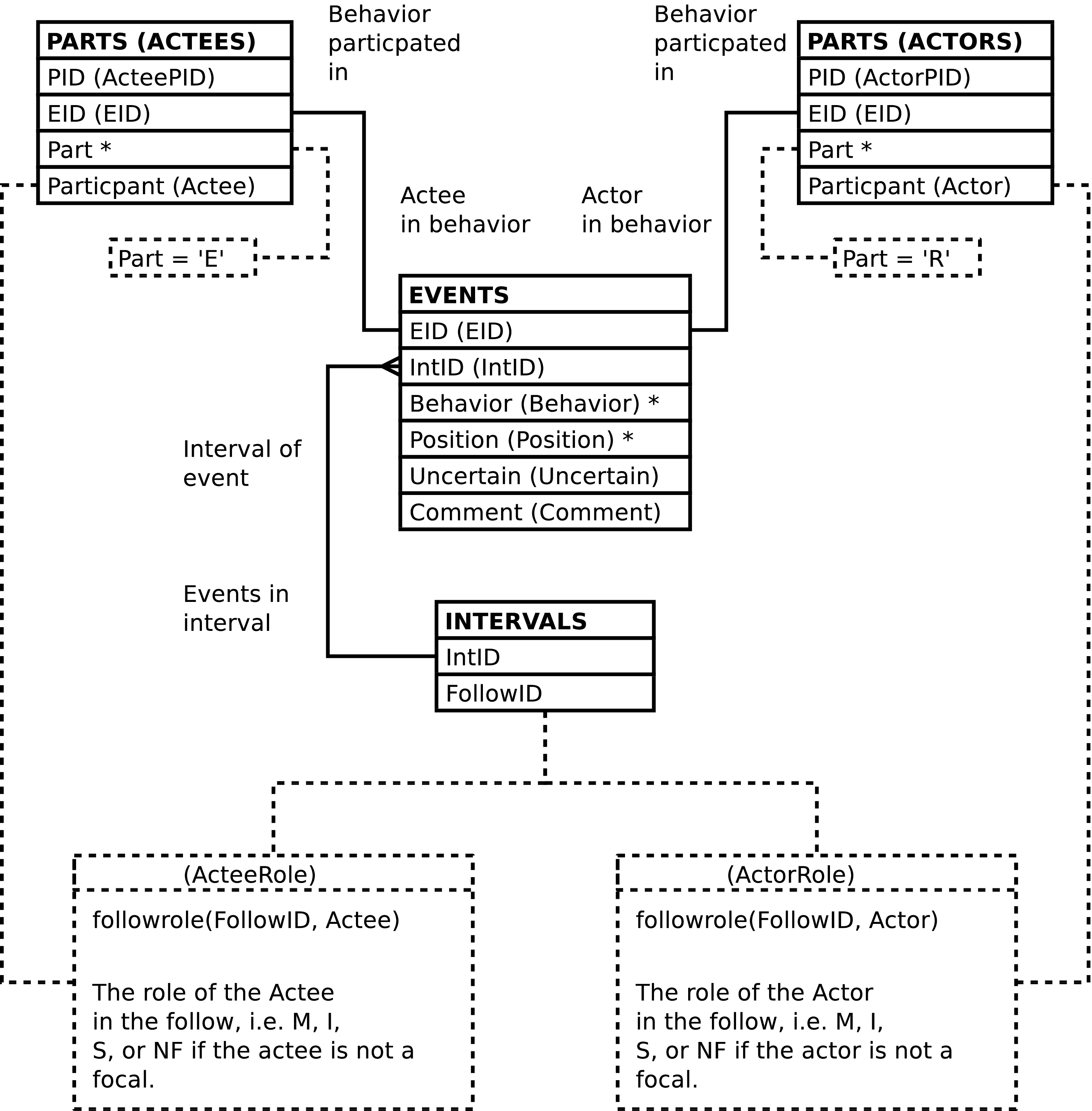
| Column | From | Description |
|---|---|---|
| EID | EVENTS.EID | Identifier of the behavioral event row. |
| IntID | EVENTS.IntID | Identifier of the observation interval during which the event was recorded. |
| ActorPID | PARTS.PID | Identifier of the behavioral participant row which records behavioral data regarding the chimpanzee who is the actor in the behavior. |
| ActeePID | PARTS.PID | Identifier of the behavioral participant row which records behavioral data regarding the chimpanzee who is the actee in the behavior. |
| Behavior | EVENTS.Behavior | Code indicating the behavior observed. |
| Position | EVENTS.Position | Position within the canopy where the event occurred. |
| Uncertain | EVENTS.Uncertain | Whether or not the behavior was observed with certainty. |
| ActorRole (Role in Follow of Actor) | FOLLOWPARTS.Role | Code for the role, i.e. mom, sib, infant, played by the animal who is the actor in the behavior. |
| Actor | PARTS.Participant | The identifier or alternate identifier of the actor. |
| ActeeRole (Role in Follow of Actee) | FOLLOWPARTS.Role | Code for the role, i.e. mom, sib, infant, played by the chimpanzee who is the actee in the behavior. |
| Actee | PARTS.Participant | The identifier or alternate identifier of the actee. |
| Comment | EVENTS.Comment | Textual remarks regarding the behavioral event. |
ACTOR_ACTEES_W_BABOONS contains one row per EVENTS row where there are 2 animals involved in an actor/actee behavioral event, including events involving baboons. ACTOR_ACTEES_W_BABOONS provides a straightforward way to analyze social behaviors from the perspective of who is initiating and who receiving the behavior.
Figure 5.33. Query Defining the ACTOR_ACTEES_W_BABOONS View: Part I
SELECT events.eid AS eid

     , events.intid AS intid

     , actors.pid AS actorpid

     , actees.pid AS acteepid

     , events.behavior AS behavior

     , events.position AS position

     , events.uncertain AS uncertain

     , followrole(intervals.followid, actors.participant) AS actorrole

     , FALSE AS baboonactor

     , actors.participant AS actor

     , followrole(intervals.followid, actees.participant) AS acteerole

     , FALSE AS baboonactee

     , actees.participant AS actee

     , events.comment AS comment

  FROM events

         JOIN intervals

           ON (intervals.intid = events.intid)

         JOIN parts AS actors

           ON (actors.eid = events.eid)

         JOIN parts AS actees

           ON (actees.eid = events.eid)

  WHERE actors.part = 'gmi_actor'

        AND actees.part = 'gmi_actee'

UNION

SELECT events.eid AS eid

     , events.intid AS intid

     , actors.pid AS actorpid

     , NULL AS acteepid

     , events.behavior AS behavior

     , events.position AS position

     , events.uncertain AS uncertain

     , followrole(intervals.followid, actors.participant) AS actorrole

     , FALSE AS baboonactor

     , actors.participant AS actor

     , 'NF' AS acteerole

     , TRUE AS baboonactee

     , NULL::VARCHAR(gmi_animid_len) AS actee

     , events.comment AS comment

  FROM events

         JOIN intervals

           ON (intervals.intid = events.intid)

         JOIN parts AS actors

           ON (actors.eid = events.eid)

  WHERE actors.part = 'gmi_actor'

        AND events.baboon
Figure 5.34. Query Defining the ACTOR_ACTEES_W_BABOONS View: Part II
UNION

SELECT events.eid AS eid

     , events.intid AS intid

     , NULL AS actorpid

     , actees.pid AS acteepid

     , events.behavior AS behavior

     , events.position AS position

     , events.uncertain AS uncertain

     , 'NF' AS actorrole

     , TRUE AS baboonactor

     , NULL::VARCHAR(gmi_animid_len) AS actor

     , followrole(intervals.followid, actees.participant) AS acteerole

     , FALSE AS baboonactee

     , actees.participant AS actee

     , events.comment AS comment

  FROM events

         JOIN intervals

           ON (intervals.intid = events.intid)

         JOIN parts AS actees

           ON (actees.eid = events.eid)

  WHERE actees.part = 'gmi_actee'

        AND events.baboon
;
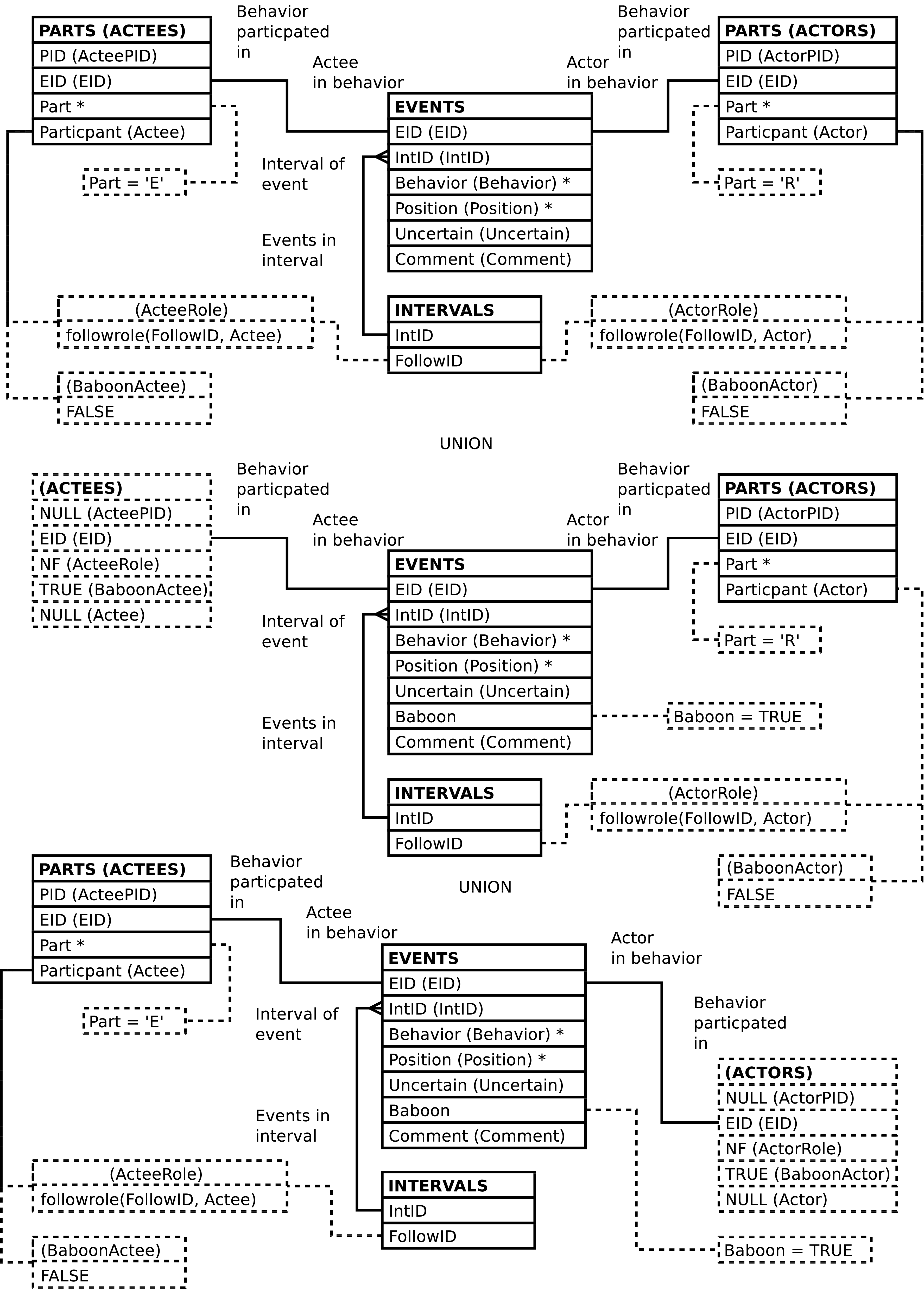
| Column | From | Description |
|---|---|---|
| EID | EVENTS.EID | Identifier of the behavioral event row. |
| IntID | EVENTS.IntID | Identifier of the observation interval during which the event was recorded. |
| ActorPID | PARTS.PID | Identifier of the behavioral participant row which records behavioral data regarding the animal who is the actor in the behavior. |
| ActeePID | PARTS.PID | Identifier of the behavioral participant row which records behavioral data regarding the animal who is the actee in the behavior. |
| Behavior | EVENTS.Behavior | Code indicating the behavior observed. |
| Position | EVENTS.Position | Position within the canopy where the event occurred. |
| Uncertain | EVENTS.Uncertain | Whether or not the behavior was observed with certainty. |
| ActorRole (Role in Follow of Actor) | FOLLOWPARTS.Role or NF
in the case of baboons or nonfocal chimpanzees | Code for the role, i.e. mom, sib, infant, played by the animal who is the actor in the behavior. |
| BaboonActor | Computed | A Boolean value, true when the actor is a baboon. |
| Actor | PARTS.Participant | The identifier or alternate identifier of the
actor, or NULL if the actor is a baboon. |
| ActeeRole (Role in Follow of Actee) | FOLLOWPARTS.Role or NF
in the case of baboons or nonfocal chimpanzees | Code for the role, i.e. mom, sib, infant, played by the animal who is the actee in the behavior. |
| BaboonActee | Computed | A Boolean value, true when the actee is a baboon. |
| Actee | PARTS.Participant | The identifier or alternate identifier of the
actee, or NULL if the actee is a baboon. |
| Comment | EVENTS.Comment | Textual remarks regarding the behavioral event. |
ASOCIAL_EVENTS contains one row per EVENTS
row per when there is a related PARTS row having
a Part value
of S. ASOCIAL_EVENTS provides a
direct way to analyze non-social behaviors, those behaviors
involving a single chimp and no other animal.
Figure 5.36. Query Defining the ASOCIAL_EVENTS View
SELECT events.eid AS eid

     , events.intid AS intid

     , parts.pid AS pid

     , events.behavior AS behavior

     , events.position AS position

     , events.uncertain AS uncertain

     , followparts.role AS role

     , parts.participant AS participant

     , events.comment AS comment

  FROM events

         JOIN intervals

           ON (intervals.intid = events.intid)

         JOIN parts

           ON (parts.eid = events.eid)

         JOIN followparts

           ON (followparts.followid = intervals.followid)

         JOIN chimpids AS p_ids

           ON (p_ids.chimpid = parts.participant)

         JOIN chimpids AS fp_ids

           ON (fp_ids.chimpid = followparts.chimpid)

  WHERE parts.part = 'gmi_self'

        AND fp_ids.animid = p_ids.animid
;
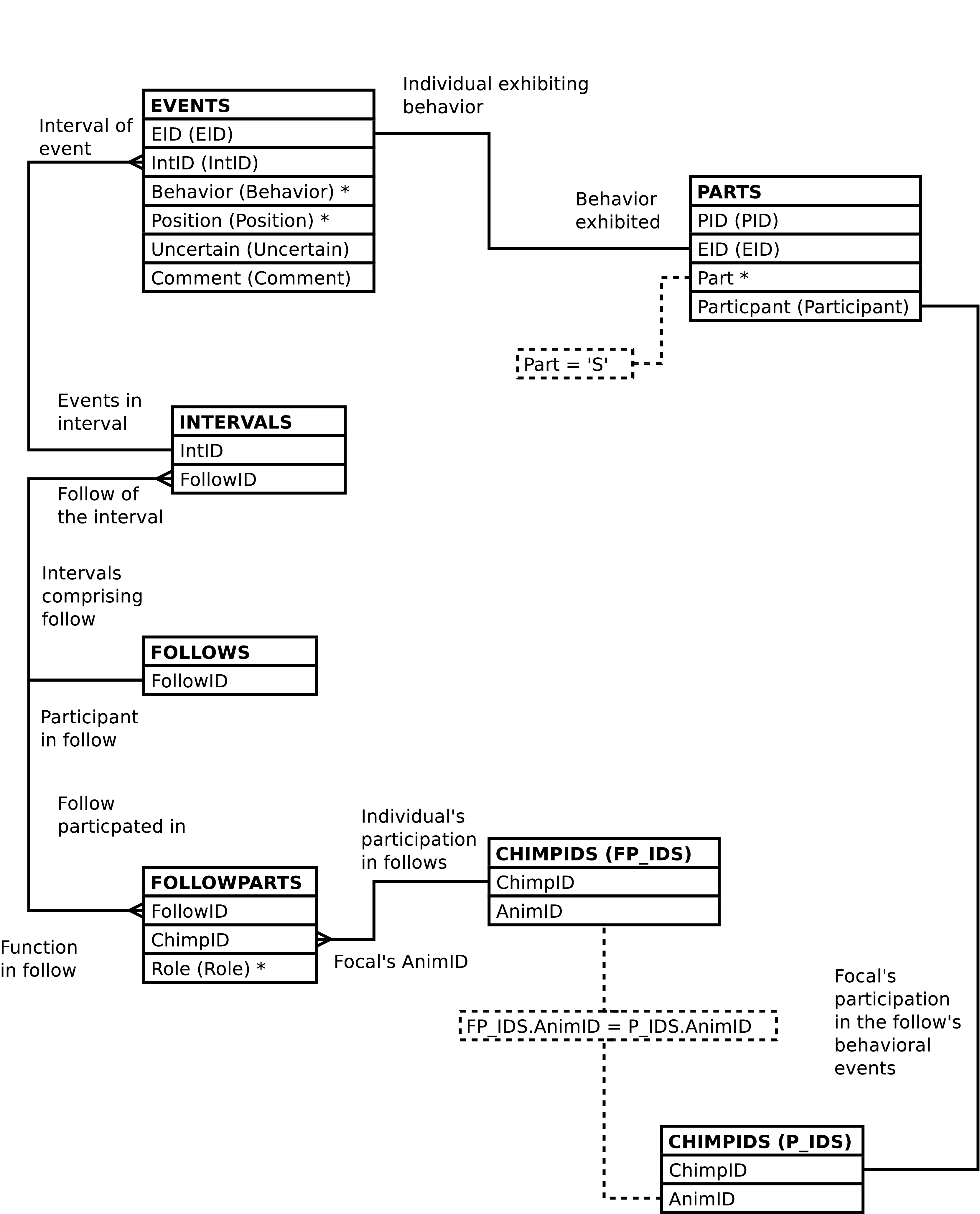
| Column | From | Description |
|---|---|---|
| EID | EVENTS.EID | Identifier of the behavioral event row. |
| IntID | EVENTS.IntID | Identifier of the observation interval during which the event was recorded. |
| PID | PARTS.PID | Identifier of the behavioral participant row which records behavioral data regarding the individual exhibiting the behavior. |
| Behavior | EVENTS.Behavior | Code indicating the behavior observed. |
| Position | EVENTS.Position | Position within the canopy where the event occurred. |
| Uncertain | EVENTS.Uncertain | Whether or not the behavior was observed with certainty. |
| Role (Role in Follow of Chimp) | FOLLOWPARTS.Role | Code for the role, i.e. mom, sib, infant, played by the individual involved in the behavioral event. |
| Participant | PARTS.Participant | The identifier or alternate identifier of the individual exhibiting the behavior. |
| Comment | EVENTS.Comment | Textual remarks regarding the behavioral event. |
An event bout is defined as a contiguous series of minutes during which a focal is involved in a behavior. However, behavioral events involving baboons are excluded when considering contiguity. Behaviors are distinguished by the codes used to represent them. An individual can be involved in more than one event bout at a time, if involved in more than one behavior at a time.
EVENT_BOUTS contains one row per FOLLOWPARTS row per INTERVALS row, per EVENTS.Behavior value having a related PARTS row that shows the given focal involved in the given behavior -- one row per follow, per focal, per interval in which the focal is involved in a behavior (excluding behavioral events which involve a baboon), per code for the behavior involved in. The number of rows returned is not affected by the number of times the focal is involved in the behavior during any given interval, nor is it affected by the behavioral role the focal plays regards the behavior. There is a row per focal per behavior the focal is involved in per interval, excluding cases where a baboon is involved.
Event bouts are numbered sequentially, in a time-wise order, per follow, per focal, per behavior, starting with 1.
Bouts are said to be censored, either on the left (earlier) or on the right (later) if the “edge” of the bout exists because there is a lack of behavioral data on the given focal. Censoring can occur because of “badobs”, because observation has not started or because observation finishes, or any other time there is no behavioral data what so ever on the focal. Note that censoring or lack thereof of any one focal is not affected by data or lack thereof on any other focal. Note also that observations involving baboons are not excluded when it comes to considering whether a bout is censored. Baboon related observations are like any other behavioral events involving the focal when it comes to considering whether behavioral data exists.
Likewise, the columns that indicate censoring due to the start of observation at the beginning of the day and end of observation at the end of the day are per-focal and not affected by observations that may or may not be made on the other focals.
Note that uncertain behavioral events are not distinguished from certain behavioral events in event bout analysis, although the EVENT_BOUTS view does provide some information regarding uncertainty.
Tip
Since the EVENT_BOUTS view can take a number of minutes to return results it may be desirable to put the results of interest into a table for repeated analysis. If this is done it is very likely a good idea to add indexes to most of the new table's columns. This will greatly improve performance.
Figure 5.38. Query Defining the EVENT_BOUTS View: Part I
-- Note that we don't worry about leap seconds given

-- the time values in the db.


WITH detail AS

     -- Compute mins_in and mins_out

     (SELECT bouts.followid AS followid

           , bouts.intid AS intid

           , bouts.function AS function

           , bouts.animid AS animid

           , bouts.role AS role

           , bouts.chimpid AS chimpid

           , bouts.bout AS bout

           , bouts.behavior AS behavior

           , bouts.uncertain AS uncertain

           , bouts.time AS time

           , (EXTRACT(EPOCH FROM bouts.time)

                - EXTRACT(EPOCH FROM FIRST_VALUE(bouts.time) OVER bout_w)

             ) / 60

             + 1

             AS mins_in

           , (EXTRACT(EPOCH FROM LAST_VALUE(bouts.time)

                                   OVER (bout_w RANGE BETWEEN CURRENT ROW

                                                AND UNBOUNDED FOLLOWING))

                - EXTRACT(EPOCH FROM bouts.time)

             ) / 60

             AS mins_out

        FROM

          -- Compute bout number by summing transition ticks

          (SELECT ticks.followid AS followid

                   , ticks.intid AS intid

                   , ticks.function AS function

                   , ticks.animid AS animid

                   , ticks.role AS role

                   , ticks.chimpid AS chimpid

                   , ticks.behavior AS behavior

                   , ticks.uncertain AS uncertain

                   , ticks.time AS time

                   , SUM(ticks.bouttick)

                       OVER (PARTITION BY ticks.followid

                                        , ticks.behavior

                                        , ticks.animid

                             ORDER BY ticks.time

                                    , ticks.bouttick DESC)

                     AS bout
Figure 5.39. Query Defining the EVENT_BOUTS View: Part II
             FROM

               -- Distinguish one bout from another

               (SELECT intervals.followid AS followid

                     , intervals.intid AS intid

                     , followroles.function AS function

                     , part_cids.animid AS animid

                     , followparts.role AS role

                     , followparts.chimpid AS chimpid

                     , events.behavior AS behavior

                     , BOOL_AND(events.uncertain) AS uncertain

                     , intervals.time AS time

                     , CASE

                         WHEN LAG(MIN(intervals.time)) OVER tick_w

                                = MIN(intervals.time) - '1 minute'::INTERVAL

                           THEN 0

                         ELSE

                           1

                       END

                       AS bouttick

                  FROM intervals

                         JOIN events

                              ON (events.intid = intervals.intid)

                         JOIN parts

                              ON (parts.eid = events.eid)

                         JOIN chimpids AS part_cids

                              ON (part_cids.chimpid = parts.participant)

                         JOIN chimpids AS fp_cids

                              ON (fp_cids.animid = part_cids.animid)

                         JOIN followparts

                              ON (followparts.followid = intervals.followid

                                  AND followparts.chimpid = fp_cids.chimpid)

                         JOIN followroles

                              ON (followroles.role = followparts.role)

                  WHERE NOT(events.baboon)

                  GROUP BY intervals.followid

                     , intervals.intid

                     , part_cids.animid

                     , events.behavior

                     -- The values that are unique per above anyway

                     , followroles.function

                     , followparts.role

                     , followparts.chimpid

                     , intervals.time

                  WINDOW tick_w AS (PARTITION BY intervals.followid

                                               , events.behavior

                                               , part_cids.animid

                                    ORDER BY intervals.time)

               ) AS ticks

          ) AS bouts

        WINDOW bout_w AS (PARTITION BY bouts.followid

                                     , bouts.behavior

                                     , bouts.animid

                                     , bouts.bout

                          ORDER BY bouts.time)

      )
Figure 5.40. Query Defining the EVENT_BOUTS View: Part III
  -- Distribute aggregated bout info over the bout's minutes

  SELECT detail.*

       , summary.prior_gap AS prior_gap

       , summary.gap_noobs AS gap_noobs

       , summary.left_censored AS left_censored

       , summary.right_censored AS right_censored

       , summary.day_start AS day_start

       , summary.day_end AS day_end

    FROM

      detail

        JOIN

        (-- Aggregate per-bout information

         SELECT bout_ends.followid AS followid

              , bout_ends.animid AS animid

              , bout_ends.behavior AS behavior

              , bout_ends.bout AS bout

              , CASE

                  WHEN bout_ends.bout = 1 THEN

                    NULL

                  ELSE

                    SUM(bout_ends.prior_gap)

                END

                AS prior_gap

              , CASE

                  WHEN bout_ends.bout = 1 THEN

                    NULL

                  ELSE

                    SUM(bout_ends.prior_gap)

                      -- Subtract number of minutes the focal had

                      -- any behaviors during the gap.

                      - (SELECT COUNT(DISTINCT intervals.intid)

                           FROM intervals

                                  JOIN events

                                       ON (events.intid = intervals.intid)

                                  JOIN parts

                                       ON (parts.eid = events.eid)

                                  JOIN chimpids

                                       ON (chimpids.chimpid

                                           = parts.participant)

                           WHERE intervals.followid = bout_ends.followid

                                 AND MIN(bout_ends.time) > intervals.time

                                 AND intervals.time

                                     >= MIN(bout_ends.time)

                                          - (SUM(bout_ends.prior_gap)

                                             || ' minutes')::INTERVAL

                                 AND chimpids.animid = bout_ends.animid)

                END

                AS gap_noobs

              , BOOL_OR(bout_ends.left_censored) AS left_censored

              , BOOL_OR(bout_ends.right_censored) AS right_censored
Figure 5.41. Query Defining the EVENT_BOUTS View: Part IV
              , CASE

                  WHEN bout_ends.bout = 1 THEN

                    NOT EXISTS

                          -- Behavioral data on the focal before the bout

                          (SELECT 1

                             FROM intervals

                                    JOIN events

                                         ON (events.intid = intervals.intid)

                                    JOIN parts

                                         ON (parts.eid = events.eid)

                                    JOIN chimpids

                                         ON (chimpids.chimpid

                                             = parts.participant)

                             WHERE intervals.followid = bout_ends.followid

                                   AND intervals.time < MIN(bout_ends.time)

                                   AND chimpids.animid = bout_ends.animid

                             LIMIT 1)

                  ELSE

                    FALSE

                END

                AS day_start

              , CASE

                  WHEN bout_ends.bout = LAST_VALUE(bout_ends.bout)

                                          OVER (PARTITION BY

                                                  bout_ends.followid

                                                , bout_ends.animid

                                                , bout_ends.behavior

                                                ORDER BY bout_ends.bout

                                                RANGE BETWEEN CURRENT ROW

                                                      AND UNBOUNDED FOLLOWING)

                    THEN

                    NOT EXISTS

                          -- Behavioral data on the focal after the bout

                          (SELECT 1

                             FROM intervals

                                    JOIN events

                                         ON (events.intid = intervals.intid)

                                    JOIN parts

                                         ON (parts.eid = events.eid)

                                    JOIN chimpids

                                         ON (chimpids.chimpid

                                             = parts.participant)

                             WHERE intervals.followid = bout_ends.followid

                                   AND intervals.time

                                       > MAX(bout_ends.time)

                                   AND chimpids.animid = bout_ends.animid

                             LIMIT 1)

                  ELSE

                    FALSE

                END

                AS day_end
Figure 5.42. Query Defining the EVENT_BOUTS View: Part V
           FROM

             -- Examine the bout's endpoints to compute prior_gap, and

             -- left and right censoring.

             (SELECT detail.followid

                   , detail.animid

                   , detail.behavior

                   , detail.bout

                   , detail.mins_in AS mins_in

                   , detail.mins_out AS mins_out

                   , CASE

                       WHEN detail.mins_in = 1 THEN

                         (EXTRACT(EPOCH FROM detail.time)

                            - EXTRACT(EPOCH FROM

                                      LAG(detail.time)

                                        OVER (PARTITION BY

                                                detail.followid

                                              , detail.animid

                                              , detail.behavior

                                              ORDER BY detail.time))

                         ) / 60 - 1

                       ELSE

                         0

                     END

                     AS prior_gap

                   , CASE

                       WHEN detail.mins_in = 1 THEN

                         NOT EXISTS

                           (SELECT 1

                              FROM intervals AS i

                                     JOIN events AS e

                                          ON (e.intid = i.intid)

                                     JOIN parts AS p

                                          ON (p.eid = e.eid)

                                     JOIN chimpids AS p_cids

                                          ON (p_cids.chimpid = p.participant)

                              WHERE i.followid = detail.followid

                                    AND i.time = detail.time

                                                 - '1 minute'::INTERVAL

                                    AND p_cids.animid = detail.animid

                                    LIMIT 1)

                       ELSE

                         FALSE

                       END

                     AS left_censored
Figure 5.43. Query Defining the EVENT_BOUTS View: Part VI
                   , CASE

                       WHEN detail.mins_out = 0 THEN

                         NOT EXISTS

                           (SELECT 1

                              FROM intervals AS i

                                     JOIN events AS e

                                          ON (e.intid = i.intid)

                                     JOIN parts AS p

                                          ON (p.eid = e.eid)

                                     JOIN chimpids AS p_cids

                                          ON (p_cids.chimpid = p.participant)

                              WHERE i.followid = detail.followid

                                    AND i.time = detail.time

                                                 + '1 minute'::INTERVAL

                                    AND p_cids.animid = detail.animid

                                    LIMIT 1)

                       ELSE

                         FALSE

                       END

                     AS right_censored

                   , detail.time AS time

                FROM detail

                WHERE detail.mins_in = 1

                      OR detail.mins_out = 0

             ) AS bout_ends

           GROUP BY bout_ends.followid

                  , bout_ends.animid

                  , bout_ends.behavior

                  , bout_ends.bout)

          AS summary

          ON (summary.followid = detail.followid

              AND summary.animid = detail.animid

              AND summary.behavior = detail.behavior

              AND summary.bout = detail.bout)
;
| Column | From | Description |
|---|---|---|
| FollowID | FOLLOWPARTS.FollowID | Identifier of the follow. |
| IntID | INTERVALS.IntID | Identifier of the observation interval comprising one of the bout's minutes. |
| Function (Function in Follow of Focal) | FOLLOWROLES.Function | Code indicating the biological role the focal plays in the follow: Mother, Infant, or Sibling. |
| AnimID | CHIMPIDS.AnimID | Canonical identifier of the focal, the BIOGRAPHY_DATA.AnimID value. This can differ from the ChimpID in the case of twins or other circumstances where individuals have multiple identifiers. |
| Role (Role in Follow of Focal) | FOLLOWPARTS.Role | Code indicating the family role the focal plays in the follow. This can differ from the Function in the case of twins. |
| ChimpID | FOLLOWPARTS.ChimpID | Identifier of the focal as recorded in the FOLLOWROLES row for the follow. This can differ from the focal's AnimID in the case of twins or other circumstances where individuals have multiple identifiers. In such cases this may also differ from the ChimpID stored in the PARTS.Participant rows which designate the focal as being involved in a behavioral event. |
| Bout | Computed | Integer indicating the bout number. Bout numbers start with 1 and are per follow, per focal, per behavior code. |
| Behavior | EVENTS.Behavior | Code indicating the behavior in which the focal is involved. |
| Uncertain | EVENTS.Uncertain | TRUE if all of the (non-baboon related)
behavioral events in which the focal is involved during
the given minute for the given behavior are uncertain,
FALSE otherwise. |
| Time | INTERVALS.Time | The time of the observation. |
| Mins_In (Minutes Into the bout) | Computed | Number of minutes into the current bout, including the current minute.[a] |
| Mins_Out (Minutes remaining in the bout) | Computed | Number of minutes remaining in the current bout, excluding the current minute.[b] |
| Prior_Gap (Minutes between the current and Prior bout) | Computed | The number of minutes between the current bout
and the previous bout (of the same follow, focal,
behavior). NULL if there is no prior bout. |
| Gap_NoObs (Minutes without Observation of the focal between the current and prior bout) | Computed | The number of minutes between the current bout
and the previous bout (of the same follow, focal,
behavior) during which there is no behavioral data what
so ever on the focal. NULL if there is no prior
bout. |
| Left_Censored | Computed. | TRUE when the bout is left censored, FALSE
otherwise. See above for more information regards
censoring. |
| Right_Censored | Computed. | TRUE when the bout is right censored, FALSE
otherwise. See above for more information regards
censoring. |
| Day_Start (Bout is censored due to Start of Day) | Computed | TRUE when the bout is censored because it
occurs at the beginning of the day's observation of the
follow, FALSE otherwise. |
| Day_End (Bout is censored due to End of Day) | Computed | TRUE when the bout is censored because it
occurs at the end of the day's observation of the
follow, FALSE otherwise. |
EVENT_BOUT_AGGS contains one row per FOLLOWPARTS row per EVENTS.Behavior value having a related PARTS row that shows the given focal involved in the given behavior -- one row per follow, per focal in which the focal is involved in a behavior (excluding behavioral events which involve a baboon), per code for the behavior involved in. Each row represents an entire event bout.
See EVENT_BOUTS for more information on event bout analysis.
Figure 5.45. Query Defining the EVENT_BOUT_AGGS View
SELECT event_bouts.followid AS followid

     , event_bouts.function AS function

     , event_bouts.animid AS animid

     , event_bouts.role AS role

     , event_bouts.chimpid AS chimpid

     , event_bouts.bout AS bout

     , event_bouts.behavior AS behavior

     , BOOL_OR(event_bouts.uncertain) AS uncertain

     , MIN(event_bouts.time) AS start_time

     , MAX(event_bouts.time) AS stop_time

     , event_bouts.prior_gap AS prior_gap

     , event_bouts.gap_noobs AS gap_noobs

     , event_bouts.left_censored AS left_censored

     , event_bouts.right_censored AS right_censored

     , event_bouts.day_start AS day_start

     , event_bouts.day_end AS day_end

  FROM event_bouts

  GROUP BY event_bouts.followid

         , event_bouts.animid

         , event_bouts.bout

         , event_bouts.behavior

         -- The values that are unique per above anyway

         , event_bouts.function

         , event_bouts.role

         , event_bouts.chimpid

         , event_bouts.prior_gap

         , event_bouts.gap_noobs

         , event_bouts.left_censored

         , event_bouts.right_censored

         , event_bouts.day_start

         , event_bouts.day_end
;
Figure 5.46. Entity Relationship Diagram of the EVENT_BOUT_AGGS View
| Column | From | Description |
|---|---|---|
| FollowID | FOLLOWPARTS.FollowID | Identifier of the follow. |
| Function (Function in Follow of Focal) | FOLLOWROLES.Function | Code indicating the biological role the focal plays in the follow: Mother, Infant, or Sibling. |
| AnimID | CHIMPIDS.AnimID | Canonical identifier of the focal, the BIOGRAPHY_DATA.AnimID value. This can differ from the ChimpID in the case of twins or other circumstances where individuals have multiple identifiers. |
| Role (Role in Follow of Focal) | FOLLOWPARTS.Role | Code indicating the family role the focal plays in the follow. This can differ from the Function in the case of twins. |
| ChimpID | FOLLOWPARTS.ChimpID | Identifier of the focal as recorded in the FOLLOWROLES row for the follow. This can differ from the focal's AnimID in the case of twins or other circumstances where individuals have multiple identifiers. In such cases this may also differ from the ChimpID stored in the PARTS.Participant rows which designate the focal as being involved in a behavioral event. |
| Bout | Computed | Integer indicating the bout number. Bout numbers start with 1 and are per follow, per focal, per behavior code. |
| Behavior | EVENTS.Behavior | Code indicating the behavior in which the focal is involved. |
| Uncertain | EVENTS.Uncertain | TRUE if any of the underlying
EVENT_BOUTS rows which comprise the
bout are uncertain, FALSE otherwise. |
| Start_Time | INTERVALS.Time | The time the event bout started. The time of the first observation of the bout. |
| Stop_Time | INTERVALS.Time | The time the event bout stopped. The time of the last observation of the bout. |
| Prior_Gap (Minutes between the current and Prior bout) | Computed | The number of minutes between the current bout
and the previous bout (of the same follow, focal,
behavior). NULL if there is no prior bout. |
| Gap_NoObs (Minutes without Observation of the focal between the current and prior bout) | Computed | The number of minutes between the current bout
and the previous bout (of the same follow, focal,
behavior) during which there is no behavioral data what
so ever on the focal. NULL if there is no prior
bout. |
| Left_Censored | Computed. | TRUE when the bout is left censored, FALSE
otherwise. See above for more information regards
censoring. |
| Right_Censored | Computed. | TRUE when the bout is right censored, FALSE
otherwise. See above for more information regards
censoring. |
| Day_Start (Bout is censored due to Start of Day) | Computed | TRUE when the bout is censored because it
occurs at the beginning of the day's observation of the
follow, FALSE otherwise. |
| Day_End (Bout is censored due to End of Day) | Computed | TRUE when the bout is censored because it
occurs at the end of the day's observation of the
follow, FALSE otherwise. |
FAMILY_EVENTS contains one row per EVENTS row. FAMILY_EVENTS provides a way to review recorded behaviors in a way similar to the way data is recorded in the field. It is also useful for changing database content, since this is often done based on data recorded in the field.
Note
The FAMILY_EVENTS view is neither particularly efficient nor particularly well suited to data analysis. Other views will very likely be much faster and more appropriate when analyzing data.
Note
The FAMILY_EVENTS view is limited in that it will not change database content in the tables which extend the EVENTS table, tables such as VOCS, EATS, and the like. For this the DATASHEETS view must be used.
Figure 5.47. Query Defining the FAMILY_EVENTS View: Part I
SELECT focal_follows.followid AS followid

     , intervals.intid AS intid

     , events.eid AS eid

     , moms.pid AS e_mompid

     , infants.pid AS e_infantpid

     , sibs.pid AS e_sibpid

     , nfs.pid AS e_nonfocalpid

     , focal_follows.date AS date

     , intervals.time AS time

     , focal_follows.mom AS mom

     , focal_follows.infant AS infant

     , focal_follows.infant2 AS infant2

     , focal_follows.sib AS sib

     , focal_follows.sib2 AS sib2

     , events.behavior AS behavior

     , events.position AS position

     , events.uncertain AS uncertain

     , moms.participant AS e_mom

     , moms.part AS e_mompart

     , infants.participant AS e_infant

     , infants.part AS e_infantpart

     , sibs.participant AS e_sib

     , sibs.part AS e_sibpart

     , nfs.participant AS e_nonfocal

     , nfs.part AS e_nonfocalpart

     , events.baboon AS e_baboon

     , CASE

         WHEN events.baboon THEN

           CASE

             WHEN moms.part = 'gmi_actor'

                  OR infants.part = 'gmi_actor'

                  OR sibs.part = 'gmi_actor' THEN

               'gmi_actee'

             WHEN moms.part = 'gmi_actee'

                  OR infants.part = 'gmi_actee'

                  OR sibs.part = 'gmi_actee' THEN

               'gmi_actor'

             ELSE

               'gmi_participant'

           END

         ELSE

           NULL

       END::parts_part AS e_baboonpart

     , events.comment AS e_comment

     , intervals.comment AS i_comment
Figure 5.48. Query Defining the FAMILY_EVENTS View: Part II
  FROM focal_follows

         JOIN intervals

           ON (intervals.followid = focal_follows.followid)

         JOIN events

           ON (events.intid = intervals.intid)

         LEFT OUTER JOIN parts AS moms

                      ON (moms.eid = events.eid

                          AND followfunc(intervals.followid

                                       , moms.participant)

                              = 'gmi_mom')

         LEFT OUTER JOIN parts AS infants

                      ON (infants.eid = events.eid

                          AND followfunc(intervals.followid

                                       , infants.participant)

                              = 'gmi_infant')

         LEFT OUTER JOIN parts AS sibs

                      ON (sibs.eid = events.eid

                          AND followfunc(intervals.followid

                                       , sibs.participant)

                              = 'gmi_sib')

         LEFT OUTER JOIN parts AS nfs

                      ON (nfs.eid = events.eid

                          AND followfunc(intervals.followid

                                       , nfs.participant)

                              = 'gmi_nonfocal')
;
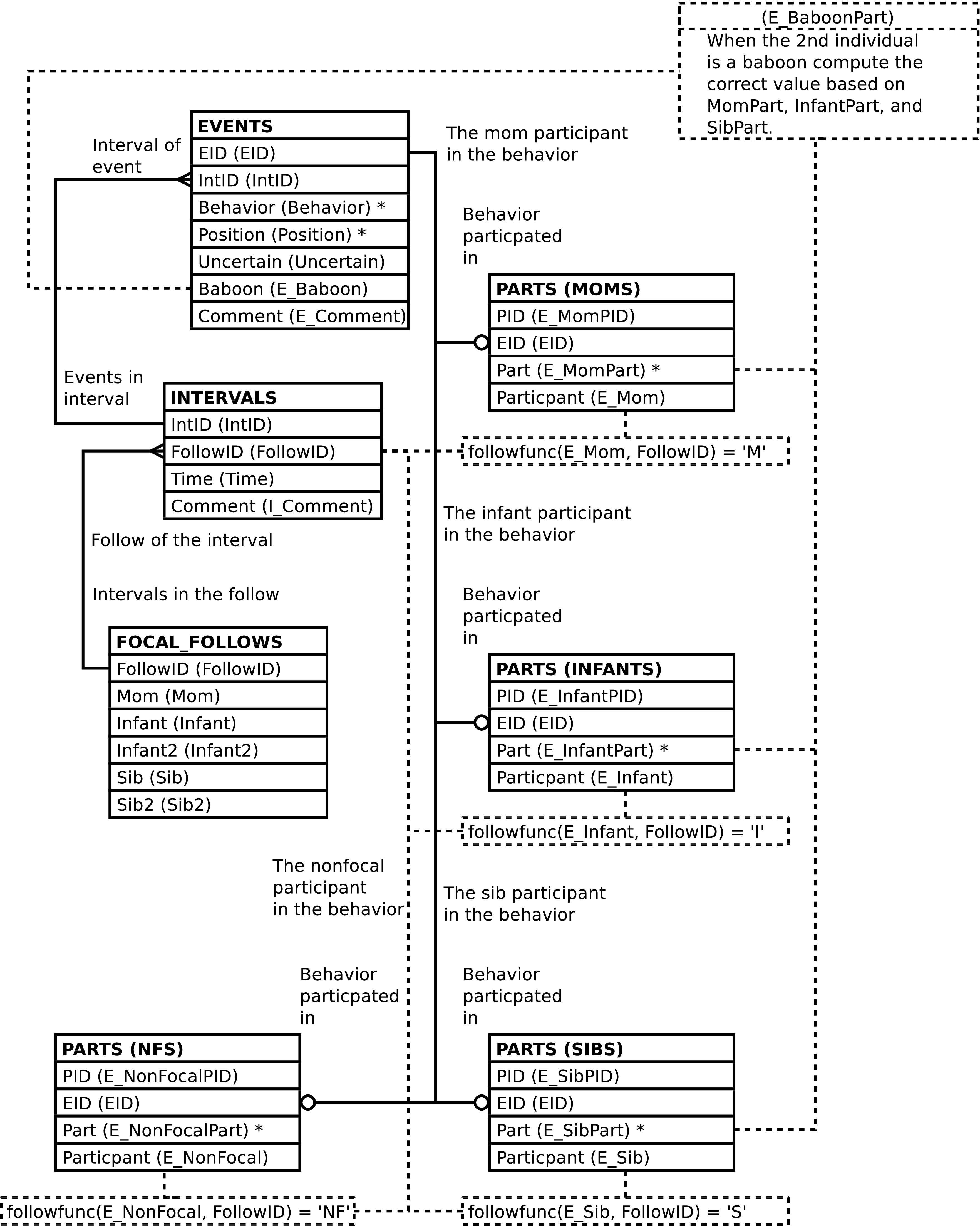
| Column | From | Description |
|---|---|---|
| FollowID | FOLLOWS.FollowID | Identifier of the follow. |
| IntID | EVENTS.IntID | Identifier of the observation interval during which the event was recorded. |
| EID | EVENTS.EID | Identifier of the behavioral event row. |
| MomPID (Event Mom PID) | PARTS.PID | Identifier of the behavioral participant row
which records behavioral data regarding the mother in
the follow, or NULL when the mother is not a
participant in the behavior. |
| E_InfantPID (Event Infant PID) | PARTS.PID | Identifier of the behavioral participant row
which records behavioral data regarding the infant in
the follow, or NULL when the infant is not a
participant in the behavior. |
| E_SibPID (Event Sib PID) | PARTS.PID | Identifier of the behavioral participant row
which records behavioral data regarding the sibling in
the follow, or NULL when the sibling is not a
participant in the behavior. |
| E_NonfocalPID (Event Non-Focal PID) | PARTS.PID |
Identifier of the behavioral participant row
which records behavioral data regarding any nonfocal
individual involved in the behavior, or |
| Date | FOLLOWS.Date | The date of the follow. |
| Time | INTERVALS.Time | The time of the interval. |
| Mom | FOLLOWPARTS.ChimpID | The ChimpID of the mother in the follow. |
| Infant | FOLLOWPARTS.ChimpID | The ChimpID of an infant in the follow. |
| Infant2 | FOLLOWPARTS.ChimpID | The ChimpID of a
second infant in the follow, or NULL if the infant
is not a twin. |
| Sib | FOLLOWPARTS.ChimpID | The ChimpID of a
sibling in the follow, or NULL if there is no
sibling focal. |
| Sib2 | FOLLOWPARTS.ChimpID | The ChimpID of a
second sibling in the follow, or NULL if the sibling
is not a twin. |
| Behavior | EVENTS.Behavior | Code indicating the behavior observed. |
| Position | EVENTS.Position | Position within the canopy where the event occurred. |
| Uncertain | EVENTS.Uncertain | Whether or not the behavior was observed with certainty. |
| E_Mom (Event Mom) | PARTS.Participant | The identifier or alternate identifier of the mom,
or NULL if the mother is not a participant in the
behavior. |
| E_MomPart (Event Mom Participant code) | PARTS.Part | The role the mom plays in the behavior, or
NULL if the mother is not a participant in the
behavior. |
| E_Infant (Event Infant) | PARTS.Participant | The identifier or alternate identifier of the
infant, or NULL when the infant is not a participant
in the behavior. |
| E_InfantPart (Event Infant Participant code) | PARTS.Part | The role the infant plays in the behavior, or
NULL when the infant is not a participant in the
behavior. |
| E_Sib (Events Sibling) | PARTS.Participant | The identifier or alternate identifier of the
sibling, or NULL when the sibling is not a
participant in the behavior. |
| E_SibPart (Event Sibling Participant code) | PARTS.Part | The role the sibling plays in the behavior, or
NULL when the sibling is not a participant in the
behavior. |
| E_Nonfocal | PARTS.Participant |
The identifier or alternate identifier of any
nonfocal individual involved in the behavior, or
|
| E_NonfocalPart (Event Non-Focal Participant code) | PARTS.Part |
The role a nonfocal individual plays in the
behavior, or |
| E_Baboon (Event Baboon) | EVENTS.Baboon | Whether or not a baboon is the second participant in the behavioral interaction. |
| E_BaboonPart (Event Baboon Participant code) | A simulated PARTS.Part value |
The role the baboon plays in the behavior, or
|
| E_Comment (Event Comment) | EVENTS.Comment | Textual remarks regarding the behavioral event. |
| I_Comment (Interval Comment) | INTERVALS.Comment | Textual remarks regarding the interval. |
Altering the FAMILY_EVENTS view alters the content of the underlying EVENTS and PARTS tables in the fashion described below. The INTERVALS and related FOLLOWS and FOLLOWPARTS rows must exist; the content of these tables is never altered.
Inserting a row into the FAMILY_EVENTS view inserts a row into the EVENTS table, as expected.
When inserting into FAMILY_EVENTS the interval of the follow must be specified. The interval may be specified in either or both of the following 2 ways:
A IntID may be supplied.
A Time may be supplied and the follow specified. The follow may be specified in either or both of the following 2 ways:
A FollowID may be supplied.
Date, Mom and, Infant values all may be supplied.
Note
See the note regards twins when inserting into FOLLOW_INTERVALS.
Caution
FAMILY_EVENTS inserts rows into the database only when there is a INTERVALS row that matches the above selection criteria. If no row matches the database content is not altered. Note that no row will match if conflicting information is supplied.
Note
When inserting into FAMILY_EVENTS it is not
recommended to set any of the
EID,
E_MomPID,
E_InfantPID,
E_SibPID, or
E_NonfocalPID values.
Omitting these columns or supplying NULL values will
allow the system to automatically generate ids.
Note
When inserting into FAMILY_EVENTS the user-supplied value for E_BaboonPart is ignored.
Updating the FAMILY_EVENTS view updates EVENTS, as expected.
Updating FAMILY_EVENTS can update, insert into, or delete rows from PARTS.
Note
The examples below explicitly specify an
EVENTS.EID
value. This is solely for the purpose of brevity. Any valid
WHERE clause could be used instead to
designate the desired row in
EVENTS.
If the old values for a mom, infant, sib or nonfocal
PARTS row are not NULL and the new
values are all NULL then the old row is deleted. The
following example removes the mother as a participant in the
event with an
EVENTS.EID
of 1234:
Example 5.6. Deleting The Mother's PARTS Row
UPDATE family_events

       SET e_mom = NULL

         , e_mompid = NULL

         , e_mompart = NULL

       WHERE eid = 1234;
If the old values for a mom, infant, sib, or nonfocal
are NULL, i.e. if the mom, infant, sib, or nonfocal has no
PARTS row then a new
PARTS row can be inserted by supplying
values. The following example adds, to the event with an
EVENTS.EID
of 1234, assuming she is not already one
of the individuals involved in the event, the mother as an
actor (PARTS.Part
= 'R'):
Example 5.7. Inserting A PARTS Row For The Mother
UPDATE family_events

       SET e_mom = 'GA'

         , e_mompart = 'R'

       WHERE eid = 1234;
If old values exist, they are replaced by new values.
Assuming the non-focal JOE is involved in
the event with an
EVENTS.EID
of 1234, the following example changes
the non-focal to JAK:
Example 5.8. Changing Non-Focal Participant In A PARTS Row
UPDATE family_events

       SET e_nonfocal = 'JAK'

       WHERE eid = 1234;
Note
The ChimpID values need
not correspond to the roles the individuals play in the
follow because data is associated with chimp id values,
not focal roles. The presence of focal roles in the
column names is, in some sense, artificial. For example,
there are two ways to change the infant
(INF) to a sibling
(SB) in the event with an
EVENTS.EID
of 1234. The first is to delete the
PARTS row for the infant and insert a
new PARTS row for the sibling:
Example 5.9. Deleting the Infant's PARTS row and Inserting a New PARTS Row for the Sibling
UPDATE family_events

       SET e_infant = NULL

         , e_infantpid = NULL

         , e_infantpart = NULL

         , e_sib = 'SB'

         , e_sibpart = 'R'

       WHERE eid = 1234;
Deleting and re-adding rows is somewhat inefficient and error prone. It is probably better to simply replace the infant's ChimpID value with the siblings. Simply changing the PARTS.Participant value is enough; being the sibling is a property of a ChimpID with respect to a follow and, again, when updating the database there is no correspondence between the column names and the roles played by the individual chimps. The following is sufficient to re-use the exiting PARTS row and change the infant's ChimpID value to the siblings:
Example 5.10. Changing an Infant's PARTS row Into A PARTS Row for the Sibling
UPDATE family_events

       SET e_infant = 'SB'  -- SB is the sibling

       WHERE eid = 1234;
When the result is queried SB
will show up as a sibling, not an infant.
It is an error to attempt to update the values of any columns not derived from the EVENTS or PARTS tables. It is also an error to attempt to change the E_BaboonPart value.
When updated, FAMILY_EVENTS raises a notice containing the number of rows altered. A row is counted only once, when updating the row changes the database content in any way.
FOCAL_EVENTS contains one row per EVENTS row per focal individual involved in the behavioral event. FOCAL_EVENTS provides a direct way to analyze behaviors when interested in the role (mom, infant, sib, non-focal) of the individuals involved in the behavior.
Caution
FOCAL_EVENTS has 1 or 2 rows per behavioral event -- per EVENTS row -- depending on whether the the behavioral interaction is social and how many of the individuals involved are focals in the follow.
Caution
FOCAL_EVENTS includes rows for behavioral interactions with baboons.
Figure 5.50. Query Defining the FOCAL_EVENTS View
SELECT events.eid AS eid

     , events.intid AS intid

     , focals.pid AS focalpid

     , otherpart.pid AS otherpid

     , events.behavior AS behavior

     , events.position AS position

     , events.uncertain AS uncertain

     , followparts.role AS focalrole

     , focals.participant AS focal

     , focals.part AS focalpart

     , CASE

         WHEN events.baboon THEN

           'gmi_nonfocal'

         ELSE

           followrole(intervals.followid, otherpart.participant)

       END AS otherrole

     , otherpart.participant AS other

     , CASE

         WHEN events.baboon THEN

           CASE

             WHEN focals.part = 'gmi_actor' THEN

               'gmi_actee'

             WHEN focals.part = 'gmi_actee' THEN

               'gmi_actor'

             ELSE

               'gmi_participant'

           END::parts_part

         ELSE

           otherpart.part

       END AS otherpart

     , events.baboon AS baboon

     , events.comment AS comment

  FROM events

         JOIN intervals

           ON (intervals.intid = events.intid)

         JOIN followparts

           ON (followparts.followid = intervals.followid)

         JOIN chimpids AS fp_ids

           ON (fp_ids.chimpid = followparts.chimpid)

         JOIN parts AS focals

           ON (focals.eid = events.eid)

         JOIN chimpids AS focal_ids

           ON (focal_ids.chimpid = focals.participant)

         LEFT OUTER JOIN parts AS otherpart

                      ON (otherpart.eid = events.eid

                          AND focals.pid IS DISTINCT FROM otherpart.pid)

  WHERE focal_ids.animid = fp_ids.animid
;
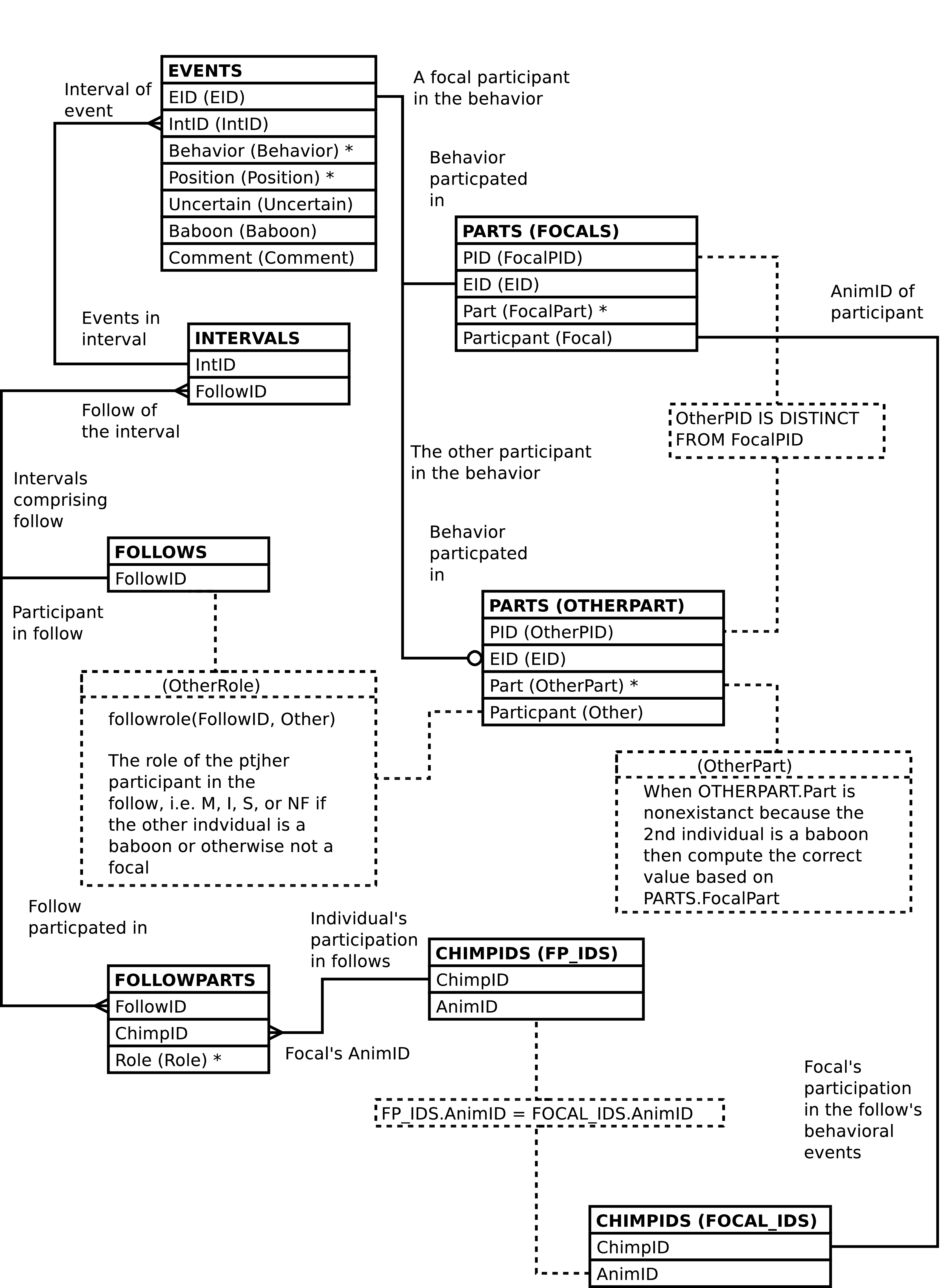
| Column | From | Description |
|---|---|---|
| EID | EVENTS.EID | Identifier of the behavioral event row. |
| IntID | EVENTS.IntID | Identifier of the observation interval during which the event was recorded. |
| FocalPID | PARTS.PID | Identifier of the behavioral participant row which records behavioral data regarding one of the focals in the follow. |
| OtherPID | PARTS.PID |
Identifier of the behavioral participant row which records behavioral data regarding the other individual (the individual involved in the behavior who is not designated as the focal in the row). This value is |
| Behavior | EVENTS.Behavior | Code indicating the behavior observed. |
| Position | EVENTS.Position | Position within the canopy where the event occurred. |
| Uncertain | EVENTS.Uncertain | Whether or not the behavior was observed with certainty. |
| FocalRole (Role in Follow of Focal Chimp) | FOLLOWPARTS.Role | Code for the role, i.e. mom, sib, infant, played by the individual designated as focal in the behavioral event. |
| Focal | PARTS.Participant | The identifier or alternate identifier of the focal. |
| FocalPart | PARTS.Part | The role the focal plays in the behavior. |
| OtherRole (Role in Follow of Other Chimp) | FOLLOWPARTS.Role or computed in the case of interaction with a baboon |
Code for the role played by the other
individual in the behavioral event,
or This value is |
| Other | PARTS.Participant |
The identifier or alternate identifier of the other individual (the the individual not designated as the focal in the row). This value is |
| OtherPart | PARTS.Part or computed in the case of interaction with a baboon |
The role the other individual (the individual involved in the behavior who is not designated as the focal in the row) plays in the behavior. This value is |
| Baboon | EVENTS.Baboon | Whether or not a baboon is the second participant in the behavioral interaction. |
| Comment | EVENTS.Comment | Textual remarks regarding the behavioral event. |
FOCAL_SOCIAL_EVENTS contains one row per EVENTS row per individual involved in the behavioral event when the individual is a focal in the follow where a focal in the follow is one of 2 chimpanzees involved in the exhibited behavior. FOCAL_SOCIAL_EVENTS provides a direct way to analyze social behaviors when interested in the role (mom, infant, sib, non-focal) of the chimpanzees involved in the behavior.
Caution
FOCAL_SOCIAL_EVENTS has 0, 1 or 2 rows per behavioral event -- per EVENTS row -- depending on whether there are 2 chimpanzees involved in the event and how many of the chimpanzees are focals in the follow.
Figure 5.52. Query Defining the FOCAL_SOCIAL_EVENTS View
SELECT events.eid AS eid

     , events.intid AS intid

     , focals.pid AS focalpid

     , otherpart.pid AS otherpid

     , events.behavior AS behavior

     , events.position AS position

     , events.uncertain AS uncertain

     , followparts.role AS focalrole

     , focals.participant AS focal

     , focals.part AS focalpart

     , followrole(intervals.followid, otherpart.participant) AS otherrole

     , otherpart.participant AS other

     , otherpart.part AS otherpart

     , events.comment AS comment

  FROM events

         JOIN intervals

           ON (intervals.intid = events.intid)

         JOIN followparts

           ON (followparts.followid = intervals.followid)

         JOIN chimpids AS fp_ids

           ON (fp_ids.chimpid = followparts.chimpid)

         JOIN parts AS focals

           ON (focals.eid = events.eid)

         JOIN chimpids AS focal_ids

           ON (focal_ids.chimpid = focals.participant)

         JOIN parts AS otherpart

           ON (otherpart.eid = events.eid)

  WHERE focal_ids.animid = fp_ids.animid

        AND focals.pid <> otherpart.pid
;
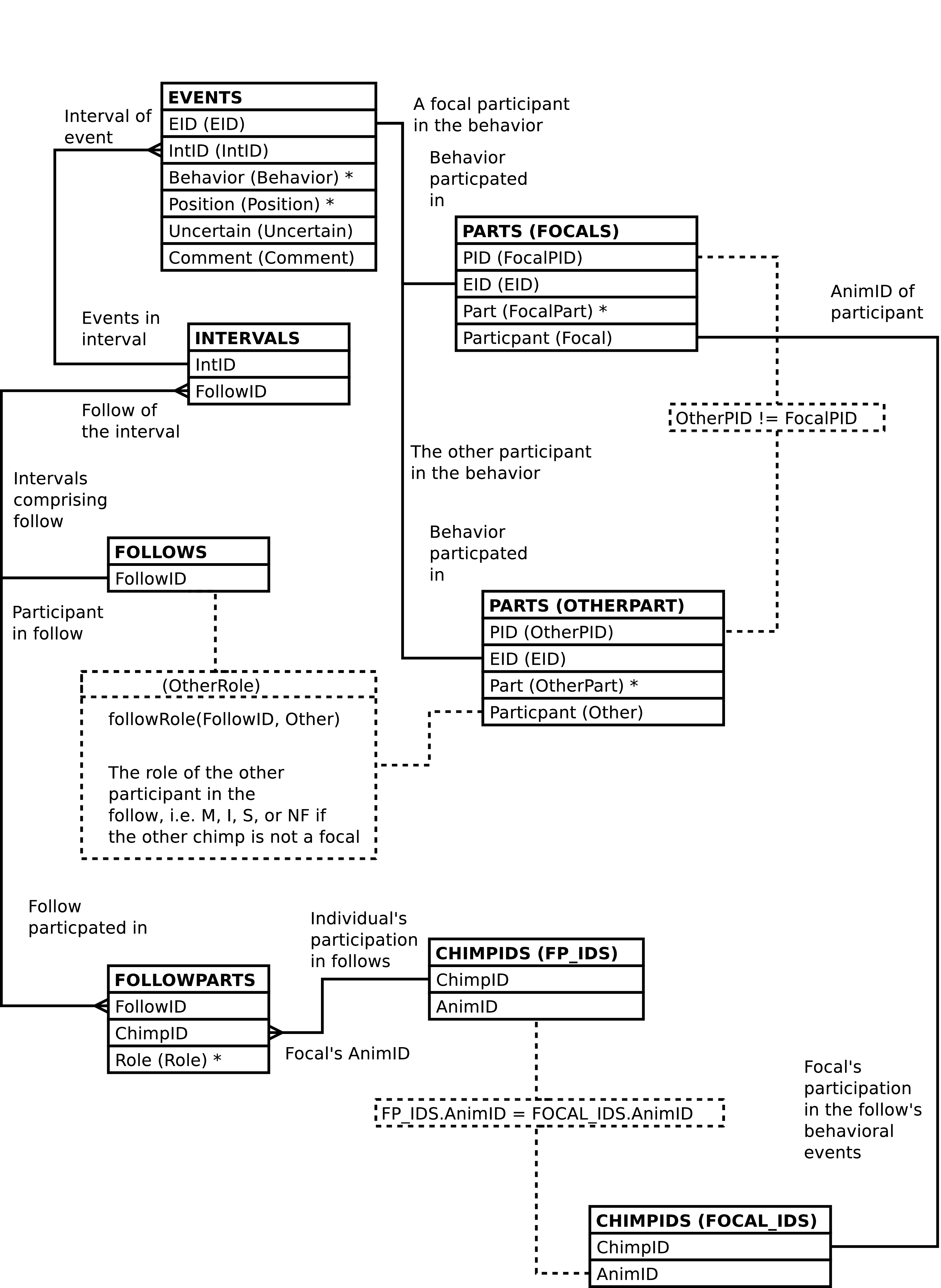
| Column | From | Description |
|---|---|---|
| EID | EVENTS.EID | Identifier of the behavioral event row. |
| IntID | EVENTS.IntID | Identifier of the observation interval during which the event was recorded. |
| FocalPID | PARTS.PID | Identifier of the behavioral participant row which records behavioral data regarding one of the focals in the follow. |
| OtherPID | PARTS.PID | Identifier of the behavioral participant row which records behavioral data regarding the other individual (the individual involved in the behavior who is not designated as the focal in the row). |
| Behavior | EVENTS.Behavior | Code indicating the behavior observed. |
| Position | EVENTS.Position | Position within the canopy where the event occurred. |
| Uncertain | EVENTS.Uncertain | Whether or not the behavior was observed with certainty. |
| FocalRole (Role in Follow of Focal Chimp) | FOLLOWPARTS.Role | Code for the role, i.e. mom, sib, infant, played by the individual designated as focal in the behavioral event. |
| Focal | PARTS.Participant | The identifier or alternate identifier of the focal. |
| FocalPart | PARTS.Part | The role the focal plays in the behavior. |
| OtherRole (Role in Follow of Other Chimp) | FOLLOWPARTS.Role | Code for the role played by the other individual
in the behavioral event,
or NF if the other
individual is not a focal in the follow. |
| Other | PARTS.Participant | The identifier or alternate identifier of the other individual (the the individual not designated as the focal in the row). |
| OtherPart | PARTS.Part | The role the other individual (the individual involved in the behavior who is not designated as the focal in the row) plays in the behavior. |
| Comment | EVENTS.Comment | Textual remarks regarding the behavioral event. |
NOOBS contains one row per FOLLOWS row, per FOLLOWPARTS row, per minute from 06:00 through 20:00, inclusive, but only when there is no behavioral data on the focal. NOOBS provides a direct way to tell when there is no behavioral data on a focal, regardless of reason and, so long as the individual is a focal in a follow on given day, irrespective of whether an observer is present.
Note that the ChimpID should be the same as the AnimID, unless twins are involved.
Figure 5.54. Query Defining the NOOBS View
SELECT followparts.followid AS followid

     , followparts.chimpid AS chimpid

     , followparts.role AS role

     , chimpids.animid AS animid

     , times.time AS time

  FROM followparts

         JOIN chimpids ON (chimpids.chimpid = followparts.chimpid)

         CROSS JOIN

           (SELECT GENERATE_SERIES('2000-01-01 gmi_day_start'::TIMESTAMP

                                 , '2000-01-01 gmi_day_end'::TIMESTAMP

                                 , '1 minute')::TIME

                   AS time

           ) AS times

  WHERE NOT EXISTS

          (SELECT 1

             FROM intervals

                  JOIN events ON (events.intid = intervals.intid)

                  JOIN parts ON (parts.eid = events.eid)

                  JOIN chimpids AS part_cids

                       ON (part_cids.chimpid = parts.participant)

            WHERE intervals.followid = followparts.followid

                  AND intervals.time = times.time

                  AND part_cids.animid = chimpids.animid

            LIMIT 1)
;
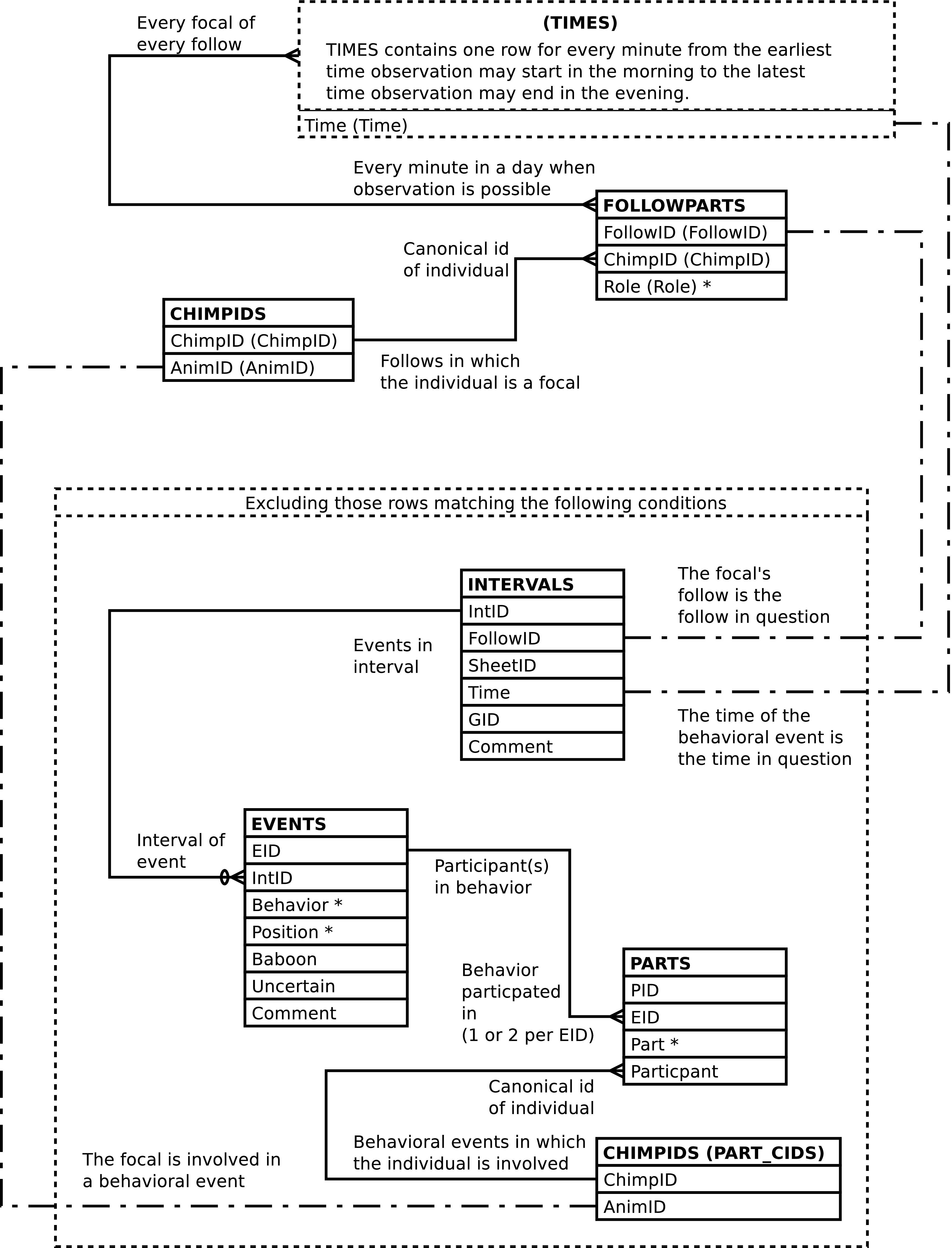
| Column | From | Description |
|---|---|---|
| FollowID | FOLLOWPARTS.FollowID | Identifier of the follow. |
| ChimpID | FOLLOWPARTS.ChimpID | The ChimpID of the focal. Useful when twins are involved. |
| Role | FOLLOWPARTS.Role | The role the focal plays in the follow. |
| AnimID | CHIMPIDS.AnimID | The canonical id, the BIOGRAPHY_DATA.AnimID of the focal. |
| Time | Computed | The time. |
A social bout is defined as a contiguous series of minutes during which a focal is involved in a behavior with a given social partner. However, behavioral events involving baboons are excluded when considering contiguity. Behaviors are distinguished by the codes used to represent them. An individual can be involved in more than one social bout at a time, if involved in more than one social behavior at a time.
SOCIAL_BOUTS contains one row per FOLLOWPARTS row per INTERVALS row, per EVENTS.Behavior value having a related PARTS row that shows the given focal involved in the given behavior with a social partner, per AnimID of the social partner -- one row per follow, per focal, per social partner, per interval in which the focal is involved in a social behavior (excluding behavioral events which involve a baboon), per code for the behavior involved in. The number of rows returned is not affected by the behavioral role the focal plays regards the social behavior or whether the focal is involved with the same behavior with the same social partner in a number of ways. There is a row per focal per social partner per social behavior the focal is involved in per interval, excluding cases where a baboon is involved.
Social bouts are numbered sequentially, in a time-wise order, per follow, per focal, per social partner, per social behavior, starting with 1.
Note that uncertain behavioral events are not distinguished from certain behavioral events in event bout analysis, although the SOCIAL_BOUTS view does provide some information regarding uncertainty.
See EVENT_BOUTS for more information on bout analysis.
Figure 5.56. Query Defining the SOCIAL_BOUTS View: Part I
-- Note that we don't worry about leap seconds given

-- the time values in the db.


WITH detail AS

     -- Compute mins_in and mins_out

     (SELECT bouts.followid AS followid

           , bouts.intid AS intid

           , bouts.function AS function

           , bouts.animid AS animid

           , bouts.role AS role

           , bouts.chimpid AS chimpid

           , bouts.other_animid AS other_animid

           , bouts.bout AS bout

           , bouts.behavior AS behavior

           , bouts.uncertain AS uncertain

           , bouts.time AS time

           , (EXTRACT(EPOCH FROM bouts.time)

                - EXTRACT(EPOCH FROM FIRST_VALUE(bouts.time) OVER bout_w)

             ) / 60

             + 1

             AS mins_in

           , (EXTRACT(EPOCH FROM LAST_VALUE(bouts.time)

                                   OVER (bout_w RANGE BETWEEN CURRENT ROW

                                                AND UNBOUNDED FOLLOWING))

                - EXTRACT(EPOCH FROM bouts.time)

             ) / 60

             AS mins_out

        FROM

          -- Compute bout number by summing transition ticks

          (SELECT ticks.followid AS followid

                   , ticks.intid AS intid

                   , ticks.function AS function

                   , ticks.animid AS animid

                   , ticks.role AS role

                   , ticks.chimpid AS chimpid

                   , ticks.other_animid AS other_animid

                   , ticks.behavior AS behavior

                   , ticks.uncertain AS uncertain

                   , ticks.time AS time

                   , SUM(ticks.bouttick)

                       OVER (PARTITION BY ticks.followid

                                        , ticks.behavior

                                        , ticks.animid

                                        , ticks.other_animid

                             ORDER BY ticks.time

                                    , ticks.bouttick DESC)

                     AS bout
Figure 5.57. Query Defining the SOCIAL_BOUTS View: Part II
             FROM

               -- Distinguish one bout from another

               (SELECT intervals.followid AS followid

                     , intervals.intid AS intid

                     , followroles.function AS function

                     , part_cids.animid AS animid

                     , followparts.role AS role

                     , followparts.chimpid AS chimpid

                     , other_cids.animid AS other_animid

                     , events.behavior AS behavior

                     , BOOL_AND(events.uncertain) AS uncertain

                     , intervals.time AS time

                     , CASE

                         WHEN LAG(MIN(intervals.time)) OVER tick_w

                                = MIN(intervals.time) - '1 minute'::INTERVAL

                           THEN 0

                         ELSE

                           1

                       END

                       AS bouttick
Figure 5.58. Query Defining the SOCIAL_BOUTS View: Part III
                  FROM intervals

                         JOIN events

                              ON (events.intid = intervals.intid)

                         JOIN parts

                              ON (parts.eid = events.eid)

                         JOIN chimpids AS part_cids

                              ON (part_cids.chimpid = parts.participant)

                         JOIN chimpids AS fp_cids

                              ON (fp_cids.animid = part_cids.animid)

                         JOIN followparts

                              ON (followparts.followid = intervals.followid

                                  AND followparts.chimpid = fp_cids.chimpid)

                         JOIN followroles

                              ON (followroles.role = followparts.role)

                         JOIN parts AS other_parts

                              ON (other_parts.eid = events.eid

                                  AND other_parts.pid <> parts.pid)

                         JOIN chimpids AS other_cids

                              ON (other_cids.chimpid = other_parts.participant)

                  WHERE NOT(events.baboon)

                  GROUP BY intervals.followid

                     , intervals.intid

                     , part_cids.animid

                     , other_cids.animid

                     , events.behavior

                     -- The values that are unique per above anyway

                     , followroles.function

                     , followparts.role

                     , followparts.chimpid

                     , intervals.time

                  WINDOW tick_w AS (PARTITION BY intervals.followid

                                               , events.behavior

                                               , part_cids.animid

                                               , other_cids.animid

                                    ORDER BY MIN(intervals.time))

               ) AS ticks

          ) AS bouts

        WINDOW bout_w AS (PARTITION BY bouts.followid

                                     , bouts.behavior

                                     , bouts.animid

                                     , bouts.other_animid

                                     , bouts.bout

                          ORDER BY bouts.time)

      )
Figure 5.59. Query Defining the SOCIAL_BOUTS View: Part IV
  -- Distribute aggregated bout info over the bout's minutes

  SELECT detail.followid AS followid

       , detail.intid AS intid

       , detail.function AS function

       , detail.animid AS animid

       , detail.role AS role

       , detail.chimpid AS chimpid

       , summary.other_function AS other_function

       , detail.other_animid AS other_animid

       , summary.other_role AS other_role

       , summary.other_chimpid AS other_chimpid

       , detail.bout AS bout

       , detail.behavior AS behavior

       , detail.uncertain AS uncertain

       , detail.time AS time

       , detail.mins_in AS mins_in

       , detail.mins_out AS mins_out

       , summary.prior_gap AS prior_gap

       , summary.gap_noobs AS gap_noobs

       , summary.left_censored AS left_censored

       , summary.right_censored AS right_censored

       , summary.day_start AS day_start

       , summary.day_end AS day_end

    FROM

      detail

        JOIN

        (-- Determine the role the focal's social partner has

         -- in the follow family group, if any.

         SELECT bouts.followid AS followid

              , bouts.animid AS animid

              , bouts.other_animid AS other_animid

              , other_followroles.function AS other_function

              , other_followparts.role AS other_role

              , other_followparts.chimpid AS other_chimpid

              , bouts.behavior AS behavior

              , bouts.bout AS bout

              , bouts.prior_gap AS prior_gap

              , bouts.gap_noobs AS gap_noobs

              , bouts.left_censored AS left_censored

              , bouts.right_censored AS right_censored

              , bouts.day_start AS day_start

              , bouts.day_end AS day_end
Figure 5.60. Query Defining the SOCIAL_BOUTS View: Part V
          FROM

            (-- Aggregate per-bout information

             SELECT bout_ends.followid AS followid

                  , bout_ends.animid AS animid

                  , bout_ends.other_animid AS other_animid

                  , bout_ends.behavior AS behavior

                  , bout_ends.bout AS bout

                  , CASE

                      WHEN bout_ends.bout = 1 THEN

                        NULL

                      ELSE

                        SUM(bout_ends.prior_gap)

                    END

                    AS prior_gap

                  , CASE

                      WHEN bout_ends.bout = 1 THEN

                        NULL

                      ELSE

                        SUM(bout_ends.prior_gap)

                          -- Subtract number of minutes the focal had

                          -- any behaviors during the gap.

                          - (SELECT COUNT(DISTINCT intervals.intid)

                               FROM intervals

                                    JOIN events

                                         ON (events.intid = intervals.intid)

                                    JOIN parts

                                         ON (parts.eid = events.eid)

                                    JOIN chimpids

                                         ON (chimpids.chimpid

                                             = parts.participant)

                               WHERE intervals.followid = bout_ends.followid

                                     AND MIN(bout_ends.time)

                                           > intervals.time

                                     AND intervals.time

                                           >= MIN(bout_ends.time)

                                              - (SUM(bout_ends.prior_gap)

                                                 || ' minutes')::INTERVAL

                                     AND chimpids.animid = bout_ends.animid)

                    END

                    AS gap_noobs

                  , BOOL_OR(bout_ends.left_censored) AS left_censored

                  , BOOL_OR(bout_ends.right_censored) AS right_censored
Figure 5.61. Query Defining the SOCIAL_BOUTS View: Part VI
                  , CASE

                      WHEN bout_ends.bout = 1 THEN

                        NOT EXISTS

                              -- Behavioral data on the focal before the bout

                              (SELECT 1

                                 FROM

                                   intervals

                                     JOIN events

                                          ON (events.intid = intervals.intid)

                                     JOIN parts

                                          ON (parts.eid = events.eid)

                                     JOIN chimpids

                                          ON (chimpids.chimpid

                                              = parts.participant)

                                 WHERE intervals.followid = bout_ends.followid

                                       AND intervals.time

                                             < MIN(bout_ends.time)

                                       AND chimpids.animid = bout_ends.animid

                                 LIMIT 1)

                      ELSE

                        FALSE

                    END

                    AS day_start

                  , CASE

                      WHEN bout_ends.bout = LAST_VALUE(bout_ends.bout)

                                              OVER (PARTITION BY

                                                      bout_ends.followid

                                                    , bout_ends.animid

                                                    , bout_ends.behavior

                                                    ORDER BY bout_ends.bout

                                                    RANGE

                                                      BETWEEN CURRENT ROW

                                                      AND UNBOUNDED FOLLOWING)

                        THEN

                        NOT EXISTS

                          -- Behavioral data on the focal after the bout

                          (SELECT 1

                             FROM intervals

                                    JOIN events

                                         ON (events.intid = intervals.intid)

                                    JOIN parts

                                         ON (parts.eid = events.eid)

                                    JOIN chimpids

                                         ON (chimpids.chimpid

                                             = parts.participant)

                             WHERE intervals.followid = bout_ends.followid

                                   AND intervals.time > MAX(bout_ends.time)

                                   AND chimpids.animid = bout_ends.animid

                             LIMIT 1)

                      ELSE

                        FALSE

                    END

                    AS day_end
Figure 5.62. Query Defining the SOCIAL_BOUTS View: Part VII
               FROM

                 -- Examine the bout's endpoints to compute prior_gap, and

                 -- left and right censoring.

                 (SELECT detail.followid

                       , detail.animid

                       , detail.other_animid

                       , detail.behavior

                       , detail.bout

                       , detail.mins_in AS mins_in

                       , detail.mins_out AS mins_out

                       , CASE

                           WHEN detail.mins_in = 1 THEN

                             (EXTRACT(EPOCH FROM detail.time)

                                - EXTRACT(EPOCH FROM

                                          LAG(detail.time)

                                            OVER (PARTITION BY

                                                    detail.followid

                                                  , detail.animid

                                                  , detail.other_animid

                                                  , detail.behavior

                                                  ORDER BY detail.time))

                             ) / 60 - 1

                           ELSE

                             0

                         END

                         AS prior_gap

                       , CASE

                           WHEN detail.mins_in = 1 THEN

                             NOT EXISTS

                               (SELECT 1

                                  FROM

                                    intervals AS i

                                      JOIN events AS e

                                           ON (e.intid = i.intid)

                                      JOIN parts AS p

                                           ON (p.eid = e.eid)

                                      JOIN chimpids AS p_cids

                                           ON (p_cids.chimpid = p.participant)

                                  WHERE i.followid = detail.followid

                                        AND i.time = detail.time

                                                     - '1 minute'::INTERVAL

                                        AND p_cids.animid = detail.animid

                                        LIMIT 1)

                           ELSE

                             FALSE

                           END

                         AS left_censored
Figure 5.63. Query Defining the SOCIAL_BOUTS View: Part VIII
                       , CASE

                           WHEN detail.mins_out = 0 THEN

                             NOT EXISTS

                               (SELECT 1

                                  FROM

                                    intervals AS i

                                      JOIN events AS e

                                           ON (e.intid = i.intid)

                                      JOIN parts AS p

                                           ON (p.eid = e.eid)

                                      JOIN chimpids AS p_cids

                                           ON (p_cids.chimpid = p.participant)

                                  WHERE i.followid = detail.followid

                                        AND i.time = detail.time

                                                     + '1 minute'::INTERVAL

                                        AND p_cids.animid = detail.animid

                                        LIMIT 1)

                           ELSE

                             FALSE

                           END

                         AS right_censored

                       , detail.time AS time

                    FROM detail

                    WHERE detail.mins_in = 1

                          OR detail.mins_out = 0

                 ) AS bout_ends

               GROUP BY bout_ends.followid

                      , bout_ends.animid

                      , bout_ends.other_animid

                      , bout_ends.behavior

                      , bout_ends.bout

            ) AS bouts

            JOIN chimpids AS other_chimpids

                 ON (other_chimpids.animid = bouts.other_animid)

            LEFT OUTER JOIN followparts AS other_followparts

                            ON (other_followparts.followid = bouts.followid

                                AND other_followparts.chimpid

                                    = other_chimpids.chimpid)

            LEFT OUTER JOIN followroles AS other_followroles

                            ON (other_followroles.role

                                = other_followparts.role)

        ) AS summary

          ON (summary.followid = detail.followid

              AND summary.animid = detail.animid

              AND summary.other_animid = detail.other_animid

              AND summary.behavior = detail.behavior

              AND summary.bout = detail.bout)
;
| Column | From | Description |
|---|---|---|
| FollowID | FOLLOWPARTS.FollowID | Identifier of the follow. |
| IntID | INTERVALS.IntID | Identifier of the observation interval comprising one of the bout's minutes. |
| Function (Function in Follow of Focal) | FOLLOWROLES.Function | Code indicating the biological role the focal plays in the follow: Mother, Infant, or Sibling. |
| AnimID | CHIMPIDS.AnimID | Canonical identifier of the focal, the BIOGRAPHY_DATA.AnimID value. This can differ from the ChimpID in the case of twins or other circumstances where individuals have multiple identifiers. |
| Role (Role in Follow of Focal) | FOLLOWPARTS.Role | Code indicating the family role the focal plays in the follow. This can differ from the Function in the case of twins. |
| ChimpID | FOLLOWPARTS.ChimpID | Identifier of the focal as recorded in the FOLLOWROLES row for the follow. This can differ from the focal's AnimID in the case of twins or other circumstances where individuals have multiple identifiers. In such cases this may also differ from the ChimpID stored in the PARTS.Participant rows which designate the focal as being involved in a behavioral event. |
| Other_Function (Function in Follow of focal's social partner) | FOLLOWROLES.Function | Code indicating the biological role the focal's
social partner plays in the follow: Mother, Infant,
Sibling, or NULL when the social partner is not also
a focal. |
| Other_AnimID (AnimID of the focal's social partner) | CHIMPIDS.AnimID | Canonical identifier of the focal's social partner, the BIOGRAPHY_DATA.AnimID value. This can differ from the ChimpID in the case of twins or other circumstances where individuals have multiple identifiers. |
| Other_Role (Role in Follow of focal's social partner) | FOLLOWPARTS.Role | Code indicating the family role the focal's
social partner plays in the follow. As with
Other_Function the value
is NULL when the focal's social partner is not a
focal. The value in this column can differ from the
Other_Function in the
case of twins. |
| Other_ChimpID (ChimpID of the focal's social partner when the partner is a focal) | FOLLOWPARTS.ChimpID |
Identifier of the focal's social partner as recorded in the FOLLOWROLES row for the follow. This can differ from the focal's AnimID in the case of twins or other circumstances where individuals have multiple identifiers. In such cases this may also differ from the ChimpID stored in the PARTS.Participant rows which designate the social partner as being involved in a behavioral event.
|
| Bout | Computed | Integer indicating the bout number. Bout numbers start with 1 and are per follow, per focal, per social partner, per behavior code. |
| Behavior | EVENTS.Behavior | Code indicating the behavior in which the focal is involved. |
| Uncertain | EVENTS.Uncertain | TRUE if all of the (non-baboon related)
behavioral events in which the focal is involved with
the social partner during the given minute for the
given behavior are uncertain, FALSE
otherwise. |
| Time | INTERVALS.Time | The time of the observation. |
| Mins_In (Minutes Into the bout) | Computed | Number of minutes into the current bout, including the current minute.[a] |
| Mins_Out (Minutes remaining in the bout) | Computed | Number of minutes remaining in the current bout, excluding the current minute.[b] |
| Prior_Gap (Minutes between the current and Prior bout) | Computed | The number of minutes between the current bout
and the previous bout (of the same follow, focal,
social partner, and behavior). NULL if there is no
prior bout. |
| Gap_NoObs (Minutes without Observation of the focal between the current and prior bout) | Computed | The number of minutes between the current bout
and the previous bout (of the same follow, focal,
social partner, and behavior) during which there is no
behavioral data what so ever on the focal. NULL if
there is no prior bout. |
| Left_Censored | Computed. | TRUE when the bout is left censored, FALSE
otherwise. See EVENT_BOUTS above for
more information regards censoring. |
| Right_Censored | Computed. | TRUE when the bout is right censored, FALSE
otherwise. See EVENT_BOUTS above for
more information regards censoring. |
| Day_Start (Bout is censored due to Start of Day) | Computed | TRUE when the bout is censored because it
occurs at the beginning of the day's observation of the
follow, FALSE otherwise. |
| Day_End (Bout is censored due to End of Day) | Computed | TRUE when the bout is censored because it
occurs at the end of the day's observation of the
follow, FALSE otherwise. |
SOCIAL_BOUT_AGGS contains one row per FOLLOWPARTS row per EVENTS.Behavior value having a related PARTS row that shows the given focal involved in the given behavior with a social partner, per AnimID of the social partner -- one row per follow, per focal, per social partner (excluding behavioral events which involve a baboon), per code for the behavior involved in. Each row represents an entire event bout.
See SOCIAL_BOUTS for more information on event bout analysis.
Figure 5.65. Query Defining the SOCIAL_BOUT_AGGS View
SELECT social_bouts.followid AS followid

     , social_bouts.function AS function

     , social_bouts.animid AS animid

     , social_bouts.role AS role

     , social_bouts.chimpid AS chimpid

     , social_bouts.other_function AS other_function

     , social_bouts.other_animid AS other_animid

     , social_bouts.other_role AS other_role

     , social_bouts.other_chimpid AS other_chimpid

     , social_bouts.bout AS bout

     , social_bouts.behavior AS behavior

     , BOOL_OR(social_bouts.uncertain) AS uncertain

     , MIN(social_bouts.time) AS start_time

     , MAX(social_bouts.time) AS stop_time

     , social_bouts.prior_gap AS prior_gap

     , social_bouts.gap_noobs AS gap_noobs

     , social_bouts.left_censored AS left_censored

     , social_bouts.right_censored AS right_censored

     , social_bouts.day_start AS day_start

     , social_bouts.day_end AS day_end

  FROM social_bouts

  GROUP BY social_bouts.followid

         , social_bouts.animid

         , social_bouts.other_animid

         , social_bouts.bout

         , social_bouts.behavior

         -- The values that are unique per above anyway

         , social_bouts.function

         , social_bouts.role

         , social_bouts.chimpid

         , social_bouts.other_function

         , social_bouts.other_role

         , social_bouts.other_chimpid

         , social_bouts.prior_gap

         , social_bouts.gap_noobs

         , social_bouts.left_censored

         , social_bouts.right_censored

         , social_bouts.day_start

         , social_bouts.day_end
;
Figure 5.66. Entity Relationship Diagram of the SOCIAL_BOUT_AGGS View
| Column | From | Description |
|---|---|---|
| FollowID | FOLLOWPARTS.FollowID | Identifier of the follow. |
| Function (Function in Follow of Focal) | FOLLOWROLES.Function | Code indicating the biological role the focal plays in the follow: Mother, Infant, or Sibling. |
| AnimID | CHIMPIDS.AnimID | Canonical identifier of the focal, the BIOGRAPHY_DATA.AnimID value. This can differ from the ChimpID in the case of twins or other circumstances where individuals have multiple identifiers. |
| Role (Role in Follow of Focal) | FOLLOWPARTS.Role | Code indicating the family role the focal plays in the follow. This can differ from the Function in the case of twins. |
| ChimpID | FOLLOWPARTS.ChimpID | Identifier of the focal as recorded in the FOLLOWROLES row for the follow. This can differ from the focal's AnimID in the case of twins or other circumstances where individuals have multiple identifiers. In such cases this may also differ from the ChimpID stored in the PARTS.Participant rows which designate the focal as being involved in a behavioral event. |
| Other_Function (Function in Follow of focal's social partner) | FOLLOWROLES.Function | Code indicating the biological role the focal's
social partner plays in the follow: Mother, Infant,
Sibling, or NULL when the social partner is not also
a focal. |
| Other_AnimID (AnimID of the focal's social partner) | CHIMPIDS.AnimID | Canonical identifier of the focal's social partner, the BIOGRAPHY_DATA.AnimID value. This can differ from the ChimpID in the case of twins or other circumstances where individuals have multiple identifiers. |
| Other_Role (Role in Follow of focal's social partner) | FOLLOWPARTS.Role | Code indicating the family role the focal's
social partner plays in the follow. As with
Other_Function the value
is NULL when the focal's social partner is not a
focal. The value in this column can differ from the
Other_Function in the
case of twins. |
| Other_ChimpID (ChimpID of the focal's social partner when the partner is a focal) | FOLLOWPARTS.ChimpID |
Identifier of the focal's social partner as recorded in the FOLLOWROLES row for the follow. This can differ from the focal's AnimID in the case of twins or other circumstances where individuals have multiple identifiers. In such cases this may also differ from the ChimpID stored in the PARTS.Participant rows which designate the social partner as being involved in a behavioral event.
|
| Bout | Computed | Integer indicating the bout number. Bout numbers start with 1 and are per follow, per focal, per behavior code. |
| Behavior | EVENTS.Behavior | Code indicating the behavior in which the focal is involved. |
| Uncertain | EVENTS.Uncertain | TRUE if any of the underlying
SOCIAL_BOUTS rows which comprise the
bout are uncertain, FALSE otherwise. |
| Start_Time | INTERVALS.Time | The time the event bout started. The time of the first observation of the bout. |
| Stop_Time | INTERVALS.Time | The time the event bout stopped. The time of the last observation of the bout. |
| Prior_Gap (Minutes between the current and Prior bout) | Computed | The number of minutes between the current bout
and the previous bout (of the same follow, focal,
behavior). NULL if there is no prior bout. |
| Gap_NoObs (Minutes without Observation of the focal between the current and prior bout) | Computed | The number of minutes between the current bout
and the previous bout (of the same follow, focal,
behavior) during which there is no behavioral data what
so ever on the focal. NULL if there is no prior
bout. |
| Left_Censored | Computed. | TRUE when the bout is left censored, FALSE
otherwise. See above for more information regards
censoring. |
| Right_Censored | Computed. | TRUE when the bout is right censored, FALSE
otherwise. See above for more information regards
censoring. |
| Day_Start (Bout is censored due to Start of Day) | Computed | TRUE when the bout is censored because it
occurs at the beginning of the day's observation of the
follow, FALSE otherwise. |
| Day_End (Bout is censored due to End of Day) | Computed | TRUE when the bout is censored because it
occurs at the end of the day's observation of the
follow, FALSE otherwise. |
SOCIAL_EVENTS contains one row per EVENTS row per individual involved in the behavioral event per chimpanzee when there are 2 chimpanzees (no baboons) involved in the exhibited behavior. SOCIAL_EVENTS provides a direct way to analyze chimp social behaviors regardless of whether a chimpanzee is a focal in the follow.
Caution
SOCIAL_EVENTS has 0 or 2 rows per behavioral event -- per EVENTS row -- depending on whether there are 2 chimpanzees involved in the event.
Tip
The two SOCIAL_EVENTS rows for each EVENTS row are reciprocal, the individuals arbitrarily designated “first” and “second” are reversed. So, either querying for the first individual as the mother and the 2nd as the infant or querying for the second individual as the mother and the 1st as the infant will eliminate double counting of events; each query returning “one side” of the “duplicated pair”.
The mutual placement of each interaction participant in both the “first” and “second” columns can be convenient when querying; all individuals involved in a behavior can be tested against, joined with, etc., regardless of whether the “first” or “second” column content is examined.
Tip
The Part1Role and Part2Role columns significantly slow the query. Performance is much improved if, when possible, these columns are not displayed or queried against.
Figure 5.67. Query Defining the SOCIAL_EVENTS View
SELECT events.eid AS eid

     , events.intid AS intid

     , part1.pid AS part1pid

     , part2.pid AS part2pid

     , events.behavior AS behavior

     , events.position AS position

     , events.uncertain AS uncertain

     , followrole(intervals.followid, part1.participant) AS part1role

     , part1.participant AS participant1

     , part1.part AS part1

     , followrole(intervals.followid, part2.participant) AS part2role

     , part2.participant AS participant2

     , part2.part AS part2

     , events.comment AS comment

  FROM events

         JOIN intervals

           ON (intervals.intid = events.intid)

         JOIN parts AS part1

           ON (part1.eid = events.eid)

         JOIN parts AS part2

           ON (part2.eid = events.eid)

  WHERE part1.pid <> part2.pid
;
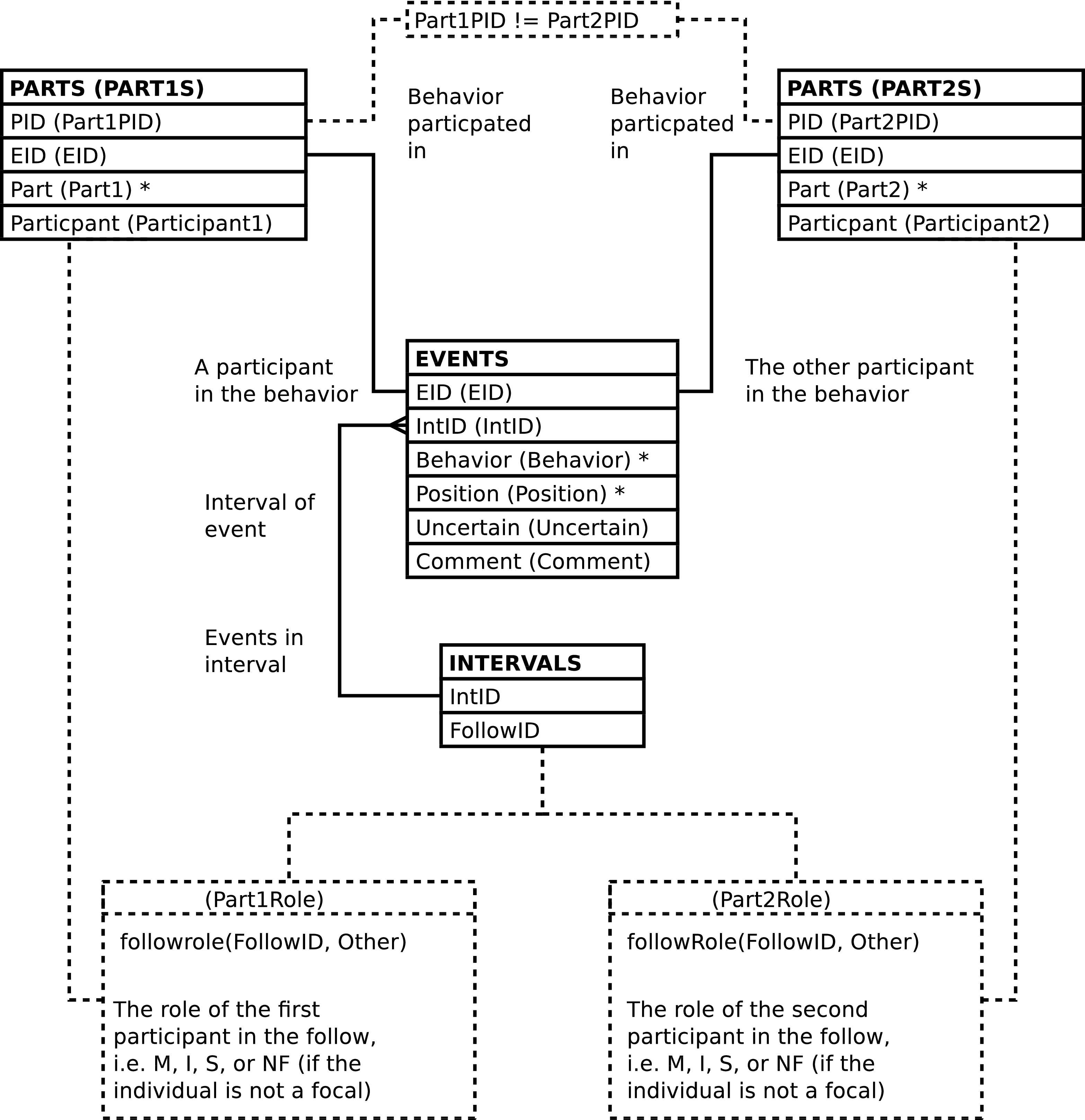
| Column | From | Description |
|---|---|---|
| EID | EVENTS.EID | Identifier of the behavioral event row. |
| IntID | EVENTS.IntID | Identifier of the observation interval during which the event was recorded. |
| Part1PID | PARTS.PID | Identifier of the behavioral participant row which records behavioral data regarding “the first” of the individuals in the behavioral event. |
| Part2PID | PARTS.PID | Identifier of the behavioral participant row which records behavioral data regarding “the second” of the individuals in the behavioral event. |
| Behavior | EVENTS.Behavior | Code indicating the behavior observed. |
| Position | EVENTS.Position | Position within the canopy where the event occurred. |
| Uncertain | EVENTS.Uncertain | Whether or not the behavior was observed with certainty. |
| Part1Role (Role in Follow of First Chimp) | FOLLOWPARTS.Role | Code for the role, i.e. mom, sib, infant, played by the individual designated as “the first” in the behavioral event. |
| Participant1 | PARTS.Participant | The identifier or alternate identifier of the “first” individual. |
| Part1 | PARTS.Part | The role the “first” individual plays in the behavior. |
| Part2Role (Role in Follow of Second Chimp) | FOLLOWPARTS.Role | Code for the role, i.e. mom, sib, infant played by the individual designated as “the second” in the behavioral event. |
| Participant2 | PARTS.Participant | The identifier or alternate identifier of the “second” individual. |
| Part2 | PARTS.Part | The role the “second” individual plays in the behavior. |
| Comment | EVENTS.Comment | Textual remarks regarding the behavioral event. |
SOCIAL_EVENTS_W_BABOONS contains one row per EVENTS row per animal involved in the behavioral event per individual involved in the exhibited behavior, including baboons. SOCIAL_EVENTS_W_BABOONS provides a direct way to analyze social behaviors regardless of whether a chimpanzee is a focal in the follow.
Caution
SOCIAL_EVENTS_W_BABOONS has 0 or 2 rows per behavioral event -- per EVENTS row -- depending on whether there are 2 animals involved in the event.
The two SOCIAL_EVENTS rows for each EVENTS row are reciprocal, the individuals arbitrarily designated “first” and “second” are reversed. This can be convenient when querying; all individuals involved in a behavior can be tested against, joined with, etc., regardless of whether the “first” or “second” column content is examined.
Figure 5.69. Query Defining the SOCIAL_EVENTS_W_BABOONS View: Part I
SELECT events.eid AS eid

     , events.intid AS intid

     , part1.pid AS part1pid

     , part2.pid AS part2pid

     , events.behavior AS behavior

     , events.position AS position

     , events.uncertain AS uncertain

     , followrole(intervals.followid, part1.participant) AS part1role

     , FALSE AS part1baboon

     , part1.participant AS participant1

     , part1.part AS part1

     , followrole(intervals.followid, part2.participant) AS part2role

     , FALSE AS part2baboon

     , part2.participant AS participant2

     , part2.part AS part2

     , events.comment AS comment

  FROM events

         JOIN intervals

           ON (intervals.intid = events.intid)

         JOIN parts AS part1

           ON (part1.eid = events.eid)

         JOIN parts AS part2

           ON (part2.eid = events.eid)

  WHERE part1.pid <> part2.pid
Figure 5.70. Query Defining the SOCIAL_EVENTS_W_BABOONS View: Part II
UNION

  SELECT events.eid AS eid

       , events.intid AS intid

       , part1.pid AS part1pid

       , NULL AS part2pid

       , events.behavior AS behavior

       , events.position AS position

       , events.uncertain AS uncertain

       , followrole(intervals.followid, part1.participant) AS part1role

       , FALSE AS part1baboon

       , part1.participant AS participant1

       , part1.part AS part1

       , 'NF' AS part2role

       , TRUE AS part2baboon

       , NULL::VARCHAR(gmi_animid_len) AS participant2

       , CASE

           WHEN part1.part = 'gmi_actor' THEN

             'gmi_actee'

           WHEN part1.part = 'gmi_actee' THEN

             'gmi_actor'

           ELSE

             'gmi_participant'

         END::parts_part

         AS part2

       , events.comment AS comment

  FROM events

         JOIN intervals

           ON (intervals.intid = events.intid)

         JOIN parts AS part1

           ON (part1.eid = events.eid)

  WHERE events.baboon
Figure 5.71. Query Defining the SOCIAL_EVENTS_W_BABOONS View: Part III
UNION

  SELECT events.eid AS eid

       , events.intid AS intid

       , NULL AS part1pid

       , part2.pid AS part2pid

       , events.behavior AS behavior

       , events.position AS position

       , events.uncertain AS uncertain

       , 'NF' AS part1role

       , TRUE AS part1baboon

       , NULL::VARCHAR(gmi_animid_len) AS participant1

       , CASE

           WHEN part2.part = 'gmi_actor' THEN

             'gmi_actee'

           WHEN part2.part = 'gmi_actee' THEN

             'gmi_actor'

           ELSE

             'gmi_participant'

         END::parts_part

         AS part1

       , followrole(intervals.followid, part2.participant) AS part2role

       , FALSE AS part2baboon

       , part2.participant AS participant2

       , part2.part AS part2

       , events.comment AS comment

  FROM events

         JOIN intervals

           ON (intervals.intid = events.intid)

         JOIN parts AS part2

           ON (part2.eid = events.eid)

  WHERE events.baboon
;
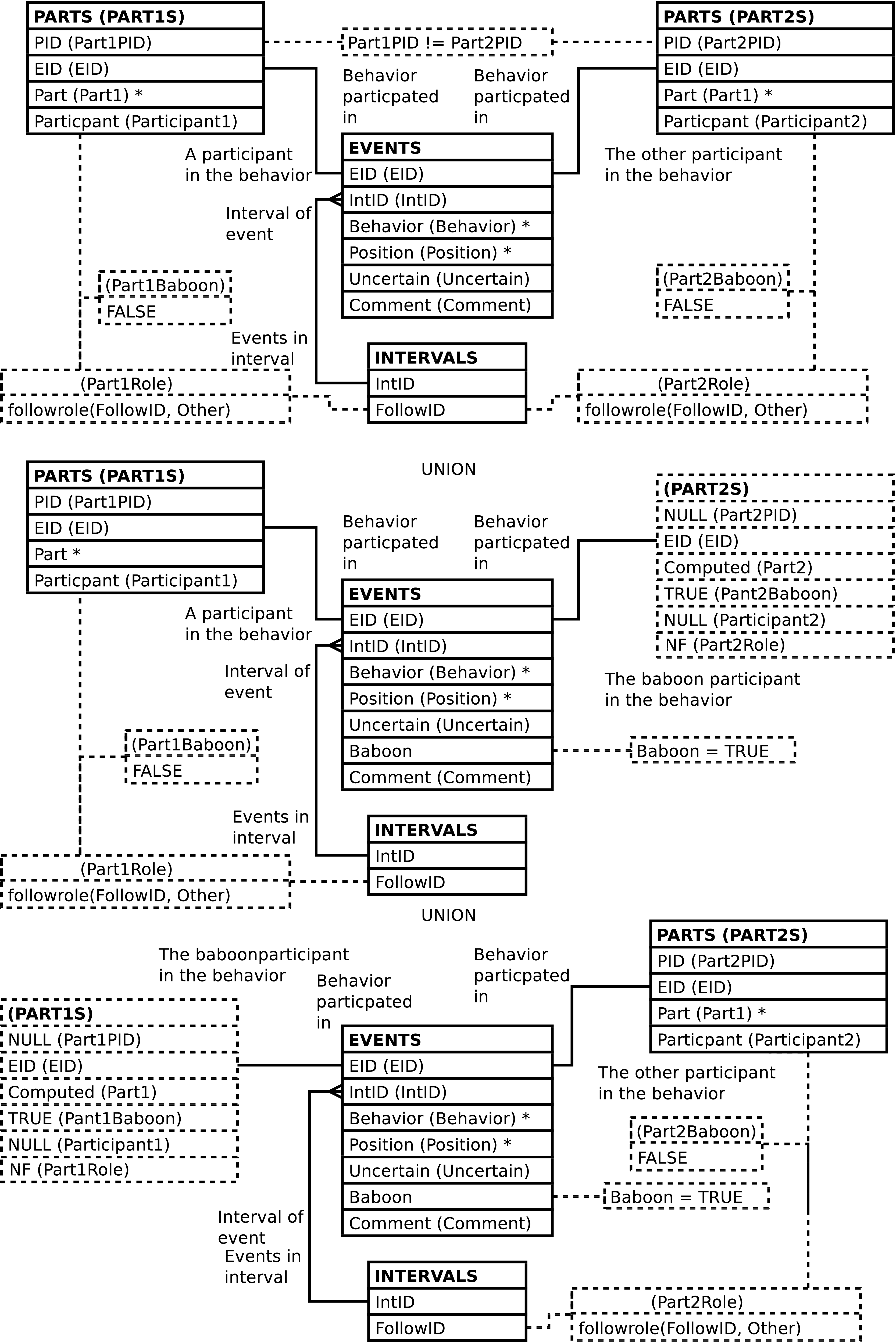
| Column | From | Description |
|---|---|---|
| EID | EVENTS.EID | Identifier of the behavioral event row. |
| IntID | EVENTS.IntID | Identifier of the observation interval during which the event was recorded. |
| Part1PID | PARTS.PID | Identifier of the behavioral participant row which records behavioral data regarding “the first” of the animals in the behavioral event. |
| Part2PID | PARTS.PID | Identifier of the behavioral participant row which records behavioral data regarding “the second” of the animals in the behavioral event. |
| Behavior | EVENTS.Behavior | Code indicating the behavior observed. |
| Position | EVENTS.Position | Position within the canopy where the event occurred. |
| Uncertain | EVENTS.Uncertain | Whether or not the behavior was observed with certainty. |
| Part1Role (Role in Follow of First Animal) | FOLLOWPARTS.Role or NF
in the case of baboons or nonfocal chimpanzees | Code for the role, i.e. mom, sib, infant, played by the animal designated as “the first” in the behavioral event. |
| Part1Baboon | Computed | A Boolean value, true when the “first” animal is a baboon. |
| Participant1 | PARTS.Participant | The identifier or alternate identifier of the
“first” animal, or NULL if the individual
is a baboon. |
| Part1 | PARTS.Part or computed based on the 2nd individual's role if the animal is a baboon | The role the “first” animal plays in the behavior. |
| Part2Role (Role in Follow of Second Animal) | FOLLOWPARTS.Role or NF
in the case of baboons or nonfocal chimpanzees | Code for the role, i.e. mom, sib, infant, played by the animal designated as “the second” in the behavioral event. |
| Part2Baboon | Computed | A Boolean value, true when the “second” animal is a baboon. |
| Participant2 | PARTS.Participant | The identifier or alternate identifier of the
“second” animal, or NULL if the individual
is a baboon. |
| Part2 | PARTS.Part or computed based on the 2nd individual's role if the animal is a baboon | The role the “second” animal plays in the behavior. |
| Comment | EVENTS.Comment | Textual remarks regarding the behavioral event. |
DISTS contains one row per DISTANCES row per related DISTANCEPARTS row. DISTS provides a general way to analyze chimp inter-familial distances -- based on either ChimpID or role played in the follow.
Caution
DISTS has 2 rows per inter-familial distance measurement -- per DISTANCES row.
Tip
The two DISTS rows for each DISTANCES row are reciprocal, the individuals arbitrarily designated “first” and “second” are reversed. So, either querying for the first individual as the mother and the 2nd as the infant or querying for the second individual as the mother and the 1st as the infant will eliminate double counting of events; each query returning “one side” of the “duplicated pair”.
The mutual placement of each participant in the distance measurements in both the “first” and “second” columns can be convenient when querying; all individuals involved in a measurement can be tested against, joined with, etc., regardless of whether the “first” or “second” column content is examined.
Figure 5.73. Query Defining the DISTS View
SELECT distances.distid AS distid

     , distances.intid AS intid

     , dpart1s.dpid AS dpart1pid

     , dpart2s.dpid AS dpart2pid

     , distances.uncertain AS uncertain

     , dpart1s.role AS dpart1role

     , dpart1s.participant AS participant1

     , dpart2s.role AS dpart2role

     , dpart2s.participant AS participant2

     , distances.distance AS distance

  FROM distances

         JOIN distanceparts AS dpart1s

           ON (dpart1s.distid = distances.distid)

         JOIN distanceparts AS dpart2s

           ON (dpart2s.distid = distances.distid)

  WHERE dpart1s.dpid <> dpart2s.dpid
;
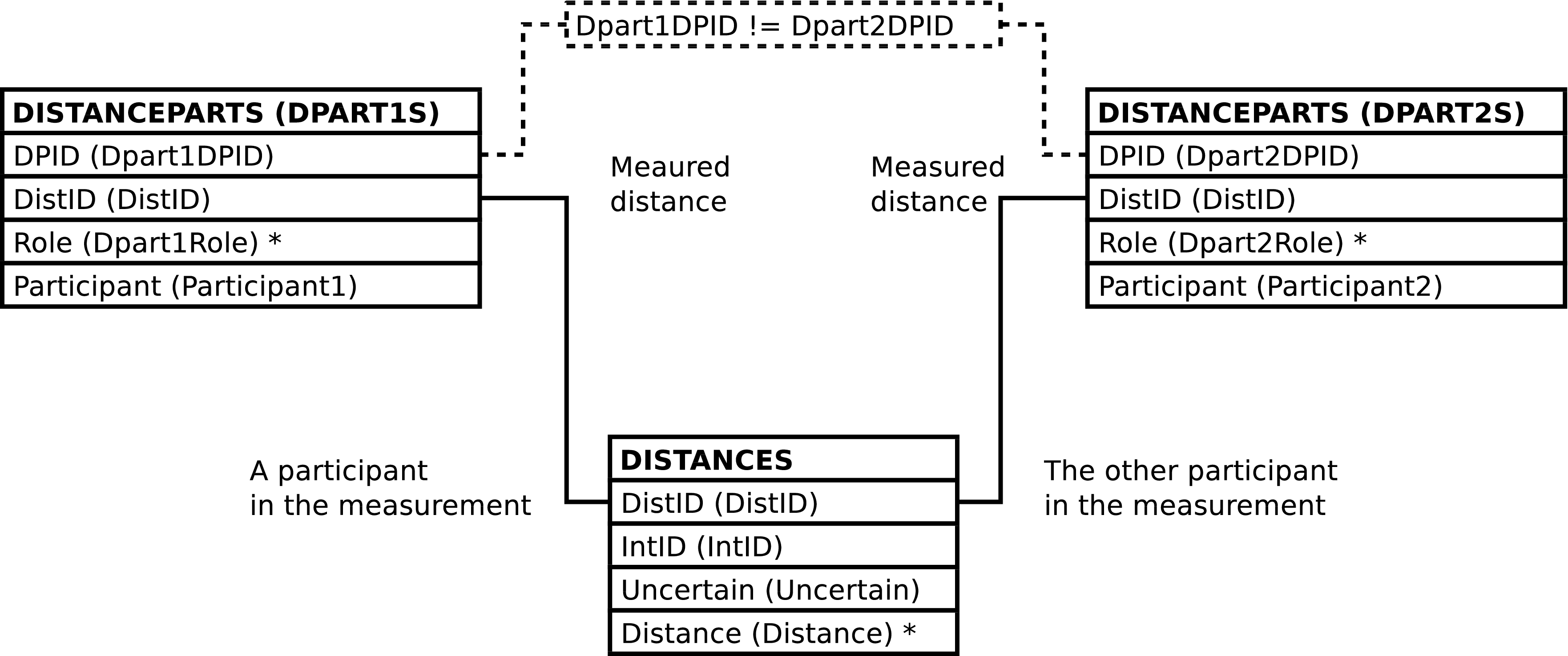
| Column | From | Description |
|---|---|---|
| DistID | DISTANCES.DistID | Identifier of the distance measurement row. |
| IntID | DISTANCES.IntID | Identifier of the observation interval during which the distance measurement was recorded. |
| Part1DPID | DISTANCEPARTS.DPID | Identifier of the distance measurement participant row which records data regarding “the first” of the individuals between which distance was measured. |
| Part2DPID | DISTANCEPARTS.DPID | Identifier of the distance measurement participant row which records data regarding “the second” of the individuals between which distance was measured. |
| Uncertain | DISTANCES.Uncertain | Whether or not the inter-familial distance was observed with certainty. |
| DPart1Role (Role in Follow of First Chimp) | DISTANCEPARTS.Role | Code for the role, i.e. mom, sib, infant, played by the individual designated as “the first” individual involved in the measurement. |
| Participant1 | DISTANCEPARTS.Participant | The identifier or alternate identifier of the “first” individual. |
| DPart2Role (Role in Follow of Second Chimp) | DISTANCEPARTS.Role | Code for the role, i.e. mom, sib, infant, played by the individual designated as “the second” in the measurement. |
| Participant2 | DISTANCEPARTS.Participant | The identifier or alternate identifier of the “second” individual. |
| Distance | DISTANCES.Distance | Code designating the distance between the 2 individuals. |
FAMILY_DISTS contains one row per DISTANCES row. FAMILY_DISTS provides a way to review recorded inter-familial distances in a way similar to the way data is recorded in the field. It is also useful for changing database content, since this is often done based on data recorded in the field.
Note
The FAMILY_DISTS view is neither particularly efficient nor always well suited to data analysis. Other views will very likely be faster and more appropriate when analyzing data.
Note
The D_Momrole, D_Infantrole, and D_Sibrole columns are not useful from a query standpoint but are, at present, needed when changing some database content; notably, but not exclusively, when inserting new rows.
Figure 5.75. Query Defining the FAMILY_DISTS View: Part I
SELECT focal_follows.followid AS followid

     , intervals.intid AS intid

     , distances.distid AS distid

     , moms.dpid AS d_momdpid

     , infants.dpid AS d_infantdpid

     , sibs.dpid AS d_sibdpid

     , focal_follows.date AS date

     , intervals.time AS time

     , focal_follows.mom AS mom

     , focal_follows.infant AS infant

     , focal_follows.infant2 AS infant2

     , focal_follows.sib AS sib

     , focal_follows.sib2 AS sib2

     , distances.uncertain AS uncertain

     , moms.participant AS d_mom

     , moms.role as d_momrole

     , infants.participant AS d_infant

     , infants.role AS d_infantrole

     , sibs.participant AS d_sib

     , sibs.role AS d_sibrole

     , distances.distance AS distance

     , intervals.comment AS i_comment
Figure 5.76. Query Defining the FAMILY_DISTS View: Part II
  FROM focal_follows

         JOIN intervals

           ON (intervals.followid = focal_follows.followid)

         JOIN distances

           ON (distances.intid = intervals.intid)

         LEFT OUTER JOIN

           (SELECT distanceparts.dpid AS dpid

                 , distanceparts.distid AS distid

                 , distanceparts.participant AS participant

                 , distanceparts.role AS role

                 , followroles.function AS function

              FROM distanceparts

                     JOIN followroles

                       ON (followroles.role = distanceparts.role)

           ) AS moms

               ON (moms.distid = distances.distid

                   AND moms.function = 'gmi_mom')

         LEFT OUTER JOIN

           (SELECT distanceparts.dpid AS dpid

                 , distanceparts.distid AS distid

                 , distanceparts.participant AS participant

                 , distanceparts.role AS role

                 , followroles.function AS function

              FROM distanceparts

                     JOIN followroles

                       ON (followroles.role = distanceparts.role)

           ) AS infants

               ON (infants.distid = distances.distid

                   AND infants.function = 'gmi_infant')

         LEFT OUTER JOIN

           (SELECT distanceparts.dpid AS dpid

                 , distanceparts.distid AS distid

                 , distanceparts.participant AS participant

                 , distanceparts.role AS role

                 , followroles.function AS function

              FROM distanceparts

                     JOIN followroles

                       ON (followroles.role = distanceparts.role)

           ) AS sibs

               ON (sibs.distid = distances.distid

                   AND sibs.function = 'gmi_sib')
;

| Column | From | Description |
|---|---|---|
| FollowID | FOLLOWS.FollowID | Identifier of the follow. |
| IntID | EVENTS.IntID | Identifier of the observation interval during which the inter-familial distance was recorded. |
| DistID | DISTANCES.DistID | Identifier of the row recording inter-familial distance. |
| D_MomDPID | DISTANCEPARTS.DPID | Identifier of the distance participant row
which records distance data regarding the mother
in the follow, or NULL. |
| D_InfantDPID | DISTANCEPARTS.DPID | Identifier of the distance participant row
which records distance data regarding the infant
in the follow, or NULL. |
| D_SibDPID | DISTANCEPARTS.DPID | Identifier of the distance participant row
which records distance data regarding the sibling
in the follow, or NULL. |
| Date | FOLLOWS.Date | The date of the follow. |
| Time | INTERVALS.Time | The time of the interval. |
| Mom | FOLLOWPARTS.ChimpID | The ChimpID of the mother in the follow. |
| Infant | FOLLOWPARTS.ChimpID | The ChimpID of an infant in the follow. |
| Infant2 | FOLLOWPARTS.ChimpID | The ChimpID of a
second infant in the follow, or NULL if the infant
is not a twin. |
| Sib | FOLLOWPARTS.ChimpID | The ChimpID of a
sibling in the follow, or NULL if there is no
sibling focal. |
| Sib2 | FOLLOWPARTS.ChimpID | The ChimpID of a
second sibling in the follow, or NULL if the sibling
is not a twin. |
| Uncertain | DISTANCES.Uncertain | Whether or not the distance was observed with certainty. |
| D_Mom | DISTANCEPARTS.Participant | The identifier or alternate identifier of the mom,
or NULL if the mother is not involved in the
distance measurement. |
| D_Momrole | DISTANCEPARTS.Role | The Role of the mother in the inter-familial distance measurement. See above regards inter-familial distance measurement roles. |
| D_Infant | DISTANCEPARTS.Participant | The identifier or alternate identifier of the
infant, or NULL when the infant is not involved in the
distance measurement. |
| D_Infantrole | DISTANCEPARTS.Role | The Role of the infant in the inter-familial distance measurement. See above regards inter-familial distance measurement roles. |
| D_Sib | DISTANCEPARTS.Participant | The identifier or alternate identifier of the
sibling, or NULL when the sibling is not involved in
the distance measurement. |
| D_Sibrole | DISTANCEPARTS.Role | The Role of the sibling in the inter-familial distance measurement. See above regards inter-familial distance measurement roles. |
| Distance | DISTANCES.Distance | Code designating the distance between the individuals. |
| I_Comment (Interval Comment) | INTERVALS.Comment | Textual remarks regarding the interval. |
Altering the FAMILY_DISTS view alters the content of the underlying DISTANCES and DISTANCEPARTS tables in the fashion described below. The INTERVALS and related FOLLOWS and FOLLOWPARTS rows must exist; the content of these tables is never altered.
Inserting a row into the FAMILY_DISTS view inserts a row into the DISTANCES table, as expected.
When inserting into FAMILY_DISTS the interval of the follow must be specified. The interval may be specified in either or both of the following 2 ways:
A IntID may be supplied.
A Time may be supplied and the follow specified. The follow may be specified in either or both of the following 2 ways:
A FollowID may be supplied.
Date, Mom and, Infant values all may be supplied.
Note
See the note regards twins when inserting into FOLLOW_INTERVALS.
Caution
FAMILY_DISTS inserts rows into the database only when there is a INTERVALS row that matches the above selection criteria. If no row matches the database content is not altered. Note that no row will match if conflicting information is supplied.
Note
When inserting into FAMILY_DISTS it is not
recommended to set any of the
DistID,
D_MomDPID,
D_InfantDPID or,
D_SibDPID values.
Omitting these columns or supplying NULL values will
allow the system to automatically generate ids.
Updating the FAMILY_DISTS view updates DISTANCES, as expected.
Updating FAMILY_DISTS can update, insert into, or delete rows from DISTANCEPARTS.
Note
The examples below explicitly specify an
DISTANCES.DistID
value. This is solely for the purpose of brevity. Any
valid
WHERE clause could be used instead to
designate the desired row in
DISTANCES.
Note
Although the initial examples show how to insert and delete individual DISTANCEPARTS rows this is never done, at least not without other changes, because DISTANCEPARTS rows always come in pairs. An example combining insertion and deletion follows.
If the old values for a mom, infant, sib or nonfocal
DISTANCEPARTS row are not NULL and the new
values are all NULL then the old row is deleted.[63] The following example removes the mother as a
participant in the inter-familial distance measurement with
a
DISTANCES.DistID
of 1234:
Example 5.11. Deleting The Mother's DISTANCEPARTS Row
UPDATE family_dists

       SET d_mom = NULL

         , d_momrole = NULL

         , d_momdpid = NULL

       WHERE distid = 1234;
If the old values for a mom, infant, sib, or nonfocal
are NULL, i.e. if the mom, infant, sib, or nonfocal has no
DISTANCEPARTS row then a new
DISTANCEPARTS row can be inserted by
supplying values. The following example adds, to the
inter-familial distance measurement with a
DISTANCES.DistID
of 1234, assuming she is not already one
of the individuals involved in the inter-familial distance
measurement, the mother.
Example 5.12. Inserting A DISTANCEPARTS Row For The Mother
UPDATE family_dists

       SET d_mom = 'GA'

         , d_momrole = 'M'  -- M is the mother role

       WHERE distid = 1234;
If old values exist, they are replaced by new values.
Assuming the infant JOE is involved in
the inter-familial distance measurement with an
DISTANCES.DistID
of 1234, the following example changes
the infant to JAK:
Example 5.13. Changing A Inter-Familial Distance Measurement Participant In A DISTANCEPARTS Row
UPDATE family_dists

       SET d_infant = 'JAK'

       WHERE distid = 1234;
Note
The ChimpID values need
not correspond to the roles the individuals play in the
follow because data is associated with chimp id values,
not focal roles. The presence of focal roles in the
column names is, in some sense, artificial. For example,
there are two ways to change the infant
(INF) to a sibling
(SB) in the inter-familial distance
measurement with an
DISTANCES.DistID
of 1234. The first is to delete the
DISTANCEPARTS row for the infant and
insert a new DISTANCEPARTS row for the
sibling:
Example 5.14. Deleting the Infant's DISTANCEPARTS row and Inserting a New DISTANCEPARTS Row for the Sibling
UPDATE family_dists

       SET d_infant = NULL

         , d_infantrole = NULL

         , d_infantdpid = NULL

         , d_sib = 'SB'

         , d_sibrole = 'S'  -- S is the sibling role

       WHERE dpid = 1234;
Deleting and re-adding rows is somewhat inefficient and error prone. It is probably better to simply replace the infant's ChimpID value with the siblings. Simply changing the DISTANCEPARTS.Participant value is enough; being the sibling is a property of a ChimpID with respect to a follow and, again, when updating the database there is no correspondence between the column names and the roles played by the individual chimps. The following is sufficient to re-use the exiting DISTANCEPARTS row and change the infant's ChimpID value to the siblings:
Example 5.15. Changing an Infant's DISTANCEPARTS row Into A DISTANCEPARTS Row for the Sibling
UPDATE family_dists

       SET d_infant = 'SB'     -- SB is the sibling

         , d_infantrole = 'S'  -- S is the sibling role

       WHERE distid = 1234;
When the result is queried SB
will show up as a sibling, not an infant.
It is an error to attempt to update the values of any columns not derived from the DISTANCES or DISTANCEPARTS tables.
When updated, FAMILY_DISTS raises a notice containing the number of rows altered. A row is counted only once, when updating the row changes the database content in any way.
Deleting rows from the FAMILY_DISTS view deletes rows from DISTANCES and DISTANCEPARTS, as expected.
[48] The exception being the Import_Datetime column, which is not included in the BIOGRAPHY_UPLOAD view.
[49] This might be never. Which is why the CHIMPIDS table exists; so that use of the temporary twin identifiers does not imply existence of additional individuals. Twins will always cause headaches, but at least the database can recognize the temporary identifiers as representing virtual rather than real individuals.
Using the CHIMPS view should be safe enough when simply retrieving demographic data from BIOGRAPHY_DATA, but care must be taken when using CHIMPS and doing any sort of counting of individuals. One way to take care is to pay attention to AnimID values.
[50] Note that while BIOGRAPHY and BIOGRAPHY_DATA have the CHIMPS view there is no corresponding view for COMMUNITY_MEMBERSHIP, although such a view could be created.
[51] While it is possible to use the “window function” PostgreSQL feature to produce an improved report-like format by eliminating rectangular areas of empty space in the query output, this was not deemed important enough to justify the time required. The reader is left to to complete this as an exercise in query construction.
[52] This allows, e.g., id columns to be omitted or
specified as NULL.
[53] Of course more than one row can be inserted into
DATASHEET events in a single INSERT
statement. The requirement is that each inserted row be
sufficiently specified.
[54] As can be seen from the documentation on updating FAMILY_EVENTS, the system does not really care about whether the column name pertains to a particular focal or not. It's possible for the system to ignore the focal associated with an EVENTS “sub-table” and simply insert data into the appropriate table, relating it to the event at hand. However at this point it seems preferable to have DATASHEET_EVENTS perform this check.
[55] The odd nature of this procedure is due to the lack of EATS, FISHED, PLAYS, RESTS, RIDES, or VOCS id columns on DATASHEET_EVENTS. Id values could be used to signal whether an existing row should be altered or a new row inserted. However, additional id columns would clutter the view, which already has over-many columns.
[56] This works due to the lack of association on update
between the column names and the focal, and because the
infant's column values will always be NULL so changing
them to a non-NULL value causes a row to be
inserted.
[57] Based on a behavior code written into the data and according to the corresponding BEHAVIOR_TRANS row.
[58] That is, they are processed as if
FOLLOWTYPES.Implied_Behavior
is TRUE regardless of it's actual value.
[59] Duplicate detection is hardcoded into UPLOAD_BEHAVIORS for those columns that are dedicated to specific behaviors.
[60] Yes, it is allowed to have data in the Ma_Groomingplay column even though the data is ignored.
[61] Note that the text of the INTERVALS.Comment is unchanged; it retains the text copied into the EVENTS.Comment column.
[62] Assuming that the FOLLOWROLES table contains rows to distinguish twins.
[63] Since every distance measurement is between two focals there is not a lot of point in deleting a focal's row unless another focal's row is inserted -- at which point you may as well have changed the chimpid of the focal and re-used the existing row.
Table of Contents
- Query Functions
- followfunc — return the function (role) of a chimp in a follow
- followrole — return the role of a chimp in a follow
- Utility Functions
- add_social_partners — Ensure that all social interaction partners are in the group composition data
- delete_gc — Delete a follow's group composition data
- infants_in_gc — Ensure that the (biological or adopted) young infants of a mom are the group composition data
- infer_gc — Infer group composition from social relationships
- mom_in_gc — Ensure that the (biological or adoptive) mother of a young chimp, and all the mom's young infants, are in the group composition data
The functions in this section are suitable for use in SQL queries.
Name
followfunc — return the function (role) of a chimp in a follow
Synopsis
              VARCHAR
              followfunc
( | followid, | |
chimpid); |
              INT
              followid
;
              VARCHAR(5)
              chimpid
;Name
followrole — return the role of a chimp in a follow
Synopsis
              VARCHAR
              followrole
( | followid, | |
chimpid); |
              INT
              followid
;
              VARCHAR(5)
              chimpid
;Description
A function which returns the role,
i.e. M, I,
or S of a chimpid in a follow,
or NF if the chimp is not a focal
in the follow.
Note that the role, returned by followrole(),
is able to distinguish twins from other infants or siblings
whereas the function, returned by followfunc(), does
not make this distinction.
A NULL is returned if any of the input arguments are
NULL.
The functions in this section are intended for use within programs or other code. The typical user will not have need of these functions.
Name
add_social_partners — Ensure that all social interaction partners are in the group composition data
Synopsis
              INT
              add_social_partners
( | chimpid, | |
rgid); |
              VARCHAR(5)
              chimpid
;
              BIGINT
              rgid
;Description
add_social_partners adds all
non-UNK social partners, and the
mother's of young infant social partners and the young infants
of mother social partners, of the specified chimp to the group
composition data identified by the rgid. Social
partners are those individuals (or baboons[64]) which interact with the given
individual in any way during the time period starting with the
time of the group composition (inclusive of endpoint) and ending
with the time of the follow's next group composition (exclusive
of endpoint). The group composition is unchanged if all social
partners are already in the group composition.
add_social_partners()
calls mom_in_gc()
and infants_in_gc() on the
added social partners to ensure that young infants are in the
group composition with their mothers and vice versa.
Caution
This function does not check it's arguments. It assumes that the supplied chimpid is in the supplied group composition.
When inserting a RAW_GROUPMEMBERS row
the ChimpID value used is the
BIOGRAPHY_DATA.AnimID
of a social partner
[65], the
Origin value used is
always A, and the
Uncertain value always
FALSE
This function always returns 0.
[64] While baboons are not individually identified anywhere the RAW_GROUPS table does have a flag indicating whether baboons are present.
[65] This matters in the case of twins.
Name
delete_gc — Delete a follow's group composition data
Synopsis
              BOOLEAN
              delete_gc
( | followdate, | |
chimpid); |
              DATE
              followdate
;
              VARCHAR(5)
              chimpid
;
              BOOLEAN
              delete_gc
( | followid); |
              INT
              followid
;Input
The follow for which group composition should be deleted may be designated either by supplying the date and mother of the follow or by supplying the id of the follow.
Description
delete_gc deletes all of a follow's
related group composition information -- the related rows in
RAW_GROUPS,
RAW_GROUPMEMBERS, GROUPS,
and GROUPMEMBERS are deleted.
Note
This function orders the deletes in such a way that performance may be improved by orders of magnitude. It is therefore the preferred way to delete group composition.
This function returns TRUE if the supplied follow
exists and group comp rows are deleted and FALSE
otherwise.
The following example demonstrates how to delete all of the automatically generated group compositions.
Example 6.1. Deleting Automatically Generated Group Compositions
SELECT delete_gc(follows.followid)

  FROM follows

  WHERE EXISTS (SELECT 1

                  FROM intervals

                         JOIN sheets

                              ON (sheets.sheetid = intervals.sheetid)

                         JOIN fieldfollows

                              ON (fieldfollows.ffid = sheets.ffid)

                      WHERE intervals.followid = follows.followid

                            AND fieldfollows.gcstatus = 'A');
Name
infants_in_gc — Ensure that the (biological or adopted) young infants of a mom are the group composition data
Synopsis
              BOOLEAN
              infants_in_gc
( | chimpid, | |
| rgid, | ||
date); |
              VARCHAR(5)
              chimpid
;
              BIGINT
              rgid
;
              DATE
              date
;Input
Description
infants_in_gc adds the (biological or
adopted) infants of a possible mother identified
by chimpid to the group composition data identified
by the rgid when the infant is less than
5 years old as of the date supplied in
the date argument and in the study population and
the possible mom is either the biological mother or an adoptive
mother and the adoption occurred on or before the given date and
the infant has not been adopted subsequently (but before the
given date). The group composition is unchanged when the infant
is already in the group composition.
Caution
Because adoptions can happen at any time during a day, when the given group composition date is the date of adoption the infant is added to all group compositions where either mother is found.
Caution
This function does not check it's arguments. It assumes that the supplied date is the date of the supplied group composition and that the supplied chimpid is in the supplied group composition.
When inserting a RAW_GROUPMEMBERS row
the ChimpID value used is the
BIOGRAPHY_DATA.AnimID
of the (biological or adopted) infant
[67], the
Origin value used is
always A, and the
Uncertain value always
FALSE
A TRUE value is returned if a row for any infant is
added to RAW_GROUPMEMBERS, FALSE is returned
if not.
Name
infer_gc — Infer group composition from social relationships
Synopsis
              BOOLEAN
              infer_gc
( | followdate, | |
chimpid); |
              DATE
              followdate
;
              VARCHAR(5)
              chimpid
;
              BOOLEAN
              infer_gc
( | followid); |
              INT
              followid
;Input
The follow for which group composition should be inferred may be designated either by supplying the date and mother of the follow or by supplying the id of the follow.
Description
infer_gc adds all
non-UNK social partners,
including baboons, and the mother's of young infant social
partners and the young infants of mother social partners, of
the focals of the specified follow to the group composition
tables. It does so by first ensuring that the focals are in
the group composition and then calling
add_social_partners() and
infants_in_gc() on all of the focals. Social
interaction with baboons is also checked for. See the
documentation of add_social_partners() for
further information.
Tip
This function does not remove any data from the group composition tables. If an existing group composition is to be re-inferred based on changes to database content the old group composition data must first be deleted.
It is an error to attempt to infer group composition
where group composition already exists -- as determined by
whether
FIELDFOLLOWS.GCStatus
is NULL
The group compositions, the RAW_GROUPS rows, are created at intervals of 15 minutes, starting at the time of the first behavioral observation, the first INTERVALS.Time value. Periods of no observation, periods during which there are no INTERVALS rows, lasting 15 minutes or longer cause a new set group compositions to start beginning at the time of the next observation, at the time of the next INTERVALS. Time value.
This function returns TRUE if the supplied follow
exists and group comp rows were created and FALSE
otherwise.
The following example demonstrates how to infer group
composition of all the follows which have none. All of the
INTERVALS rows of any follow having a group
composition have a GID value.
Those with no group composition have a NULL
GID value, and this is used to
identify all the follows with no group composition.
Example 6.2. Inferring the group composition of follows that have none
SELECT infer_gc(follows.followid)

  FROM follows

  WHERE NOT EXISTS (SELECT 1

                      FROM intervals

                      WHERE intervals.followid = follows.followid

                            AND intervals.gid IS NOT NULL);
Name
mom_in_gc — Ensure that the (biological or adoptive) mother of a young chimp, and all the mom's young infants, are in the group composition data
Synopsis
              BOOLEAN
              mom_in_gc
( | chimpid, | |
| rgid, | ||
date); |
              VARCHAR(5)
              chimpid
;
              BIGINT
              rgid
;
              DATE
              date
;Input
Description
mom_in_gc adds the (biological or
adoptive) mother, as well as all of the mother's young infants,
of the chimp identified by chimpid to the group
composition data identified by the rgid when the
chimp is less than 5 years old as of the date
supplied in the date argument. The group
composition is unchanged when the chimp is older than
5 years old, and also unchanged if the mother is
already in the group composition. The mother added must be in
the study population as of the supplied date. When there are
multiple (in-study) adoptive parents the most recent adopter, on
or prior to the supplied date, is added to the group
composition, regardless of the presence or absence of other
parents in the group composition.
mom_in_gc
calls infants_in_gc() on
the added mother to ensure that young infants are in the group
composition with their mothers.
Caution
This function does not check it's arguments. It assumes that the supplied date is the date of the supplied group composition and that the supplied chimpid is in the supplied group composition.
When inserting a RAW_GROUPMEMBERS row
the ChimpID value used is the
BIOGRAPHY_DATA.AnimID
of the (biological or adoptive) mother, the
Origin value used is
always A, and the
Uncertain value always
FALSE
A TRUE value is returned if a row for the mother is
added to RAW_GROUPMEMBERS, FALSE is returned
if not.
[64] While baboons are not individually identified anywhere the RAW_GROUPS table does have a flag indicating whether baboons are present.
[65] This matters in the case of twins.
[66] In theory, any individual can adopt. Regardless, the caller should not need to worry about such details.
[67] This matters in the case of twins.
Table of Contents
The prototypical way to import data into Gombe-MI is in bulk, via a plain text file having columns delimited by the tab character. These are easily produced by almost any spreadsheet program; it is expected that most data imported into Gombe-MI will be typed into a spreadsheet and then exported to tab-delimited text for upload.
Most data are uploaded into Gombe-MI via the Upload program, most often directly into views. The phpPgAdmin program's import function can also be used, although it aborts as soon as it encounters an error. Data may also be entered row by row directly into the database, either via the phpPgAdmin web interface, or by entering SQL into either phpPgAdmin or any other PostgreSQL front-end.
Tip
Typically when uploading data into PostgreSQL encountering an error causes the upload to abort. This can be a problem when uploading large amounts of data since it results in a repeated cycle of upload-fix-re-upload. Gombe-MI contains some bespoke programs that address this issue by attempting to continue uploading after an error is encountered in order to deliver back to the user as many errors as possible from a single upload.
The nature of the data validation built into Gombe-MI has an impact on the efficient use of these sorts of upload programs. Data validation occurs in two stages. First, as much validation as possible takes place as each row is inserted into each table. This phase of the data validation process is called here, for lack of a better term, “before commit” data validation. The second phase of data validation occurs once all the data has been inserted into the database. In this phase additional validation occurs to check for consistency throughout the data as a whole. This second phase of data validation is called here the “on commit” data validation phase.
The two phases of data validation can be distinguished by the errors messages they produce. “Before commit” data validation error messages do not contain the phrase “on commit” in their text, “on commit” error messages do contain this phrase.
The upload programs can recover and continue to upload additional rows if a data validation error is found during the “before commit” phase of data validation. In this case it can be beneficial to upload large files in order to produce large numbers of error messages and minimize the number of upload-fix-re-upload cycles.
However once the data is clean enough that the upload program ceases to produce “before commit” error messages, once the “on commit” validation phase has been entered, only a single error message at a time can be returned. Encountering an error during the “on commit” validation phase always immediately aborts the upload. When the data is clean enough that only “on commit” errors are returned then it can be beneficial to upload small files in order to reduce the amount of time it takes to produce an error and increase the speed of the upload-fix-re-upload cycle.
Gombe-MI contains a minimal number of bespoke programs. Some few of these programs are utility in nature: a program to logout, a program to automate the steps involved in the creation of a new database user, and so forth. Most of the data entered into Gombe-MI is collected in tabular, row-and-column, format suitable for entry into a relational database. As mentioned previously, this data can be imported directly.
Most errors in computer data entry can be caught by the wwwdiff program. This program compares files. Typos are detected by entering the data twice, preferably by 2 different people, and comparing the result. Errors made in the field are more likely to be detected by manual checks of the data, or by the data validation built into Gombe-MI.
The system will automatically generate id columns whenever a new row is inserted and an id column is not supplied. When an id value is supplied the system does not check to see that it is indeed the next id in sequence, nor does it update the sequence number to be automatically supplied the next time a row is inserted without an id column. Should an id value be manually supplied, it may be necessary to update the internal id counter so that future system generated ids will not conflict with an id already used.
See the PostgreSQL documentation section on sequence functions for reference material on the requisite PostgreSQL functions.
Tip
Don't supply id values manually unless you know what your doing.
Automatically generated ids are not guaranteed to be contiguous.
Table of Contents
To reduce cost the number of custom programs are minimal.
These are the programs that are used in the entry and maintenance of the Gombe-MI Master tables. Their use should be fully documented elsewhere in manuals describing how the system is used when performing specific tasks. The summary written here provides a statement of purpose and a mention of all updated data. The operation and behavior of the programs supports the table and program characteristics documented in this manual. For more information on the actual capabilities of the programs see the documentation in the programs' source code.
Some programs are designed to upload data in “batch” -- each run of a program uploads a single file containing multiple lines of data, each of which is then inserted into the database as a row of data in one (or more[68]) database tables. Other programs provide utility functions.
The upload programs take as input a file of data arranged in tabular format. The file is expected to contain plain text, with rows on separate lines and columns separated by a single tab character. This data structure can be produced by exporting data from a spreadsheet as tab delimited text.
The programs upload the data into the database in an all-or-nothing fashion. Ether all the data in a uploaded file is inserted into the database or, should any error occur, none of it is. After an error each program continues to process the uploaded file so as to catch additional errors. However the input line containing the erroneous data is ignored so the “trial”[69] insertion into the database of the subsequent lines in the uploaded file may result in spurious errors due to the “missing” data. It is left to the operator to distinguish the real errors from the false positives.
Tip
When in doubt simply correct the errors that are clearly problems, notably the first error reported, and re-run the program.
Tip
For reasons of security most browsers will remove pathnames from forms. Should a program which imports data into Gombe-MI from a file find an error in the data, rather than re-enter the pathname of the file to be uploaded simply press the browser's "reload" button. This (usually, depending on the browser) redoes the upload using the previously entered file name -- but with the new, now-corrected, data content.
Each time any of the Gombe-MI web programs successfully uploads a file into a database Gombe-MI remembers the name of the file and the database. The Gombe-MI programs raise an error to warn a user who has upload a file of the same name into the same database twice in a row. Re-uploading a third time overrides the warning, allowing the re-upload to complete.
For more information on whether data is required to present, as well as other required characteristics of the data values, see the documentation of the specific column into which the data is stored.
The UPLOAD_BEHAVIORS view takes the place of a custom web-based upload program. The Upload program can be used to insert data into this view and thence into the various follow related tables.
Upload uploads data into any table or view. Its primary purpose is to report as many data errors as possible during a single upload.[70]
Tip
The name of the table uploaded into may be qualified with a schema name to upload data into tables or views that are not in the gombemi schema.
Both the table name, entered into the web browser, and the column names, appearing as column headings in the uploaded file, are taken exactly as written. Capital characters, spaces, or other unusual characters are taken exactly as written. This is in contrast to typical occurrences of table and column names within PostgreSQL SQL statements, where such identifiers are normalized and automatically converted to lower case. The Upload program can therefore insert into tables with unusual names or columns, at the cost of being persnickety about table and column names.
The one exception to the above rule is that when the Upload program is told to trim leading and trailing spaces from the data in each uploaded column. In this case leading and trailing spaces are also trimmed from the column names appearing in the first line of the uploaded file.
The upload program has a checkbox which determines whether or not it removes (“trims”) leading and trailing spaces from each uploaded datum -- from each column of each row in the uploaded file.
There are 2 ways to upload NULL data values. The easiest
is to omit the column. Columns without some other default value
will be given NULL values. The second is to check the checkbox
labeled "Upload NULL Values" and supply a input value
for NULL. Data values that match the given NULL
representation will then be given a NULL value in the
database.
The default NULL representation is the empty string, no
data at all. When this representation is used (and the
"Upload NULL Values" checkbox is checked) data that are
omitted in the input file becomes NULL when uploaded into the
database.
Tip
\N is sometimes used to represent the
NULL value.
Caution
A space (or multiple spaces) may be chosen as the NULL
representation. This can be difficult to discern while
operating the program.
The uploaded data must be in either CSV or tab delimited format. When in tab delimited format the first line of the input file must contain the column names, each separated by a tab. The remaining lines of the file contain the data to be uploaded. Each line is a row of data, each column is separated from its neighbor with a tab character.
Caution
There is no standard for the CSV format, it is defined by the operation of the programs which read and write the format. At the time of this writing the program attempts to read CSV formatted data as produced by Excel, which is probably described more or less as follows: the column delimiter must be a comma, the character used to quote textual data, if any quote character is used, must be the double quote character, and escaping must be done by doubling the double quotes. At the time of this writing this format can be obtained from Excel by exporting in CSV format with a comma delimiter.
Attempting to upload data which contains the ASCII 0 character or spreadsheets with individual cells that contain multiple lines of text is likely to fail in unpredictable ways or in ways which are difficult to detect.
A line need not contain as many data elements as there are column names given in the first line. All unspecified data elements will be given a blank value, the empty string, just as if, with tab delimited data, the tabs occurred but no data were specified.[71]
A line must not have more data elements than there are column names given in the first line.
The Upload_GC program uploads group composition data into the database. The program creates rows in the RAW_GROUPS and RAW_GROUPMEMBERS tables and the database itself then creates the necessary rows in GROUPS and GROUPMEMBERS.
Caution
Upload_GC
calls mom_in_gc(),
infants_in_gc(),
and
add_social_partners()
on the uploaded follows. Use of any other means to add group
composition data to the database or modify group composition
data can result in failure to meet the assurances provided by
the aforementioned functions.
One way to correctly approach such “manual”
group composition alterations is to alter the group
composition in the database, delete all the
RAW_GROUPMEMBERS rows having an
Origin value
of A, and then
re-run mom_in_gc(),
infants_in_gc(),
and
add_social_partners()
on the altered follows.
There must be no existent information on an uploaded follow's group composition in the database.[72]
The uploaded data must be in either CSV or Tab delimited format (each column separated from the next by a tab character). Leading and trailing spaces are removed from the data contained in each column before any other processing is performed.
There is no standard for the CSV format, it is defined by the operation of the programs which read and write the format. At the time of this writing the program attempts to read CSV formatted data as produced by Excel, which is probably described more or less as follows: the column delimiter must be a comma, the character used to quote textual data, if any quote character is used, must be the double quote character, and escaping must be done by doubling the double quotes. At the time of this writing this format can be obtained from Excel by exporting in CSV format with a comma delimiter.
Attempting to upload data which contains the ASCII 0 character or spreadsheets with individual cells that contain multiple lines of text is likely to fail in unpredictable ways or in ways which are difficult to detect.
The overall layout of the uploaded data is similar to that of the data sheet collected in the field, described in the Gombe Chimp Database Handbook. The first line of the file contains column headings and each of the remaining lines contains the group composition recorded for a given time interval of a specified follow.
All of the group composition information related to a follow must be in contiguous lines of the uploaded file. There must be no group composition information of a different follow interspersed among the lines which comprise any follow's group composition data.
The first line of the file, as mentioned, contains the column headings. Column headings may appear in any order. There are 2 kinds of column headings, those to which the program assigns specific uses and those which represent ChimpIDs.
All non-ChimpID columns, unless otherwise noted, are required. Character case is significant, unless otherwise noted, both in column headings and elsewhere. Although the non-ChimpID columns listed below are shown in mixed-case[73] in the uploaded file all of these column headings must be lower case.
| Column | Description | Purpose |
|---|---|---|
| Researcher | The PEOPLE.Descr value identifying the field researcher who collected the data. The comparison is done in a case-insensitive fashion. | One of the columns which must match (the FIELDFOLLOWS.Collector value) when determining the follow to which the group composition belongs. |
| Date | The date of the follow. The date may be formatted in any manner acceptable to PostgreSQL. | One of the columns which must match (the FOLLOWS.Date value) when determining the follow to which the group composition belongs. |
| Mother | A ChimpID of the mother in the follow. |
One of the columns which must match (the FOLLOWPARTS.ChimpID value in the row identifying the chimp who is the mother in the follow) when determining the follow to which the group composition belongs. The supplied ChimpID must match exactly the value recorded in the FOLLOWPARTS.ChimpID of the row identifying the chimp who is the mother in the follow. Other ChimpIDs which the mother may have are not allowed. |
| Page | The page number written on the field data collection sheet recording the group composition. | One of the columns which must match
(Sheets.Page)
when determining the follow to which the group
composition belongs. The uploaded value must be blank
when the page numbers on the sheets were not entered
into the database -- when the
Sheets.Page
value of the follow is NULL. |
| Time_On_Sheet | The time of the group comp as it was written on the data entry sheet. | The value entered into this column is ignored. The presence of this column in the uploaded file is optional. |
| Time_Converted_Mil | The time of the group composition, written in military time form. | The time value used in the RAW_GROUPS. Time column, and consequently the value used to relate the group composition to the intervals during which behavioral data was collected. Although defined by protocol to be military time the program will accept a time value formatted in any manner acceptable to PostgreSQL. |
| Time_Type | The time encoding scheme used when the data was collected in the field. | The value entered into this column is ignored. |
| Entered | Whether or not the group comp information was entered into the MS Access version of the database. | The value entered into this column is ignored. The presence of this column in the uploaded file is optional. |
| GCStatus | The status code assigned to the group composition information collected on the follow, per field researcher who collected the information. | The value to record in the FIELDFOLLOWS.GCStatus column. All of the uploaded GCStatus values for a given follow for a given field researcher must match. |
| NYA | A column for recording baboon presence. | Unlike regular ChimpID columns this column may never contain information on paracallosal swelling. |
| An entirely empty column. | For purposes of visual formatting the uploaded file may, but is not required to, contain (at most) a single column that contains no data what so ever. |
All column headings not listed above are expected to be valid ChimpID values. The entries in the rows for the ChimpID columns must contain values found in GC_TRANS.Mark. When the mark indicates that the individual identified in the column heading is present a row is created in the RAW_GROUPMEMBERS table.[74]
Tip
The GC_TRANS table should contain a row having a Mark value which is the empty string (a blank value) because the group composition sheet collected in the field uses a blank to indicate absence.
Note
A ChimpID column heading is not tested for validity unless at least one of marks contained in the column indicates presence in the group.
At least one ChimpID column must exist in the uploaded file.
The logout program logs the user out of the Gombe-MI web based collection of programs.
Note
Gombe-MI consists of many programs, only some of which are web based programs written specifically for Gombe-MI. The logout program only controls access to those programs written specifically for Gombe-MI, other “off the shelf” programs (notably phpPgAdmin) have their own logout mechanisms.
Note
Logout from Gombe-MI is automatic after a period of inactivity.[75]
The wwwdiff program compares two text files. It can be found on the Gobemi-MI Web site.
Among other uses, this program provides a useful data validation mechanism. To validate data, have two different individuals enter the data and compare the results with the wwwdiff program. It is unlikely that both individuals will make identical errors and so almost all data transcription errors should be caught using this method.
Tip
The program uploads the two files to be compared. For security reasons most web browsers will always clear the names of the uploaded files once they have been uploaded. This makes it difficult to repeatedly upload the same or similar files, as when re-comparing two files after correcting errors. The situation is not as bad as it might sound because browsers will often provide a “browse” button and keep track of the directory last accessed, removing the need to re-navigate to the location of the data files. But it is still awkward to have to repeatedly point and click.
One solution is to use the browser's “reload” button. This will repeat the upload and comparison of the two files, but using the new, corrected, file content. A second, less desirable possibility is to have the have the pathnames of the files handy in a text document and cut and paste them as needed. A third possibility might be to use the browser's “back” button, but browsers will often clear the file upload information in this case in the same fashion they would with password information.
The wwwdiff program provides 4 comparison methods:
- Tabular by Word
Useful where the data consists of individual words aligned as rows and columns of data. Compares the files contents on a word-by-word basis and displays the entire content of both files as a table with differences marked.
Caution
When one file contains whitespace[76] that is not in the other, this comparison method shows extra cells in the output. Words are separated by whitespace but because there is only extra whitespace the cells are empty. Thus, when one file contains more whitespace than the other those rows will contain more columns. Normally the data in the extra cells would be color coded to inform as to whence they came, but because the cells are empty there is nothing to color code. The operator must compare the files by hand to determine which file contains the extra whitespace.
- By Word
Useful where the data consists of words and there are relatively few changes or where paragraphs have been refilled and words have moved from line to line. Compares the file contents on a word-by-word basis displaying the entire content of both files as plain text.
- By Line
Useful when there is a large amount of textual data. Compares the file contents on a line-by-line basis and displays only a small amount of context surrounding those portions of the text which differ between the files.
- By File
Useful when comparing non-text files. Reports the location (by line and byte offset from the beginning of the files) of the first difference found.
The programs in this section are of use to the administrators that manage the system. These programs require login be done using a username having administrative authority. These programs automatically logout upon completion; usernames and passwords must be re-entered each invocation.
The Add_User program provides a convenient way to add
database users, users who have access to the database. This
program is something of a non-essential convenience, as it's
possible to do everything the Add_User program does with SQL
statements. Add_User provides a convenient web interface which
adds a user, constructs an initial password, creates a private
schema for the user in both the gombemi and
the gombemi_test databases, and gives the new
user appropriate permissions to database content.
Note
Every person should have their own username. Usernames (and passwords) should never be shared.
Either ordinary database usernames
or administrative
usernames may be created. Ordinary usernames have either
read-only access to the gombemi schema or
read/write access to the gombemi schema.
Ordinary users always have read/write access to their own
private schemas. For further information see:
Roles and Database Permissions
Only administrative logins (administrative users) can create new users.
Caution
Passwords should not be known to anyone but the person to whom the username belongs. Once given the initial password by the administrator who created the username, the person receiving the new username/password should immediately replace the password by one of their own choosing. This can be done with phpPgAdmin or manually via the ALTER ROLE SQL statement.
Warning
People who have administrative privileges to the database should have separate usernames for ordinary and administrative use. Ordinary use of the database should be done with a non-administrative login to avoid the risk of accidental database destruction.[77]
Administrative users have the permissions necessary to do great damage. Enable those permissions only at need.
All usernames are created in lower case. Leading and trailing spaces are removed.
When a new username is created the program generates a password and reports the generated password. If the generated password is lost a new password must be manually assigned to the user in phpPgAdmin.
Tip
Reassignment of a
username's database role (whether
the username is a member of gombemi_readers
or gombemi_editors) can be done either with
the SQL GRANT ROLE and DROP ROLE
statements or via the administrative facilities of
phpPgAdmin.[78]
The Copy_Schema program copies schemas between databases. The schema and all it's content is copied. Permissions are preserved.
An administrative login must be used to copy a schema between databases.
The Copy_Schema interface has 2 checkboxs that control it's behavior:
Copy_Schema will not copy a schema on top of an existing schema of the same name, destroying the original schema in the target database, unless explicitly asked to do so.
Copy_Schema will not alter the
gombemidatabase, potentially destroying production data, unless explicitly asked to do so.
Note
It can take some time, depending on the size of the schema to copy and the size of the target database, to copy a schema. Expect execution times that may be in the 10s of minutes.
The Copy_Schema program performs a VACUUM ANALYZE on the target database, which contributes to the amount of time it takes to perform the copy.
[68] Uploading into a single row of a view can update multiple tables, and programs designed to handle specialized input data formats may update arbitrary portions of the database as needed.
[69] Once an error occurs no changes will be committed to the database.
[70] Many other upload facilities will abort on the first error.
Upload also provides an assured way to upload into views. At the time of this writing most PostgreSQL front ends are unable to import data into views, although this is in the process of being addressed.
[71] This may or may not result in a NULL value in the
database, depending on how the program is invoked.
[72] This is due to the need to call the aforementioned functions. Uploading a single follow's group composition in multiple uploads would result in incorrect group composition inference.
[73] For legibility and for consistency in style with the manner in which other column names are written in this document.
[74] The database then, in turn, creates a GROUPMEMBERS row.
[75] Currently 1 hour.
[76] Spaces, tabs, and whatever other characters that can't been seen.
[77] You know the rule: “With great power comes great responsibility.”
[78] Either way the operation must be performed by an Administrative user.
Using the SET CONSTRAINTS statement to change
the timing of constraints can reduce Gombe-MI's functionality.
Constraints must be checked when expected for the proper operation
of the system.
Many data integrity checks are not performed on truncate. Do not truncate the tables.
Note
This appendix is primarily excerpted from the PostgreSQL 9.1 documentation chapter titled “Transactions”.
Transactions are a fundamental concept of all database systems. The essential point of a transaction is that it bundles multiple steps into a single, all-or-nothing operation. The intermediate states between the steps are not visible to other concurrent transactions, and if some failure occurs that prevents the transaction from completing, then none of the steps affect the database at all.
Another important property of transactional databases is closely related to the notion of atomic updates: when multiple transactions are running concurrently, each one should not be able to see the incomplete changes made by others.
In PostgreSQL, a transaction is set up by surrounding the
SQL commands of the transaction with BEGIN and
COMMIT commands. So a banking transaction would
actually look like:
BEGIN;

UPDATE accounts SET balance = balance - 100.00

    WHERE name = 'Alice';

-- etc etc

COMMIT;
If, partway through the transaction, we decide we do not
want to commit (perhaps we just noticed that Alice's balance went
negative), we can issue the command ROLLBACK instead
of COMMIT, and all our updates so far will be
canceled.
PostgreSQL actually treats every SQL statement as being
executed within a transaction. If you do not issue a
BEGIN command, then each individual statement has an
implicit BEGIN and (if successful)
COMMIT wrapped around it.
The entirely of each file uploaded using phpPgAdmin is committed to the database in a transaction.
There are some elements of the Gombe-MI system which assume that the follows have a 1 minute interval duration. This appendix documents these system elements.
The test for non-overlapping follow intervals.
The test which requires that a mother's offspring who are less than 5 years old be with the mother in the group composition survey relies on all intervals being the same duration when checking whether the offspring is with a different (adopted) mother.
Table of Contents
- Introduction to the Warning Sub-System
- An Overview of the Warning Sub-System Data Structures
- The Warning Sub-System Main Tables
- Warning Sub-System Support Tables
- The Warning Sub-System Functions (Activating The Warning Sub-System)
- run_integrity_queries — execute one or more of the queries stored in the INTEGRITY_QUERIES table
For the most part, database integrity checks are built into the system and it should not be possible to put invalid data into the database. However in some cases, whether for reasons of complexity or for some other reason, some database integrity problems are not caught by the system. There are also questionable cases; situations where the acceptability of the data is dependent upon circumstances. In these cases it is useful for the system to provide a warning and allow the user to decide whether a problem really exists. It is for these reasons that the warning sub-system exists.
The warning sub-system provides a means by which the system can be supplied with arbitrary queries which validate data integrity. These queries are stored and, when activated, report arbitrary problems with the database's data integrity, either warning conditions or errors. Errors are always reported when the warning system is activated. Individual warnings reported by the supplied queries are then manually sorted into one of the following categories: unclassified (the default), labeled “resolved”, or deferred until a later date. When the warning system is activated unclassified warnings are reported, “resolved” warnings are not reported, and deferred warnings are not reported until the current date reaches the deferral date.
Unlike the database integrity checks built into the rest of the system which report problems immediately as data is inserted into the database, the warning system does nothing until activated.
The warning system is activated by use of one of the supplied functions, causing one or more of the stored queries to check the state of the database.
This section provides an overview of the data structures used by the warning sub-system.
| Table | One row for each |
|---|---|
| INTEGRITY_QUERIES | query used to discover data integrity problems |
| INTEGRITY_WARNINGS | data integrity problem discovered by the warning sub-system |
| Table | Id Column | Related Column(s) | One entry for every possible choice of... |
|---|---|---|---|
| IQTYPES | IQType | INTEGRITY_QUERIES.Type | kind of problem with data integrity |
| WARNING_REMARKS | WRID | INTEGRITY_WARNINGS.Category | remark which might apply to more than one instance of questionable database integrity |

All date plus time values (timestamps) have a one second precision. Fractions of a second are not recorded.
The INTEGRITY_QUERIES contains one row for every query used to search for database integrity issues.
The Last_Run value cannot be before the First_Run value.
Tip
Use PostgreSQL's dollar quoting when inserting queries into INTEGRITY_QUERIES using INSERT statements. This avoids problems that would otherwise arise involving the use of quote characters inside quoted strings.
Example D.1. Inserting a query into INTEGRITY_QUERIES using dollar quoting
INSERT INTO integrity_queries (iqname, error, type, query)

  VALUES('mycheck', false, 'bdate',

         $$SELECT 'Bad birthdate: ' || mytable.id || ', ' || mytable.birthdate

                  AS id

                , 'Id ('

                  || mytable.id

                  || ') has a birthdate ('

                  || mytable.birthdate

                  || ') before 1950'

                  AS msg

             FROM mytable

             WHERE mytable.birthdate < '1950-01-01'$$

        );
A unique name for the query. The IQName value cannot be
changed. This column may not be empty, it must contain characters,
and it must contain at least one non-space character. This column may not be NULL. This column may not contain spaces. The IQName value
may contain no more than 15 characters.
A Boolean value. TRUE when the query finds conditions
that are errors, FALSE when the query finds conditions that
are warnings. See INTEGRITY_WARNINGS (and
the Introduction to the Warning Sub-System)
for more on warnings
and errors.
This column may not be NULL.
Code classifying the query. The legal values for this column are defined by the IQTYPES support table.
This column may not be NULL.
Date and time the query was first run by the warning
sub-system. NULL if the query has never been run.
Date and time the query was most recently run by the
warning sub-system. NULL if the query has never been
run.
A query which checks for database integrity violations.
The query need not end in a semi-colon. The query must return
2 columns, both of type TEXT.
The first column is used as an id. It must contain a unique value. (Unique per results returned by the given query). The value must also be constant; repeated runs of the query which find the same problem must return a consistent value.
Caution
The system can not enforce the requirement that the first column be consistent over repeated runs of the query. If the query does not satisfy this requirement the warning sub-system will generate duplicates of previously reported problems.
The value of the first column may not be NULL or the
empty string.
Guidelines for the value of the first column are that it should be human readable and relatively short. It should probably contain id values in order to ensure uniqueness, but only those that will not change over time.
The value of this first column may need to be typed in or otherwise referenced by a person in order to make notes regarding the problem or to change the problem's status.
The INTEGRITY_WARNINGS table contains one row for every
database integrity problem discovered by the queries in
INTEGRITY_QUERIES. It's purpose is twofold.
It provides an efficient way to list data integrity problems,
without having to execute the potentially complex queries which
discover the problems. But it's main purpose is to allow
warnings, i.e. those problems discovered by the queries saved in
INTEGRITY_QUERIES rows having a FALSE
Error value, to be resolved
-- permanently marked as acceptable conditions. Resolved
warnings can be safely ignored thereafter, and since the warning
sub-system automatically ignores resolved warnings those
responsible for maintaining database integrity need not
repeatedly concern themselves with resolved conditions.
To resolve a warning place a timestamp in the Resolved column.
Data integrity errors can not
be resolved, the erroneous data condition must be fixed --
INTEGRITY_WARNINGS rows must have a NULL
Resolved value when the row
has a IQName related to an
INTEGRITY_QUERIES row having a TRUE
Error value.
The Last_Seen value, the Resolved value, and the Deferred_To value cannot be before the First_Seen value.
A resolved warning cannot be deferred -- either
Resolved or
Deferred_To, or both, must
be NULL.[79]
The warning id generated by the stored query must be unique per query -- the combination of INTEGRITY_WARNINGS.IQName and INTEGRITY_WARNINGS.Warning_Id must be unique.
An integer uniquely identifying the row containing the result of a database integrity query. The IWID value cannot be changed.
The INTEGRITY_QUERIES.IQName value identifying the query which produced the result.
Date and time the query result was first
produced by the warning sub-system. This column may not be NULL.
Date and time the query result was most recently
produced by the warning sub-system. This column may not be NULL.
Date and time the query result was resolved; i.e. marked not a concern. The warning sub-system does not display resolved results, although of course the INTEGRITY_WARNINGS table can always be manually queried.
The value of this column is NULL both when the query
result is a data integrity error and when it is a data
integrity warning that has not yet been resolved.
Date and time before which the warning sub-system will not display the result. Use of this column allows resolution of data integrity problems to be deferred, and hence not clutter up the output of the warning sub-system with noise that might hide other problems.
When this column is NULL the warning sub-system will
display the query result.
Code classifying the query result. The legal values for this column are defined by the WARNING_REMARKS support table.
This column may be NULL when the query result is
unclassified.
This is a unique, unique per query that is, identifier for the query result. It is the first column produced by the related INTEGRITY_QUERIES.Query.
This column may not be NULL.
Once given a value, the content of this column may not be altered except by a username with administrative authority.
This is the message, the second column, produced by the INTEGRITY_QUERIES.Query.
Once given a value, the content of this column may not be altered except by a username with administrative authority.
IQTYPES contains one row for every code used to classify database integrity queries. Classification may be by the type of data integrity problem the related queries are designed to uncover, by who is responsible for resolving the discovered problems, or any other desired classification scheme.
The IQTYPES table is keyed by the IQType column. No more than 5 characters are allowed in the key. This column may not contain spaces.
WARNING_REMARKS contains one row for every code used to classify or explain sets of database integrity problems, problems discovered by the warning sub-system's queries. Codes may be used as needed, whether to organize reported problems pending resolution, to describe the circumstances which resolve an issue, or to serve other purposes.
The WARNING_REMARKS table is keyed by the WRID column. No more than 15 characters are allowed in the key. This column may not contain spaces.
The warning sub-system is activated by using one of it's functions. Of course the INTEGRITY_WARNINGS table may always be queried manually, but this does not discover any new problems.
All of the warning sub-system functions are designed to be
used in the FROM clause of SELECT
statements, as if they were tables. Indeed the functions look
like tables to the SELECT statement, tables that look
exactly like INTEGRITY_WARNINGS -- except that
the Resolved and
Deferred_To columns are
missing. The difference between querying on the
INTEGRITY_WARNINGS table directly and querying
using the warning sub-system's functions is that the functions
update the content of the INTEGRITY_WARNINGS
table by executing the the queries in
INTEGRITY_QUERIES table. Also, the functions
never return rows where the underlying
INTEGRITY_WARNINGS row has a non-NULL
Resolved value or a
Deferred_To time and date
that has not yet been reached.
All timestamps, date plus time values, which the warning sub-system updates in the INTEGRITY_QUERIES and INTEGRITY_WARNINGS tables are set to the date and time at which program execution started. So when, say, run_integrity_queries(), is run, all of the new timestamp values in the INTEGRITY_QUERIES and INTEGRITY_WARNINGS rows touched by the execution are identical.
Various warning sub-system functions (or versions of the same function) are supplied to allow easy selection of which queries in which INTEGRITY_QUERIES rows are to be executed, whether all or only some.
Note
As with a regular table, the order in which rows are
returned by the warning sub-system's functions is indeterminate.
If you wish to ensure a specific ordering an ORDER
BY clause must be used.
Name
run_integrity_queries — execute one or more of the queries stored in the INTEGRITY_QUERIES table
Synopsis
TABLE (iwid, iqname, first_seen, last_seen, category,
warning_id, warning_message, notes)
run_integrity_queries
( | ); |
TABLE (iwid, iqname, first_seen, last_seen, category,
warning_id, warning_message, notes)
run_integrity_queries
( | iq_query); |
TEXT
iq_query
;Input
iq_query
The text of an SQL query. The query must return a single column of INTEGRITY_QUERIES.IQName values.
Description
A function which runs the queries stored in the
INTEGRITY_QUERIES table, returns the output
of the stored queries, and stores the results in the
INTEGRITY_WARNINGS table. Because the
function returns rows and columns it must be invoked in
the FROM clause of a SELECT
statement. (See the
Examples
below.)
The function may be called in one of two ways. When called with no arguments all of the queries in INTEGRITY_QUERIES are run. When called with the text of an SQL query, a query which returns a single column containing INTEGRITY_QUERIES.IQName values, the function runs only those queries.
Tip
Use PostgreSQL's dollar
quoting when supplying a
query to run_integrity_queries().
The function returns a set of columns with multiple
rows, a table. So it must be used in the FROM
clause of a SELECT statement. The columns
returned by the function are the columns of the
INTEGRITY_WARNINGS table, excepting the
Resolved column and the
Deferred_To
column.
The rows returned by the function are those of the newly
updated INTEGRITY_WARNINGS table, excepting
those rows with a non-NULL
Resolved column or those
rows with a Deferred_To
value that is in the future. Only those rows that are related
to the executed queries (in
INTEGRITY_QUERIES) are returned. So, when
called with no arguments the function returns all warnings
that have not been resolved and all errors. When called with
a query that selects specific
INTEGRITY_QUERIES to execute, only the
unresolved warnings and errors discovered by the executed
INTEGRITY_QUERIES are returned.
Running an INTEGRITY_QUERIES.Query does more than add new rows to the INTEGRITY_WARNINGS table. The INTEGRITY_QUERIES.Last_Run column is updated with a new timestamp as is the INTEGRITY_WARNINGS.Last_Seen value of all INTEGRITY_WARNINGS rows with IQName values matching that of the executed query where the Warning_Id value matches the value returned in the first column of the executed query.
Further, if an existing INTEGRITY_WARNINGS row matches the IQName value of the executed query but there is no corresponding Warning_Id value returned by the executed query then the INTEGRITY_WARNINGS row is deleted. This empties the INTEGRITY_WARNINGS table of errors and warnings that no longer apply to the current state of the database. This happens to warnings regardless of whether or not the warning is resolved.
Caution
If significant research has gone into the resolution of a warning condition that is expected, for whatever reason, to be absent from the database and then re-appear then care should be taken to record this research somewhere other than in the INTEGRITY_WARNINGS table. The row corresponding to the warning condition in INTEGRITY_WARNINGS may be automatically deleted by the warning sub-system when the warning condition is temporarily absent from the database content.
Examples
The following example runs all the queries in INTEGRITY_QUERIES, displays all the errors and all the unresolved warnings (unless the error or warning has been deferred), ordered first by the name of the query, within that showing newer problems first, and within that ordered by warning id.
Example D.2. Executing all INTEGRITY_QUERIES
SELECT *
FROM run_integrity_queries() AS problems
ORDER BY problems.iqname
, problems.first_seen desc
, problems.warning_id;
The following example runs a single saved query with an
INTEGRITY_QUERIES.IQName
of mycheck and displays any of these sorts
of problems found, ordered as in the previous example. This
example also demonstrates how to use dollar
quoting to give
a query to run_integrity_queries and thereby
avoid problems having to do with trying to nest regular
quotes.
Example D.3. Executing a single INTEGRITY_QUERIES.Query
SELECT *

  FROM run_integrity_queries($$SELECT 'mycheck'$$) AS problems

  ORDER BY problems.iqname

         , problems.first_seen desc

         , problems.warning_id;
The following example runs all the queries of
the bdate type and displays any of these
sorts of problems found, ordered as in the previous example.
This example also demonstrates how to use dollar
quoting to
give a query to run_integrity_queries and thereby
avoid problems having to do with trying to nest regular
quotes.
Example D.4. Executing INTEGRITY_QUERIES of the “bdate” type
SELECT *

  FROM run_integrity_queries(

         $$SELECT integrity_queries.iqname

             FROM integrity_queries

             WHERE integrity_queries.type = 'bdate'$$

       ) AS problems

  ORDER BY problems.iqname

         , problems.first_seen desc

         , problems.warning_id;
[79] To remove an
INTEGRITY_WARNINGS.Deferred_To
value and add a
INTEGRITY_WARNINGS.Resolved
value without raising an error either update both values in
the same UPDATE statement or first set the
Deferred_To value to
NULL and then the
Resolved value to
something non-NULL.
Version 1.3, 3 November 2008
Copyright © 2000, 2001, 2002, 2007, 2008 Free Software Foundation, Inc.
Everyone is permitted to copy and distribute verbatim copies of this license document, but changing it is not allowed.
0. PREAMBLE
The purpose of this License is to make a manual, textbook, or other functional and useful document “free” in the sense of freedom: to assure everyone the effective freedom to copy and redistribute it, with or without modifying it, either commercially or noncommercially. Secondarily, this License preserves for the author and publisher a way to get credit for their work, while not being considered responsible for modifications made by others.
This License is a kind of “copyleft”, which means that derivative works of the document must themselves be free in the same sense. It complements the GNU General Public License, which is a copyleft license designed for free software.
We have designed this License in order to use it for manuals for free software, because free software needs free documentation: a free program should come with manuals providing the same freedoms that the software does. But this License is not limited to software manuals; it can be used for any textual work, regardless of subject matter or whether it is published as a printed book. We recommend this License principally for works whose purpose is instruction or reference.
1. APPLICABILITY AND DEFINITIONS
This License applies to any manual or other work, in any medium, that contains a notice placed by the copyright holder saying it can be distributed under the terms of this License. Such a notice grants a world-wide, royalty-free license, unlimited in duration, to use that work under the conditions stated herein. The “Document”, below, refers to any such manual or work. Any member of the public is a licensee, and is addressed as “you”. You accept the license if you copy, modify or distribute the work in a way requiring permission under copyright law.
A “Modified Version” of the Document means any work containing the Document or a portion of it, either copied verbatim, or with modifications and/or translated into another language.
A “Secondary Section” is a named appendix or a front-matter section of the Document that deals exclusively with the relationship of the publishers or authors of the Document to the Document's overall subject (or to related matters) and contains nothing that could fall directly within that overall subject. (Thus, if the Document is in part a textbook of mathematics, a Secondary Section may not explain any mathematics.) The relationship could be a matter of historical connection with the subject or with related matters, or of legal, commercial, philosophical, ethical or political position regarding them.
The “Invariant Sections” are certain Secondary Sections whose titles are designated, as being those of Invariant Sections, in the notice that says that the Document is released under this License. If a section does not fit the above definition of Secondary then it is not allowed to be designated as Invariant. The Document may contain zero Invariant Sections. If the Document does not identify any Invariant Sections then there are none.
The “Cover Texts” are certain short passages of text that are listed, as Front-Cover Texts or Back-Cover Texts, in the notice that says that the Document is released under this License. A Front-Cover Text may be at most 5 words, and a Back-Cover Text may be at most 25 words.
A “Transparent” copy of the Document means a machine-readable copy, represented in a format whose specification is available to the general public, that is suitable for revising the document straightforwardly with generic text editors or (for images composed of pixels) generic paint programs or (for drawings) some widely available drawing editor, and that is suitable for input to text formatters or for automatic translation to a variety of formats suitable for input to text formatters. A copy made in an otherwise Transparent file format whose markup, or absence of markup, has been arranged to thwart or discourage subsequent modification by readers is not Transparent. An image format is not Transparent if used for any substantial amount of text. A copy that is not “Transparent” is called “Opaque”.
Examples of suitable formats for Transparent copies include plain ASCII without markup, Texinfo input format, LaTeX input format, SGML or XML using a publicly available DTD, and standard-conforming simple HTML, PostScript or PDF designed for human modification. Examples of transparent image formats include PNG, XCF and JPG. Opaque formats include proprietary formats that can be read and edited only by proprietary word processors, SGML or XML for which the DTD and/or processing tools are not generally available, and the machine-generated HTML, PostScript or PDF produced by some word processors for output purposes only.
The “Title Page” means, for a printed book, the title page itself, plus such following pages as are needed to hold, legibly, the material this License requires to appear in the title page. For works in formats which do not have any title page as such, “Title Page” means the text near the most prominent appearance of the work's title, preceding the beginning of the body of the text.
The “publisher” means any person or entity that distributes copies of the Document to the public.
A section “Entitled XYZ” means a named subunit of the Document whose title either is precisely XYZ or contains XYZ in parentheses following text that translates XYZ in another language. (Here XYZ stands for a specific section name mentioned below, such as “Acknowledgements”, “Dedications”, “Endorsements”, or “History”.) To “Preserve the Title” of such a section when you modify the Document means that it remains a section “Entitled XYZ” according to this definition.
The Document may include Warranty Disclaimers next to the notice which states that this License applies to the Document. These Warranty Disclaimers are considered to be included by reference in this License, but only as regards disclaiming warranties: any other implication that these Warranty Disclaimers may have is void and has no effect on the meaning of this License.
2. VERBATIM COPYING
You may copy and distribute the Document in any medium, either commercially or noncommercially, provided that this License, the copyright notices, and the license notice saying this License applies to the Document are reproduced in all copies, and that you add no other conditions whatsoever to those of this License. You may not use technical measures to obstruct or control the reading or further copying of the copies you make or distribute. However, you may accept compensation in exchange for copies. If you distribute a large enough number of copies you must also follow the conditions in section 3.
You may also lend copies, under the same conditions stated above, and you may publicly display copies.
3. COPYING IN QUANTITY
If you publish printed copies (or copies in media that commonly have printed covers) of the Document, numbering more than 100, and the Document's license notice requires Cover Texts, you must enclose the copies in covers that carry, clearly and legibly, all these Cover Texts: Front-Cover Texts on the front cover, and Back-Cover Texts on the back cover. Both covers must also clearly and legibly identify you as the publisher of these copies. The front cover must present the full title with all words of the title equally prominent and visible. You may add other material on the covers in addition. Copying with changes limited to the covers, as long as they preserve the title of the Document and satisfy these conditions, can be treated as verbatim copying in other respects.
If the required texts for either cover are too voluminous to fit legibly, you should put the first ones listed (as many as fit reasonably) on the actual cover, and continue the rest onto adjacent pages.
If you publish or distribute Opaque copies of the Document numbering more than 100, you must either include a machine-readable Transparent copy along with each Opaque copy, or state in or with each Opaque copy a computer-network location from which the general network-using public has access to download using public-standard network protocols a complete Transparent copy of the Document, free of added material. If you use the latter option, you must take reasonably prudent steps, when you begin distribution of Opaque copies in quantity, to ensure that this Transparent copy will remain thus accessible at the stated location until at least one year after the last time you distribute an Opaque copy (directly or through your agents or retailers) of that edition to the public.
It is requested, but not required, that you contact the authors of the Document well before redistributing any large number of copies, to give them a chance to provide you with an updated version of the Document.
4. MODIFICATIONS
You may copy and distribute a Modified Version of the Document under the conditions of sections 2 and 3 above, provided that you release the Modified Version under precisely this License, with the Modified Version filling the role of the Document, thus licensing distribution and modification of the Modified Version to whoever possesses a copy of it. In addition, you must do these things in the Modified Version:
- Use in the Title Page (and on the covers, if any) a title distinct from that of the Document, and from those of previous versions (which should, if there were any, be listed in the History section of the Document). You may use the same title as a previous version if the original publisher of that version gives permission.
- List on the Title Page, as authors, one or more persons or entities responsible for authorship of the modifications in the Modified Version, together with at least five of the principal authors of the Document (all of its principal authors, if it has fewer than five), unless they release you from this requirement.
- State on the Title page the name of the publisher of the Modified Version, as the publisher.
- Preserve all the copyright notices of the Document.
- Add an appropriate copyright notice for your modifications adjacent to the other copyright notices.
- Include, immediately after the copyright notices, a license notice giving the public permission to use the Modified Version under the terms of this License, in the form shown in the Addendum below.
- Preserve in that license notice the full lists of Invariant Sections and required Cover Texts given in the Document's license notice.
- Include an unaltered copy of this License.
- Preserve the section Entitled “History”, Preserve its Title, and add to it an item stating at least the title, year, new authors, and publisher of the Modified Version as given on the Title Page. If there is no section Entitled “History” in the Document, create one stating the title, year, authors, and publisher of the Document as given on its Title Page, then add an item describing the Modified Version as stated in the previous sentence.
- Preserve the network location, if any, given in the Document for public access to a Transparent copy of the Document, and likewise the network locations given in the Document for previous versions it was based on. These may be placed in the “History” section. You may omit a network location for a work that was published at least four years before the Document itself, or if the original publisher of the version it refers to gives permission.
- For any section Entitled “Acknowledgements” or “Dedications”, Preserve the Title of the section, and preserve in the section all the substance and tone of each of the contributor acknowledgements and/or dedications given therein.
- Preserve all the Invariant Sections of the Document, unaltered in their text and in their titles. Section numbers or the equivalent are not considered part of the section titles.
- Delete any section Entitled “Endorsements”. Such a section may not be included in the Modified Version.
- Do not retitle any existing section to be Entitled “Endorsements” or to conflict in title with any Invariant Section.
- Preserve any Warranty Disclaimers.
If the Modified Version includes new front-matter sections or appendices that qualify as Secondary Sections and contain no material copied from the Document, you may at your option designate some or all of these sections as invariant. To do this, add their titles to the list of Invariant Sections in the Modified Version's license notice. These titles must be distinct from any other section titles.
You may add a section Entitled “Endorsements”, provided it contains nothing but endorsements of your Modified Version by various parties — for example, statements of peer review or that the text has been approved by an organization as the authoritative definition of a standard.
You may add a passage of up to five words as a Front-Cover Text, and a passage of up to 25 words as a Back-Cover Text, to the end of the list of Cover Texts in the Modified Version. Only one passage of Front-Cover Text and one of Back-Cover Text may be added by (or through arrangements made by) any one entity. If the Document already includes a cover text for the same cover, previously added by you or by arrangement made by the same entity you are acting on behalf of, you may not add another; but you may replace the old one, on explicit permission from the previous publisher that added the old one.
The author(s) and publisher(s) of the Document do not by this License give permission to use their names for publicity for or to assert or imply endorsement of any Modified Version.
5. COMBINING DOCUMENTS
You may combine the Document with other documents released under this License, under the terms defined in section 4 above for modified versions, provided that you include in the combination all of the Invariant Sections of all of the original documents, unmodified, and list them all as Invariant Sections of your combined work in its license notice, and that you preserve all their Warranty Disclaimers.
The combined work need only contain one copy of this License, and multiple identical Invariant Sections may be replaced with a single copy. If there are multiple Invariant Sections with the same name but different contents, make the title of each such section unique by adding at the end of it, in parentheses, the name of the original author or publisher of that section if known, or else a unique number. Make the same adjustment to the section titles in the list of Invariant Sections in the license notice of the combined work.
In the combination, you must combine any sections Entitled “History” in the various original documents, forming one section Entitled “History”; likewise combine any sections Entitled “Acknowledgements”, and any sections Entitled “Dedications”. You must delete all sections Entitled “Endorsements”.
6. COLLECTIONS OF DOCUMENTS
You may make a collection consisting of the Document and other documents released under this License, and replace the individual copies of this License in the various documents with a single copy that is included in the collection, provided that you follow the rules of this License for verbatim copying of each of the documents in all other respects.
You may extract a single document from such a collection, and distribute it individually under this License, provided you insert a copy of this License into the extracted document, and follow this License in all other respects regarding verbatim copying of that document.
7. AGGREGATION WITH INDEPENDENT WORKS
A compilation of the Document or its derivatives with other separate and independent documents or works, in or on a volume of a storage or distribution medium, is called an “aggregate” if the copyright resulting from the compilation is not used to limit the legal rights of the compilation's users beyond what the individual works permit. When the Document is included in an aggregate, this License does not apply to the other works in the aggregate which are not themselves derivative works of the Document.
If the Cover Text requirement of section 3 is applicable to these copies of the Document, then if the Document is less than one half of the entire aggregate, the Document's Cover Texts may be placed on covers that bracket the Document within the aggregate, or the electronic equivalent of covers if the Document is in electronic form. Otherwise they must appear on printed covers that bracket the whole aggregate.
8. TRANSLATION
Translation is considered a kind of modification, so you may distribute translations of the Document under the terms of section 4. Replacing Invariant Sections with translations requires special permission from their copyright holders, but you may include translations of some or all Invariant Sections in addition to the original versions of these Invariant Sections. You may include a translation of this License, and all the license notices in the Document, and any Warranty Disclaimers, provided that you also include the original English version of this License and the original versions of those notices and disclaimers. In case of a disagreement between the translation and the original version of this License or a notice or disclaimer, the original version will prevail.
If a section in the Document is Entitled “Acknowledgements”, “Dedications”, or “History”, the requirement (section 4) to Preserve its Title (section 1) will typically require changing the actual title.
9. TERMINATION
You may not copy, modify, sublicense, or distribute the Document except as expressly provided under this License. Any attempt otherwise to copy, modify, sublicense, or distribute it is void, and will automatically terminate your rights under this License.
However, if you cease all violation of this License, then your license from a particular copyright holder is reinstated (a) provisionally, unless and until the copyright holder explicitly and finally terminates your license, and (b) permanently, if the copyright holder fails to notify you of the violation by some reasonable means prior to 60 days after the cessation.
Moreover, your license from a particular copyright holder is reinstated permanently if the copyright holder notifies you of the violation by some reasonable means, this is the first time you have received notice of violation of this License (for any work) from that copyright holder, and you cure the violation prior to 30 days after your receipt of the notice.
Termination of your rights under this section does not terminate the licenses of parties who have received copies or rights from you under this License. If your rights have been terminated and not permanently reinstated, receipt of a copy of some or all of the same material does not give you any rights to use it.
10. FUTURE REVISIONS OF THIS LICENSE
The Free Software Foundation may publish new, revised versions of the GNU Free Documentation License from time to time. Such new versions will be similar in spirit to the present version, but may differ in detail to address new problems or concerns. See Copyleft.
Each version of the License is given a distinguishing version number. If the Document specifies that a particular numbered version of this License “or any later version” applies to it, you have the option of following the terms and conditions either of that specified version or of any later version that has been published (not as a draft) by the Free Software Foundation. If the Document does not specify a version number of this License, you may choose any version ever published (not as a draft) by the Free Software Foundation. If the Document specifies that a proxy can decide which future versions of this License can be used, that proxy's public statement of acceptance of a version permanently authorizes you to choose that version for the Document.
11. RELICENSING
“Massive Multiauthor Collaboration Site” (or “MMC Site”) means any World Wide Web server that publishes copyrightable works and also provides prominent facilities for anybody to edit those works. A public wiki that anybody can edit is an example of such a server. A “Massive Multiauthor Collaboration” (or “MMC”) contained in the site means any set of copyrightable works thus published on the MMC site.
“CC-BY-SA” means the Creative Commons Attribution-Share Alike 3.0 license published by Creative Commons Corporation, a not-for-profit corporation with a principal place of business in San Francisco, California, as well as future copyleft versions of that license published by that same organization.
“Incorporate” means to publish or republish a Document, in whole or in part, as part of another Document.
An MMC is “eligible for relicensing” if it is licensed under this License, and if all works that were first published under this License somewhere other than this MMC, and subsequently incorporated in whole or in part into the MMC, (1) had no cover texts or invariant sections, and (2) were thus incorporated prior to November 1, 2008.
The operator of an MMC Site may republish an MMC contained in the site under CC-BY-SA on the same site at any time before August 1, 2009, provided the MMC is eligible for relicensing.
ADDENDUM: How to use this License for your documents
To use this License in a document you have written, include a copy of the License in the document and put the following copyright and license notices just after the title page:
Copyright © YEAR YOUR NAME

Permission is granted to copy, distribute and/or modify this document under the
terms of the GNU Free Documentation License, Version 1.3 or any later version
published by the Free Software Foundation; with no Invariant Sections, no
Front-Cover Texts, and no Back-Cover Texts. A copy of the license is included in
the section entitled “GNU Free Documentation License”.
If you have Invariant Sections, Front-Cover Texts and Back-Cover Texts, replace the “with… Texts.” line with this:
with the Invariant Sections being LIST THEIR TITLES, with the Front-Cover Texts
being LIST, and with the Back-Cover Texts being LIST.
If you have Invariant Sections without Cover Texts, or some other combination of the three, merge those two alternatives to suit the situation.
If your document contains nontrivial examples of program code, we recommend releasing these examples in parallel under your choice of free software license, such as the GNU General Public License, to permit their use in free software.
Version 3, 29 June 2007
Copyright © 2007 Free Software Foundation, Inc. http://fsf.org/
Everyone is permitted to copy and distribute verbatim copies of this license document, but changing it is not allowed.
Preamble
The GNU General Public License is a free, copyleft license for software and other kinds of works.
The licenses for most software and other practical works are designed to take away your freedom to share and change the works. By contrast, the GNU General Public License is intended to guarantee your freedom to share and change all versions of a program—to make sure it remains free software for all its users. We, the Free Software Foundation, use the GNU General Public License for most of our software; it applies also to any other work released this way by its authors. You can apply it to your programs, too.
When we speak of free software, we are referring to freedom, not price. Our General Public Licenses are designed to make sure that you have the freedom to distribute copies of free software (and charge for them if you wish), that you receive source code or can get it if you want it, that you can change the software or use pieces of it in new free programs, and that you know you can do these things.
To protect your rights, we need to prevent others from denying you these rights or asking you to surrender the rights. Therefore, you have certain responsibilities if you distribute copies of the software, or if you modify it: responsibilities to respect the freedom of others.
For example, if you distribute copies of such a program, whether gratis or for a fee, you must pass on to the recipients the same freedoms that you received. You must make sure that they, too, receive or can get the source code. And you must show them these terms so they know their rights.
Developers that use the GNU GPL protect your rights with two steps: (1) assert copyright on the software, and (2) offer you this License giving you legal permission to copy, distribute and/or modify it.
For the developers' and authors' protection, the GPL clearly explains that there is no warranty for this free software. For both users' and authors' sake, the GPL requires that modified versions be marked as changed, so that their problems will not be attributed erroneously to authors of previous versions.
Some devices are designed to deny users access to install or run modified versions of the software inside them, although the manufacturer can do so. This is fundamentally incompatible with the aim of protecting users' freedom to change the software. The systematic pattern of such abuse occurs in the area of products for individuals to use, which is precisely where it is most unacceptable. Therefore, we have designed this version of the GPL to prohibit the practice for those products. If such problems arise substantially in other domains, we stand ready to extend this provision to those domains in future versions of the GPL, as needed to protect the freedom of users.
Finally, every program is threatened constantly by software patents. States should not allow patents to restrict development and use of software on general-purpose computers, but in those that do, we wish to avoid the special danger that patents applied to a free program could make it effectively proprietary. To prevent this, the GPL assures that patents cannot be used to render the program non-free.
The precise terms and conditions for copying, distribution and modification follow.
TERMS AND CONDITIONS
0. Definitions.
“This License” refers to version 3 of the GNU General Public License.
“Copyright” also means copyright-like laws that apply to other kinds of works, such as semiconductor masks.
“The Program” refers to any copyrightable work licensed under this License. Each licensee is addressed as “you”. “Licensees” and “recipients” may be individuals or organizations.
To “modify” a work means to copy from or adapt all or part of the work in a fashion requiring copyright permission, other than the making of an exact copy. The resulting work is called a “modified version” of the earlier work or a work “based on” the earlier work.
A “covered work” means either the unmodified Program or a work based on the Program.
To “propagate” a work means to do anything with it that, without permission, would make you directly or secondarily liable for infringement under applicable copyright law, except executing it on a computer or modifying a private copy. Propagation includes copying, distribution (with or without modification), making available to the public, and in some countries other activities as well.
To “convey” a work means any kind of propagation that enables other parties to make or receive copies. Mere interaction with a user through a computer network, with no transfer of a copy, is not conveying.
An interactive user interface displays “Appropriate Legal Notices” to the extent that it includes a convenient and prominently visible feature that (1) displays an appropriate copyright notice, and (2) tells the user that there is no warranty for the work (except to the extent that warranties are provided), that licensees may convey the work under this License, and how to view a copy of this License. If the interface presents a list of user commands or options, such as a menu, a prominent item in the list meets this criterion.
1. Source Code.
The “source code” for a work means the preferred form of the work for making modifications to it. “Object code” means any non-source form of a work.
A “Standard Interface” means an interface that either is an official standard defined by a recognized standards body, or, in the case of interfaces specified for a particular programming language, one that is widely used among developers working in that language.
The “System Libraries” of an executable work include anything, other than the work as a whole, that (a) is included in the normal form of packaging a Major Component, but which is not part of that Major Component, and (b) serves only to enable use of the work with that Major Component, or to implement a Standard Interface for which an implementation is available to the public in source code form. A “Major Component”, in this context, means a major essential component (kernel, window system, and so on) of the specific operating system (if any) on which the executable work runs, or a compiler used to produce the work, or an object code interpreter used to run it.
The “Corresponding Source” for a work in object code form means all the source code needed to generate, install, and (for an executable work) run the object code and to modify the work, including scripts to control those activities. However, it does not include the work's System Libraries, or general-purpose tools or generally available free programs which are used unmodified in performing those activities but which are not part of the work. For example, Corresponding Source includes interface definition files associated with source files for the work, and the source code for shared libraries and dynamically linked subprograms that the work is specifically designed to require, such as by intimate data communication or control flow between those subprograms and other parts of the work.
The Corresponding Source need not include anything that users can regenerate automatically from other parts of the Corresponding Source.
The Corresponding Source for a work in source code form is that same work.
2. Basic Permissions.
All rights granted under this License are granted for the term of copyright on the Program, and are irrevocable provided the stated conditions are met. This License explicitly affirms your unlimited permission to run the unmodified Program. The output from running a covered work is covered by this License only if the output, given its content, constitutes a covered work. This License acknowledges your rights of fair use or other equivalent, as provided by copyright law.
You may make, run and propagate covered works that you do not convey, without conditions so long as your license otherwise remains in force. You may convey covered works to others for the sole purpose of having them make modifications exclusively for you, or provide you with facilities for running those works, provided that you comply with the terms of this License in conveying all material for which you do not control copyright. Those thus making or running the covered works for you must do so exclusively on your behalf, under your direction and control, on terms that prohibit them from making any copies of your copyrighted material outside their relationship with you.
Conveying under any other circumstances is permitted solely under the conditions stated below. Sublicensing is not allowed; section 10 makes it unnecessary.
3. Protecting Users' Legal Rights From Anti-Circumvention Law.
No covered work shall be deemed part of an effective technological measure under any applicable law fulfilling obligations under article 11 of the WIPO copyright treaty adopted on 20 December 1996, or similar laws prohibiting or restricting circumvention of such measures.
When you convey a covered work, you waive any legal power to forbid circumvention of technological measures to the extent such circumvention is effected by exercising rights under this License with respect to the covered work, and you disclaim any intention to limit operation or modification of the work as a means of enforcing, against the work's users, your or third parties' legal rights to forbid circumvention of technological measures.
4. Conveying Verbatim Copies.
You may convey verbatim copies of the Program's source code as you receive it, in any medium, provided that you conspicuously and appropriately publish on each copy an appropriate copyright notice; keep intact all notices stating that this License and any non-permissive terms added in accord with section 7 apply to the code; keep intact all notices of the absence of any warranty; and give all recipients a copy of this License along with the Program.
You may charge any price or no price for each copy that you convey, and you may offer support or warranty protection for a fee.
5. Conveying Modified Source Versions.
You may convey a work based on the Program, or the modifications to produce it from the Program, in the form of source code under the terms of section 4, provided that you also meet all of these conditions:
The work must carry prominent notices stating that you modified it, and giving a relevant date.
The work must carry prominent notices stating that it is released under this License and any conditions added under section 7. This requirement modifies the requirement in section 4 to “keep intact all notices”.
You must license the entire work, as a whole, under this License to anyone who comes into possession of a copy. This License will therefore apply, along with any applicable section 7 additional terms, to the whole of the work, and all its parts, regardless of how they are packaged. This License gives no permission to license the work in any other way, but it does not invalidate such permission if you have separately received it.
If the work has interactive user interfaces, each must display Appropriate Legal Notices; however, if the Program has interactive interfaces that do not display Appropriate Legal Notices, your work need not make them do so.
A compilation of a covered work with other separate and independent works, which are not by their nature extensions of the covered work, and which are not combined with it such as to form a larger program, in or on a volume of a storage or distribution medium, is called an “aggregate” if the compilation and its resulting copyright are not used to limit the access or legal rights of the compilation's users beyond what the individual works permit. Inclusion of a covered work in an aggregate does not cause this License to apply to the other parts of the aggregate.
6. Conveying Non-Source Forms.
You may convey a covered work in object code form under the terms of sections 4 and 5, provided that you also convey the machine-readable Corresponding Source under the terms of this License, in one of these ways:
Convey the object code in, or embodied in, a physical product (including a physical distribution medium), accompanied by the Corresponding Source fixed on a durable physical medium customarily used for software interchange.
Convey the object code in, or embodied in, a physical product (including a physical distribution medium), accompanied by a written offer, valid for at least three years and valid for as long as you offer spare parts or customer support for that product model, to give anyone who possesses the object code either (1) a copy of the Corresponding Source for all the software in the product that is covered by this License, on a durable physical medium customarily used for software interchange, for a price no more than your reasonable cost of physically performing this conveying of source, or (2) access to copy the Corresponding Source from a network server at no charge.
Convey individual copies of the object code with a copy of the written offer to provide the Corresponding Source. This alternative is allowed only occasionally and noncommercially, and only if you received the object code with such an offer, in accord with subsection 6b.
Convey the object code by offering access from a designated place (gratis or for a charge), and offer equivalent access to the Corresponding Source in the same way through the same place at no further charge. You need not require recipients to copy the Corresponding Source along with the object code. If the place to copy the object code is a network server, the Corresponding Source may be on a different server (operated by you or a third party) that supports equivalent copying facilities, provided you maintain clear directions next to the object code saying where to find the Corresponding Source. Regardless of what server hosts the Corresponding Source, you remain obligated to ensure that it is available for as long as needed to satisfy these requirements.
Convey the object code using peer-to-peer transmission, provided you inform other peers where the object code and Corresponding Source of the work are being offered to the general public at no charge under subsection 6d.
A separable portion of the object code, whose source code is excluded from the Corresponding Source as a System Library, need not be included in conveying the object code work.
A “User Product” is either (1) a “consumer product”, which means any tangible personal property which is normally used for personal, family, or household purposes, or (2) anything designed or sold for incorporation into a dwelling. In determining whether a product is a consumer product, doubtful cases shall be resolved in favor of coverage. For a particular product received by a particular user, “normally used” refers to a typical or common use of that class of product, regardless of the status of the particular user or of the way in which the particular user actually uses, or expects or is expected to use, the product. A product is a consumer product regardless of whether the product has substantial commercial, industrial or non-consumer uses, unless such uses represent the only significant mode of use of the product.
“Installation Information” for a User Product means any methods, procedures, authorization keys, or other information required to install and execute modified versions of a covered work in that User Product from a modified version of its Corresponding Source. The information must suffice to ensure that the continued functioning of the modified object code is in no case prevented or interfered with solely because modification has been made.
If you convey an object code work under this section in, or with, or specifically for use in, a User Product, and the conveying occurs as part of a transaction in which the right of possession and use of the User Product is transferred to the recipient in perpetuity or for a fixed term (regardless of how the transaction is characterized), the Corresponding Source conveyed under this section must be accompanied by the Installation Information. But this requirement does not apply if neither you nor any third party retains the ability to install modified object code on the User Product (for example, the work has been installed in ROM).
The requirement to provide Installation Information does not include a requirement to continue to provide support service, warranty, or updates for a work that has been modified or installed by the recipient, or for the User Product in which it has been modified or installed. Access to a network may be denied when the modification itself materially and adversely affects the operation of the network or violates the rules and protocols for communication across the network.
Corresponding Source conveyed, and Installation Information provided, in accord with this section must be in a format that is publicly documented (and with an implementation available to the public in source code form), and must require no special password or key for unpacking, reading or copying.
7. Additional Terms.
“Additional permissions” are terms that supplement the terms of this License by making exceptions from one or more of its conditions. Additional permissions that are applicable to the entire Program shall be treated as though they were included in this License, to the extent that they are valid under applicable law. If additional permissions apply only to part of the Program, that part may be used separately under those permissions, but the entire Program remains governed by this License without regard to the additional permissions.
When you convey a copy of a covered work, you may at your option remove any additional permissions from that copy, or from any part of it. (Additional permissions may be written to require their own removal in certain cases when you modify the work.) You may place additional permissions on material, added by you to a covered work, for which you have or can give appropriate copyright permission.
Notwithstanding any other provision of this License, for material you add to a covered work, you may (if authorized by the copyright holders of that material) supplement the terms of this License with terms:
Disclaiming warranty or limiting liability differently from the terms of sections 15 and 16 of this License; or
Requiring preservation of specified reasonable legal notices or author attributions in that material or in the Appropriate Legal Notices displayed by works containing it; or
Prohibiting misrepresentation of the origin of that material, or requiring that modified versions of such material be marked in reasonable ways as different from the original version; or
Limiting the use for publicity purposes of names of licensors or authors of the material; or
Declining to grant rights under trademark law for use of some trade names, trademarks, or service marks; or
Requiring indemnification of licensors and authors of that material by anyone who conveys the material (or modified versions of it) with contractual assumptions of liability to the recipient, for any liability that these contractual assumptions directly impose on those licensors and authors.
All other non-permissive additional terms are considered “further restrictions” within the meaning of section 10. If the Program as you received it, or any part of it, contains a notice stating that it is governed by this License along with a term that is a further restriction, you may remove that term. If a license document contains a further restriction but permits relicensing or conveying under this License, you may add to a covered work material governed by the terms of that license document, provided that the further restriction does not survive such relicensing or conveying.
If you add terms to a covered work in accord with this section, you must place, in the relevant source files, a statement of the additional terms that apply to those files, or a notice indicating where to find the applicable terms.
Additional terms, permissive or non-permissive, may be stated in the form of a separately written license, or stated as exceptions; the above requirements apply either way.
8. Termination.
You may not propagate or modify a covered work except as expressly provided under this License. Any attempt otherwise to propagate or modify it is void, and will automatically terminate your rights under this License (including any patent licenses granted under the third paragraph of section 11).
However, if you cease all violation of this License, then your license from a particular copyright holder is reinstated (a) provisionally, unless and until the copyright holder explicitly and finally terminates your license, and (b) permanently, if the copyright holder fails to notify you of the violation by some reasonable means prior to 60 days after the cessation.
Moreover, your license from a particular copyright holder is reinstated permanently if the copyright holder notifies you of the violation by some reasonable means, this is the first time you have received notice of violation of this License (for any work) from that copyright holder, and you cure the violation prior to 30 days after your receipt of the notice.
Termination of your rights under this section does not terminate the licenses of parties who have received copies or rights from you under this License. If your rights have been terminated and not permanently reinstated, you do not qualify to receive new licenses for the same material under section 10.
9. Acceptance Not Required for Having Copies.
You are not required to accept this License in order to receive or run a copy of the Program. Ancillary propagation of a covered work occurring solely as a consequence of using peer-to-peer transmission to receive a copy likewise does not require acceptance. However, nothing other than this License grants you permission to propagate or modify any covered work. These actions infringe copyright if you do not accept this License. Therefore, by modifying or propagating a covered work, you indicate your acceptance of this License to do so.
10. Automatic Licensing of Downstream Recipients.
Each time you convey a covered work, the recipient automatically receives a license from the original licensors, to run, modify and propagate that work, subject to this License. You are not responsible for enforcing compliance by third parties with this License.
An “entity transaction” is a transaction transferring control of an organization, or substantially all assets of one, or subdividing an organization, or merging organizations. If propagation of a covered work results from an entity transaction, each party to that transaction who receives a copy of the work also receives whatever licenses to the work the party's predecessor in interest had or could give under the previous paragraph, plus a right to possession of the Corresponding Source of the work from the predecessor in interest, if the predecessor has it or can get it with reasonable efforts.
You may not impose any further restrictions on the exercise of the rights granted or affirmed under this License. For example, you may not impose a license fee, royalty, or other charge for exercise of rights granted under this License, and you may not initiate litigation (including a cross-claim or counterclaim in a lawsuit) alleging that any patent claim is infringed by making, using, selling, offering for sale, or importing the Program or any portion of it.
11. Patents.
A “contributor” is a copyright holder who authorizes use under this License of the Program or a work on which the Program is based. The work thus licensed is called the contributor's “contributor version”.
A contributor's “essential patent claims” are all patent claims owned or controlled by the contributor, whether already acquired or hereafter acquired, that would be infringed by some manner, permitted by this License, of making, using, or selling its contributor version, but do not include claims that would be infringed only as a consequence of further modification of the contributor version. For purposes of this definition, “control” includes the right to grant patent sublicenses in a manner consistent with the requirements of this License.
Each contributor grants you a non-exclusive, worldwide, royalty-free patent license under the contributor's essential patent claims, to make, use, sell, offer for sale, import and otherwise run, modify and propagate the contents of its contributor version.
In the following three paragraphs, a “patent license” is any express agreement or commitment, however denominated, not to enforce a patent (such as an express permission to practice a patent or covenant not to sue for patent infringement). To “grant” such a patent license to a party means to make such an agreement or commitment not to enforce a patent against the party.
If you convey a covered work, knowingly relying on a patent license, and the Corresponding Source of the work is not available for anyone to copy, free of charge and under the terms of this License, through a publicly available network server or other readily accessible means, then you must either (1) cause the Corresponding Source to be so available, or (2) arrange to deprive yourself of the benefit of the patent license for this particular work, or (3) arrange, in a manner consistent with the requirements of this License, to extend the patent license to downstream recipients. “Knowingly relying” means you have actual knowledge that, but for the patent license, your conveying the covered work in a country, or your recipient's use of the covered work in a country, would infringe one or more identifiable patents in that country that you have reason to believe are valid.
If, pursuant to or in connection with a single transaction or arrangement, you convey, or propagate by procuring conveyance of, a covered work, and grant a patent license to some of the parties receiving the covered work authorizing them to use, propagate, modify or convey a specific copy of the covered work, then the patent license you grant is automatically extended to all recipients of the covered work and works based on it.
A patent license is “discriminatory” if it does not include within the scope of its coverage, prohibits the exercise of, or is conditioned on the non-exercise of one or more of the rights that are specifically granted under this License. You may not convey a covered work if you are a party to an arrangement with a third party that is in the business of distributing software, under which you make payment to the third party based on the extent of your activity of conveying the work, and under which the third party grants, to any of the parties who would receive the covered work from you, a discriminatory patent license (a) in connection with copies of the covered work conveyed by you (or copies made from those copies), or (b) primarily for and in connection with specific products or compilations that contain the covered work, unless you entered into that arrangement, or that patent license was granted, prior to 28 March 2007.
Nothing in this License shall be construed as excluding or limiting any implied license or other defenses to infringement that may otherwise be available to you under applicable patent law.
12. No Surrender of Others' Freedom.
If conditions are imposed on you (whether by court order, agreement or otherwise) that contradict the conditions of this License, they do not excuse you from the conditions of this License. If you cannot convey a covered work so as to satisfy simultaneously your obligations under this License and any other pertinent obligations, then as a consequence you may not convey it at all. For example, if you agree to terms that obligate you to collect a royalty for further conveying from those to whom you convey the Program, the only way you could satisfy both those terms and this License would be to refrain entirely from conveying the Program.
13. Use with the GNU Affero General Public License.
Notwithstanding any other provision of this License, you have permission to link or combine any covered work with a work licensed under version 3 of the GNU Affero General Public License into a single combined work, and to convey the resulting work. The terms of this License will continue to apply to the part which is the covered work, but the special requirements of the GNU Affero General Public License, section 13, concerning interaction through a network will apply to the combination as such.
14. Revised Versions of this License.
The Free Software Foundation may publish revised and/or new versions of the GNU General Public License from time to time. Such new versions will be similar in spirit to the present version, but may differ in detail to address new problems or concerns.
Each version is given a distinguishing version number. If the Program specifies that a certain numbered version of the GNU General Public License “or any later version” applies to it, you have the option of following the terms and conditions either of that numbered version or of any later version published by the Free Software Foundation. If the Program does not specify a version number of the GNU General Public License, you may choose any version ever published by the Free Software Foundation.
If the Program specifies that a proxy can decide which future versions of the GNU General Public License can be used, that proxy's public statement of acceptance of a version permanently authorizes you to choose that version for the Program.
Later license versions may give you additional or different permissions. However, no additional obligations are imposed on any author or copyright holder as a result of your choosing to follow a later version.
15. Disclaimer of Warranty.
THERE IS NO WARRANTY FOR THE PROGRAM, TO THE EXTENT PERMITTED BY APPLICABLE LAW. EXCEPT WHEN OTHERWISE STATED IN WRITING THE COPYRIGHT HOLDERS AND/OR OTHER PARTIES PROVIDE THE PROGRAM “AS IS” WITHOUT WARRANTY OF ANY KIND, EITHER EXPRESSED OR IMPLIED, INCLUDING, BUT NOT LIMITED TO, THE IMPLIED WARRANTIES OF MERCHANTABILITY AND FITNESS FOR A PARTICULAR PURPOSE. THE ENTIRE RISK AS TO THE QUALITY AND PERFORMANCE OF THE PROGRAM IS WITH YOU. SHOULD THE PROGRAM PROVE DEFECTIVE, YOU ASSUME THE COST OF ALL NECESSARY SERVICING, REPAIR OR CORRECTION.
16. Limitation of Liability.
IN NO EVENT UNLESS REQUIRED BY APPLICABLE LAW OR AGREED TO IN WRITING WILL ANY COPYRIGHT HOLDER, OR ANY OTHER PARTY WHO MODIFIES AND/OR CONVEYS THE PROGRAM AS PERMITTED ABOVE, BE LIABLE TO YOU FOR DAMAGES, INCLUDING ANY GENERAL, SPECIAL, INCIDENTAL OR CONSEQUENTIAL DAMAGES ARISING OUT OF THE USE OR INABILITY TO USE THE PROGRAM (INCLUDING BUT NOT LIMITED TO LOSS OF DATA OR DATA BEING RENDERED INACCURATE OR LOSSES SUSTAINED BY YOU OR THIRD PARTIES OR A FAILURE OF THE PROGRAM TO OPERATE WITH ANY OTHER PROGRAMS), EVEN IF SUCH HOLDER OR OTHER PARTY HAS BEEN ADVISED OF THE POSSIBILITY OF SUCH DAMAGES.
17. Interpretation of Sections 15 and 16.
If the disclaimer of warranty and limitation of liability provided above cannot be given local legal effect according to their terms, reviewing courts shall apply local law that most closely approximates an absolute waiver of all civil liability in connection with the Program, unless a warranty or assumption of liability accompanies a copy of the Program in return for a fee.
END OF TERMS AND CONDITIONS
How to Apply These Terms to Your New Programs
If you develop a new program, and you want it to be of the greatest possible use to the public, the best way to achieve this is to make it free software which everyone can redistribute and change under these terms.
To do so, attach the following notices to the program. It is safest to attach them to the start of each source file to most effectively state the exclusion of warranty; and each file should have at least the “copyright” line and a pointer to where the full notice is found.
one line to give the program's name and a brief idea of what it does.Copyright (C)yearname of authorThis program is free software: you can redistribute it and/or modify it under the terms of the GNU General Public License as published by the Free Software Foundation, either version 3 of the License, or (at your option) any later version. This program is distributed in the hope that it will be useful, but WITHOUT ANY WARRANTY; without even the implied warranty of MERCHANTABILITY or FITNESS FOR A PARTICULAR PURPOSE. See the GNU General Public License for more details. You should have received a copy of the GNU General Public License along with this program. If not, see http://www.gnu.org/licenses/.
Also add information on how to contact you by electronic and paper mail.
If the program does terminal interaction, make it output a short notice like this when it starts in an interactive mode:
programCopyright (C)yearname of authorThis program comes with ABSOLUTELY NO WARRANTY; for details type ‘show w’. This is free software, and you are welcome to redistribute it under certain conditions; type ‘show c’ for details.
The hypothetical commands ‘show w’ and
‘show c’ should show the appropriate parts of
the General Public License. Of course, your program's commands might be
different; for a GUI interface, you would use an “about box”.
You should also get your employer (if you work as a programmer) or school, if any, to sign a “copyright disclaimer” for the program, if necessary. For more information on this, and how to apply and follow the GNU GPL, see http://www.gnu.org/licenses/.
The GNU General Public License does not permit incorporating your program into proprietary programs. If your program is a subroutine library, you may consider it more useful to permit linking proprietary applications with the library. If this is what you want to do, use the GNU Lesser General Public License instead of this License. But first, please read http://www.gnu.org/philosophy/why-not-lgpl.html.